
هانرونغدا HRD-747
HanRongDa HRD-747 Wide Frequency Receiver User Manual
Comprehensive instructions for operating and maintaining your HRD-747 SSB Shortwave Radio.
1. المقدمة
The HanRongDa HRD-747 is a compact and versatile wide-frequency receiver designed for optimal radio reception across various bands. Utilizing modern DSP digital demodulation technology, it offers enhanced sensitivity, selectivity, and anti-mirror interference capabilities. This manual provides detailed guidance on the features, setup, operation, and maintenance of your HRD-747 radio.
Key capabilities include reception of:
- FM (تعديل التردد)
- MW (Medium Wave)
- SW (Shortwave) including SSB (Upper Sideband) and LSB (Lower Sideband)
- AIR (Aircraft Band)
- CB (City Band)
- VHF (Very High Frequency Band)
- UHF (Ultra High Frequency Band)
- UBD (User-Defined Band)
- WX (North American National Weather Band)

الشكل 1: الجبهة view of the HRD-747 Wide Frequency Scanner Radio.
2. انتهت الميزاتview
The HRD-747 is equipped with a range of features designed for enhanced usability and performance:
- DSP Digital Demodulation: Improves receiving sensitivity, selectivity, and anti-mirror interference across all bands.
- تغطية تردد واسعة: Comprehensive reception from FM to UHF, including SSB and NOAA Weather Band.
- Multiple Station Selection Methods: Includes Automatic Search Storage (ATS), Manual Search Pre-stored (VM), and Manual Search (VF).
- تخزين الذاكرة: Stores up to 1000 radio frequencies with manual deletion support.
- الإعدادات القابلة للتعديل: Features like adjustable antenna input attenuation (ATT), various bandwidth circuits (BW), 9-level squelch (SQ), and de-emphasis selection (DE) in FM mode.
- عرض درجة الحرارة: Shows temperature in Celsius or Fahrenheit.
- Sleep and Boot Timers: Configurable automatic sleep and boot times.
- الخلفية: Warm orange backlight for night use, activating for 10 seconds with any button press.
- الاتصال: 3.5mm external antenna input, 3.5mm headphone output, and USB Type-C charging jack.
- تصميم محمول: Compact size with a product clip for easy carrying.
- بطارية قابلة لإعادة الشحن: Uses a removable BL5C 1000mAh lithium battery for extended use.

Figure 2: The HRD-747 features an orange backlight for improved visibility in low-light conditions.

الشكل 3: مفصل views of the radio's components including the speaker, Type-C charging port, and audio jack.
3. ماذا يوجد في الصندوق
Upon unboxing your HanRongDa HRD-747, please ensure all the following items are present:
- 1 x HRD-747 SSB Shortwave Radio
- بطارية ليثيوم واحدة من نوع BL-5C
- كابل شحن 1 x USB-C
- 1 x 3.5mm External Antenna
- 1 × حزام الحبل
- 1 × حقيبة مقاومة للماء
- 1 x In-ear Headphone
- 1 × دليل المالك (هذه الوثيقة)
4. دليل الإعداد
4.1. تركيب البطارية
- حدد مكان غطاء حجرة البطارية على الجزء الخلفي من الراديو.
- حرك الغطاء لفتحه.
- Insert the provided BL-5C lithium battery, ensuring the contacts align correctly.
- أغلق غطاء حجرة البطارية جيدًا.
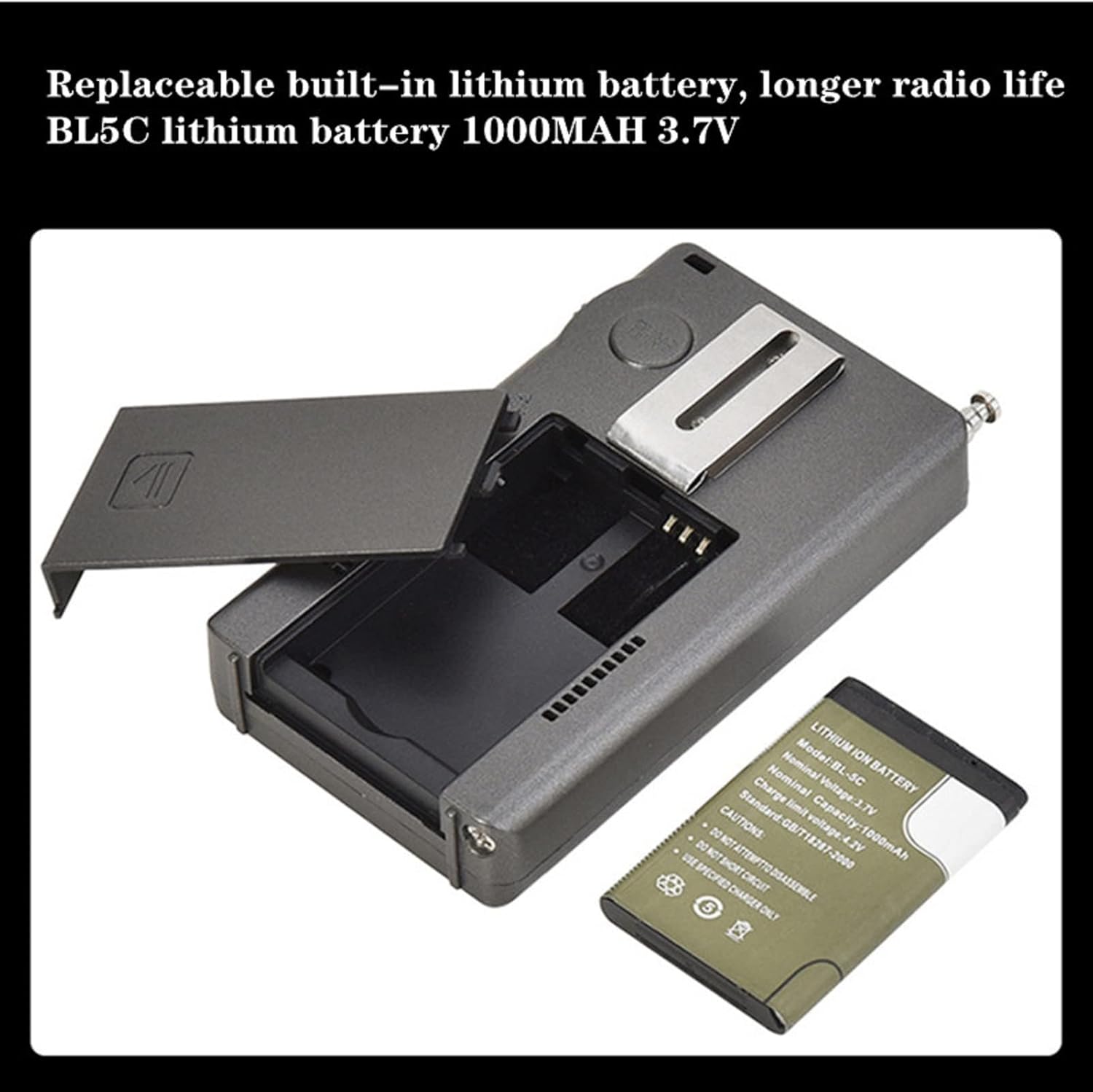
Figure 4: Installing the BL5C lithium battery into the HRD-747.
4.2. شحن البطارية
Before first use, fully charge the radio's battery.
- Connect the supplied USB-C charging cable to the USB Type-C port on the side of the radio.
- قم بتوصيل الطرف الآخر من الكابل بمحول طاقة USB قياسي (غير متضمن) أو بمنفذ USB بالكمبيوتر.
- The charging indicator on the display will show charging status. A full charge typically takes a few hours.
4.3. اتصال الهوائي
For optimal reception, especially on SW, AIR, and other bands, extend the telescopic antenna or connect the external antenna.
- هوائي تلسكوبي: Gently pull the telescopic antenna upwards until fully extended. For best reception, orient the antenna vertically.
- الهوائي الخارجي: For enhanced reception, plug the 3.5mm external wire antenna into the 3.5mm antenna input jack on the radio.

Figure 5: Extending the telescopic antenna for broadcast reception.
5. تعليمات التشغيل
5.1. تشغيل/إيقاف التشغيل
- اضغط مع الاستمرار على قوة يوجد زر في أعلى يمين الراديو لتشغيله أو إيقافه.
5.2. اختيار الفرقة
- اضغط على فرقة button to cycle through available frequency bands (FM, MW, SW, AIR, CB, VHF, UHF, UBD, WX).
5.3. ضبط التردد وتعديله
- Shuttle Tuning Knob: استخدم لحن knob on the right side of the radio to adjust the frequency. Rotate it clockwise to increase frequency and counter-clockwise to decrease. The shuttle stepping can be adjusted for faster tuning.
- STEP Button: اضغط على خطوة button to change the tuning step value for the current band. This allows for fine or coarse tuning.
- الأسهم لأعلى/لأسفل: Use the up and down arrow buttons below the TUNE knob for incremental frequency adjustments.

Figure 6: The shuttle pulley (tuning knob) allows for precise frequency selection.
5.4. Mode Selection (SSB/LSB)
- When in Shortwave (SW) band, press the وضع button to switch between AM, SSB (Upper Sideband), and LSB (Lower Sideband).
- For SSB/LSB reception, fine-tuning with the TUNE knob is crucial to clarify voice signals.
5.5. Memory Functions (MEMO)
The radio can store up to 1000 radio frequencies.
- تخزين المحطة: Tune to the desired frequency. Press and hold the MEMO button until the display indicates the station is saved.
- استدعاء محطة: اضغط لفترة وجيزة على MEMO button, then use the TUNE knob or arrow buttons to navigate through stored frequencies.
- حذف محطة: Select the stored station you wish to delete. Press and hold the ديل button until the display confirms deletion.
5.6. Automatic Search Storage (ATS)
- To automatically scan and store available stations in the current band, press and hold the فرقة button. The radio will scan and save strong signals.
5.7. التحكم في مستوى الصوت
- استخدم المجلد+ و المجلد- buttons to adjust the audio output volume.
5.8. Advanced Settings (SET Menu)
اضغط على تعيين button to access advanced settings. Use the TUNE knob or arrow buttons to navigate and the SET button again to confirm selections.
- ATT (Attenuation): Adjusts antenna input attenuation to prevent signal overload, especially with external antennas.
- BW (Bandwidth): Selects various bandwidths for improved signal clarity and interference reduction.
- ميدان (سحق): Adjusts the 9-level squelch to mute weak signals and background noise.
- DE (De-emphasis): Selects de-emphasis settings in FM band mode.
- Country/Region Settings: Adjusts FM and AM band frequencies for different regions.
- الخطوة: Allows adjustment of step values for each wave band.
- درجة الحرارة وحدة: Switch between Celsius and Fahrenheit display.
5.9. وظيفة القفل
- اضغط على قفل button to lock all buttons and prevent accidental changes. Press again to unlock.
5.10. Sleep Timer and Auto Boot
- These functions can be configured within the تعيين menu to automatically turn the radio off after a set period or turn it on at a specific time.
6. الصيانة
6.1. التنظيف
- امسح الراديو بقطعة قماش ناعمة وجافة. لا تستخدم المنظفات الكاشطة أو المذيبات.
- Avoid exposing the radio to excessive dust or moisture.
6.2. العناية بالبطارية
- If the radio will not be used for an extended period, remove the BL-5C battery to prevent leakage.
- قم بشحن البطارية بانتظام، حتى لو لم تكن قيد الاستخدام، للحفاظ على عمرها الافتراضي.
6.3. التخزين
- قم بتخزين الراديو في مكان بارد وجاف بعيدًا عن أشعة الشمس المباشرة ودرجات الحرارة القصوى.
- Use the provided waterproof pouch for protection during travel or storage.
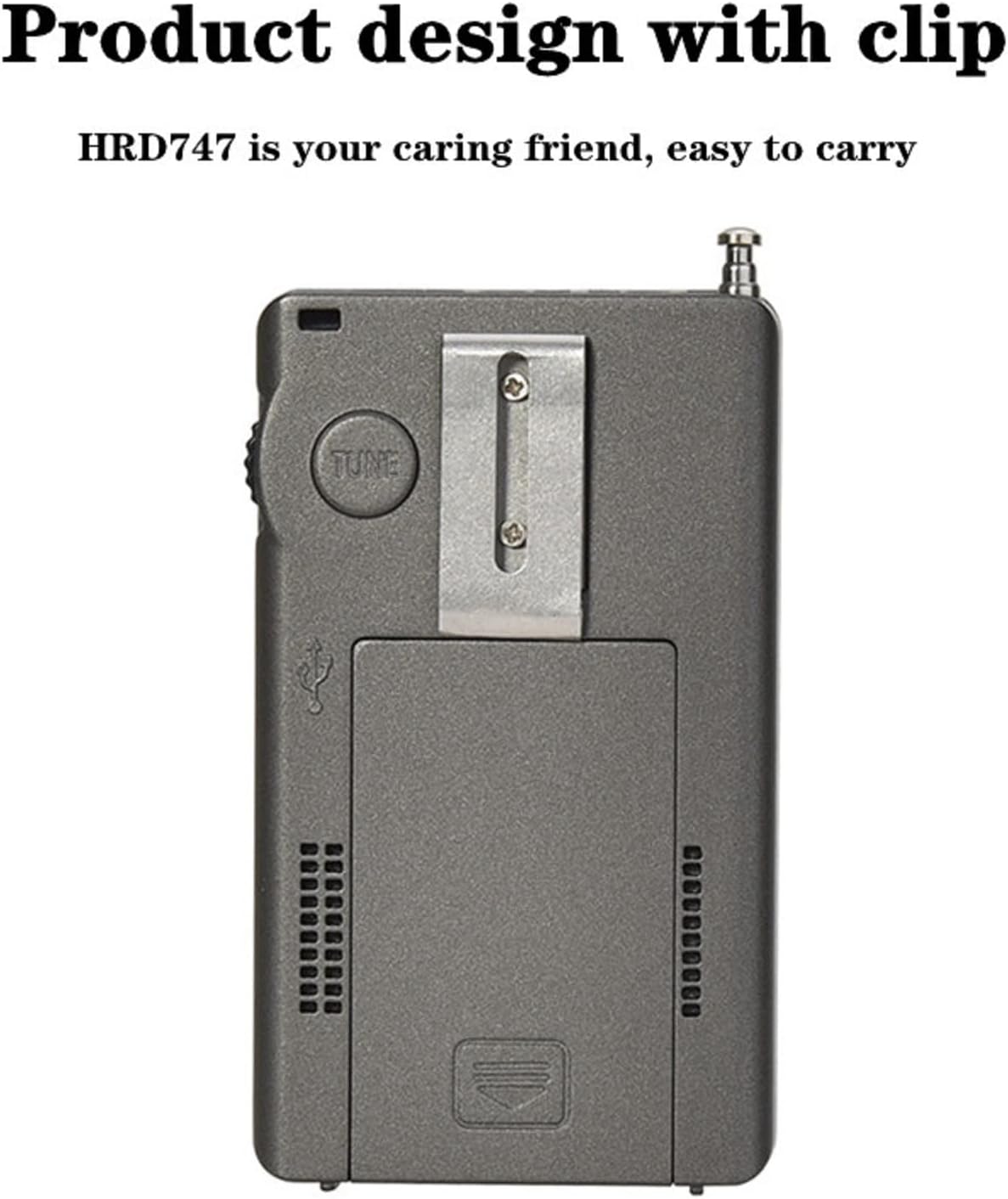
Figure 7: The HRD-747 features a convenient clip for portability.
7. استكشاف الأخطاء وإصلاحها
| مشكلة | السبب المحتمل | حل |
|---|---|---|
| الراديو لا يعمل. | البطارية منخفضة أو غير مثبتة بشكل صحيح. | اشحن البطارية. تأكد من تركيب البطارية بالقطبية الصحيحة. |
| استقبال ضعيف/ثابت. | Antenna not extended or external antenna not connected. Weak signal. Interference. | Fully extend the telescopic antenna or connect the external antenna. Try adjusting the radio's position. Adjust ATT or BW settings in the SET menu. |
| Cannot tune to desired frequency. | Radio is locked. Incorrect tuning step. | Press the LOCK button to unlock. Adjust the tuning step using the STEP button. |
| SSB/LSB audio is distorted. | Fine-tuning required. | Carefully adjust the TUNE knob for precise frequency alignment in SSB/LSB mode. |
| Display backlight not staying on. | Normal operation; backlight is temporary. | The backlight is designed to turn off after 10 seconds to conserve battery. Press any button to reactivate. |
8. المواصفات
| ميزة | التفاصيل |
|---|---|
| رقم الموديل | تنمية الموارد البشرية-747 |
| أبعاد المنتج | 4.4 × 2.4 × 0.8 بوصة (11.18 × 6.1 × 2.03 سم) |
| وزن العنصر | 3.5 أونصة (99.22 جرام) |
| بطارية | 1 x BL-5C Lithium Ion battery (1000mAh, 3.7V) |
| منفذ الشحن | يو إس بي من النوع سي |
| تقنية الموالف | DSP Digital Demodulation |
| النطاقات المدعومة | FM, MW, SW (SSB/LSB), AIR, CB, VHF, UHF, UBD, WX (NOAA) |
| إعدادات الذاكرة المسبقة | Up to 1000 frequencies |
| عرض | Backlit LCD (Orange) |
| مخرج الصوت | Built-in loudspeaker, 3.5mm headphone jack |
| External Antenna Input | 3.5 ملم |
| الشركة المصنعة | هان رونغدا |
| بلد المنشأ | الصين |
9. الضمان والدعم
For warranty information and technical support, please refer to the warranty card included with your product or contact HanRongDa customer service directly. Contact details are typically provided on the product packaging or the official HanRongDa webموقع.
يرجى الاحتفاظ بإيصال الشراء الخاص بك كدليل على الشراء لأي مطالبات بالضمان.
Ask a question about this manual
Ask about setup, troubleshooting, compatibility, parts, safety, or missing instructions. Manuals+ will review the question and use this page’s manual context to help answer it.