
مقدمة
This manual provides detailed instructions for the installation, operation, and maintenance of your Hama 00118498 Monitor Desk Mount. Designed to enhance your ergonomic workspace, this monitor arm allows for flexible positioning of your display, promoting a comfortable and productive environment. Please read these instructions carefully before beginning installation.
تعليمات الإعداد
Follow these steps to correctly install your Hama 00118498 Monitor Desk Mount.
1. تركيب درج المكتبamp
- ضع المكتب clamp assembly onto the edge of your desk. Ensure the desk surface is sturdy and can support the weight of the mount and your monitor.
- شد القفلamp screw firmly until the mount is securely fastened to the desk. Do not overtighten.
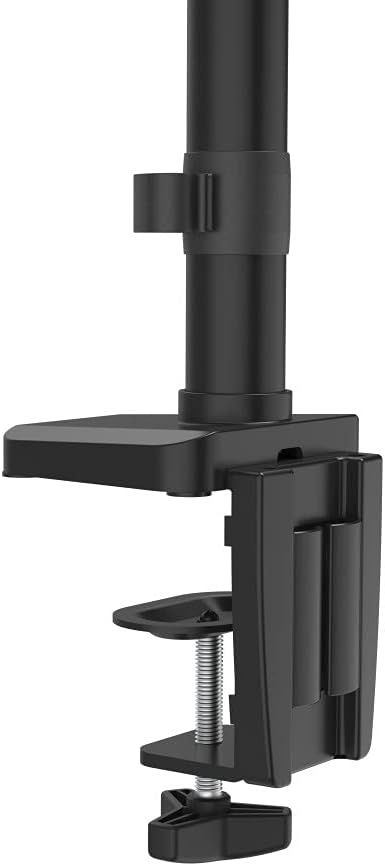
صورة: مكتب clamp mechanism, showing how it attaches to the desk edge for secure mounting.
2. تركيب الشاشة
- Ensure your monitor is VESA compatible (100x100mm or 75x75mm).
- Carefully attach the VESA plate from the monitor arm to the back of your monitor using the provided screws. Make sure the screws are tightened securely.
- Slide the monitor (with the attached VESA plate) onto the arm's mounting head. Ensure it clicks into place or is secured with any locking mechanism provided.

Image: The monitor arm's VESA plate and adjustable joint, ready for monitor attachment.

الصورة: الجانب view of the assembled monitor arm, highlighting the VESA mount and integrated cable management channels.
3. إدارة الكابلات
Utilize the integrated cable management system to route your monitor cables neatly along the arm. This helps maintain a tidy workspace and prevents cable clutter.
تعليمات التشغيل
The Hama 00118498 Monitor Desk Mount offers various adjustment options for optimal viewجي الراحة.
- ضبط الارتفاع: The integrated pneumatic spring allows for smooth and effortless vertical height adjustment. Gently push or pull the monitor to your desired height.
- قطب: The arm can swivel horizontally, allowing you to rotate your monitor to share your screen or change your viewزاوية جي.
- الإمالة: Adjust the monitor's tilt angle (up or down) to reduce glare and find the most comfortable viewموقف جيد.
- تناوب: Rotate your monitor from landscape to portrait orientation as needed for different tasks.
Adjustments should be smooth. If the monitor does not hold its position, refer to the troubleshooting section for tension adjustments.
صيانة
تضمن الصيانة الدورية طول عمر ذراع الشاشة وأدائها الأمثل.
- تنظيف: Wipe the surface of the monitor arm with a soft, damp قماش. تجنب استخدام المنظفات الكاشطة أو المذيبات.
- التحقق من الاتصالات: افحص جميع البراغي والوصلات بشكل دوري للتأكد من إحكامها وثباتها. أعد ربطها إذا لزم الأمر.
- تشحيم: The pneumatic spring is maintenance-free. Do not attempt to lubricate internal components.
استكشاف الأخطاء وإصلاحها
If you encounter issues with your Hama 00118498 Monitor Desk Mount, refer to the following common problems and solutions:
- شاشة العرض تترهل أو لا تثبت في مكانها: The tension of the pneumatic spring may need adjustment. Locate the tension adjustment screw (usually found on the arm joint) and turn it clockwise to increase tension for heavier monitors, or counter-clockwise for lighter monitors. Adjust gradually until the monitor holds its position.
- يصعب تحريك الشاشة: If the arm is too stiff, the tension may be too high. Turn the tension adjustment screw counter-clockwise to decrease tension.
- Arm Feels Loose on Desk: تأكد من نظافة المكتبamp is fully tightened. If the desk surface is too thin or fragile, consider adding a protective pad between the clamp and the desk.
- Monitor Wobbles: Check all mounting screws on the VESA plate and the arm joints to ensure they are securely fastened.
تحديد
| ميزة | التفاصيل |
|---|---|
| رقم الموديل | 00118498 |
| نوع التركيب | مكتب Clamp |
| نوع الحركة | Rotating, Swivel, Tilt, Height Adjustable (Pneumatic Spring) |
| ماركة | حماه |
| مادة | الألومنيوم |
| لون | أسود |
| الأجهزة المتوافقة | شاشة |
| الحجم الأدنى المتوافق | 10 بوصة |
| أقصى حجم متوافق | 32 بوصة |
| وزن العنصر | 2.2 كيلوغرام |
| بلد المنشأ | الصين |
الضمان والدعم
For warranty information or technical support, please refer to the documentation included with your purchase or visit the official Hama webيمكنك عادةً العثور على تفاصيل الاتصال بالدعم، والأسئلة الشائعة، وموارد إضافية هناك.
حماة الرسمية Webموقع: www.hama.com