
مقدمة
Thank you for choosing the VETEK AF6 4K Video Camera Camcorder. This manual provides comprehensive instructions for the proper setup, operation, and maintenance of your device. Please read this manual thoroughly before using the camcorder to ensure optimal performance and longevity.
محتويات الحزمة
تأكد من تضمين جميع العناصر المدرجة أدناه في الحزمة الخاصة بك:
- 1x VETEK AF6 4K Camcorder
- 1 × كابل يو اس بي
- 1 × كابل HDMI
- 1x Lens Hood
- 1x Fill Light (External LED Light)
- 1 × شاحن يو اس بي
- 1 × جهاز التحكم عن بعد
- شنومكس شنومكسب بطاقة سد
- 1x Microphone Cable
- ميكروفون خارجي واحد
- 1x Reusable Camera Bag
- 2x Rechargeable Lithium Batteries
- 1x Dual External Battery Charger
- 1x Camera Instruction Manual
- 1x Microphone Instruction Manual
- 1x Handheld Stabilizer

المنتج انتهىview
Familiarize yourself with the main components of your VETEK AF6 camcorder.

المميزات الرئيسية:
- دقة الفيديو 4K: Records videos at 3840*2160.
- 48.0 MP Image Resolution: Captures still images at 7920*5940.
- 3.0-inch 270° Rotatable Touch Screen: يوفر مرونة viewزوايا دقيقة وتحكم بديهي.
- تقريب رقمي 18X: يسمح بالتقاط صور مقربة لأهداف بعيدة.
- اتصال واي فاي: Enables remote control and file التحويل عبر تطبيق الهاتف الذكي.
- وظيفة كاميرا الكمبيوتر: Can be used as a webكاميرا للبث المباشر ومكالمات الفيديو.
- External Microphone Support: Enhances audio quality.
- External Fill Light Support: Improves illumination in low-light conditions.
- Handheld Stabilizer Compatibility: يقلل من اهتزاز الكاميرا للحصول على صور أكثر سلاسةtage.
- Special Shooting Modes: Includes Slow Motion and Time-Lapse.
يثبت
1. تركيب البطارية وشحنها
- افتح غطاء حجرة البطارية في كاميرا الفيديو.
- Insert a rechargeable lithium battery, ensuring correct polarity.
- أغلق غطاء حجرة البطارية.
- To charge, insert the batteries into the dual external battery charger. Connect the charger to a power source using the provided USB cable and charger. The indicator lights will show charging status.
ملحوظة: Ensure batteries are fully charged before first use for optimal performance. If indicator lights flicker or do not show a stable charging status, ensure the batteries are correctly seated in the charger and the power connection is stable.
2. تركيب بطاقة SD
- حدد مكان فتحة بطاقة الذاكرة SD في كاميرا الفيديو.
- Insert the 32GB SD card (included) into the slot with the metal contacts facing the correct direction, until it clicks into place.
- To remove, gently press the SD card until it pops out.
مهم: Format the SD card in the camcorder's menu before initial use to ensure compatibility and prevent data corruption.
3. تركيب الملحقات
- ميكروفون خارجي: Slide the external microphone onto the hot shoe mount on top of the camcorder. Connect the microphone cable to the MIC input port.
- غطاء العدسة: Attach the lens hood to the front of the camcorder lens by twisting it clockwise until secure. The lens hood helps reduce glare and protects the lens.
- External LED Light: Slide the external fill light onto the hot shoe mount. Ensure it is securely fastened. This light provides additional illumination.
- مثبت يدوي: Attach the camcorder to the handheld stabilizer using the screw mount at the bottom of the camcorder. The stabilizer helps maintain steady footage.




تعليمات التشغيل
1. تشغيل/إيقاف التشغيل
Open the LCD screen to power on the camcorder. Close the LCD screen to power off. Alternatively, use the power button located on the device.
2. Basic Recording (Video/Photo)
- أوضاع التبديل: Use the Mode button to switch between video recording mode and photo capture mode.
- بدء/إيقاف التسجيل: In video mode, press the Record button to start recording. Press it again to stop.
- التقط الصورة: In photo mode, press the Photo button to capture a still image.

3. وظيفة التكبير
Use the T (Telephoto) and W (Wide) buttons on the camcorder or the zoom controls on the remote control to adjust the 18X digital zoom.
4. تشغيل الشاشة اللمسية
The 3.0-inch LCD screen is rotatable up to 270 degrees and supports touch input. Navigate menus, adjust settings, and review فوtage by tapping or swiping on the screen.
5. Wi-Fi Connection & App
Download the specified app (refer to the camera's manual for the app name) on your smartphone or tablet. Enable Wi-Fi on the camcorder and connect your mobile device to the camcorder's Wi-Fi network (SSID: 4K_WIFI1079, Password: 12345678). This allows for remote viewing, image capture, video shooting, and sharing to social media.

6. PC Camera Mode (Webcam Function)
Connect the camcorder to your PC using the USB cable. Select "PC CAM" mode on the camcorder. Your computer will recognize the camcorder as a webcam, enabling its use for video chatting and live streaming on platforms like YouTube or Facebook.

7. الميزات الخاصة
- الحركة البطيئة: Access this mode through the camcorder's menu to record videos at a higher frame rate, allowing for slow-motion playback.
- المعدل الزمني للتصوير: Select this option in the menu to capture a series of still images at set intervals, which can then be compiled into a time-lapse video.
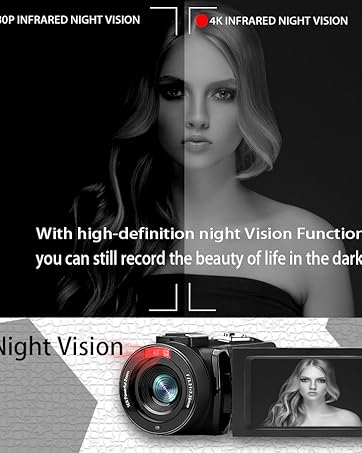
- الرؤية الليلية: The camcorder features an infrared night vision function, enabling recording in low-light or dark environments. Activate this feature via the menu.


8. جهاز التحكم عن بعد
The included remote control allows you to operate the camcorder from a distance, controlling functions such as recording, photo capture, and zoom without touching the device.

صيانة
- تنظيف: استخدم قطعة قماش ناعمة وجافة لتنظيف جسم كاميرا الفيديو. أما بالنسبة للعدسة، فاستخدم قطعة قماش ومحلول تنظيف عدسات مخصصين. تجنب استخدام المواد الكاشطة أو المواد الكيميائية القاسية.
- تخزين: خزّن كاميرا الفيديو في مكان بارد وجاف بعيدًا عن أشعة الشمس المباشرة ودرجات الحرارة القصوى. أزل البطاريات إذا كنت ستخزنها لفترات طويلة.
- مقاومة الماء: This camcorder is غير مقاوم للماء. تجنب التعرض للماء أو الرطوبة العالية.
استكشاف الأخطاء وإصلاحها
| مشكلة | السبب المحتمل | حل |
|---|---|---|
| كاميرا الفيديو لا تعمل. | تم استنزاف البطارية أو تم تركيبها بشكل غير صحيح. | تأكد من شحن البطاريات بالكامل وإدخالها بشكل صحيح. |
| Battery charger indicator lights flicker. | Poor contact between battery and charger, or unstable power supply. | Re-seat batteries firmly in the charger. Check USB cable and power adapter connection. Try a different USB port or power source. |
| لا يمكن تسجيل الفيديو أو التقاط الصور. | SD card is full, not inserted, or corrupted. Incorrect mode selected. | Check SD card status, ensure it's inserted and has free space. Format the SD card if necessary (this will erase all data). Verify camcorder is in the correct mode. |
| جودة الفيديو/الصورة رديئة. | Lens is dirty. Insufficient lighting. Incorrect settings. | Clean the lens. Use the external fill light or shoot in better-lit conditions. Adjust resolution and other settings in the menu. |
| مشاكل في الاتصال بشبكة Wi-Fi. | Incorrect Wi-Fi password or app not installed. | Ensure correct SSID (4K_WIFI1079) and password (12345678). Download and install the correct app. |
تحديد
- ماركة: فيتيك
- رقم الموديل: ايه اف 6
- دقة التقاط الفيديو: 4 كيلو بايت (3840*2160)
- دقة ثابتة فعالة: 48.0 ميجابكسل (7920*5940)
- التكبير الرقمي: 18X
- حجم الشاشة: 3.0 بوصة
- نوع العرض: 270° Rotatable Touch Screen
- نوع ذاكرة الفلاش: SD (supports up to 128GB, 32GB included)
- تنسيق التقاط الفيديو: إم بي 4
- تنسيق الصوت المدعوم: إم بي 4
- تقنية الاتصال: USB، HDMI، واي فاي
- توافق نظام التشغيل: Windows XP/7/8/10, MAC
- تثبيت الصورة: رقمي
- مستوى مقاومة الماء: غير مقاوم للماء
- عدد البطاريات: 2 بطاريات ليثيوم بوليمر (مضمنة)
- أبعاد المنتج (العمق × العرض × الارتفاع): 3.9 بوصة عمق × 6.2 بوصة عرض × 7.8 بوصة ارتفاع
الضمان والدعم
For warranty information and technical support, please refer to the contact details provided in the separate warranty card or visit the official VETEK webالموقع. إذا واجهت أي مشاكل غير مذكورة في هذا الدليل، يرجى الاتصال بخدمة العملاء للحصول على المساعدة.