
zemismart ZM16EL-03/33
Zemismart Tuya WiFi Rechargeable Roller Blind Motor 28mm User Manual
Model: ZM16EL-03/33
مقدمة
This manual provides detailed instructions for the installation, operation, and maintenance of your Zemismart Tuya WiFi Rechargeable Roller Blind Motor. Please read this manual carefully before use to ensure proper functionality and safety.
The Zemismart Tuya WiFi Rechargeable Roller Blind Motor is designed to automate your roller blinds, offering convenient control via the Tuya Smart or Smart Life app, voice commands (Alexa, Google Home, Siri), and an optional RF433 remote control. It features a built-in rechargeable battery and is suitable for 28mm roller blind tubes.
محتويات الحزمة
تأكد من وجود جميع المكونات في الحزمة الخاصة بك:
- Zemismart Roller Blind Motor (ZM16EL-03/33)
- Tuya WiFi 2.4 USB Dongle
- كابل الشحن (النوع C)
- RF433 Remote Control (optional, may vary by package)
- Crown and Drive Adapter Set (for 28mm tube, other sizes may be included)
- أقواس التثبيت والبراغي
- دليل المستخدم (هذا المستند)

Image: Components included with the Zemismart Roller Blind Motor, including the motor, WiFi dongle, remote control, charging cable, and various adapters/brackets.
الإعداد والتثبيت
1. Motor Preparation and Tube Compatibility
The motor is designed for 28mm roller blind tubes. Ensure your blind tube is compatible. Adapters for 17mm and 25mm tubes may also be included or available separately.

Image: Visual guide showing the motor with adapters for 17mm, 25mm, and 28mm tubes, illustrating how the motor fits into different tube sizes.
2. Replacing the Tail Plug
If your blind tube requires a different size adapter, you may need to replace the motor's tail plug. Follow the diagrams below for 25mm or 28mm tube replacement operations. Carefully remove the existing plug and install the correct adapter.
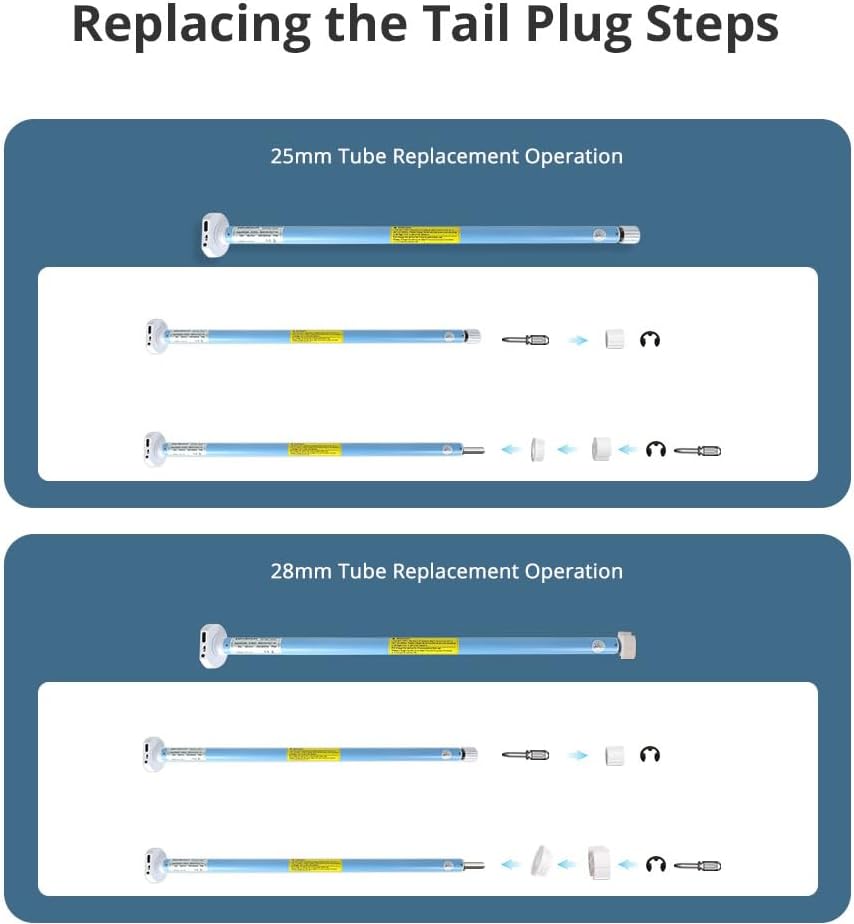
Image: Step-by-step diagrams illustrating how to replace the tail plug for 25mm and 28mm tube compatibility.
3. شحن المحرك
Before initial use, fully charge the motor's built-in 800mAh lithium battery using the provided Type-C USB charging cable. The motor can also be charged via a compatible solar panel (sold separately).

Image: The motor showing its Type-C charging port and an illustration of how it can be connected to a solar panel for charging.
4. خطوات التثبيت
- أدخل المحرك: Put the motor into the appropriate driving tube of your roller blind.
- Install End Plug and Mounting Bracket: Install the end plug and mounting bracket. Place them into the tube to test the whole length. Mark the position on the wall, and then install the mounting bracket on the wall or ceiling.
- Clip Blind: Clip the entire blind assembly onto the mounting bracket. The installation is now complete.

Image: Step-by-step visual instructions for installing the motor into the blind tube and mounting the blind to the wall or ceiling.
5. Connecting to WiFi Network (Tuya/Smart Life App)
To enable smart features, connect the motor to your WiFi network via the Tuya WiFi 2.4 USB Dongle.
- Plug the Tuya WiFi 2.4 USB Dongle into a power source.
- افتح تطبيق Tuya Smart أو Smart Life على هاتفك الذكي.
- Follow the in-app instructions to add a new device and pair the motor with the app.

Image: Diagram showing the connection flow between the smartphone app, WiFi dongle, and the roller blind motor for network pairing.
تعليمات التشغيل
1. التحكم في التطبيقات (Tuya Smart / Smart Life)
Once paired with the app, you can control the motor's direction, set upper and lower limits, and create schedules.
- صفحة التحكم: Use the main control page to open, stop, or close the blinds.
- صفحة الإعدادات: Access the settings page to adjust motor direction (forward/back), set precise upper and lower limits for the blind's travel, or remove existing limits.
- الجدولة: Set up timers and schedules for automatic opening and closing of your blinds at specific times.

Image: Screenshots of the Tuya app interface, showing the main control page for opening/closing blinds and the settings page for motor direction, limits, and scheduling.

Image: Illustration demonstrating the timing function of the Tuya app, showing blinds automatically closing in the evening and opening in the morning based on a set schedule.
2. التحكم الصوتي
The motor supports voice control via Amazon Echo (Alexa), Google Home, and Apple Siri when integrated with the Tuya Smart or Smart Life app.
- Ensure your smart speaker or device is linked to your Tuya Smart or Smart Life account.
- Use commands such as "Alexa, open the roller shade" or "Hey Google, close the blinds."

Image: A person interacting with smart speakers (Alexa and Google Home) to control roller shades using voice commands.

الصورة: حبيب سابقample of voice control in a living room setting, showing a user commanding "Open the bedroom's shades" to a smart speaker.
3. RF Remote Control
If your package includes an RF433 remote control, you can use it for direct control of the blinds. The remote supports individual and group control.

Image: A hand holding an RF remote control, demonstrating its use to raise multiple roller blinds simultaneously.
صيانة
شحن البطارية
The motor is powered by a built-in rechargeable lithium battery. When the battery level is low, connect the motor to a power source using the provided Type-C USB cable. A full charge ensures optimal performance. For continuous charging, a compatible solar panel can be used.
Regular charging is recommended to prolong battery life. Avoid completely draining the battery frequently.
استكشاف الأخطاء وإصلاحها
- المحرك لا يستجيب:
- تأكد من شحن بطارية المحرك.
- Ensure the WiFi dongle is powered and connected to the network.
- Verify the motor is properly paired with the Tuya app and/or RF remote.
- Blind not moving smoothly or stopping incorrectly:
- تحقق من وجود أي عوائق في مسار الستارة.
- Recalibrate the upper and lower limits in the Tuya app.
- Ensure the motor is securely installed within the blind tube.
- التحكم الصوتي لا يعمل:
- Confirm your smart assistant (Alexa, Google Home, Siri) is linked to your Tuya account.
- تحقق من اتصالك بالإنترنت.
- Ensure the device name in the Tuya app matches the name you are using for voice commands.
- مشاكل اتصال WiFi:
- Ensure the WiFi dongle is within range of your 2.4GHz WiFi router.
- Restart the WiFi dongle and your router.
- Re-pair the device in the Tuya app if necessary.
تحديد
| ميزة | التفاصيل |
|---|---|
| نموذج | ZM16EL-03/33 |
| ماركة | Zemismart |
| مدخل | تيار مستمر 5 فولت/2 أمبير |
| القدرة المقدرة | 5W |
| سعة البطارية | 7.4V/800mAh (Rechargeable Lithium) |
| عزم الدوران | 0.3 نيوتن متر |
| عدد الدورات في الدقيقة المقدر | 33 دورة في الدقيقة |
| تشغيل الضوضاء | 35-40 ديسيبل |
| Max Load (with 17mm tube) | 2كجم |
| توافق الأنبوب | 28mm (adapters for 17mm, 25mm available) |
| طرق التحكم | Tuya Smart/Smart Life App, Voice Control (Alexa, Google Home, Siri), RF433 Remote Control |

Image: Detailed diagram showing the dimensions of the motor and a table of its technical specifications.
المشاهد القابلة للتطبيق
The Zemismart Tuya WiFi Rechargeable Roller Blind Motor is versatile and can be used with various types of window coverings, including:
- ستائر رول
- Zebra Blinds
- Shangri-La Blinds
- الستائر الرومانية
- ظلال شفافة أفقية
- ظلال خشبية منسوجة

الصورة: السابقamples of different blind types (roller, zebra, Shangri-La) that are compatible with the Zemismart motor.

Image: A collage showing the motor integrated with various window coverings in different room environments, highlighting its versatility.
عرض فيديو
Video: A demonstration of the Zemismart roller blind motor in operation, showing the smooth movement of a zebra blind as it opens and closes, and adjusts for light control.
الضمان والدعم
For warranty information or technical support, please contact Zemismart customer service. Refer to your purchase documentation for specific warranty terms and contact details.
As a professional manufacturer and installer of window blinds, Zemismart is available for custom orders and support for all your window shading needs.
You can also visit the official Zemismart store on Amazon for more products and information: Zemismart Store
Ask a question about this manual
Ask about setup, troubleshooting, compatibility, parts, safety, or missing instructions. Manuals+ will review the question and use this page’s manual context to help answer it.