
winees B09DKQQFD3
WINEES Smart Video Doorbell Camera User Manual
Model: B09DKQQFD3
العلامة التجارية: واينز
مقدمة
This manual provides comprehensive instructions for the installation, operation, and maintenance of your winees Smart Video Doorbell Camera. Please read this manual thoroughly before use to ensure proper functionality and safety.

Image: The winees Smart Video Doorbell Camera and its accompanying indoor chime unit.
مميزات المنتج
- 1080P Full HD and 2-Way Audio: Provides super-clear 1080p full HD resolution with a 170° wide-angle view. Enables real-time two-way communication with visitors via your smartphone.
- Smart PIR Motion Detection and IP65 Waterproof: Built-in PIR motion sensor detects movement and sends notifications to your phone. The device is IP65 waterproof, suitable for outdoor installation.
- 2.4G Wi-Fi & Night Vision: Supports 2.4GHz Wi-Fi connectivity (5GHz Wi-Fi not supported). Features infrared night vision for clear monitoring in low-light conditions.
- Remote Control on App & Free Wireless Chime Included: Manage the doorbell remotely and access playback video via the encrypted Cloud Service. The included chime offers 58 ringtones and adjustable volume.
- Secure Cloud Storage & Local Storage: Utilizes financial encryption for data security. Supports up to 128GB Micro SD card storage (not included) and cloud storage options.
ماذا يوجد في الصندوق
يرجى التأكد من وجود جميع المكونات عند إخراجها من الصندوق:
- winees Smart Video Doorbell Camera
- Indoor Wireless Chime
- تصاعد قوس ومسامير
- USB Charging Cable (for doorbell, if battery-powered)
- دليل المستخدم (هذا المستند)
- دليل البدء السريع
دليل الإعداد
1. Charging the Doorbell (if applicable)
If your doorbell model is battery-powered, ensure it is fully charged before installation. Connect the doorbell to a USB power source using the provided cable until the indicator light shows a full charge.
2. تثبيت التطبيق وإنشاء الحساب
Download the official winees app from your smartphone's app store (iOS App Store or Google Play Store). Follow the in-app instructions to create an account and log in.
3. Connecting the Indoor Chime
The indoor chime connects wirelessly to your doorbell. Plug the chime into a standard power outlet. Refer to the video below for detailed pairing instructions.
Video: Instructions on how to connect the winees video doorbell chime, including volume adjustment, music selection, and pairing steps.
To pair the chime with the doorbell:
- قم بتوصيل الرنين.
- Press and hold the "Set" button on the chime for approximately 3 seconds until it rings (e.g., a bird voice).
- Within 30 seconds, press the doorbell button twice. The chime should ring again, indicating successful pairing.

Image: The winees doorbell and chime, illustrating their interaction during the setup process.
4. اتصال واي فاي
Ensure your Wi-Fi network is 2.4GHz. The doorbell does not support 5GHz Wi-Fi. Follow the in-app instructions to connect your doorbell to your home Wi-Fi network. A recommended network environment is 32KB/S-2MB/S.
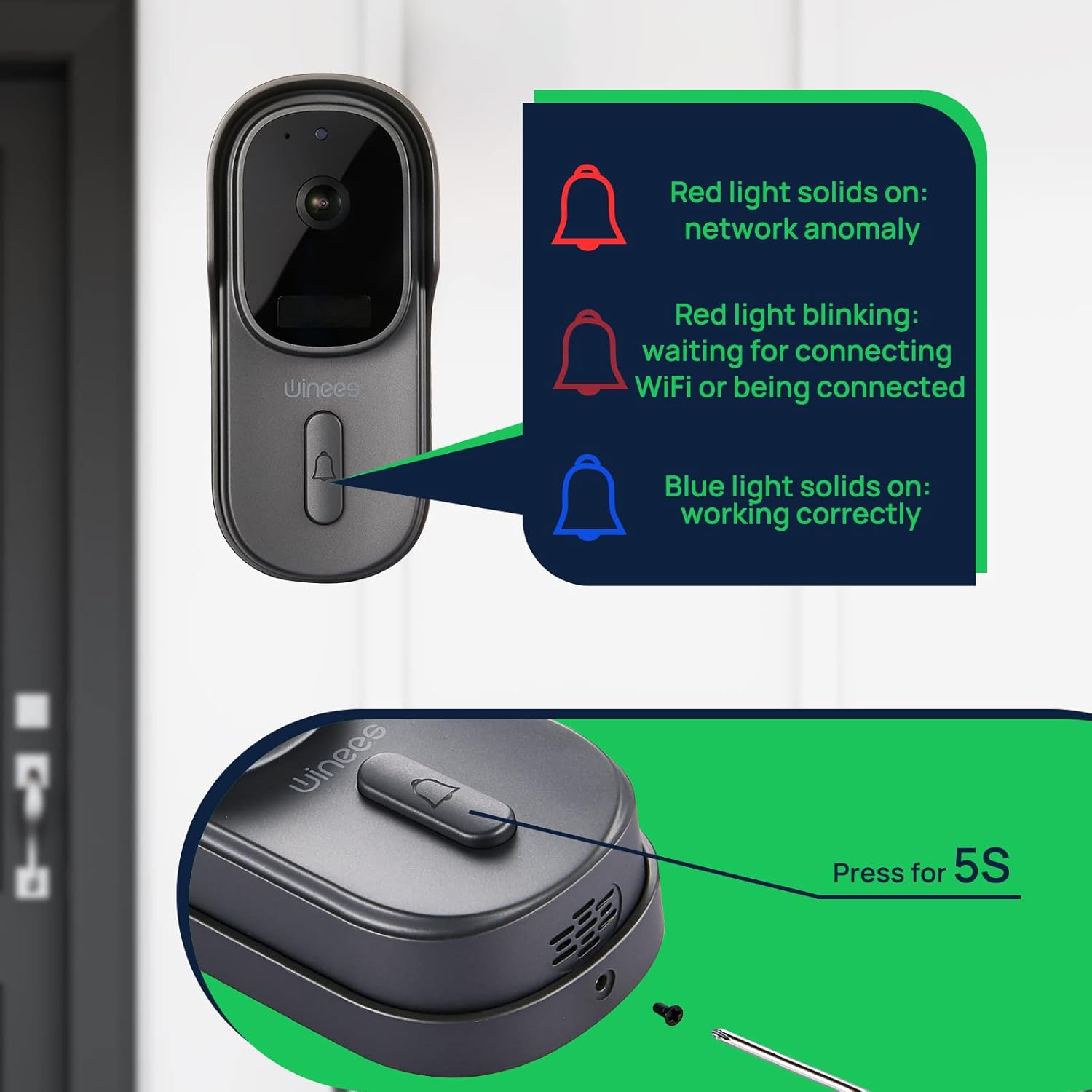
Image: Visual guide to doorbell status lights: Red solid (network anomaly), Red blinking (waiting for Wi-Fi connection), Blue solid (working correctly).
5. التثبيت المادي
Choose a suitable location for your doorbell, typically near your front door. Use the provided mounting bracket and screws to securely attach the doorbell to the wall. Ensure the camera has a clear, unobstructed view.

Image: The doorbell installed outdoors, demonstrating its IP65 waterproof rating against rain.
تعليمات التشغيل
يعيش View والصوت ثنائي الاتجاه
Open the winees app to access the live feed from your doorbell camera. When a visitor presses the doorbell or motion is detected, you will receive a notification. Tap the notification to view the live feed and use the two-way audio feature to communicate with the person at your door.
إعدادات اكتشاف الحركة
Adjust the sensitivity of the PIR motion sensor within the app settings to minimize false alerts. The 170° wide-angle view provides comprehensive coverage for motion detection.

Image: Illustrates the 170° ultra-wide angle view and the clear 1080P HD night vision capabilities of the doorbell camera.
الرؤية الليلية
The doorbell automatically switches to infrared night vision in low-light conditions, ensuring clear video monitoring 24/7.
خيارات التخزين
Recorded videos can be stored securely in the encrypted Cloud Service or locally on a Micro SD card (up to 128GB, not included). Manage your storage preferences and review تم تسجيل فوtagه من خلال التطبيق.
Smart Home Integration (Alexa)
The winees doorbell camera can integrate with smart home systems like Amazon Alexa. You can use voice commands to view your front door on compatible devices.

Image: A person interacting with an Alexa-enabled smart display, showing the doorbell camera feed, demonstrating smart home integration.
صيانة
- تنظيف: امسح عدسة الكاميرا وسطح جرس الباب برفق بقطعة قماش ناعمة.amp القماش. تجنب استخدام المنظفات أو المذيبات الكاشطة.
- تحديثات البرامج الثابتة: Regularly check the winees app for available firmware updates to ensure optimal performance and security.
- عمر البطارية (إن أمكن): Monitor the battery level through the app and recharge as needed to prevent interruptions in service.
- إشارة Wi-Fi: Ensure your Wi-Fi router is within an optimal range for a stable connection.
استكشاف الأخطاء وإصلاحها
Doorbell Not Connecting to Wi-Fi
- تأكد من أن شبكة Wi-Fi لديك هي 2.4 جيجاهرتز. لا يتم دعم الشبكات ذات التردد 5 جيجاهرتز.
- Check the Wi-Fi signal strength at the doorbell's location. Move the router closer or use a Wi-Fi extender if necessary.
- Verify that the Wi-Fi password entered in the app is correct.
- Restart your Wi-Fi router and the doorbell.
No Notifications or Delayed Notifications
- Check your phone's notification settings for the winees app to ensure notifications are enabled.
- Verify the doorbell's internet connection is stable.
- ضبط حساسية اكتشاف الحركة في التطبيق.
مشاكل الصوت ثنائي الاتجاه
- Ensure your phone's microphone is enabled for the winees app.
- تحقق من إعدادات مستوى الصوت على هاتفك وفي التطبيق.
- A weak Wi-Fi signal can affect audio quality.
الجرس لا يرن
- تأكد من توصيل الجرس بمأخذ كهربائي يعمل.
- Re-pair the chime with the doorbell following the "Connecting the Indoor Chime" steps in the Setup Guide.
- Check the chime's volume settings.
For further assistance, please refer to the official winees support channels.
تحديد
| ميزة | التفاصيل |
|---|---|
| دقة الفيديو | 1080p Full HD |
| Viewزاوية جي | زاوية واسعة 170 درجة |
| الاتصال | شبكة واي فاي بتردد 2.4 جيجاهرتز (IEEE 802.11b/g/n) |
| صوتي | صوت ثنائي الاتجاه |
| كشف الحركة | مستشعر PIR الذكي |
| الرؤية الليلية | الرؤية الليلية بالأشعة تحت الحمراء |
| مقاومة الطقس | IP65 مقاوم للماء |
| خيارات التخزين | Cloud Storage, Local Micro SD (up to 128GB, not included) |
| مصدر الطاقة | Corded Electric (for chime), Battery (for doorbell, if applicable) |
| لون | رمادي غامق |
| وزن العنصر | 1.1 رطل |
| أبعاد | 5.91 × 4.45 × 4.17 بوصة (الحزمة) |
الضمان والدعم
For warranty information, technical support, or further inquiries, please visit the official winees webيمكنك زيارة الموقع الإلكتروني أو الاتصال بخدمة العملاء. كما يمكنك الرجوع إلى دليل الاستخدام الرسمي بصيغة PDF للحصول على تفاصيل إضافية.
Ask a question about this manual
Ask about setup, troubleshooting, compatibility, parts, safety, or missing instructions. Manuals+ will review the question and use this page’s manual context to help answer it.