
zemismart DS-151
zemismart Wi-Fi Wall Switch for Roller Shutters Instruction Manual
الموديل: DS-151
مقدمة
This manual provides detailed instructions for the installation, operation, and maintenance of your zemismart Wi-Fi Wall Switch for Roller Shutters. Please read this manual thoroughly before installation and use to ensure proper function and safety.

الصورة: الجبهة view of the zemismart Wi-Fi Wall Switch for Roller Shutters. The switch is white with a glass-like finish and three touch-sensitive icons: a left arrow (open), an equals sign (stop), and a right arrow (close).
معلومات السلامة
تحذير: Electrical installation should only be performed by a qualified electrician. Ensure power is disconnected at the circuit breaker before beginning any installation work. Failure to follow these instructions can result in electric shock, fire, or serious injury.
- Do not install with wet hands.
- لا تقم بالتثبيت في دamp البيئات.
- Ensure the power supply matches the switch's specifications (110V-240V).
- مطلوب سلك محايد للتثبيت.
تحديد
| ميزة | التفاصيل |
|---|---|
| نموذج | DS-151 |
| المجلدtage | تيار متردد 100-240 فولت |
| تكرار | 50/60 هرتز |
| الحد الأقصى للحمل | 1800 واط |
| نوع لاسلكي | واي فاي |
| أبعاد | 87 مم × 87 مم × 27 مم (الطول × العرض × العمق) |
| الشهادات | CE، RoHS |
| المميزات الخاصة | UV Protection, Weather Resistant |
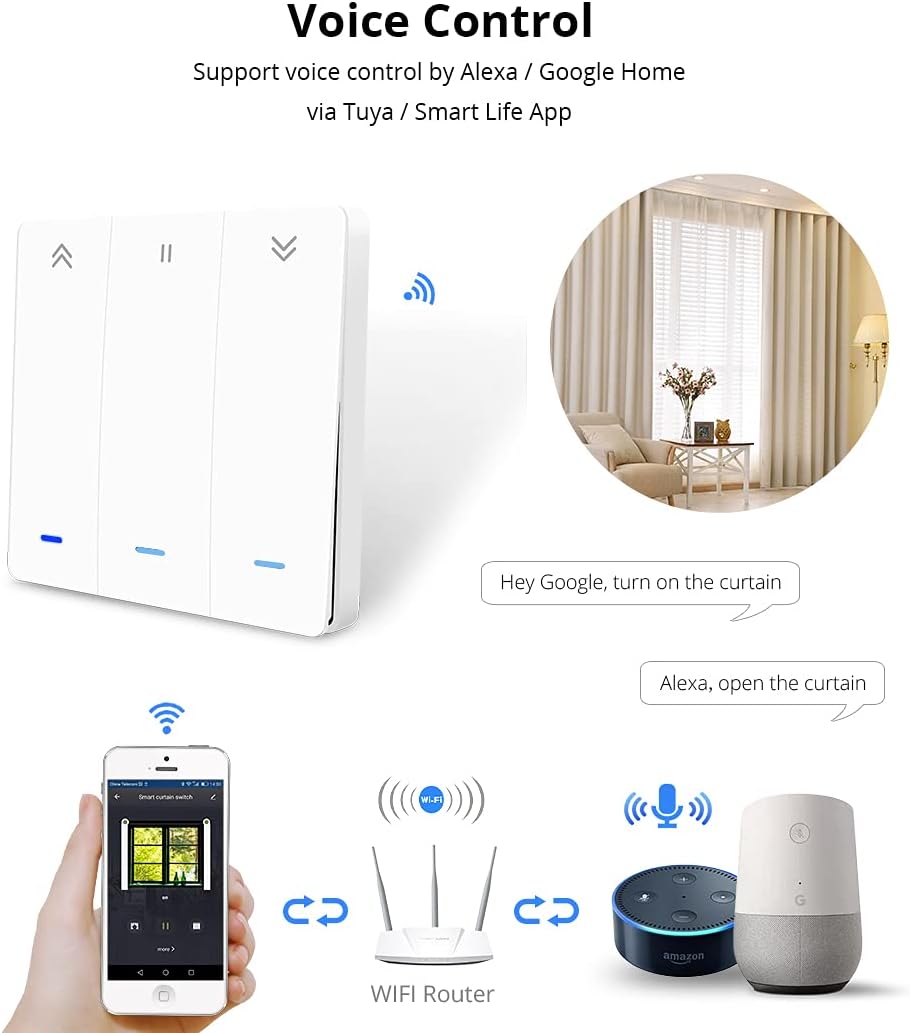
Image: Detailed diagram showing the dimensions of the switch (87mm x 87mm x 27mm) and its wiring connections. The wiring diagram indicates connections for Live (L), Neutral (N), and motor lines (L1, L2, L3, L4).
التثبيت والإعداد
1. تعليمات الأسلاك
- فصل الطاقة: Before starting, turn off the main power supply at your circuit breaker to avoid electric shock.
- تحديد الأسلاك: Identify the Live (L), Neutral (N), and motor control wires (L1, L2, L3, L4) from your roller shutter system. A neutral wire is required for this switch.
- توصيل الأسلاك: Connect the wires to the corresponding terminals on the zemismart Wi-Fi Wall Switch as shown in the wiring diagram.
- قم بتوصيل السلك الحي بالطرف "L".
- Connect the Neutral wire to the 'N' terminal.
- Connect the motor control wires to the 'L1', 'L2', 'L3', 'L4' terminals as per your motor's requirements (typically L1/L2 for up/down, L3/L4 for limit switches if applicable). Refer to your motor's manual for specific wiring.
- تركيب المفتاح: قم بتثبيت المفتاح بإحكام في علبة الحائط.
- اعادة الطاقة: Once all connections are secure and the switch is mounted, restore power at the circuit breaker.
2. Mobile App Control Setup
The zemismart Wi-Fi Wall Switch supports control via the Smart Life or Tuya Smart app on Android and iOS devices.
- تحميل التطبيق: Download and install the "Smart Life" or "Tuya Smart" app from your device's app store.
- التسجيل/تسجيل الدخول: افتح التطبيق وقم بالتسجيل للحصول على حساب جديد أو قم بتسجيل الدخول إذا كان لديك حساب بالفعل.
- إضافة جهاز:
- Ensure your Wi-Fi switch is powered on and in pairing mode (usually indicated by a blinking light).
- في التطبيق، اضغط على أيقونة "+" لإضافة جهاز جديد.
- Select "Curtain Switch" or "Roller Shutter Switch" from the device list.
- Follow the in-app instructions to connect the switch to your 2.4GHz Wi-Fi network.
- Control and Schedule: Once connected, you can control your roller shutters (Open, Stop, Close) and set schedules or timers directly from the app.

Image: Three mobile phone screens displaying the Smart Life/Tuya app interface. The first shows the home screen with various smart devices, the second shows the curtain switch control interface with Open, Stop, and Close buttons, and the third shows the timer scheduling interface.
عملية
1. التحكم اليدوي
The touch-sensitive buttons on the switch allow for direct control of your roller shutters:
- السهم الايسر («): Tap to open the roller shutter.
- Equals Sign (=): Tap to stop the roller shutter at its current position.
- السهم الأيمن (»): Tap to close the roller shutter.
2. التحكم الصوتي
The switch supports voice control through Amazon Alexa and Google Home when integrated with the Smart Life/Tuya app.
- ربط الحسابات: In your Alexa or Google Home app, link your Smart Life/Tuya account.
- اكتشاف الأجهزة: Discover new devices in your smart home app. Your zemismart switch should appear.
- الأوامر الصوتية: استخدم الأوامر مثل:
- "Alexa, open the curtain."
- "Hey Google, turn on the curtain." (Note: "turn on" might be interpreted as "open" for curtains/shutters)
- "Alexa, close the curtain."
- "Hey Google, stop the curtain."

Image: A diagram showing a smartphone, a Wi-Fi router, an Amazon Echo device, and a Google Home device, all connected to the smart curtain switch. Speech bubbles indicate voice commands like "Hey Google, turn on the curtain" and "Alexa, open the curtain."
3. Backlight Function Key
The backlight function of the switch can be activated or deactivated via the mobile app to save power or suit preference.
- Open the Smart Life/Tuya app and navigate to the curtain switch control interface.
- Look for a "Backlight" option or similar setting within the device's settings to toggle it on or off.

Image: A mobile phone screen showing the curtain switch app interface with a "Backlight" button highlighted. To the right, two sets of switch images illustrate the backlight being off (no red light) and on (red light visible).
صيانة
- تنظيف: افصل التيار الكهربائي قبل التنظيف. استخدم قطعة قماش ناعمة وجافة لمسح سطح المفتاح. لا تستخدم منظفات كاشطة أو مذيبات.
- تحديثات البرامج الثابتة: Periodically check the Smart Life/Tuya app for available firmware updates for your switch to ensure optimal performance and security.
- الظروف البيئية: Ensure the switch is not exposed to extreme temperatures or humidity, as this can affect its lifespan and functionality.
استكشاف الأخطاء وإصلاحها
| مشكلة | السبب المحتمل | حل |
|---|---|---|
| المفتاح لا يستجيب / لا يوجد طاقة | No power supply; Incorrect wiring; Circuit breaker tripped. | Check circuit breaker. Verify wiring connections (Live, Neutral, Motor). Ensure power is restored. |
| Cannot connect to Wi-Fi / App | Incorrect Wi-Fi password; Not 2.4GHz Wi-Fi; Switch not in pairing mode; Router too far. | Ensure 2.4GHz Wi-Fi. Re-enter password. Put switch into pairing mode (refer to app instructions). Move router closer or use a Wi-Fi extender. |
| Roller shutter not moving or moving incorrectly | Incorrect motor wiring; Motor limits not set; Motor malfunction. | Verify motor wire connections (L1, L2, L3, L4). Consult your roller shutter motor manual for limit setting procedures. Contact a professional if motor malfunction is suspected. |
| التحكم الصوتي لا يعمل | Smart Life/Tuya account not linked; Device not discovered; Incorrect voice command. | Ensure Smart Life/Tuya account is linked in Alexa/Google Home app. Redo device discovery. Use correct voice commands. |
معلومات الضمان
Specific warranty details for the zemismart Wi-Fi Wall Switch are typically provided at the point of purchase or on the official zemismart website. Please retain your proof of purchase for warranty claims. The product is certified CE and RoHS, indicating compliance with European safety and environmental standards.
دعم العملاء
For further assistance, technical support, or inquiries regarding your zemismart Wi-Fi Wall Switch, please visit the official zemismart website or contact their customer service department. You can often find support contact information on the product packaging or through the Smart Life/Tuya app's help section.
Visit the zemismart store: zemismart Official Store
المستندات ذات الصلة - DS-151
 |
Zemismart Smart Switch User Manual Comprehensive user manual for the Zemismart Smart Switch. Includes installation instructions, wiring diagrams, app setup, Alexa integration, and operating guidelines for the DS-104 model. |
 |
EFPERFECT Limited Warranty Information Details the limited warranty coverage, remedies, exclusions, and service contact information for EFPERFECT products. |
 |
تم تعيينه في 9/80/81/70 لفحص CVR 本手册为海康威视 (HIKVISION) 9/80/81/70 系列单机 CVR لا يوجد سبب آخر لذلك. |
 |
Personalized Fridge Magnet - Custom Photo & Text Decor High-quality personalized fridge magnet with custom photo and text engraving. Romantic refrigerator decoration, durable acrylic material, easy to use and maintain. Includes manufacturer details and quality assurance. |
 |
دليل تثبيت سلسلة Peerless-AV DS-LEDTK تعليمات التثبيت التفصيلية وقائمة الأجزاء لمجموعة القطع العالمية من سلسلة Peerless-AV DS-LEDTK، المصممة لجدران الفيديو dvLED. |
 |
Teilnahmebedingungen: 3 Jahre erweiterter Epson Geräteschutz (CoverPlus Maintenance) – 2026 Offizielle Teilnahmebedingungen für die 3-jährige Garantieverlängerung (CoverPlus Maintenance) für ausgewählte Epson WorkForce und DS-Scanner. |
Ask a question about this manual
Ask about setup, troubleshooting, compatibility, parts, safety, or missing instructions. Manuals+ will review the question and use this page’s manual context to help answer it.