
1. المقدمة
Thank you for choosing the Greadio MD-T26 Portable AM/FM/SW Radio. This manual provides detailed instructions for the proper setup, operation, and maintenance of your radio. Please read this manual thoroughly before use to ensure optimal performance and longevity of your device.
The Greadio MD-T26 is a versatile portable radio featuring AM, FM, and Shortwave (SW) bands, an LCD display for clear frequency and time viewing, and dual power options for both indoor and outdoor use. It is designed for ease of use with large, accessible controls and a built-in speaker for clear audio.

الشكل 1: الجبهة view of the Greadio MD-T26 Portable AM/FM/SW Radio.
2. مواصفات المنتج
- استقبال متعدد النطاقات: Receives AM, FM, and Shortwave (SW) frequencies.
- شاشة LCD: Clear digital display for frequency and time settings.
- خيارات الطاقة المزدوجة: Operates via AC power or 4 x D cell batteries (not included).
- مكبر صوت عالي الجودة: Integrated 2W speaker for clear sound output.
- التحكم في النغمة: Adjustable tone settings (Low/High) for personalized audio.
- مدخل سماعة الأذن: 3.5mm stereo earphone jack for private listening.
- تصميم محمول: Equipped with a sturdy handle for easy transport.
3. الإعداد
3.1 تزويد الراديو بالطاقة
The Greadio MD-T26 radio offers two methods for power supply:
- أس امدادات الطاقة: For indoor use, connect the included AC power cable to the radio's AC input jack and then plug it into a standard wall outlet.
- مزود طاقة البطارية: For portable use, insert four (4) D cell batteries (not included) into the battery compartment located on the back of the radio. Ensure correct polarity (+/-) as indicated inside the compartment.
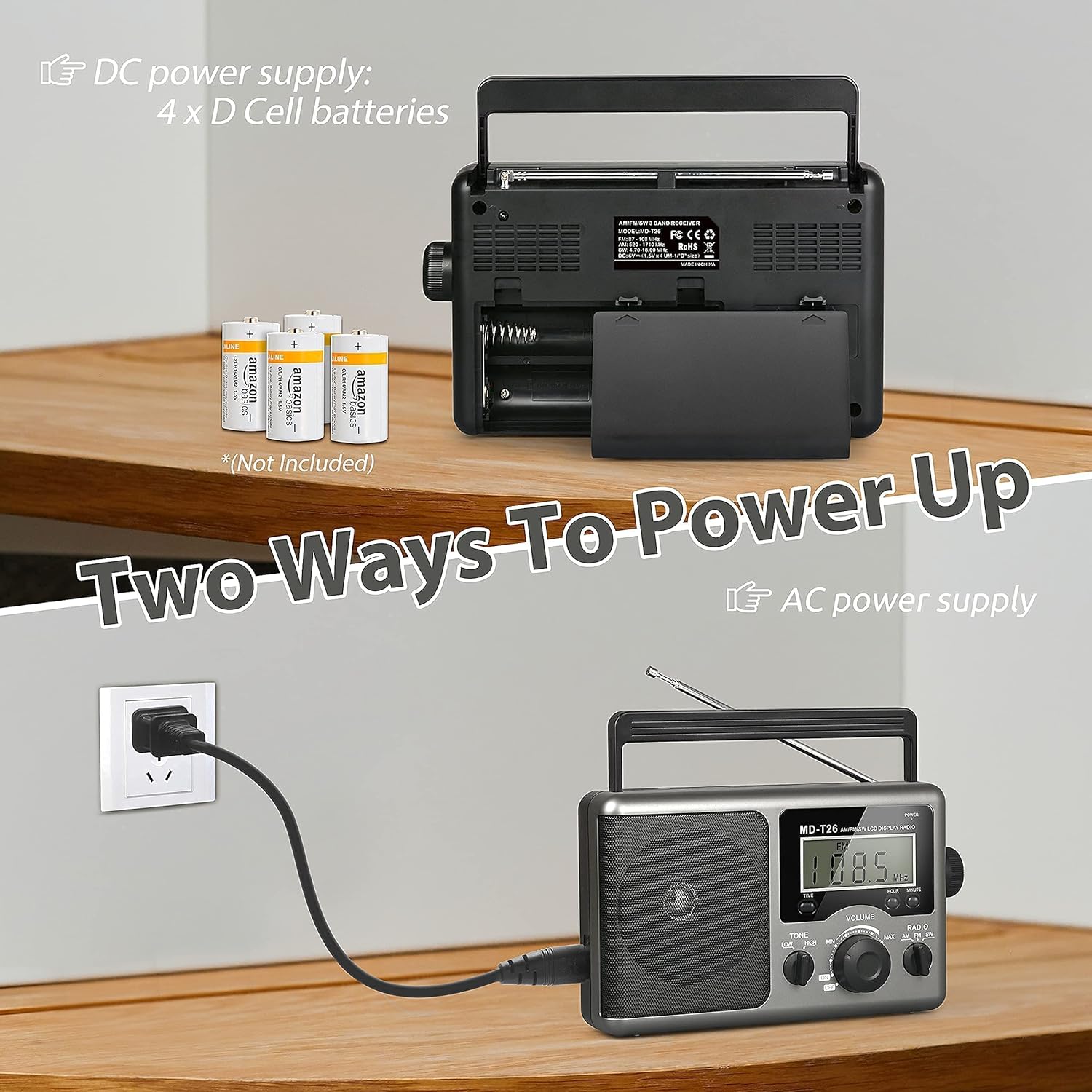
Figure 2: Illustration of AC power connection and battery compartment for D cell batteries.
3.2 ضبط الهوائي
For optimal reception, adjust the antenna as follows:
- FM/SW Reception: Extend the telescopic antenna fully and adjust its angle for the clearest signal.
- استقبال الصباح: The radio uses a built-in ferrite rod antenna for AM. Rotate the entire radio unit to find the strongest signal.
4. تعليمات التشغيل
4.1 الضوابط أكثرview

الشكل 3: مفصل view of the radio's control panel.
- زر الطاقة: Located on the top right, press to turn the radio ON/OFF.
- موجة الضبط: Located on the right side, rotate to select radio stations.
- مقبض الصوت: Located on the front panel, rotate to adjust the sound level.
- RADIO Band Selector: Switch between AM, FM, and SW bands.
- TONE Switch: Select between LOW and HIGH tone settings.
- TIME/HOUR/MINUTE Buttons: Used for setting the time on the LCD display.
4.2 Turning On and Selecting a Band
- اضغط على قوة button to turn on the radio. The LCD display will illuminate.
- استخدم راديو band selector switch to choose your desired band: AM, FM, or SW.
4.3 ضبط المحطة
بمجرد تحديد الفرقة، قم بتدويرها ببطء ضبط knob on the right side of the radio. Observe the frequency displayed on the LCD screen. Stop rotating when you hear your desired station clearly.
4.4 ضبط الصوت والنغمة
- مقدار: تدوير مقدار knob on the front panel clockwise to increase volume and counter-clockwise to decrease it.
- نغمة: استخدم نغمة switch to select between 'LOW' for a warmer sound or 'HIGH' for a brighter sound, according to your preference.
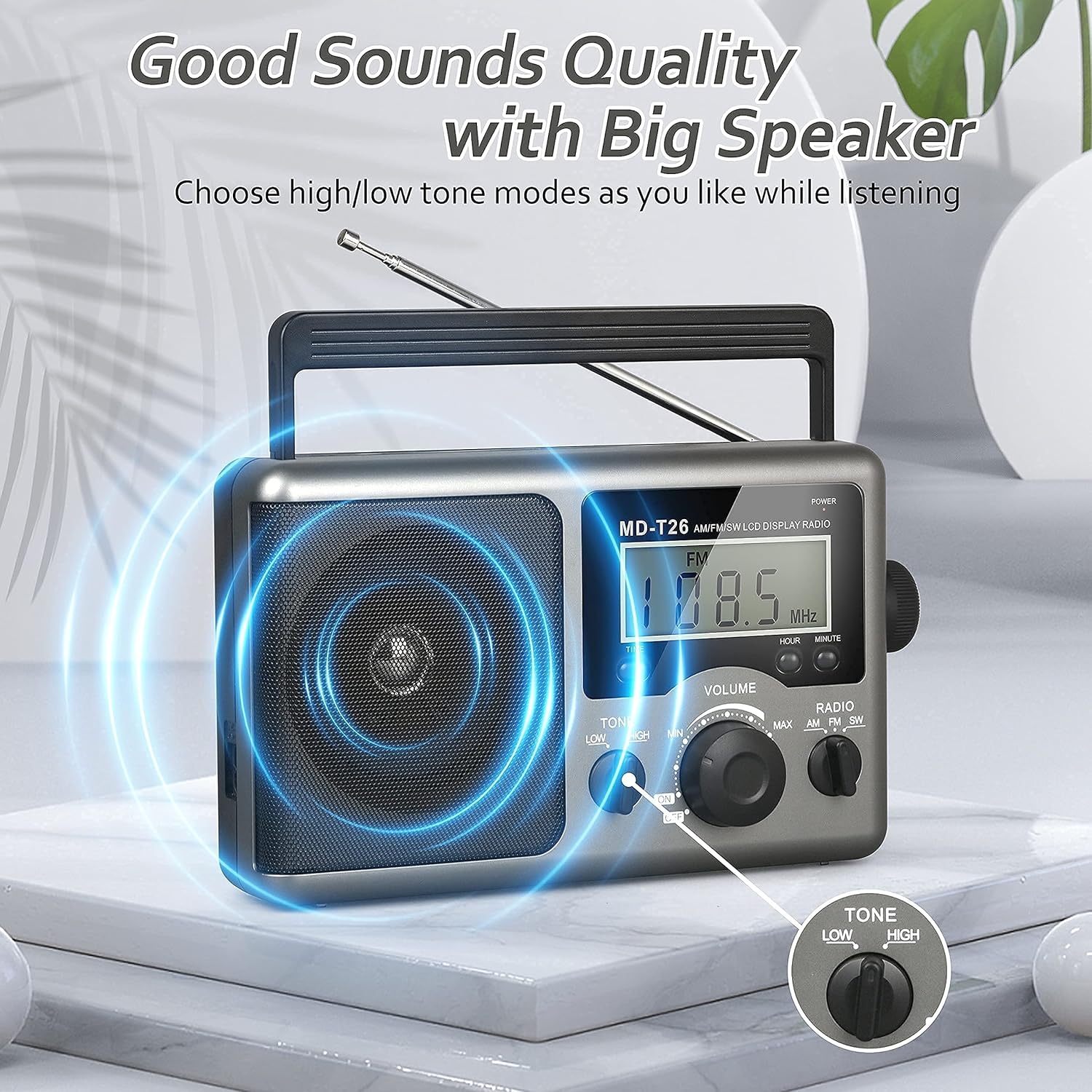
Figure 4: Speaker and Tone control detail.
4.5 ضبط الوقت
The LCD display can also show the current time. To set the time:
- اضغط على وقت button once to enter time setting mode.
- استخدم ساعة زر لضبط الساعة.
- استخدم دقيقة زر لضبط الدقيقة.
- The time system is 24-hour format.
4.6 Using the Earphone Jack
For private listening, plug any standard 3.5mm stereo earphones (not included) into the مدخل سماعة الأذن located on the side of the radio. The internal speaker will automatically mute when earphones are connected.
5. الصيانة
- تنظيف: امسح الجزء الخارجي من الراديو بقطعة قماش ناعمة وجافة. لا تستخدم منظفات أو مذيبات كاشطة.
- العناية بالبطارية: If the radio will not be used for an extended period, remove the D cell batteries to prevent leakage and damage.
- تخزين: قم بتخزين الراديو في مكان بارد وجاف بعيدًا عن أشعة الشمس المباشرة ودرجات الحرارة القصوى.
- مقاومة الماء: هذا الراديو غير مقاوم للماء. Avoid exposure to rain, moisture, or splashing water.
6. استكشاف الأخطاء وإصلاحها
| مشكلة | السبب المحتمل | حل |
|---|---|---|
| لا يوجد طاقة | AC cable not connected, batteries depleted or incorrectly inserted. | تحقق من توصيل كابل التيار المتردد. استبدل البطاريات أو تأكد من صحة قطبيتها. |
| ضعف الاستقبال / تشويش | Antenna not extended/adjusted, weak signal area, interference. | Extend and adjust telescopic antenna (FM/SW). Rotate radio for AM. Move to an area with better signal. Avoid sources of electronic interference. |
| لا يوجد صوت من السماعة | Volume too low, earphones connected. | Increase volume. Disconnect earphones if not intended for private listening. |
| شاشة LCD لا تعمل | مشكلة في الطاقة، عطل داخلي. | Check power supply. If problem persists, contact customer support. |
7. المواصفات
| ميزة | التفاصيل |
|---|---|
| ماركة | جراديو |
| رقم الموديل | مد-T26 |
| تكنولوجيا الاتصال | مساعد (لسماعة الأذن) |
| تقنية الموالف | AM، FM، SW |
| مصدر الطاقة | AC Power, 4 x D Cell Batteries |
| الأجهزة المتوافقة | سماعة |
| نوع العرض | شاشة الكريستال السائل |
| واجهة الأجهزة | شنومكسم جاك الصوت |
| مستوى مقاومة الماء | غير مقاوم للماء |
8. الضمان والدعم
8.1 معلومات الضمان
Greadio provides a ضمان لمدة 12 شهرًا for this product, covering manufacturing defects from the date of purchase. Additionally, a ضمان استرداد الأموال لمدة 30 يومًا يتم تقديمها.
لا يغطي هذا الضمان الأضرار الناجمة عن سوء الاستخدام أو الحوادث أو التعديل غير المصرح به أو التآكل الطبيعي.
8.2 دعم العملاء
For any questions, technical assistance, or warranty claims, please contact Greadio customer service. We offer خدمة العملاء على مدار الساعة طوال أيام الأسبوع لمساعدتك.
يرجى الرجوع إلى عبوة المنتج أو إلى دليل البائع. webالموقع للحصول على أحدث معلومات الاتصال.