
مقدمة
Thank you for choosing the CHOETECH 38W Dual Port Fast Charger, Model PD5002. This charger is designed to provide efficient and rapid charging for your mobile devices, featuring both a USB Type-C port with Power Delivery (PD) and a USB Type-A port with Quick Charge (QC) technology. Please read this manual carefully to ensure proper use and optimal performance of your charger.
معلومات السلامة
- Use this charger indoors only. Avoid exposure to rain, moisture, or extreme temperatures.
- Do not disassemble, modify, or repair the product yourself. This may cause electric shock, fire, or damage to the product.
- أبقِ الشاحن بعيدًا عن متناول الأطفال والحيوانات الأليفة.
- Ensure the charger is fully inserted into the power outlet. Loose connections can cause overheating.
- Unplug the charger from the power outlet when not in use or during lightning storms.
- لا تقم بتشغيل الشاحن ويداك مبتلتان.
- Use only compatible charging cables with your devices.
محتويات الحزمة
- 1 x CHOETECH 38W Dual Port Fast Charger (Model PD5002)
المنتج انتهىview
The CHOETECH PD5002 charger features a compact and lightweight design, making it ideal for travel and everyday use. It includes two charging ports for simultaneous charging.

الصورة: الجبهة view of the CHOETECH PD5002 38W Dual Port Fast Charger, showing the USB-C and USB-A ports and the CHOETECH logo.
تخطيط الميناء:
- USB Type-C Port (PD 3.0): Delivers up to 20W of power for fast charging compatible devices.
- USB Type-A Port (QC 3.0): Delivers up to 18W of power for quick charging compatible devices.
يثبت
Setting up your CHOETECH PD5002 charger is straightforward:
- قم بتوصيله بمنفذ الطاقة: أدخل أسنان الشاحن بإحكام في مقبس الطاقة الجداري القياسي (تيار متردد 100-240 فولت).
- توصيل كابل الشحن: Connect one end of your device's charging cable to the appropriate port on the charger (USB-C for Power Delivery or USB-A for Quick Charge).
- الاتصال بالجهاز: Connect the other end of the charging cable to your mobile phone, tablet, or other compatible device.
تعليمات التشغيل
شحن جهاز واحد:
When charging a single device, the charger will deliver the maximum power supported by the port and your device. For example, a compatible device connected to the USB-C port can receive up to 20W, while a device connected to the USB-A port can receive up to 18W.
شحن جهازين في وقت واحد:
The CHOETECH PD5002 allows you to charge two devices simultaneously with a combined total output of 38W. When both ports are in use, the power is intelligently distributed:
- The USB-C port can deliver up to 20W.
- The USB-A port can deliver up to 18W.
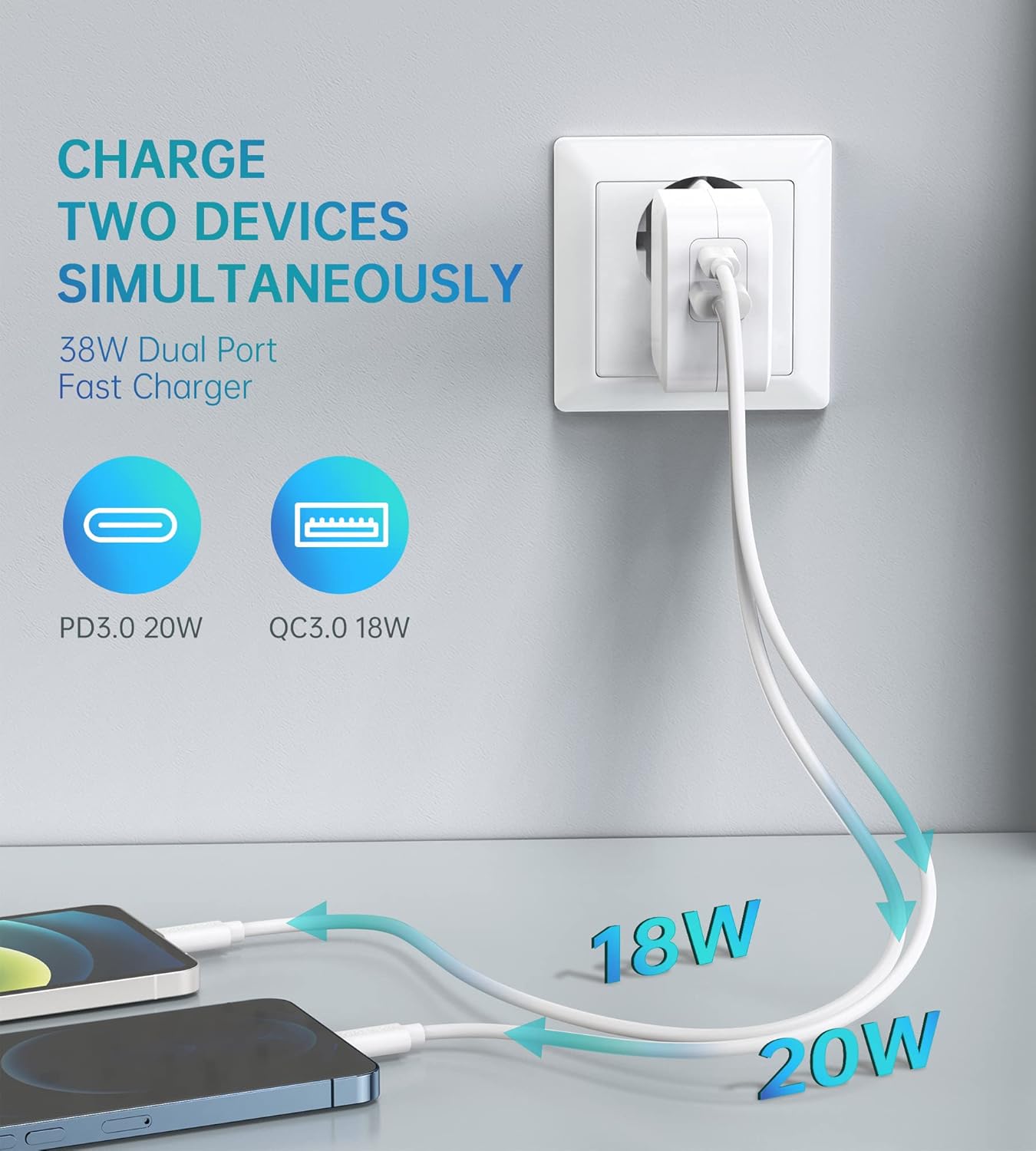
Image: Illustration showing the CHOETECH PD5002 charger plugged into a wall, with two cables extending to charge two smartphones. One cable is labeled 20W (USB-C) and the other 18W (USB-A), demonstrating simultaneous charging.
قدرات الشحن السريع:
This charger supports Power Delivery (PD) 3.0 via the USB-C port and Quick Charge (QC) 3.0 via the USB-A port, enabling significantly faster charging speeds for compatible devices compared to standard chargers.

Image: The CHOETECH PD5002 charger plugged into a wall outlet, connected to an iPhone 12 via a USB-C to Lightning cable. Text highlights "20W Power Delivery for the new iPhone 12 series" and "4X FASTER Than Original 5W Chargers."

Image: The CHOETECH PD5002 charger plugged into a wall outlet, connected to a Samsung smartphone via a USB-A to USB-C cable. Text highlights "18W QUICK CHARGE 3.0" and "3X Faster Than Standard Chargers."
صيانة
- تنظيف: افصل الشاحن عن مصدر الطاقة قبل التنظيف. استخدم قطعة قماش ناعمة وجافة لمسح السطح. لا تستخدم المنظفات السائلة أو البخاخات.
- تخزين: Store the charger in a cool, dry place when not in use. Avoid storing it in areas with high humidity or extreme temperatures.
- التعامل: Avoid dropping or subjecting the charger to strong impacts, as this can damage internal components.
استكشاف الأخطاء وإصلاحها
الجهاز لا يشحن:
- التحقق من الاتصالات: Ensure the charger is securely plugged into the wall outlet and the charging cable is firmly connected to both the charger and your device.
- جرب منفذًا مختلفًا: Test the charger with a different wall outlet to rule out a faulty power source.
- فحص الكابل: Try using a different charging cable. Damaged cables can prevent charging.
- توافق الجهاز: Confirm that your device is compatible with USB charging and that the cable matches the device's port type.
الشحن البطيء:
- جودة الكابل: Ensure you are using a high-quality charging cable that supports fast charging protocols (PD or QC). Generic or old cables may limit charging speed.
- دعم الجهاز: Verify that your device supports Power Delivery (PD) or Quick Charge (QC) for optimal fast charging.
- تطبيقات الخلفية: قم بإغلاق أي تطبيقات تستهلك الكثير من الطاقة وتعمل في الخلفية على جهازك.
- العوامل البيئية: Extreme temperatures can affect charging efficiency. Charge in a moderate environment.
تحديد
| رقم الموديل | بي دي 5002 |
| مدخل التيار المتردد | 100-240V, 50/60Hz, 1.0A (Max) |
| USB Type-C Output (PD 3.0) | 5V-3A، 9V-2.22A، 12V-1.67A (20 واط كحد أقصى) |
| USB Type-A Output (QC 3.0) | 5V-3A، 9V-2A، 12V-1.5A (18 واط كحد أقصى) |
| إجمالي انتاج الطاقة | 38 وات (الحد الأقصى) |
| تكنولوجيا الاتصال | USB |
| المميزات الخاصة | Lightweight design, Fast charging |
| لون | أبيض |
| أبعاد المنتج | 4 × 11 × 10 سم |
| وزن العنصر | 5 جرام |
| الأجهزة المتوافقة | Mobile phones, tablets, and other USB-powered devices |
الضمان والدعم
CHOETECH products are designed and manufactured to the highest quality standards. For information regarding warranty coverage or technical support, please refer to the warranty card included with your purchase or visit the official CHOETECH website. If you encounter any issues not covered in this manual, please contact CHOETECH customer service for assistance.