
1. المقدمة
This instruction manual provides detailed information on the setup, operation, maintenance, and troubleshooting for your Aibecy withzoom 1080P 3X Optical Zoom Webcam. Please read this manual thoroughly before using the product to ensure proper functionality and to prevent damage.
2. انتهى المنتجview
2.1 الميزات الرئيسية
- 1080P Full HD Video Resolution
- عدسة تكبير بصري 3X
- 355° Horizontal Rotation and 90° Vertical Rotation
- تشغيل التحكم عن بعد
- اتصال USB
- Compatible with Windows, Mac, Linux, and Chromebook operating systems
- Infrared (IR) support
2.2 محتويات العبوة
تأكد من وجود جميع العناصر في العبوة:
- Aibecy withzoom Webكاميرا
- جهاز التحكم عن بعد
- محول التيار المتردد
- كابل يو اس بي
- تزايد شريحة
- مسامير للتثبيت

الشكل 1: محتويات العبوة
2.3 مخطط المنتج

الشكل 2: الجبهة View والمكونات
- عدسة HD: يلتقط فيديو عالي الدقة.
- 355° Rotating Gimbal: Allows for wide-angle coverage and precise positioning.
- IR Infrared Receiver: يستقبل اشارات من جهاز التحكم عن بعد.
- مؤشر الطاقة: يظهر حالة الطاقة للجهاز.
- Remote Indicator: Lights up when a remote control signal is received.
3. دليل الإعداد
3.1 طرق التثبيت
The Aibecy withzoom webcam offers flexible installation options:
- وضع الجدول: Place the camera on a flat surface such as a desk or conference table.
- سقف جبل: Use the included mounting bracket and screws to attach the camera to the ceiling. Ensure the image flip function is enabled if mounting upside down.
- حامل القوس: Attach the camera to a tripod or other compatible bracket using the screw hole at the bottom.

الشكل 3: خيارات التثبيت
3.2 توصيل الكاميرا
اتبع هذه الخطوات لتوصيل جهازك webكام:
- توصيل الطاقة: Connect the AC power adapter to the camera's 12V power input port and plug it into a power outlet.
- اتصال USB: Connect the USB cable from the camera's USB port to an available USB port on your computer (Windows, Mac, Linux, or Chromebook). The camera is plug-and-play and does not require driver software.
- Optional RS232/RS422 Connection: If advanced control via RS232 or RS422 is required, connect the appropriate cable from the camera to your control device.

الشكل 4: مخطط الاتصال
Once connected, open your video conferencing software (e.g., Zoom, Skype, Microsoft Teams) and select the Aibecy withzoom camera as your video input device.
4. تعليمات التشغيل
4.1 التشغيل الأساسي
- تشغيل الطاقة: After connecting the power adapter, the camera will automatically power on. The Power Indicator light will illuminate.
- إيقاف التشغيل: Disconnect the power adapter from the camera.
4.2 استخدام جهاز التحكم عن بعد
The included remote control allows for easy adjustment of camera functions.

الشكل 5: Webcam and Remote Control
- Camera Selection Buttons: If multiple cameras are connected, use these buttons to select the camera you wish to control.
- التحكم في سرعة الدوران: Adjust the pan/tilt speed for smoother movements.
- Pan/Tilt/Zoom (PTZ) Controls: Use the directional arrows to pan (left/right) and tilt (up/down) the camera. Use the zoom in/out buttons to adjust the optical zoom.
- Preset Function Area: Save and recall specific camera positions and zoom levels using the preset buttons.
4.3 Camera Movement and Zoom
The camera supports wide-range movement for comprehensive coverage:
- الدوران الأفقي: The camera head can rotate 355 degrees horizontally.
- الدوران العمودي: The camera head can tilt 90 degrees vertically.
- التكبير البصري: Utilize the 3X optical zoom to focus on specific areas without loss of image quality.
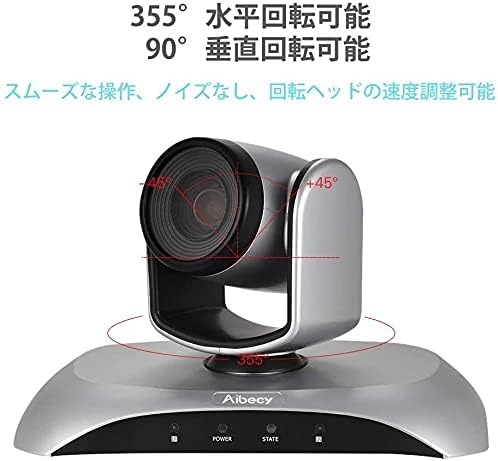
Figure 6: Camera Rotation Capabilities
4.4 Image Flip Function
If the camera is mounted upside down (e.g., on a ceiling), you can use the image flip function to correct the video orientation.

Figure 7: Image Flip Function in Use
Refer to the remote control instructions for the specific button to activate or deactivate the image flip function.
5. الصيانة
تضمن الصيانة المناسبة طول عمر جهازك وأدائه الأمثل webكام.
- تنظيف: استخدم قطعة قماش ناعمة وجافة لتنظيف جسم الكاميرا. أما بالنسبة للعدسة، فاستخدم قطعة قماش ومحلول تنظيف مخصصين للعدسات. تجنب استخدام المنظفات الكاشطة أو المذيبات.
- تخزين: عند عدم استخدام الكاميرا لفترات طويلة، قم بتخزينها في مكان بارد وجاف بعيدًا عن أشعة الشمس المباشرة ودرجات الحرارة القصوى.
- التعامل: تجنب إسقاط الكاميرا أو تعريضها لصدمات قوية.
6. استكشاف الأخطاء وإصلاحها
If you encounter issues with your Aibecy withzoom webcam, refer to the table below for common problems and solutions.
| مشكلة | السبب المحتمل | حل |
|---|---|---|
| No image or video output | Power not connected; USB cable loose; Incorrect camera selected in software. | Ensure power adapter is securely connected. Check USB cable connection. Select the Aibecy withzoom camera in your video conferencing software settings. |
| جهاز التحكم عن بعد لا يعمل | Batteries low/dead; Obstruction between remote and camera; Remote not pointed at IR receiver. | Replace remote control batteries. Ensure a clear line of sight to the camera's IR receiver. Point the remote directly at the camera. |
| Image is upside down | Camera mounted upside down and image flip not activated. | Activate the image flip function using the remote control. |
| جودة الفيديو رديئة | Insufficient lighting; Dirty lens; Network bandwidth issues. | Ensure adequate lighting in the room. Clean the camera lens. Check your internet connection speed. |
7. المواصفات الفنية
| ميزة | مواصفة |
|---|---|
| ماركة | أيبيسي |
| رقم الموديل | withzoom |
| دقة التقاط الفيديو | 1080 بكسل |
| التكبير البصري | 3X |
| الدوران الأفقي | 355° |
| الدوران العمودي | 90° |
| تكنولوجيا الاتصال | USB |
| الأجهزة المتوافقة | Windows, Mac, Linux, Chromebook |
| المميزات الخاصة | Remote Control, Infrared |
| تثبيت الصورة | لا |
| أبعاد الحزمة | 29.7 × 22.4 × 19.9 سم |
| وزن العنصر | 1.51 كجم |
8. معلومات الدعم
For further assistance or inquiries not covered in this manual, please refer to the official Aibecy support channels or contact your retailer. Keep your purchase receipt for warranty purposes.