
مقدمة
The Macally BTBLZKEYSG is a full-size backlit Bluetooth keyboard designed specifically for Mac and iOS devices. It features a MacOS-specific layout with 107 scissor-switch keys and 14 convenient shortcuts, enhancing workflow and productivity. This keyboard allows seamless pairing and switching between up to three Bluetooth-enabled devices, including MacBooks, iMacs, iPhones, and iPads. The integrated white LED backlighting offers three adjustable brightness levels for comfortable typing in various lighting conditions. Powered by a built-in 1500mAh rechargeable battery, it provides extended usage time between charges.
محتويات الحزمة
- Macally BTBLZKEYSG Backlit Bluetooth Keyboard
- كابل شحن USB-C
- دليل التعليمات
مميزات المنتج
- مفاتيح ذات إضاءة خلفية: Crisp white LEDs with 3 brightness levels for typing in low-light environments. Backlight can be turned off.
- MacOS Specific Layout: 107 scissor-switch keys with 14 macOS shortcuts for familiar and efficient use.
- تقنية بلوتوث متعددة الأجهزة: Easily pair and switch between up to 3 Bluetooth-enabled devices (Mac, iPhone, iPad) within a 30 ft wireless range.
- بطارية قابلة لإعادة الشحن: Built-in 1500mAh battery provides 1 to 4 weeks of runtime with backlighting on. USB-C charging cable included.
- Slim and Comfortable Design: Only 0.87 inches thin with an integrated kickstand for ergonomic typing.
يثبت
1. شحن لوحة المفاتيح
Before initial use, fully charge the keyboard. Connect the supplied USB-C charging cable to the keyboard's USB-C port and the other end to a USB power source (e.g., computer USB port, USB wall adapter). The LED indicator will show charging status.
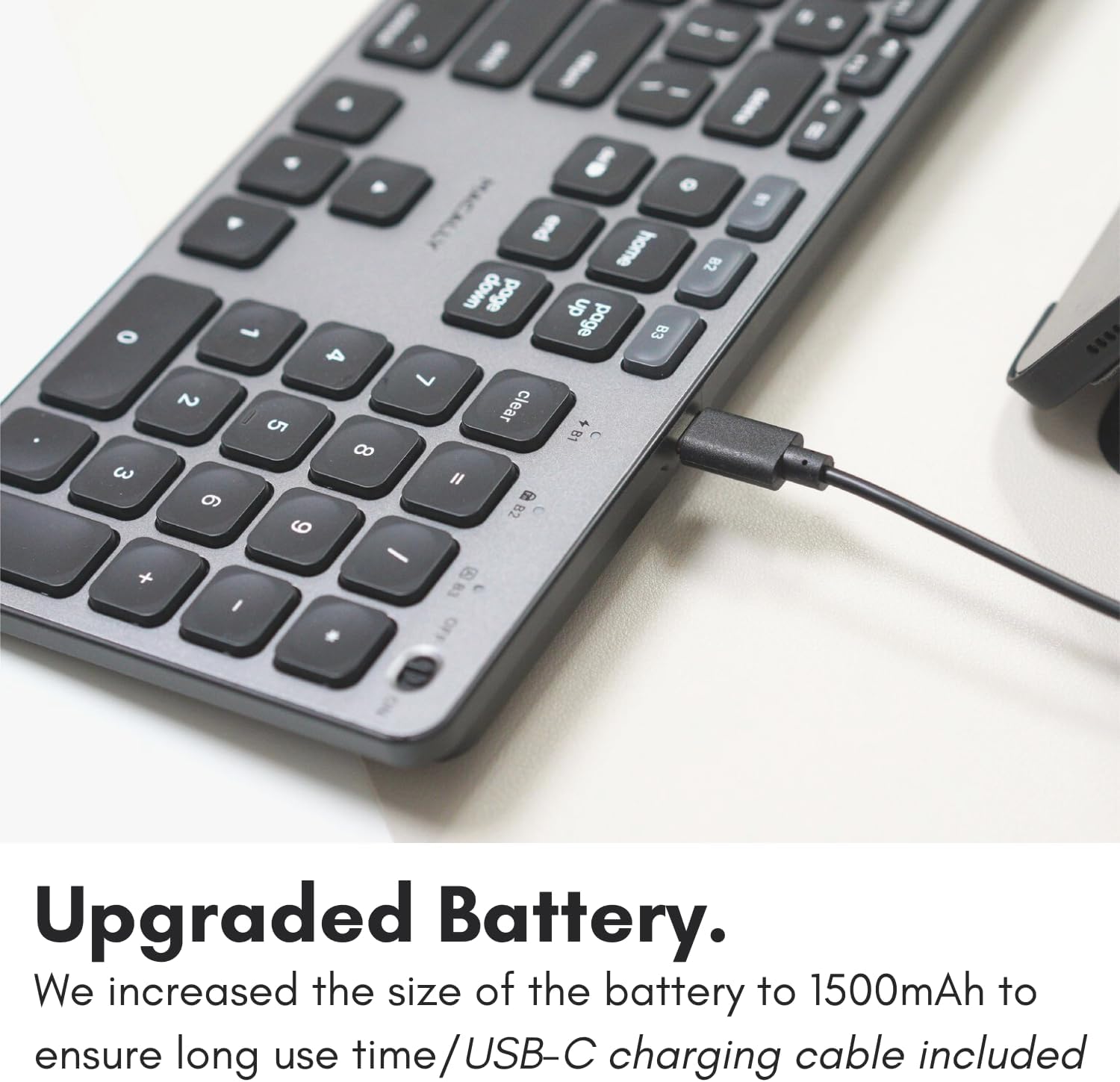
Image: The USB-C charging port on the side of the Macally BTBLZKEYSG keyboard, with the charging cable inserted.
2. تشغيل
Locate the power switch on the keyboard, usually on the top right edge. Slide the switch to the 'ON' position.
3. الاقتران بجهاز
- تأكد من تشغيل لوحة المفاتيح.
- Press and hold one of the Bluetooth pairing keys (B1, B2, or B3) for 3-5 seconds until the corresponding LED indicator above the key starts blinking rapidly. This indicates the keyboard is in pairing mode.
- On your Mac or iOS device, go to إعدادات النظام (أو تفضيلات النظام) > بلوتوث.
- Look for "Macally BTBLZKEYSG" (or similar name) in the list of available devices and click/tap to connect.
- إذا طُلب منك ذلك، فأدخل رمز الاقتران المعروض على شاشتك باستخدام لوحة المفاتيح واضغط على يدخل.
- Once connected, the LED indicator for the selected Bluetooth channel will stop blinking and remain solid for a few seconds before turning off.

Image: The Macally BTBLZKEYSG keyboard shown with a MacBook and an iPad, illustrating its multi-device capability.
تعليمات التشغيل
MacOS Specific Keys and Shortcuts
The keyboard features a standard MacOS layout, including function keys (F1-F12) that double as media and system control shortcuts. Use the Fn key in combination with these keys to access their secondary functions.
- الجبهة الوطنية + F1: تقليل سطوع الشاشة
- الجبهة الوطنية + F2: زيادة سطوع الشاشة
- الجبهة الوطنية + F3: مركز التحكم
- الجبهة الوطنية + F4: لوحة الإطلاق
- الجبهة الوطنية + F7: المسار السابق
- الجبهة الوطنية + F8: تشغيل/إيقاف مؤقت
- الجبهة الوطنية + F9: المسار التالي
- الجبهة الوطنية + F10: حجم كتم الصوت
- الجبهة الوطنية + F11: خفض مستوى الصوت
- الجبهة الوطنية + F12: زيادة الحجم
التحكم في الإضاءة الخلفية
The keyboard's backlight can be adjusted to three brightness levels or turned off completely. Use the dedicated backlight control keys, typically located near the function keys or arrow keys, to cycle through the brightness settings.

Image: The Macally BTBLZKEYSG keyboard with its white LED backlighting illuminated at different intensity levels.
التبديل بين الأجهزة المقترنة
To switch between your paired Bluetooth devices, simply press the corresponding Bluetooth pairing key (B1, B2, or B3) that your device is connected to. The keyboard will automatically connect to the selected device.
صيانة
لضمان طول عمر لوحة المفاتيح لديك وأدائها الأمثل، اتبع إرشادات الصيانة التالية:
- تنظيف: استخدم قطعة قماش ناعمة وخالية من الوبر وامسحها برفق.ampened with water or a mild cleaning solution to wipe the keyboard surface. Avoid harsh chemicals or abrasive materials.
- إزالة الغبار: استخدم الهواء المضغوط لإزالة الغبار والحطام من بين المفاتيح.
- تخزين: When not in use for extended periods, store the keyboard in a dry, cool place.
- تجنب السوائل: Do not expose the keyboard to excessive moisture or spill liquids on it.
استكشاف الأخطاء وإصلاحها
| مشكلة | حل |
|---|---|
| لوحة المفاتيح لا تعمل. | Ensure the power switch is in the 'ON' position. Charge the keyboard using the supplied USB-C cable. |
| لوحة المفاتيح لا تقترن بالجهاز. | Ensure the keyboard is in pairing mode (LED blinking). Check your device's Bluetooth settings to ensure Bluetooth is enabled and the keyboard is visible. Try restarting both the keyboard and your device. |
| يتم قطع اتصال لوحة المفاتيح بشكل متكرر. | Ensure the keyboard is within the 30 ft wireless range of your device. Check for interference from other wireless devices. Ensure the keyboard battery is sufficiently charged. |
| الإضاءة الخلفية لا تعمل. | Press the backlight control keys to cycle through brightness levels. Ensure the keyboard battery is charged, as low battery may disable backlighting. |
| المفاتيح لا تستجيب. | Check the Bluetooth connection. If connected, try restarting the keyboard. Ensure no debris is lodged under the keys. |
تحديد
| ميزة | التفاصيل |
|---|---|
| رقم الموديل | BTBLZKEYSG |
| الاتصال | بلوتوث، لاسلكي |
| الأجهزة المتوافقة | Mac Mini / Pro Studio, iMac, Macbook Air, MacBook Pro, iPhone, iPad |
| وصف لوحة المفاتيح | Backlit Keyboard for Mac |
| المميزات الخاصة | Backlit, Multi-Device Bluetooth, Rechargeable |
| لون | رمادي |
| الخلفية الخلفية لوحة المفاتيح | Single Color (White), 3 Brightness Levels |
| أبعاد المنتج | 16.8 بوصة طول × 4.6 بوصة عرض × 0.87 بوصة ارتفاع |
| عدد المفاتيح | 107 |
| مصدر الطاقة | يعمل بالبطارية (قابلة لإعادة الشحن بسعة 1500 مللي أمبير) |
| نوع المفتاح | Tactile Scissor Keys |
| تخطيط لوحة المفاتيح | QWERTY (MacOS) |
| مادة | الألومنيوم |
| رمز المنتج الموحد | 701107500362 |
فيديو المنتج الرسمي
فيديو: أكثر منview of the Macally Backlit Bluetooth Keyboard for Mac & iOS, highlighting its features and compatibility.
الضمان والدعم
The Macally BTBLZKEYSG Backlit Bluetooth Keyboard comes with a warranty of up to two years. For technical support, warranty claims, or further assistance, please visit the official Macally webالموقع أو الاتصال بقسم خدمة العملاء.