
1. المقدمة
This manual provides essential instructions for the installation, operation, and maintenance of your Hikvision 8MP AcuSense WDR Mini Bullet Network Camera, model DS-2CD2083G2-IU. Please read this manual thoroughly before using the product and retain it for future reference.
المنتج انتهىview
The Hikvision DS-2CD2083G2-IU is a high-performance 8-megapixel (4K) network camera designed for advanced surveillance. It features AcuSense technology for accurate human and vehicle target classification, Wide Dynamic Range (WDR) for clear imaging against strong backlight, and a fixed 2.8mm lens for a wide field of view. Its IP67 rating ensures robust outdoor performance, and the integrated microphone allows for audio monitoring.
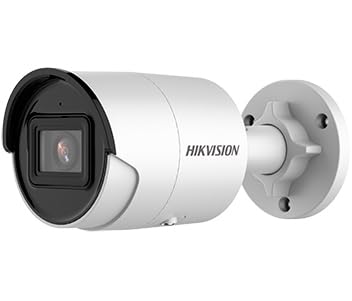
Figure 1: Hikvision 8MP AcuSense WDR Mini Bullet Network Camera (DS-2CD2083G2-IU)
This image displays the Hikvision 8MP AcuSense WDR Mini Bullet Network Camera, highlighting its compact bullet-style design suitable for various installation environments.
الميزات الرئيسية
- 8 Megapixel (4K) Resolution: Delivers high-quality, detailed video.
- تقنية AcuSense: Reduces false alarms by accurately classifying human and vehicle targets.
- النطاق الديناميكي الواسع (WDR): Ensures clear images even in scenes with strong contrast.
- Fixed 2.8mm Lens: يوفر نطاقًا واسعًا viewزاوية جي.
- الإضاءة بالأشعة تحت الحمراء (IR): Night vision up to 40 meters.
- تصنيف مقاومة الماء والغبار IP67: مناسب للاستخدام الخارجي في مختلف الظروف الجوية.
- ميكروفون مدمج: Enables audio monitoring.
- قارئ بطاقات مدمج: Supports local storage (microSD card not included).
2. معلومات السلامة
يرجى مراعاة احتياطات السلامة التالية لمنع الإصابة أو إتلاف المنتج:
- Ensure the power supply meets the camera's requirements (6.5 Watts).
- لا تعرض الكاميرا لدرجات حرارة عالية أو رطوبة أو بيئات تآكلية.
- Avoid pointing the lens directly at strong light sources, as this may damage the sensor.
- يجب أن يتم إجراء التثبيت بواسطة موظفين مؤهلين وفقًا للقوانين الكهربائية المحلية.
- استخدم فقط الملحقات المحددة من قبل الشركة المصنعة.
- نظف عدسة الكاميرا بقطعة قماش ناعمة وجافة. تجنب استخدام المواد الكيميائية القاسية.
3. الإعداد والتثبيت
3.1 فك التعبئة
Carefully unpack the camera and check for any signs of damage. Ensure all components are present. (Typical components include: camera unit, mounting template, screws, waterproof connector, quick start guide).
3.2 التثبيت المادي
The camera is designed for ceiling mounting. Select a suitable location that provides the desired field of view and is within reach of network and power cables. Due to its IP67 rating, it is suitable for outdoor environments.
- Use the provided mounting template to mark drill holes on the ceiling.
- قم بحفر الثقوب اللازمة وأدخل سدادات الحائط إذا لزم الأمر.
- قم بتثبيت قاعدة الكاميرا على سطح التركيب باستخدام البراغي المرفقة.
- اضبط زاوية الكاميرا للحصول على تغطية مثالية.
3.3 اتصال الشبكة والطاقة
This is an IP network camera. It requires a network connection and power. Power over Ethernet (PoE) is typically supported, simplifying installation by delivering both power and data over a single Ethernet cable. If PoE is not used, a separate 12V DC power adapter (not included) will be required.
- Connect an Ethernet cable from your network switch/router to the camera's RJ45 port. Use the waterproof connector for outdoor installations.
- في حالة عدم استخدام تقنية PoE، قم بتوصيل محول طاقة تيار مستمر 12 فولت بمدخل الطاقة الخاص بالكاميرا.
- Once connected, the camera will power on. Allow a few minutes for it to boot up.
3.4 التكوين الأولي
الوصول إلى الكاميرا web واجهة عبر أ web browser using its default IP address (refer to the quick start guide or use Hikvision's SADP tool to discover the IP address). You will be prompted to set a strong password for security. Follow the on-screen instructions to configure network settings, date/time, and other basic parameters.
4. تعليمات التشغيل
4.1 مباشر View والتسجيل
بعد الإعداد الأولي، يمكنك view the live feed from the camera through its web interface, a Network Video Recorder (NVR), or Hikvision's client software (e.g., iVMS-4200) or mobile app (Hik-Connect). Configure recording schedules and methods (continuous, motion-triggered) via the camera's settings or NVR.
4.2 AcuSense Smart Features
The AcuSense technology allows the camera to distinguish between humans, vehicles, and other moving objects, significantly reducing false alarms caused by animals, rain, or falling leaves. Configure these detection rules in the camera's event settings to receive more accurate alerts.
- كشف الحركة 2.0: Set up detection zones and sensitivity for human and vehicle events.
- كشف التسلل: Define virtual boundaries, and the camera will trigger an alarm if a human or vehicle crosses them.
- كشف عبور الخطوط: Similar to intrusion, but for a specific line.
4.3 نطاق ديناميكي واسع (WDR)
WDR compensates for extreme lighting conditions, such as strong backlight, to ensure that both bright and dark areas of the image are clearly visible. This feature is typically enabled by default but can be adjusted in the image settings.
4.4 Infrared (IR) Night Vision
The camera automatically switches to IR mode in low-light conditions, providing clear black-and-white video up to 40 meters. Ensure no obstructions block the IR LEDs for optimal night vision performance.
4.5 مراقبة الصوت
With its built-in microphone, the camera can capture audio from the surveillance area. Audio settings, including gain control, can be configured in the camera's web interface. Ensure local regulations regarding audio recording are followed.
5. الصيانة
- تنظيف: نظف عدسة الكاميرا وهيكلها بانتظام بقطعة قماش ناعمة.amp القماش. لا تستخدم المنظفات الكاشطة.
- تحديثات البرامج الثابتة: تحقق بشكل دوري من موقع هيكفيجن الرسمي website for firmware updates. Keeping the firmware updated ensures optimal performance, new features, and security enhancements.
- فحص الكابلات: For outdoor installations, periodically inspect cables and connections for wear or damage, especially the waterproof connectors.
- إدارة كلمة المرور: Regularly change your camera's password to maintain security.
6. استكشاف الأخطاء وإصلاحها
| مشكلة | السبب المحتمل | حل |
|---|---|---|
| لا توجد صورة/الكاميرا غير متصلة بالإنترنت | No power, network cable disconnected, incorrect IP address. | Check power supply and network cable. Verify IP address using SADP tool. Restart camera. |
| جودة الصورة رديئة | Dirty lens, incorrect focus (if adjustable), poor lighting, network bandwidth issues. | Clean the lens. Ensure adequate lighting. Check network connection speed. Adjust image settings (WDR, exposure). |
| إنذارات خاطئة من أجهزة استشعار الحركة | Sensitivity too high, environmental factors (trees, animals), AcuSense not configured. | Adjust motion detection sensitivity. Configure AcuSense human/vehicle detection. Adjust detection zones. |
| لا يمكن الوصول web واجهة | عنوان IP غير صحيح، مشكلة في اتصال الشبكة، عدم توافق المتصفح. | Verify IP address. Ensure camera and PC are on the same network segment. Try a different browser. |
If the problem persists after attempting these solutions, please contact Hikvision technical support.
7. المواصفات
| ميزة | التفاصيل |
|---|---|
| رقم الموديل | DS-2CD2083G2-IU |
| مستشعر الصورة | سيموس |
| الحد الأقصى للدقة | 8 ميجابكسل (4K) |
| عدسة | شنومكسم عدسة ثابتة |
| نطاق الأشعة تحت الحمراء | حتى 40 أمتار |
| نطاق العرض الديناميكي | مدعوم |
| أكوسنس | Human and Vehicle Target Classification |
| صوتي | ميكروفون مدمج |
| التخزين المحلي | Integrated Card Reader (MicroSD slot) |
| تصنيف مانعة لتسرب الماء | IP67 |
| استهلاك الطاقة | 6.5 واط |
| الأبعاد (الطول × العرض × الارتفاع) | 15 × 15 × 8 سم (تقريبًا) |
| نوع التركيب | التركيب على السقف |
| نوع التنبيه | Motion Only (configurable for human/vehicle) |
8. الضمان والدعم
Hikvision products typically come with a limited manufacturer's warranty. Please refer to the warranty card included with your product or visit the official Hikvision webالموقع للحصول على شروط وأحكام الضمان التفصيلية الخاصة بمنطقتك.
For technical support, firmware downloads, or further assistance, please visit the official Hikvision support portal or contact their customer service department. Ensure you have your product model number (DS-2CD2083G2-IU) and serial number ready when contacting support.
هيكفيجن الرسمية Webموقع: www.hikvision.com