
LAMA LX02 (A13-Nero)
LAMA Bluetooth Sport Headphones User Manual
Model: LX02 (A13-Nero)
العلامة التجارية: لاما
1. المقدمة
Thank you for choosing LAMA Bluetooth Sport Headphones. This manual provides essential information for setting up, operating, and maintaining your new headphones. Please read it carefully before use to ensure optimal performance and longevity of the product.

Image 1.1: LAMA Bluetooth Sport Headphones (Model LX02, A13-Nero).
2. محتويات العبوة
يرجى التحقق من الحزمة للعناصر التالية:
- LAMA Bluetooth Sport Headphones
- كابل شحن USB (نوع C)
- Multiple pairs of interchangeable ear tips (S/M/L)
- دليل المستخدم
3. انتهى المنتجview
The LAMA Bluetooth Sport Headphones feature an ergonomic neckband design with in-ear earbuds, integrated controls, and a Type-C charging port.

Image 3.1: Control Panel Layout and Functions.
- زر التغيير: تشغيل / إيقاف.
- 'C' Key: Game/Music Mode Switch, Sound Effect Switch, Voice Assistant activation.
- مفاتيح الوظائف: Play/Pause, Answer/Hang Up Call, Redial, Reject Call.
- مفاتيح الصوت: Volume Up/Down, Previous/Next Song.

Image 3.2: Magnetic Earbud Design for secure storage.
4. الإعداد
4.1 الشحن الأولي
Before first use, fully charge the headphones. Connect the provided USB Type-C charging cable to the charging port on the control panel and a suitable USB power source. The battery indicator lights will show the charging status.
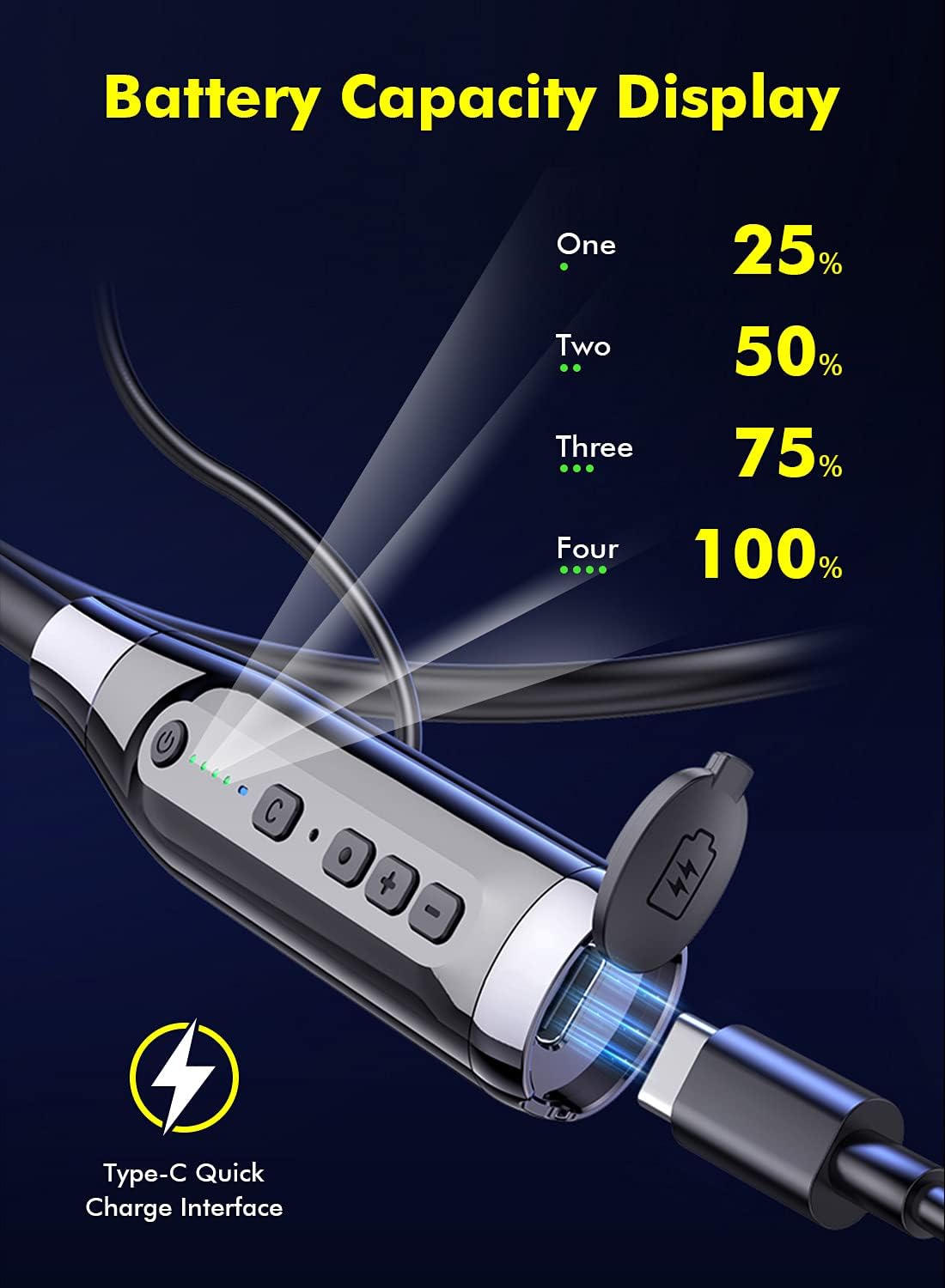
Image 4.1: Battery Capacity Display and Type-C Charging Port.
- وقت الشحن: حوالي 2 ساعات للشحن الكامل.
- Battery Life: Up to 100 hours of continuous play time on a full charge.
4.2 تشغيل/إيقاف التشغيل
- تشغيل الطاقة: Long press the Switch Button (1) for 2 seconds.
- إيقاف التشغيل: Long press the Switch Button (1) for 3 seconds.
4.3 اقتران بلوتوث
- تأكد من إيقاف تشغيل سماعات الرأس.
- Long press the Switch Button (1) for 2 seconds to power on. The LED indicator will flash, indicating pairing mode.
- على جهازك (الهاتف الذكي، الجهاز اللوحي، وما إلى ذلك)، قم بتمكين البلوتوث وابحث عن الأجهزة المتاحة.
- Select "LAMA LX02" (or similar name) from the list of found devices.
- بمجرد الاتصال، سيتوقف مؤشر LED عن الوميض وسيظل باللون الأزرق الثابت.
5. تعليمات التشغيل
5.1 تشغيل الموسيقى
- تشغيل/إيقاف مؤقت: Single click the Function Key (3).
- رفع الصوت: Click the "+" Volume Key (4).
- اخفض الصوت: Click the "-" Volume Key (4).
- الأغنية التالية: Long press the "-" Volume Key (4).
- الأغنية السابقة: Long press the "+" Volume Key (4).
5.2 إدارة المكالمات
- الرد/إنهاء المكالمة: Single click the Function Key (3).
- رفض المكالمة: Long press the Function Key (3) for 1 second.
- إعادة الاتصال بالرقم الأخير: Double click the Function Key (3).
5.3 Sound Effect and Mode Switching

Image 5.1: Three Sound Effect Switches (Bass, Voice, 3D Balance).
- Switch Sound Effect (Bass/Voice/3D Balance): Double click the 'C' Key (2).
- Switch Game/Music Mode: Single click the 'C' Key (2).

Image 5.2: Game/Music Mode with Low Latency Feature.
5.4 مساعد صوتي
- تفعيل المساعد الصوتي (Siri، Google Assistant، وما إلى ذلك): Long press the 'C' Key (2) for 1 second.
6. الصيانة
6.1 التنظيف
- امسح سماعات الرأس بقطعة قماش ناعمة وجافة.
- لا تستخدم المنظفات أو المذيبات الكاشطة.
- Regularly clean ear tips to prevent wax buildup, which can affect sound quality.
6.2 التخزين
- قم بتخزين سماعات الرأس في مكان بارد وجاف بعيدًا عن أشعة الشمس المباشرة ودرجات الحرارة القصوى.
- The magnetic earbuds help prevent tangling and secure the headphones when not in use.
6.3 مقاومة الماء (IPX5)
The headphones are rated IPX5 water-resistant, meaning they can withstand splashes and sweat. They are suitable for sports and outdoor activities.

Image 6.1: IPX5 Water Resistance for active use.
مهم: IPX5 rating does not mean the headphones are waterproof for submersion. Do not immerse them in water.
7. استكشاف الأخطاء وإصلاحها
| مشكلة | السبب المحتمل | حل |
|---|---|---|
| لا يتم تشغيل سماعات الرأس. | بطارية منخفضة. | اشحن سماعات الرأس بالكامل. |
| لا يمكن الاقتران بالجهاز. | البلوتوث معطل على الجهاز؛ سماعات الرأس ليست في وضع الاقتران؛ بعيدة جداً عن الجهاز. | Ensure Bluetooth is enabled on your device. Put headphones in pairing mode. Move closer to the device (within 10 meters). |
| لا يوجد صوت أو مستوى الصوت منخفض. | Volume too low; headphones not connected; ear tips blocked. | Adjust volume on headphones and device. Reconnect headphones. Clean ear tips. |
| جودة الصوت رديئة. | Poor connection; incorrect sound effect mode. | Ensure stable Bluetooth connection. Try switching sound effect modes (Bass, Voice, 3D Balance). |
| الميكروفون لا يعمل. | تم حظر الميكروفون؛ إعدادات الجهاز. | Ensure microphone is not covered. Check device's audio input settings. |
8. المواصفات
- نموذج: ال اكس 02
- ماركة: لاما
- الاتصال: بلوتوث 5.0
- سعة البطارية: 1000 مللي أمبير
- وقت الشحن: حوالي 2 ساعات
- وقت اللعب المستمر: تصل إلى 100 ساعة
- منفذ الشحن: USB Type-C (supports QC 3.0, QC2.0, QC1.0 fast charging protocols)
- مقاومة الماء: IPX5
- طريقة التحكم: صوت، زر
- ميكروفون: Integrated, Stereo technology
- مادة: بلاستيك
- وزن: 200 جرام
- الميزات الإضافية: Noise Cancellation, Lightweight, Magnetic Design, Multiple Sound Effects (Bass, Voice, 3D Balance), Game/Music Low Latency Mode.
9. معلومات السلامة
- لا تقم بتفكيك المنتج أو تعديله.
- يُحفظ بعيداً عن درجات الحرارة القصوى والرطوبة والمواد المسببة للتآكل.
- تجنب الاستماع لفترات طويلة بمستويات صوت عالية لمنع تلف السمع.
- Do not use headphones while driving or in situations where you need to be aware of your surroundings.
- تخلص من البطاريات والمكونات الإلكترونية بطريقة مسؤولة وفقًا للوائح المحلية.
10. الضمان والدعم
LAMA products come with a standard manufacturer's warranty. For detailed warranty information, product support, or service inquiries, please refer to the warranty card included in your package or visit the official LAMA webموقع.
For customer service, please contact your retailer or the LAMA support team.
Ask a question about this manual
Ask about setup, troubleshooting, compatibility, parts, safety, or missing instructions. Manuals+ will review the question and use this page’s manual context to help answer it.