
1. المقدمة
The ACEMIC GT-5 is a portable digital wireless microphone system designed for instruments, particularly electric blowpipes, and stage performances. It features digital audio transmission, 16 selectable frequencies, and a digital ID code to prevent interference. This manual provides detailed instructions for setting up, operating, and maintaining your GT-5 system.

الشكل 1.1: The ACEMIC GT-5 wireless microphone system, showing the transmitter (left) and the receiver (right). The transmitter features a 6.35mm plug, while the receiver has controls for power and frequency synchronization.
2. محتويات العبوة
يرجى التحقق من محتويات الحزمة للتأكد من وجود جميع العناصر:
- GT-5 Wireless Transmitter
- GT-5 Wireless Receiver
- Battery (Note: While the product specifications list a battery as an included component, some descriptions indicate it may not be included. Please verify upon receipt.)
3. الميزات الرئيسية
- Digital wireless audio transmission for clear sound.
- Pre-set 16 selectable frequencies to avoid interference.
- Digital ID code technology for robust signal integrity.
- Operating range of up to 40 meters (line-of-sight).
- Suitable for electric blowpipe, stagالعروض الإلكترونية وعروض الشوارع.
- Portable plug-on receiver, directly connects to mixers or active speakers.
- Lithium battery power supply for extended use.
4. تعليمات الإعداد
4.1. شحن البطاريات
Both the transmitter and receiver are powered by 3.7V lithium batteries. Ensure both units are fully charged before first use. Connect the appropriate charging cables (not specified in product details, assume standard USB charging) to a power source.
4.2. توصيل جهاز الاستقبال
- Identify the receiver unit. It features a 6.35mm (1/4 inch) plug.
- Plug the receiver directly into the 6.35mm input jack of your mixer, amplifier, or active speaker. The receiver's plug can swivel for optimal positioning.

الشكل 4.2.1: The GT-5 receiver connected to a mixer, demonstrating its plug-and-play functionality.
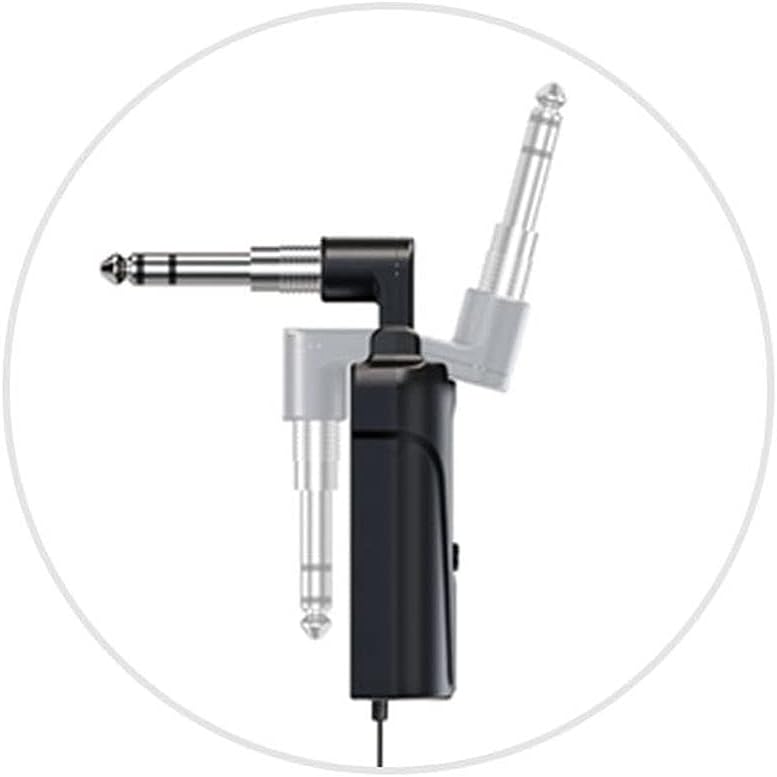
الشكل 4.2.2: Detail of the receiver's swivel plug, allowing for flexible connection angles.
4.3. Powering On and Synchronization
- Turn on the receiver by pressing its power button. The display should illuminate.
- قم بتشغيل جهاز الإرسال بالضغط على زر الطاقة الخاص به.
- The system uses IR sync to download the frequency from the receiver to the transmitter. Ensure both units are in close proximity (within a few inches) and facing each other's IR windows (if present, otherwise ensure general proximity).
- Press the "SYNC" button on the receiver (or follow specific synchronization instructions if provided with the physical product) to initiate frequency pairing. The RF indicator on both units should show a stable connection once synchronized.
- If interference occurs, you can change the frequency. The system offers 16 selectable channels. Refer to the operating section for frequency adjustment.

الشكل 4.3.1: The GT-5 transmitter attached to an electric blowpipe, ready for use.
5. تعليمات التشغيل
5.1. استخدام الميكروفون
Once the transmitter and receiver are synchronized, the system is ready for use. The transmitter is designed to be attached to an instrument, such as an electric blowpipe.
- Ensure the microphone is positioned correctly to capture the instrument's sound effectively.
- Monitor the audio output from your mixer/speaker to adjust volume levels as needed.
- Maintain a line-of-sight operating range of up to 40 meters between the transmitter and receiver for optimal signal quality. Obstacles can reduce this range.
5.2. تغيير الترددات
If you experience interference or need to operate multiple GT-5 systems simultaneously, you can change the operating frequency.
- On the receiver, use the channel selection buttons (usually labeled CHR or similar, or up/down arrows) to cycle through the 16 available frequencies.
- After selecting a new frequency on the receiver, perform the IR synchronization process again (as described in Section 4.3) to pair the transmitter with the new frequency.
6. الصيانة
- تنظيف: استخدم قطعة قماش ناعمة وجافة لتنظيف الجزء الخارجي من جهاز الإرسال والاستقبال. لا تستخدم المنظفات السائلة أو المذيبات.
- تخزين: عند عدم الاستخدام، قم بتخزين النظام في مكان بارد وجاف، بعيدًا عن أشعة الشمس المباشرة ودرجات الحرارة القصوى.
- العناية بالبطارية: For optimal battery life, avoid fully discharging the batteries frequently. If storing for extended periods, charge the batteries to approximately 50% every few months.
- تجنب الرطوبة: Protect the units from water and excessive humidity.
7. استكشاف الأخطاء وإصلاحها
| مشكلة | السبب المحتمل | حل |
|---|---|---|
| لا يوجد مخرج صوت |
|
|
| تداخل أو تشويش |
|
|
| عمر البطارية قصير |
|
|
8. المواصفات
المواصفات العامة للنظام:
- نطاق التردد: Region dependent
- نقل الصوت: Digital wireless
- صوت Sampوضع لينغ: 48 كيلو هرتز
- الترددات القابلة للاختيار: 16 pre-set channels
- رمز الهوية: Digital ID code for interference prevention
- نطاق التشغيل: حتى 40 متر (خط الرؤية)
- مزود الطاقة: 3.7V Lithium battery (for both units)
مواصفات جهاز الاستقبال:
- وضع التعديل: pi/4 DQPSK
- كمون: <6 مللي ثانية
- استجابة التردد: 60Hz - 15KHz ± 2dB
- التشويه التوافقي الكلي: <0.8٪ (1 كيلو هرتز)
- نسبة الإشارة / الضوضاء: >92 ديسيبل
- حساسية الاستقبال: -92 ديسيبل
- الإخراج: قابس 6.35 ملم
- الاستخدام المستمر: >6 ساعة
- أبعاد: 185 × 20 × 10 مم
مواصفات جهاز الإرسال:
- وضع التعديل: pi/4 DQPSK
- قوة المرسل: 10 ميغاواط
- حساسية: -47 ديسيبل ± 2 ديسيبل
- Frequency Change: IR sync
- نوع الميكروفون: مكثف
- أبعاد الميكروفون: Φ14 × 5.0 مم
- الاستخدام المستمر: >6 ساعة
- أبعاد: 125 × 40 × 20 مم
9. الضمان والدعم
For warranty information and technical support, please refer to the documentation provided with your purchase or contact ACEMIC customer service directly. Keep your proof of purchase for warranty claims.