
PowMr ML2440
دليل مستخدم وحدة التحكم في شحن الطاقة الشمسية PowMr 40A MPPT
الموديل: ML2440
1. المقدمة
This manual provides essential information for the safe and efficient operation of your PowMr 40A MPPT Solar Charge Controller, model ML2440. Please read this manual thoroughly before installation and use to ensure optimal performance and longevity of the product.
2. تعليمات السلامة
- Ensure all wiring is correctly connected and secured to prevent short circuits or damage.
- قم دائمًا بتوصيل البطارية بوحدة التحكم بالشحن أولاً، ثم الألواح الشمسية، وأخيرًا الحمل. افصلها بالترتيب العكسي.
- لا تحاول إصلاح أو تعديل وحدة التحكم بنفسك. اتصل بفنيين مؤهلين للصيانة.
- قم بتثبيت وحدة التحكم في منطقة جيدة التهوية، بعيدًا عن المواد القابلة للاشتعال وأشعة الشمس المباشرة.
- ارتدِ معدات الحماية الشخصية المناسبة عند العمل مع الأنظمة الكهربائية.
- تأكد من مستوى صوت النظامtage matches the controller's specifications (12V/24V auto-detection).
3. انتهى المنتجview
The PowMr 40A MPPT Solar Charge Controller is designed to efficiently manage power from your solar panels to charge various battery types, including Lithium, Sealed, Gel, and Flooded batteries. It features Maximum Power Point Tracking (MPPT) technology for optimized solar energy harvesting, automatic 12V/24V system voltage detection, and a clear LCD display for monitoring system status.
الشكل 3.1: أمام view من وحدة التحكم في شحن الطاقة الشمسية PowMr 40A MPPT.
This image shows the main unit of the PowMr 40A MPPT Solar Charge Controller, highlighting its compact design and integrated LCD screen.
The controller supports a maximum solar input voltage of 100V and a maximum input power of 1100W for a 24V system (550W for 12V). It also includes temperature compensation for accurate charging across varying environmental conditions.

الشكل 3.2: Temperature compensation feature.
This image illustrates the temperature compensation capability of the controller, ensuring optimal battery charging performance in both hot and cold environments.
4 التركيب والأسلاك
يُعدّ التركيب الصحيح أمراً بالغ الأهمية لضمان التشغيل الآمن والفعّال لجهاز التحكم بشحن الطاقة الشمسية. اتبع هذه الخطوات بعناية.
4.1 مخطط الأسلاك

الشكل 4.1: Wiring diagram for the PowMr MPPT Solar Charge Controller.
This diagram illustrates the correct connection order for the battery, solar panels, DC load, and optional inverter. A temperature sensor is also shown.
4.2 خطوات الاتصال
- قم بتوصيل البطارية أولاً: Connect the battery to the charge controller's battery terminals. Ensure correct polarity. The controller will auto-detect 12V or 24V system voltage.
- توصيل الألواح الشمسية: Connect the solar panels to the PV input terminals. Ensure correct polarity. The controller will begin charging if sufficient sunlight is available.
- توصيل الحمل بالتيار المستمر (اختياري): If using a DC load directly from the controller, connect it to the load terminals.
- Connect Inverter (Optional): If using an inverter, connect it to the battery terminals (not directly to the load terminals of the controller).
- توصيل مستشعر درجة الحرارة: For accurate temperature compensation, connect the provided temperature sensor to the designated port on the controller and place the sensor near the battery.
أمر الفصل: To disconnect the system, always follow the reverse order: Disconnect load, then solar panels, then battery.
5. تعليمات التشغيل
This section details how to monitor and configure your charge controller using its integrated LCD display and the optional Bluetooth mobile application.
5.1 شاشة LCD أكثرview

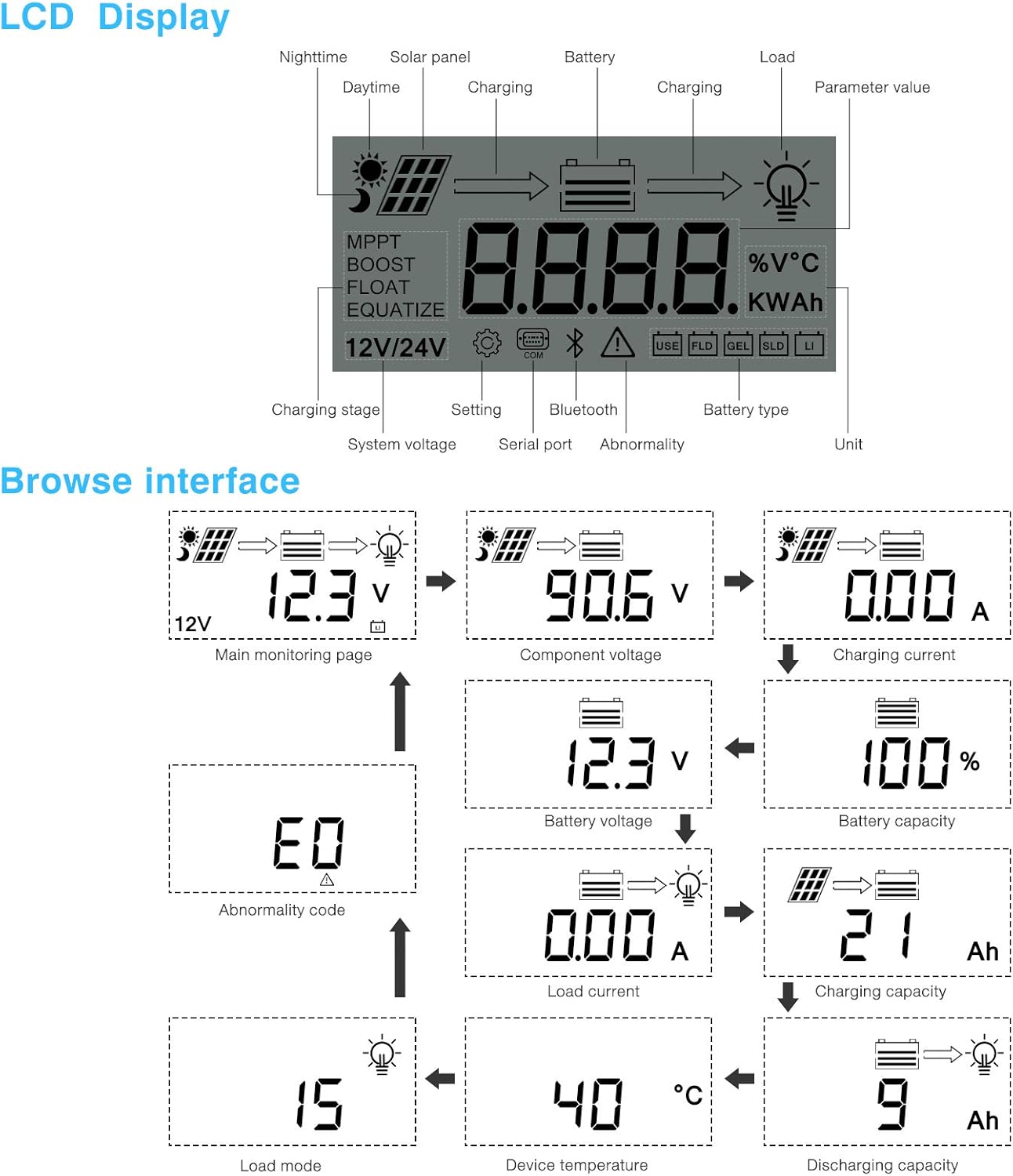
الشكل 5.1: LCD Display and Browse Interface.
This image shows the various icons and parameters displayed on the LCD screen, along with the navigation flow through different monitoring pages.
توفر شاشة LCD معلومات فورية عن نظام الطاقة الشمسية الخاص بك. تشمل المؤشرات الرئيسية ما يلي:
- الشحن Stage: MPPT, Boost, Float, Equalize.
- حجم النظامtage: 12V/24V auto-detected.
- نوع البطارية: Icons for Lithium (Li), Sealed (SLD), Gel (GEL), Flooded (FLD).
- مؤشرات الحالة: Solar panel activity, battery charging, load status, abnormality.
- قيمة المعلمة: يعرض المجلدtage, current, capacity, temperature, etc.
Use the buttons below the LCD to navigate through different screens to view parameters such as main monitoring page, component voltagه، تيار الشحن، حجم البطاريةtage, battery capacity, load current, charging capacity, device temperature, discharging capacity, abnormality codes, and load mode.
5.2 Bluetooth Mobile Application
The controller supports an optional Bluetooth module (BT-1) for remote monitoring and parameter adjustment via a mobile application (available for Apple iOS and Android devices). The Bluetooth module connects to the RS232 port on the controller.

الشكل 5.2: Controller with optional Bluetooth module.
This image displays the PowMr MPPT Solar Charge Controller alongside its optional BT-1 Bluetooth communication module and connecting cable.

الشكل 5.3: BT-1 Bluetooth module.
تفصيلية view of the BT-1 Bluetooth module, which enables wireless communication with the solar charge controller for remote monitoring and settings adjustments.

الشكل 5.4: Bluetooth Mobile Interface Display.
This image shows various screens from the mobile application, including real-time monitoring, data records, energy records, and parameter settings.
The mobile application allows you to:
- Monitor real-time system data (voltage, current, power, temperature).
- View historical data and energy records.
- Adjust various charging parameters and battery settings.
- قم باستعادة إعدادات المصنع الافتراضية.
6. الصيانة
Regular maintenance ensures the longevity and optimal performance of your charge controller.
- تنظيف: نظّف الجزء الخارجي من وحدة التحكم بشكل دوري بقطعة قماش جافة لإزالة الغبار والأوساخ. تأكد من أن فتحات التهوية خالية من العوائق.
- الاتصالات: افحص جميع توصيلات الأسلاك سنوياً للتأكد من إحكامها وخلوها من التآكل. فالتوصيلات غير المحكمة قد تتسبب في ارتفاع درجة الحرارة وضعف الأداء.
- بيئة: Ensure the installation environment remains within the specified operating temperature range and is free from excessive moisture or dust.
7. استكشاف الأخطاء وإصلاحها
This section provides guidance for common issues. Refer to the LCD display for abnormality codes.
- لا يوجد عرض/لا يوجد طاقة:
- تحقق من توصيلات البطارية وتأكد من مستوى شحن البطاريةtagه ضمن نطاق التشغيل.
- Verify that the battery fuse (if installed) is intact.
- لا الشحن:
- تأكد من توصيل الألواح الشمسية بشكل صحيح وأنها تتلقى كمية كافية من ضوء الشمس.
- تحقق من حجم الألواح الشمسيةtagهـ والحالية.
- Verify that the battery is not fully charged or in a protection state.
- التحميل لا يعمل:
- Check load connections and ensure the load current does not exceed the controller's rating.
- تحقق من أن حجم البطاريةtage أعلى من المجلد المنخفضtagإعداد فصل التيار الكهربائي (LVD).
- Check for any abnormality codes on the LCD related to load output.
- Abnormality Codes (e.g., "E0"):
- Refer to the specific abnormality code displayed on the LCD. Consult the full product manual or manufacturer's support for detailed explanations and solutions for each code.
8. المواصفات
Technical specifications for the PowMr 40A MPPT Solar Charge Controller (Model ML2440).

الشكل 8.1: Product Specifications Table.
This table provides detailed technical parameters for the ML2420, ML2430, and ML2440 models. The ML2440 column is relevant for this 40A controller.
| المعلمة | Value (ML2440) |
|---|---|
| نموذج | مل2440 |
| حجم النظامtage | 12V / 24V تلقائي |
| خسارة عدم التحميل | 0.7 واط إلى 1.2 واط |
| حجم البطاريةtage | 9 إلى 35 فولت |
| الأعلى. المجلد المدخلات الشمسيةtage | 100 فولت (25 درجة مئوية)، 90 فولت (-25 درجة مئوية) |
| الأعلى. باور بوينت المجلدtagنطاق ه | حجم البطاريةtagه + 2 فولت إلى 75 فولت |
| تصنيف الشحن الحالية | 40 أمبير |
| تيار الحمل المقدر | 20 أمبير |
| الأعلى. سعة التحميل بالسعة | 10000 ميكرو فاراد |
| الأعلى. طاقة إدخال النظام الكهروضوئي | 550W/ 12V, 1100W/ 24V |
| كفاءة التحويل | ≤ 98% |
| كفاءة تتبع MPPT | > 99% |
| عامل تعويض درجة الحرارة | -3.0mv/ °C/ 2V (default) |
| درجة حرارة التشغيل | من -35 درجة مئوية إلى +45 درجة مئوية |
| درجة الحماية | IP32 |
| وزن | 2كجم |
| طريقة التواصل | RS232 |
| ارتفاع | ≤ 3000 متر |
| أبعاد المنتج | 238*173*72.5 ملم |
9. الضمان والدعم
For warranty information, please refer to the documentation included with your product packaging or visit the official PowMr website. If you encounter any issues not covered in this manual or require further assistance, please contact PowMr customer support.
PowMr Official Webموقع: تفضل بزيارة متجر PowMr على أمازون
Ask a question about this manual
Ask about setup, troubleshooting, compatibility, parts, safety, or missing instructions. Manuals+ will review the question and use this page’s manual context to help answer it.