
مقدمة
The Poly DA75 is a versatile USB-A/USB-C digital adapter designed to connect Poly Quick Disconnect (QD) headsets to computers. It ensures clear audio quality for call center environments, supporting both USB-A and USB-C connections for compatibility with various systems. This adapter is engineered to work seamlessly with platforms such as Avaya, Genesys, and Cisco, providing a reliable audio solution for professionals.
تتضمن الميزات الرئيسية ما يلي:
- الاتصال العالمي: Equipped with both USB-A and USB-C connectors on the cable for broad compatibility with new and legacy equipment.
- Intelligent Headset Recognition: Automatically adjusts audio performance to the specific Poly Quick Disconnect headset for optimized call quality.
- Acoustic Protection: Incorporates features to manage safe volume levels, protecting user hearing.
- تكامل المنصة: Fully compatible with leading call center platforms including Avaya, Genesys, and Cisco.
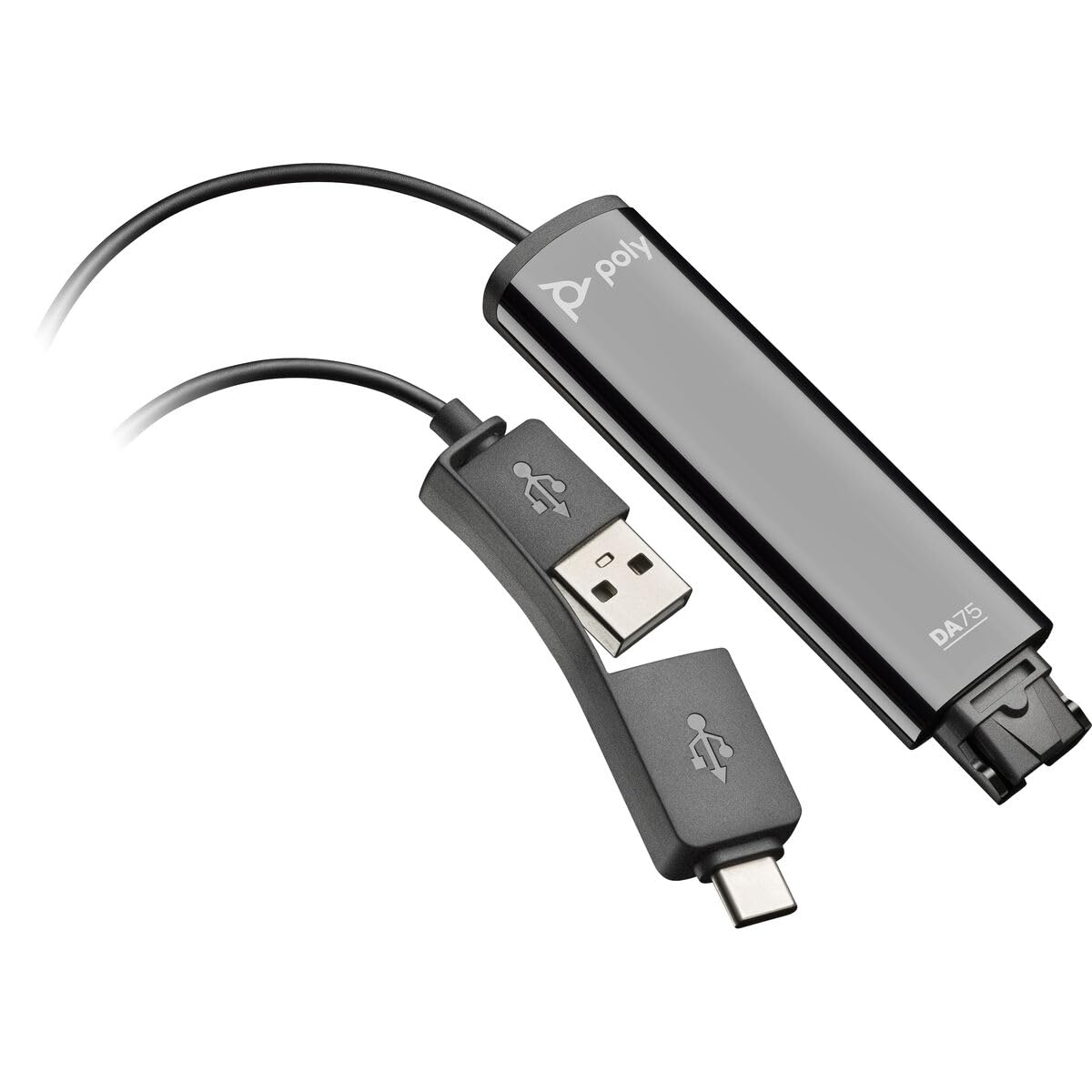
Image: The Poly DA75 USB-A/USB-C Digital Adapter, showing its dual USB-A and USB-C connectors and the Quick Disconnect port for headsets.
ماذا يوجد في الصندوق
The Poly DA75 package typically includes the following items:
- Poly DA75 USB-A/USB-C Digital Adapter
- التوثيق (دليل البدء السريع، معلومات السلامة)
Note: Headsets are sold separately and are not included with the DA75 adapter.
يثبت
Follow these steps to set up your Poly DA75 Digital Adapter:
- توصيل سماعة الرأس: Connect your Poly Quick Disconnect (QD) headset to the QD port on the Poly DA75 adapter. Ensure the connection is secure.
- الاتصال بجهاز الكمبيوتر:
- If your computer has a USB-A port, use the USB-A connector on the DA75 cable.
- If your computer has a USB-C port, use the USB-C connector on the DA75 cable.
Plug the appropriate USB connector into an available USB port on your computer.
- تثبيت برنامج التشغيل: The DA75 is a plug-and-play device. Your operating system (Windows, macOS) should automatically detect the device and install the necessary drivers. This process may take a few moments.
- التحقق من التعرف على الجهاز:
- الويندوز: اذهب الى Settings > System > Sound or لوحة التحكم > الصوت. The Poly DA75 should appear as an audio input and output device.
- ماك: اذهب الى System Settings > Sound. The Poly DA75 should appear as an input and output device.
Select the Poly DA75 as your default communication device for both playback and recording.
- تكوين البرنامج: If you are using communication software (e.g., Avaya, Genesys, Cisco, Microsoft Teams, Zoom), ensure that the Poly DA75 is selected as the audio device within the application's settings.
تعليمات التشغيل
The Poly DA75 adapter facilitates audio communication through your connected Poly QD headset. Its operation is primarily managed through your computer's operating system and communication software.
- إجراء/استقبال المكالمات: Use your communication software to initiate or answer calls. The audio will be routed through your connected Poly QD headset via the DA75 adapter.
- التحكم في مستوى الصوت: Adjust the listening volume using your computer's system volume controls or the volume controls within your communication application.
- ميكروفون كتم الصوت: Mute and unmute your microphone using the controls provided by your communication software.
- Audio Optimization: The DA75 automatically optimizes audio for your specific Poly QD headset. No manual adjustments are typically required for audio profiles.
صيانة
To ensure the longevity and optimal performance of your Poly DA75 Digital Adapter, follow these maintenance guidelines:
- تنظيف: Gently wipe the adapter with a soft, dry, anti-static cloth. Do not use liquid cleaners or abrasive materials.
- تخزين: قم بتخزين المحول في مكان بارد وجاف بعيدًا عن أشعة الشمس المباشرة ودرجات الحرارة القصوى.
- التعامل: تجنب ثني أو لف الكابل بشكل مفرط، وخاصة بالقرب من الموصلات، لمنع حدوث أضرار داخلية.
- الاتصال: Ensure the Quick Disconnect (QD) connection and USB connections are clean and free of debris before connecting.
استكشاف الأخطاء وإصلاحها
If you encounter issues with your Poly DA75 Digital Adapter, refer to the following troubleshooting steps:
| مشكلة | السبب المحتمل | حل |
|---|---|---|
| لا يوجد صوت من سماعة الرأس |
|
|
| الميكروفون لا يعمل |
|
|
| Adapter not recognized by computer |
|
|
تحديد
| ميزة | التفاصيل |
|---|---|
| رقم الموديل | 218266-01 |
| ماركة | بولي |
| نوع الموصل | USB-A, USB-C (dual connector) |
| الأجهزة المتوافقة | Poly Quick Disconnect (QD) Headsets |
| استخدامات محددة | PC, Call Center Platforms (Avaya, Genesys, Cisco) |
| لون | أسود |
| أبعاد العنصر (الطول × العرض × الارتفاع) | 0.98 × 0.39 × 2.95 بوصة |
| وزن العنصر | 30 جرام |
| عدد المنافذ | 2 (USB-A/USB-C to QD) |
| رمز المنتج الموحد | 197029650054، 017229175112 |
الضمان والدعم
معلومات الضمان: The Poly DA75 Digital Adapter comes with a ضمان محدود من الشركة المصنعة لمدة عام واحديغطي هذا الضمان عيوب المواد والتصنيع في ظل الاستخدام العادي. يُرجى الاحتفاظ بإيصال الشراء للمطالبة بالضمان.
الدعم الفني: For technical assistance, product inquiries, or warranty service, please contact Poly customer support. Visit the official Poly website for the most up-to-date support contact information, FAQs, and additional resources.
الموارد المتاحة على الإنترنت: دعم بولي Webموقع