
1. المقدمة
The QUIKCELL QAIR MAX True Wireless Earbuds offer a seamless audio experience with advanced features designed for convenience and durability. This manual provides comprehensive instructions to help you get the most out of your earbuds, from initial setup to advanced operation and maintenance.
وصف الفيديو: يوفر هذا الفيديو عرضًا مرئيًاview of the QUIKCELL QAIR MAX True Wireless Earbuds, highlighting key features such as wireless charging, touch controls, and sweat resistance.
2. الإعداد
2.1. فك الصندوق والشحن الأولي
Upon unboxing, ensure all components are present: the QUIKCELL QAIR MAX earbuds, the charging case, and various ear tip sizes. Before first use, fully charge the earbuds and charging case.
- ضع سماعات الأذن داخل علبة الشحن.
- Connect the charging case to a power source using the provided cable, or place it on a compatible wireless charging pad.
- The LED indicators on the charging case will illuminate to show the charging status and current power level.
- A full charge provides approximately 5 hours of playtime for the earbuds, with an additional 20 hours available from the charging case.

وصف الصورة: The QUIKCELL QAIR MAX earbuds are shown inside their open charging case, which is positioned on a wireless charging pad. This illustrates the magnetic charging feature and the LED power indicators on the case.
2.2. الاقتران بجهازك
The QAIR MAX earbuds feature hassle-free technology for automatic connection.
- Open the charging case. The earbuds will automatically turn on and connect to each other.
- على جهازك (الهاتف الذكي، الجهاز اللوحي، وما إلى ذلك)، قم بتمكين البلوتوث.
- بحث عن "QUIKCELL QAIR MAX" in the list of available Bluetooth devices and select it to pair.
- Once paired, the earbuds will automatically connect to your device whenever they are removed from the case and Bluetooth is enabled on your device.
2.3. تركيب سماعات الأذن
For optimal sound quality and comfort, select the correct ear tip size.
- The earbuds come with three different ear tip sizes (Small, Medium, Large).
- Try each size to find the one that provides a secure, comfortable fit and good seal in your ear canal.
- The ergonomic design ensures maximum comfort and reliability for extended periods of use.
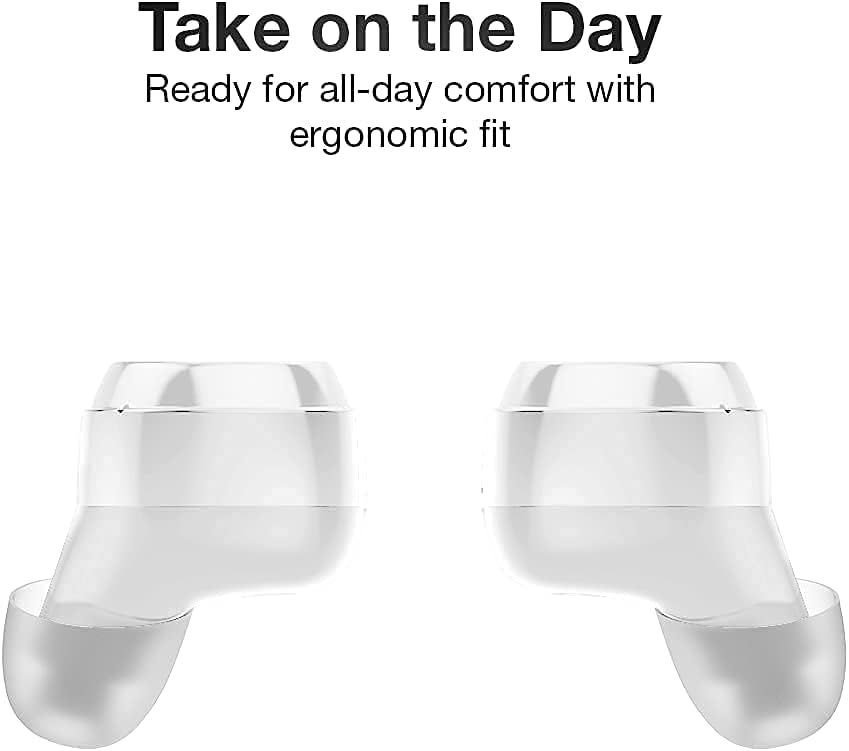
وصف الصورة: لقطة مقرّبة view of two QUIKCELL QAIR MAX earbuds, highlighting their ergonomic shape designed for comfortable and secure placement in the ear.
3. تشغيل سماعات الأذن
3.1. تشغيل/إيقاف التشغيل
- تشغيل الطاقة: يتم تشغيل سماعات الأذن تلقائيًا عند إزالتها من علبة الشحن.
- إيقاف التشغيل: ضع سماعات الأذن مرة أخرى في علبة الشحن لإيقاف تشغيلها تلقائيًا وبدء الشحن.
3.2. أدوات التحكم التي تعمل باللمس
The QAIR MAX earbuds feature intuitive touch controls on the outside of each earbud.
- تشغيل/إيقاف مؤقت: انقر مرة واحدة على أي من سماعتي الأذن.
- المسار التالي: انقر نقرًا مزدوجًا على سماعة الأذن اليمنى.
- المسار السابق: انقر نقرًا مزدوجًا على سماعة الأذن اليسرى.
- رفع الصوت: انقر ثلاث مرات على سماعة الأذن اليمنى.
- اخفض الصوت: اضغط ثلاث مرات على سماعة الأذن اليسرى.
- الرد/إنهاء المكالمة: انقر مرة واحدة على أي من سماعتي الأذن أثناء المكالمة الواردة.
- رفض المكالمة: اضغط مع الاستمرار على أي سماعة أذن لمدة ثانيتين أثناء المكالمة الواردة.
3.3. تفعيل المساعد الصوتي
Utilize the built-in microphone to activate your device's voice assistant.
- تنشيط مساعد الصوت: Press and hold either earbud for 2 seconds (when not on a call). This will activate Siri, Google Assistant, or other compatible voice assistants.
3.4. الاتصال
The earbuds maintain a stable Bluetooth connection for clear audio.
- The latest wireless technology provides crystal clear sound in both ears.
- Bluetooth connectivity is effective up to a range of 10 meters (approximately 33 feet).
4. الصيانة
4.1. تنظيف سماعات الأذن
يساعد التنظيف المنتظم على الحفاظ على جودة الصوت والنظافة.
- امسح سماعات الأذن وعلبة الشحن برفق باستخدام قطعة قماش ناعمة وجافة وخالية من الوبر.
- قم بإزالة أطراف الأذن ونظفها بالصابون المعتدل والماء، ثم جففها جيدًا قبل إعادة تركيبها.
- تجنب استخدام المواد الكاشطة أو المواد الكيميائية القاسية.
4.2. مقاومة الماء
The QAIR MAX earbuds are designed for active lifestyles.
- The earbuds feature an IPX5 sweat resistance rating, protecting them against moisture and dirt.
- This rating means they can withstand splashes of water and sweat, making them suitable for workouts.
- ملحوظة: The earbuds are not waterproof and should not be submerged in water. The charging case is not water-resistant.

وصف الصورة: Two QUIKCELL QAIR MAX earbuds are shown with visible water droplets, demonstrating their IPX5 sweat-resistant capabilities, suitable for active use.
5. استكشاف الأخطاء وإصلاحها
5.1. سماعات الأذن غير قابلة للاقتران
- تأكد من شحن سماعتي الأذن بالكامل.
- أعد وضع سماعتي الأذن في علبة الشحن، وأغلق الغطاء، وانتظر بضع ثوانٍ، ثم افتحه مرة أخرى.
- قم بإيقاف تشغيل البلوتوث على جهازك ثم تشغيله مرة أخرى، ثم حاول الاقتران مرة أخرى.
- إذا استمرت المشاكل، فحاول نسيان الجهاز في إعدادات البلوتوث وإعادة الاقتران.
5.2. لا صوت أو مستوى الصوت منخفض
- تحقق من مستوى الصوت في كل من سماعات الأذن (عبر عناصر التحكم باللمس) والجهاز المتصل.
- Ensure the earbuds are properly seated in your ears and that the ear tips provide a good seal.
- قم بتنظيف أي حطام من سماعات الأذن وأطراف الأذن.
- تأكد من توصيل سماعات الأذن بمخرج الصوت الصحيح على جهازك.
5.3. مشاكل الشحن
- تأكد من توصيل كابل الشحن بشكل آمن بكل من العلبة ومصدر الطاقة.
- If using wireless charging, ensure the case is correctly positioned on a compatible wireless charging pad.
- Check for any debris in the charging ports of the case or on the charging contacts of the earbuds.
- حاول استخدام كابل شحن أو محول طاقة مختلف.
6. المواصفات
| رقم الموديل | QAIRMAX-WHT |
| تكنولوجيا الاتصال | لاسلكي (بلوتوث 5.0) |
| مدى البلوتوث | حتى 10 أمتار |
| عمر البطارية (سماعات الأذن) | ما يصل إلى 5 ساعات لكل تهمة |
| إجمالي وقت اللعب (مع الحقيبة) | 25+ ساعات |
| تصنيف مقاومة الماء | IPX5 (مقاوم للعرق) |
| نوع التحكم | التحكم باللمس، التحكم الصوتي |
| الأجهزة المتوافقة | iPhone, Android, PC, Mac (with Bluetooth) |
| Dimensions (Earbuds) | 2.6 × 1.18 × 1.18 بوصات (تقريبًا) |
| وزن العنصر | 3.52 أونصات |
| الشركة المصنعة | ألفكوم |
7. الضمان والدعم
For warranty information and customer support, please refer to the documentation included with your purchase or visit the official QUIKCELL webالموقع. احتفظ بإثبات الشراء الخاص بك لاستخدامه في أي مطالبات بالضمان.