
انفينيكس اكس 609
Infinix X609 Smart 2 Dual SIM 3G Smartphone User Manual
1. المقدمة
Welcome to the user manual for your Infinix X609 Smart 2 smartphone. This guide provides essential information to help you set up, operate, maintain, and troubleshoot your device. Please read this manual carefully to ensure proper use and to maximize the performance of your smartphone.
2. معلومات هامة حول السلامة
- Do not use the device in prohibited areas, such as aircraft or hospitals.
- تجنب تعريض الجهاز لدرجات الحرارة القصوى أو أشعة الشمس المباشرة أو الرطوبة العالية.
- Use only original or certified accessories to prevent damage and ensure safety.
- لا تحاول تفكيك الجهاز أو إصلاحه أو تعديله بنفسك. استعن بفنيي صيانة مؤهلين.
- احتفظ بالجهاز وملحقاته بعيدًا عن متناول الأطفال الصغار.
- تخلص من الجهاز والبطارية بطريقة مسؤولة وفقًا للوائح المحلية.
3. محتويات العبوة
يرجى التحقق من محتويات علبة المنتج. في حال وجود أيٍّ من المنتجات المفقودة أو التالفة، يُرجى التواصل مع البائع.
- Infinix X609 Smart 2 Smartphone
- محول الطاقة
- كابل يو اس بي
- سماعات الرأس (قد تختلف حسب المنطقة)
- أداة قاذف SIM
- دليل البدء السريع
- بطاقة الضمان
4. انتهى الجهازview
Familiarize yourself with the physical features of your Infinix X609 Smart 2 smartphone.
This image displays the rear panel of the Infinix X609 Smart 2 smartphone. Visible features include the main camera module in the upper left corner, a circular fingerprint sensor below it, the 'Infinix' logo centrally placed, and 'smart' branding near the bottom. The phone has a smooth, matte Aqua Blue finish.
المكونات الرئيسية:
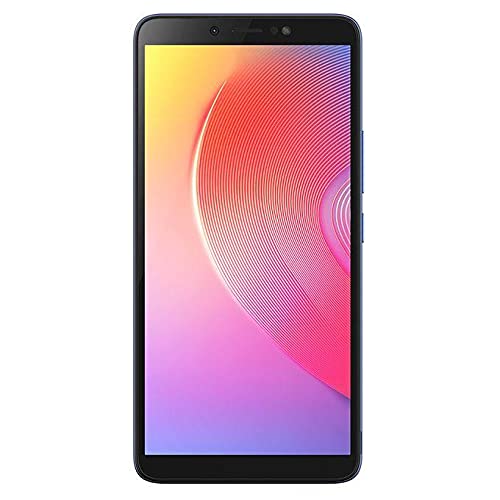
- أمام: 6.0-inch LCD Touchscreen, Front Camera, Earpiece, Light Sensor.
- الجانب الأيمن: زر الطاقة، أزرار رفع/خفض الصوت.
- قمة: مقبس سماعة رأس مقاس 3.5 ملم.
- قاع: USB Charging Port, Microphone, Speaker.
- مؤخرة: Main Camera, LED Flash, Fingerprint Sensor, Infinix Logo.
5. الإعداد
5.1 Inserting SIM Cards and Memory Card
- حدد مكان درج بطاقة SIM على جانب هاتفك.
- قم بإدخال أداة إخراج بطاقة SIM في الفتحة الصغيرة الموجودة بجوار الدرج وادفع برفق حتى يخرج الدرج.
- Place your Nano-SIM cards into the designated slots (this device supports dual SIM). Ensure the gold contacts face downwards.
- If using a microSD card for expanded storage, place it into its dedicated slot on the tray.
- ادفع الدرج برفق إلى داخل الهاتف حتى يصبح مستوياً مع الجانب.
5.2 شحن البطارية
قبل الاستخدام الأول، قم بشحن بطارية الجهاز بالكامل.
- قم بتوصيل كابل USB بمنفذ الشحن الموجود على هاتفك.
- قم بتوصيل الطرف الآخر من كابل USB بمحول الطاقة.
- قم بتوصيل محول الطاقة بمأخذ الحائط.
- سيظهر مؤشر الشحن على الشاشة.
5.3 تشغيل/إيقاف التشغيل
- لتشغيل: اضغط مع الاستمرار على زر الطاقة حتى يظهر شعار Infinix.
- لإيقاف التشغيل: اضغط مع الاستمرار على زر الطاقة حتى تظهر قائمة خيارات الطاقة، ثم انقر فوق "إيقاف التشغيل".
- لإعادة التشغيل: اضغط مع الاستمرار على زر الطاقة حتى تظهر قائمة خيارات الطاقة، ثم انقر فوق "إعادة التشغيل".
5.4 الإعداد الأولي
عند تشغيل الجهاز لأول مرة، اتبع التعليمات التي تظهر على الشاشة لإكمال الإعداد الأولي:
- اختر لغتك.
- الاتصال بشبكة Wi-Fi.
- قبول الشروط والأحكام.
- قم بتسجيل الدخول إلى حسابك على جوجل أو أنشئ حسابًا جديدًا.
- إعداد قفل الشاشة (رقم التعريف الشخصي أو النمط أو كلمة المرور أو بصمة الإصبع).
6. تشغيل هاتفك الذكي
6.1 الملاحة الأساسية
Your Infinix X609 Smart 2 features a touchscreen for interaction:
- مقبض: لتحديد عنصر أو فتح تطبيق.
- اضغط مع الاستمرار: للوصول إلى القوائم السياقية أو نقل العناصر.
- انتقاد: للتنقل بين القوائم أو التبديل بين الشاشات.
- قرصة: لتكبير أو تصغير الصور و web الصفحات.
6.2 إجراء المكالمات
- Tap the 'Phone' icon on the home screen.
- أدخل رقم الهاتف باستخدام لوحة الاتصال.
- Tap the 'Call' button to initiate the call.
6.3 إرسال الرسائل
- Tap the 'Messages' icon.
- انقر على أيقونة "رسالة جديدة".
- أدخل رقم المستلم أو اختر من جهات الاتصال.
- اكتب رسالتك في حقل النص.
- انقر على "إرسال".
6.4 الاتصال بالإنترنت
- واي فاي: Go to Settings > Wi-Fi, turn Wi-Fi on, and select your network.
- بيانات الجوال (3G): Go to Settings > Network & internet > Mobile network, and ensure 'Mobile data' is enabled.
6.5 استخدام الكاميرا
Your device is equipped with an 8MP rear camera.
- Tap the 'Camera' icon.
- قم بتأطير اللقطة الخاصة بك.
- Tap the 'Shutter' button to take a photo.
- Switch to video mode by swiping or tapping the mode selector.
6.6 اتصال البلوتوث
للاتصال بأجهزة البلوتوث:
- انتقل إلى الإعدادات > الأجهزة المتصلة > بلوتوث.
- قم بتشغيل البلوتوث.
- Select the device you wish to pair with from the list of available devices.
6.7 ملاحة GPS
The device supports GPS for location services and navigation applications. Ensure location services are enabled in Settings > Location.
7. الصيانة
7.1 تنظيف جهازك
- استخدم قطعة قماش ناعمة وخالية من الوبر لتنظيف الشاشة وجسم الهاتف.
- تجنب استخدام المواد الكيميائية القاسية، أو المنظفات الكاشطة، أو البخاخات الهوائية.
- The device is water-resistant; however, avoid submerging it in water. Wipe off any splashes immediately.
7.2 العناية بالبطارية
Your device uses a Lithium-ion battery with a capacity of 3000-4000 mAh.
- تجنب تفريغ البطارية بالكامل بشكل متكرر.
- لا تترك الجهاز قيد الشحن لفترات طويلة بعد شحنه بالكامل.
- Store the device in a cool, dry place when not in use for long periods.
7.3 تحديثات البرامج
Regularly check for and install software updates to ensure optimal performance and security. Go to Settings > About phone > System update.
8. استكشاف الأخطاء وإصلاحها
إذا واجهت مشاكل مع جهازك، فجرب الحلول التالية:
| مشكلة | حل |
|---|---|
| الجهاز لا يعمل | تأكد من شحن البطارية. وصّل الجهاز بالشاحن وانتظر بضع دقائق قبل إعادة تشغيله. |
| Cannot connect to network (3G) | Check if SIM cards are properly inserted. Ensure mobile data is enabled in settings. Try restarting the device. Contact your network provider if the issue persists. |
| شاشة اللمس لا تستجيب | Restart the device. If the issue continues, perform a factory reset (backup data first). |
| تستنزف البطارية بسرعة | Close unused apps running in the background. Reduce screen brightness. Disable Wi-Fi, Bluetooth, or GPS when not in use. |
| تتعطل التطبيقات | Clear the cache of the problematic app (Settings > Apps > [App Name] > Storage > Clear cache). Update the app or reinstall it. |
9. المواصفات
| ميزة | التفاصيل |
|---|---|
| ماركة | إنفينيكس |
| اسم الموديل | X609 سمارت 2 |
| نظام التشغيل | أندرويد 6.0 |
| المعالج | MediaTek Chipset |
| حجم العرض | 6.0 بوصة |
| نوع العرض | شاشة LCD تعمل باللمس |
| تكنولوجيا الخلوية | 3G, GSM, LTE |
| فتحات بطاقة SIM | شريحتين اتصال |
| سعة البطارية | 3000-4000 mAh (Lithium-ion) |
| دقة الكاميرا الخلفية | 8 ميجا بكسل |
| الاتصال | Bluetooth, GPS, 3.5mm Headphone Jack |
| مقاومة الماء | مقاوم للماء |
| لون | أزرق مائي |
| ASIN | B0979Z4JPM |
10. الضمان والدعم
Your Infinix X609 Smart 2 smartphone comes with a limited warranty. Please refer to the warranty card included in your package for detailed terms and conditions, including the warranty period and coverage.
للحصول على الدعم الفني أو الخدمة أو أي استفسارات أخرى، يرجى زيارة موقع Infinix الرسمي website or contact their customer service through the information provided on your warranty card or the Infinix brand store page: Infinix Store.
Ask a question about this manual
Ask about setup, troubleshooting, compatibility, parts, safety, or missing instructions. Manuals+ will review the question and use this page’s manual context to help answer it.