
1. المقدمة
The HanRongDa HRD-308S is a portable stereo FM radio headset designed for personal listening. It integrates a digital FM radio tuner into comfortable over-ear headphones, making it ideal for activities such as walking, jogging, or traveling. Featuring DSP (Digital Signal Processing) technology, it aims to provide clear reception and sound quality across its FM frequency range of 50-108MHz. This manual provides detailed instructions for the proper setup, operation, and maintenance of your HRD-308S headphones.

Figure 1.1: HanRongDa HRD-308S Portable FM Radio Headphones. This image shows the overall design of the black over-ear headphones with an integrated radio control panel on the right earcup and an extendable antenna.
2. محتويات العبوة
يرجى التحقق من الحزمة بعناية للتأكد من وجود جميع العناصر:
- 1 x HRD-308 Radio Headphones
- 1 × كابل صوت (3.5 مم)
- 1 × دليل المستخدم باللغة الإنجليزية

Figure 2.1: Package Contents. This image displays the HRD-308S headphones alongside the included 3.5mm audio cable and the user manual.
3. مواصفات المنتج
- استقبال راديو FM: Wide FM frequency range of 50-108MHz.
- DSP Digital Tuning: Advanced digital signal processing for enhanced reception and reduced interference.
- تصميم قابل للطي والحمل: Easy to store and carry, suitable for various outdoor activities.
- يعمل بالبطارية: Requires 2 AA batteries (not included), providing up to 30 hours of listening time. Saved stations are retained even after battery replacement.
- Wired Headset Functionality: Connects to external audio devices (smartphones, PCs, tablets) via a 3.5mm audio cable (included).
- المحطات مسبقة الضبط: Supports automatic search and memory for up to 10 stations, plus one favorite station accessible via a dedicated button.
- تصميم مريح: Features soft over-ear earmuffs and a telescopic headband for an adjustable and comfortable fit.
- جودة الصوت: Equipped with 40mm speakers for clear sound.
- إلغاء الضوضاء السلبية: Helps reduce ambient noise for a better listening experience.

Figure 3.1: Key Features. This image highlights the soft earmuffs for comfort, the DSP chip for improved signal processing, and the 40mm speaker for audio output.
4. عناصر التحكم والعرض
The control panel is located on the right earcup of the headphones. Familiarize yourself with the buttons and the LCD display:
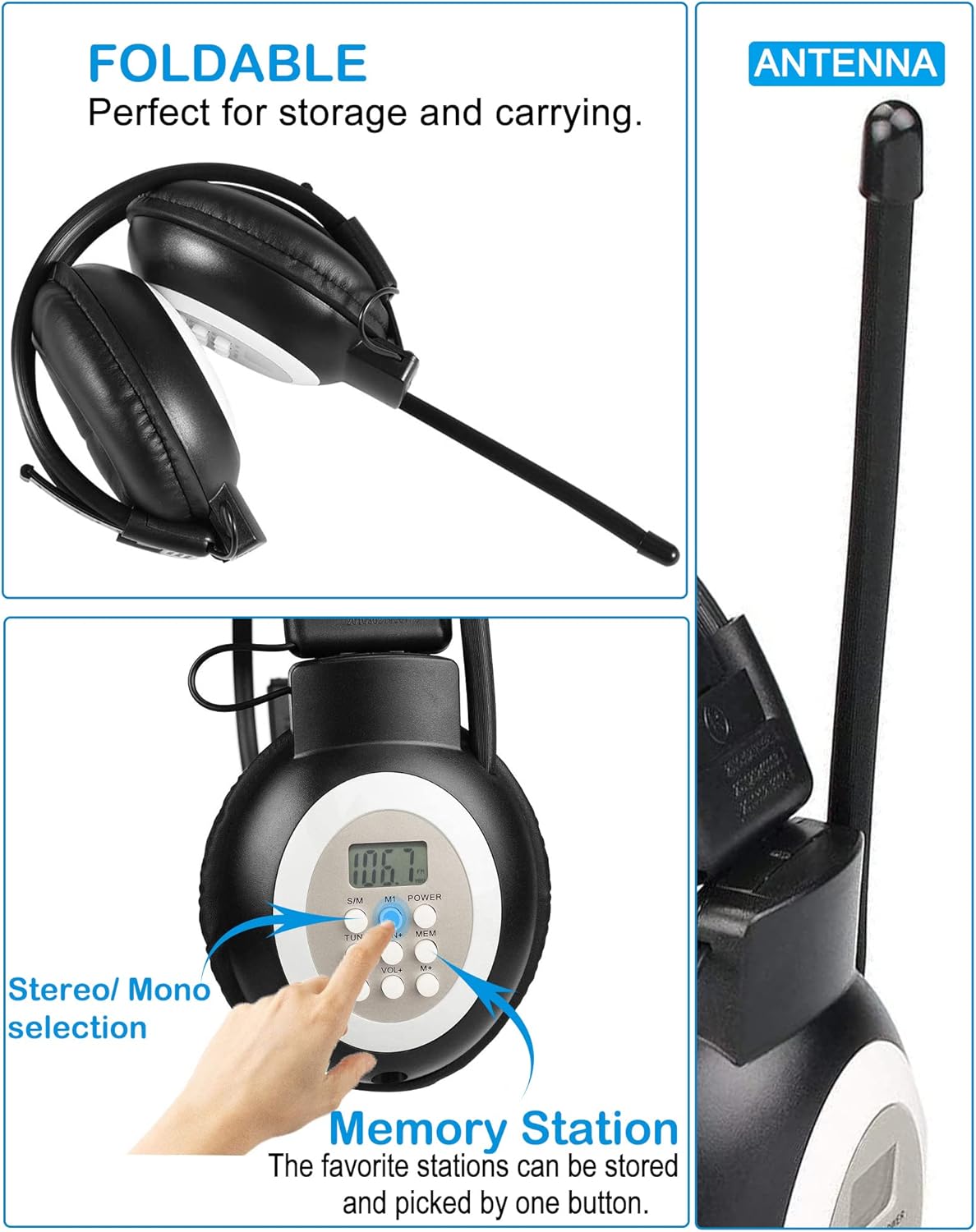
Figure 4.1: Controls and Design Elements. This image shows the control buttons on the earcup, the foldable design of the headphones, and the extendable antenna.
| الزر/الميزة | وظيفة |
|---|---|
| شاشة LCD | Shows current FM frequency, battery status, and other indicators. |
| قوة | اضغط مع الاستمرار لتشغيل سماعات الرأس أو إيقاف تشغيلها. |
| TUN+ / TUN- | Press briefly to fine-tune the frequency up/down. Press and hold to auto-scan for the next available station. |
| المجلد + / المجلد- | Adjusts the listening volume up or down. |
| MEM (الذاكرة) | Used to save and recall preset radio stations. |
| M1 (Memory 1) | Dedicated button to quickly access your first saved favorite station. |
| S/M (Stereo/Mono) | Switches between stereo and mono audio modes. |
| هوائي | Extendable antenna for improved FM signal reception. |
| شنومكسم منفذ الصوت | Input for connecting external audio sources via the included audio cable. |
5. الإعداد
5.1 تركيب البطارية
The HRD-308S headphones require two (2) AA batteries for operation. Batteries are not included.
- Locate the battery compartment on the left earcup.
- افتح غطاء حجرة البطارية برفق.
- قم بإدخال بطاريتين AA، مع التأكد من القطبية الصحيحة (+ و-) كما هو موضح داخل الحجرة.
- أغلق غطاء حجرة البطارية جيدًا.

Figure 5.1: Battery Installation. This image shows the open battery compartment on the left earcup, ready for two AA batteries.
5.2 Wired Headset Connection
To use the HRD-308S as a wired headset with an external audio device:
- Locate the 3.5mm audio port on the right earcup.
- Connect one end of the included 3.5mm audio cable to this port.
- Connect the other end of the audio cable to the headphone jack of your smartphone, PC, tablet, or other audio device.
- The headphones will now function as a wired audio output device. The radio function will be disabled when the audio cable is connected.

Figure 5.2: Wired Connection. This image shows the 3.5mm audio port on the right earcup and an audio jack, illustrating how to connect the headphones as a wired headset.
6. تعليمات التشغيل
6.1 تشغيل/إيقاف التشغيل
- لتشغيل: اضغط مع الاستمرار على قوة button until the LCD display illuminates.
- لإيقاف التشغيل: اضغط مع الاستمرار على قوة اضغط على الزر مرة أخرى حتى يتم إيقاف تشغيل الشاشة.
6.2 ضبط مستوى الصوت
- اضغط على المجلد+ زر لزيادة الصوت.
- اضغط على المجلد- زر لخفض مستوى الصوت.
6.3 ضبط محطات FM
البحث التلقائي:
- اضغط مع الاستمرار على TUN + or تون- button. The radio will automatically scan for the next available strong station and stop.
ضبط يدوي:
- اضغط على TUN + or تون- اضغط على الزر لفترة وجيزة لضبط التردد خطوة بخطوة.
6.4 Saving and Recalling Preset Stations
The HRD-308S can store up to 10 FM stations in memory, plus one favorite station (M1).
لإنقاذ محطة:
- اضبط على محطة الراديو FM المطلوبة باستخدام زري TUN+ أو TUN-.
- اضغط على ميم button. The preset number on the LCD will flash.
- استخدم TUN + or تون- buttons to select the desired memory slot (P0-P9).
- اضغط على ميم اضغط على الزر مرة أخرى لتأكيد المحطة وحفظها.
To Save a Favorite Station (M1):
- Tune to your most frequently listened-to station.
- اضغط مع الاستمرار على M1 button until the display confirms it's saved.
لاستدعاء محطة:
- اضغط على ميم button repeatedly to cycle through the saved preset stations (P0-P9).
- اضغط على M1 button to instantly recall your favorite station.
6.5 Switching Stereo/Mono Mode
- اضغط على س/م button to toggle between stereo and mono reception. Mono mode can improve reception clarity in areas with weak signals.
7. الصيانة
- تنظيف: Use a soft, dry cloth to clean the headphones. Do not use liquid cleaners or abrasive materials.
- العناية بالبطارية: Remove batteries if the headphones will not be used for an extended period to prevent leakage.
- تخزين: خزّن سماعات الرأس في مكان بارد وجاف بعيدًا عن أشعة الشمس المباشرة ودرجات الحرارة القصوى. يتيح تصميمها القابل للطي تخزينها بشكل مضغوط.
- مقاومة الماء: These headphones are not water-resistant. Avoid exposure to water or high humidity.
8. استكشاف الأخطاء وإصلاحها
| مشكلة | السبب المحتمل | حل |
|---|---|---|
| No power/Headphones do not turn on. | البطاريات فارغة أو تم إدخالها بشكل غير صحيح. | استبدل البطاريات ببطاريات AA جديدة، مع التأكد من صحة القطبية. |
| Poor FM reception/Static. | إشارة ضعيفة، أو الهوائي غير ممتد، أو تداخل. | Extend the antenna fully. Try moving to a different location. Switch to mono mode (S/M button). |
| لا يوجد صوت من سماعات الرأس. | Volume too low, headphones in wired mode, or faulty connection. | Increase volume using VOL+ button. Ensure 3.5mm audio cable is disconnected if using radio. Check if batteries are low. |
| Cannot save preset stations. | إجراء غير صحيح. | Follow the 'Saving a Station' instructions in Section 6.4 carefully. |
| Headphones uncomfortable or fall off. | تعديل غير سليم. | Adjust the telescopic headband for a secure and comfortable fit. |
9. المواصفات
| ميزة | التفاصيل |
|---|---|
| اسم الموديل | HRD-308S |
| ماركة | هان رونغدا |
| نطاق التردد FM | 50-108 ميجا هرتز |
| تكنولوجيا الاتصال | مدخل صوت AUX (3.5 ملم) |
| الاتصالات اللاسلكية | FM |
| مصدر الطاقة | 2 بطاريات AA (غير متضمنة) |
| عمر البطارية | حتى ساعتين |
| طريقة التحكم | زر |
| شكل سماعة الأذن | فوق الأذن |
| التحكم في الضوضاء | إلغاء الضجيج السلبي |
| أبعاد المنتج | 4.72 × 4.72 × 3.54 بوصة |
| وزن العنصر | 7 أونصات |
| مادة | بلاستيك |
| رمز المنتج الموحد | 724991586434 |
10. الضمان والدعم
For any product-related issues, questions, or support needs, please contact HanRongDa customer service. Refer to the contact information provided with your purchase or on the official HanRongDa webيرجى الاحتفاظ بإثبات الشراء الخاص بك للمطالبة بالضمان.