
1. المقدمة
Thank you for choosing the Foneng Stereo Music Earphone White, Model T34. These earphones are designed to provide a comfortable listening experience with clear audio and convenient controls for both music playback and phone calls. This manual will guide you through the proper use and care of your new earphones.
2. انتهى المنتجview
The Foneng T34 earphones feature a lightweight, in-ear design with comfortable ear cushions that sit securely without needing to be crammed into the ear canal. They are smaller than typical earbuds, making them suitable for users with smaller ears, including children.

الشكل 2.1: الجبهة view of the Foneng Stereo Music Earphone White, highlighting its sleek, in-ear design.
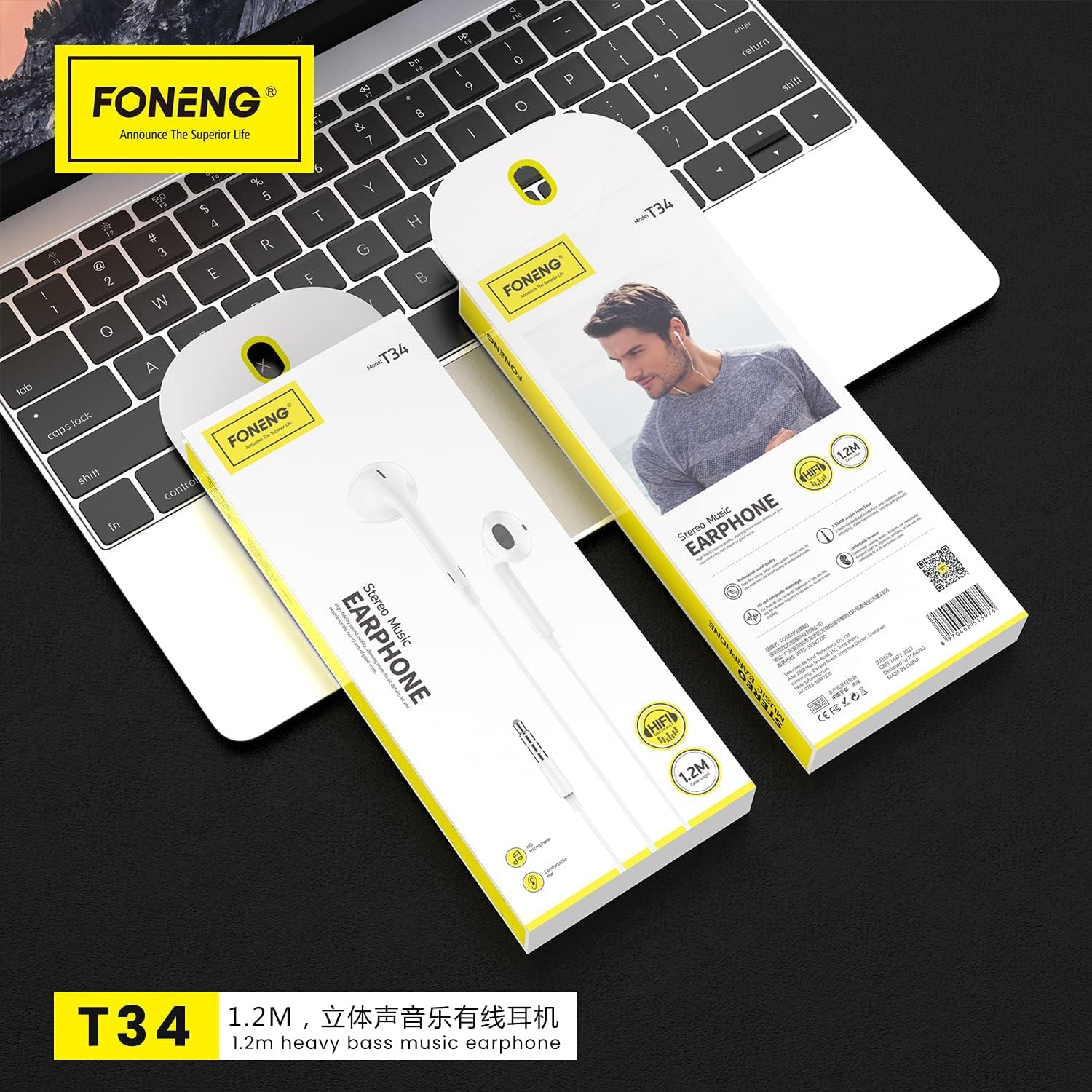
Figure 2.2: Packaging of the Foneng T34 earphones, illustrating the product and its integrated control unit.
المكونات الرئيسية:
- Earphone Units: Left and right earpieces with comfortable ear cushions.
- وحدة التحكم المدمجة: Integrated remote with multi-function button and volume controls.
- ميكروفون مدمج: Located on the control unit for clear voice pickup during calls.
- مقبس صوت 3.5 ملم: Standard connector for compatible devices.
3. الإعداد
Setting up your Foneng T34 earphones is simple and requires no complex installation.
- أفرغ: قم بإخراج سماعات الأذن من عبوتها بعناية.
- يتصل: Insert the 3.5mm audio jack firmly into the headphone port of your audio device (smartphone, tablet, laptop, MP3 player, etc.).
- ارتداء: Place the earphone units comfortably into your ears. Ensure a snug fit for optimal sound quality and noise isolation.
4. تعليمات التشغيل
The Foneng T34 earphones feature an intuitive in-line control unit for managing your audio and calls.
Multi-function Button Control:
The single button on the control unit allows for various functions:
- تشغيل/إيقاف الموسيقى: Press once to play or pause the current track.
- المسار التالي: Press twice quickly to skip to the next song.
- المسار السابق: Press three times quickly to go back to the previous song.
- الرد/إنهاء المكالمة: Press once to answer an incoming call or end an ongoing call.
- رفض المكالمة: Press and hold for approximately 2 seconds to reject an incoming call.
- تفعيل المساعد الصوتي (Siri، Google Assistant، وما إلى ذلك): Press and hold for approximately 3 seconds (functionality may vary by device).
التحكم في مستوى الصوت:
Use the dedicated volume buttons on the control unit to adjust the audio level:
- رفع الصوت: اضغط على زر "+" لزيادة مستوى الصوت.
- اخفض الصوت: اضغط على زر "-" لخفض مستوى الصوت.
استخدام الميكروفون:
The built-in microphone is positioned to pick up your voice clearly while minimizing background noise, ensuring clear conversations during phone calls. No special activation is required; it functions automatically when a call is initiated or received.
5. الصيانة والعناية
Proper care will extend the lifespan and maintain the performance of your Foneng T34 earphones.
- تنظيف: Gently wipe the earphone units and cable with a soft, dry cloth. Do not use harsh chemicals or abrasive materials. For ear cushions, a slightly damp cloth can be used, ensuring they are completely dry before use.
- تخزين: عند عدم الاستخدام، قم بتخزين سماعات الأذن في مكان نظيف وجاف، ويفضل وضعها في جراب أو علبة صغيرة لمنع تشابك الكابل وتلفه.
- تجنب الرطوبة: Do not expose the earphones to water, rain, or excessive humidity. They are not waterproof.
- التعامل معها بحذر: Avoid pulling the cable forcefully when disconnecting from a device. Always grasp the 3.5mm jack. Do not bend or twist the cable excessively.
- درجة حرارة: Avoid exposing the earphones to extreme temperatures (very hot or very cold), as this can affect the materials and internal components.
6. استكشاف الأخطاء وإصلاحها
If you encounter issues with your Foneng T34 earphones, try the following basic troubleshooting steps:
- لا يوجد صوت:
- تأكد من إدخال مقبس 3.5 ملم بالكامل في منفذ الصوت الخاص بالجهاز.
- Check the volume level on your device and on the earphone's in-line control.
- Try the earphones with a different audio device to rule out a device-specific issue.
- تأكد من تشغيل مصدر الصوت.
- الصوت المشوه:
- Lower the volume on your device and earphones.
- Check if the audio jack is clean and free of debris.
- اختبر باستخدام مصدر صوت أو جهاز آخر.
- الميكروفون لا يعمل:
- تأكد من توصيل سماعات الأذن بالجهاز بشكل كامل.
- تحقق من إعدادات الصوت في جهازك للتأكد من تحديد الميكروفون الخارجي.
- Test the microphone function with a different application or device.
إذا لم تحل هذه الخطوات المشكلة، فيرجى الرجوع إلى معلومات الضمان والدعم.
7. المواصفات
| ميزة | وصف |
|---|---|
| العلامة التجارية | Foneng |
| رقم الموديل | ت34 |
| عامل شكل سماعة الرأس | داخل الأذن |
| التحكم في الضوضاء | عزل الصوت |
| مقبس سماعة الرأس | 3.5 ملم جاك |
| المكونات المضمنة | وسائد الأذن |
| مادة | بلاستيك |
| نوع التحكم | التحكم في مستوى الصوت |
| الشركة المصنعة | فونينج |
8. الضمان والدعم
For warranty information and customer support, please refer to the documentation provided with your purchase or visit the official Foneng webالموقع. احتفظ بإثبات الشراء الخاص بك لاستخدامه في أي مطالبات بالضمان.
معلومات الاتصال: Please consult your retailer or the manufacturer's official website for the most up-to-date contact details for support.