
مقدمة
This user manual provides detailed instructions for the installation, operation, maintenance, and troubleshooting of your Xprinter XP-K200L 80mm Thermal Receipt Printer. Please read this manual thoroughly before using the printer to ensure proper function and to extend the product's lifespan. Keep this manual for future reference.
معلومات السلامة
- استخدم دائمًا محول الطاقة المرفق مع الطابعة.
- لا تعرض الطابعة للماء أو الرطوبة.
- تجنب وضع الطابعة في ضوء الشمس المباشر أو بالقرب من مصادر الحرارة.
- تأكد من التهوية المناسبة حول الطابعة.
- لا تحاول تفكيك الطابعة أو إصلاحها بنفسك. اتصل بفنيي صيانة مؤهلين.
- يحفظ بعيدًا عن متناول الأطفال.
محتويات الحزمة
يرجى التحقق من محتويات الطرد عند فتحه. في حال وجود أي نقص أو تلف في أي من المنتجات، يرجى الاتصال بالبائع.
- Xprinter XP-K200L Thermal Receipt Printer
- محول الطاقة
- سلك الطاقة
- كابل يو اس بي
- لفة ورق حراري (لفة بداية)
- كابل درج النقود
- دليل المستخدم (هذا المستند)
المنتج انتهىview
Familiarize yourself with the main components of your Xprinter XP-K200L thermal receipt printer.

الشكل 1: الجانب view of the Xprinter XP-K200L thermal receipt printer. On the right, the power switch is visible, and on the left, a button to open the paper cover is present.
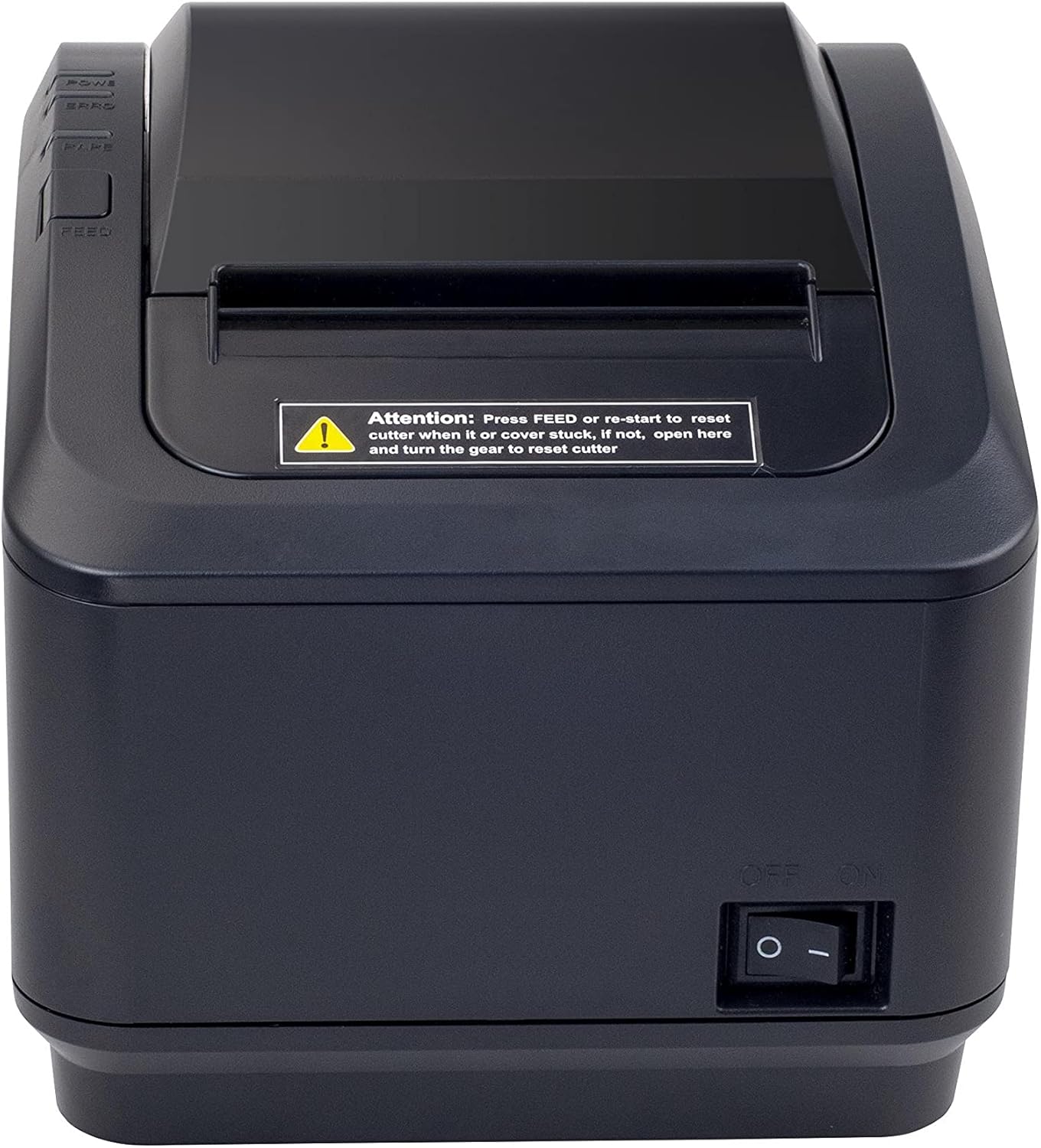
الشكل 2: واجهة view of the Xprinter XP-K200L thermal receipt printer. The paper output slot is at the top, and below it are control buttons for functions like feed and error reset. A warning label is also visible.

Figure 3: This image displays the Xprinter XP-K200L thermal receipt printer with its top cover open, showing the internal compartment where the thermal paper roll is loaded. The print head mechanism is also visible.
يثبت
1. توصيل الطاقة
- Ensure the printer's power switch is in the عن موضع.
- Connect the power adapter to the printer's power port.
- قم بتوصيل سلك الطاقة بمأخذ كهربائي مناسب.
2. تحميل الورق الحراري
- Press the cover open button (refer to Figure 1) to open the top cover of the printer.
- Insert a new 80mm thermal paper roll into the compartment, ensuring the paper feeds from the bottom and the leading edge extends slightly out of the printer.
- Close the top cover firmly until it clicks into place. Ensure there is no slack in the paper roll.
3. Connecting to a Computer/Network
The XP-K200L printer supports both USB and LAN (Ethernet) connectivity.
اتصال USB:
- Connect one end of the USB cable to the printer's USB port.
- قم بتوصيل الطرف الآخر من كابل USB بمنفذ USB المتوفر على جهاز الكمبيوتر الخاص بك.
- Install the printer drivers. Drivers are typically provided on a CD or can be downloaded from the manufacturer's webالموقع. اتبع التعليمات التي تظهر على الشاشة للتثبيت.
اتصال الشبكة المحلية (إيثرنت):
- Connect one end of an Ethernet cable to the printer's LAN port.
- قم بتوصيل الطرف الآخر من كابل Ethernet بجهاز توجيه الشبكة أو جهاز التبديل الخاص بك.
- Configure the printer's network settings (e.g., IP address) if necessary. This usually involves printing a self-test page to get the current IP address and then accessing the printer's web interface or using a utility tool provided by the manufacturer.
- Install the printer drivers on your computer, selecting the network connection option during setup.
4. توصيل درج النقود
- Connect the cash drawer cable to the dedicated cash drawer port on the printer.
- Ensure your POS software is configured to send commands to open the cash drawer via the printer.
تعليمات التشغيل
تشغيل/إيقاف التشغيل
- To power on the printer, flip the power switch (refer to Figure 1) to the ON موضع.
- To power off the printer, flip the power switch to the عن موضع.
الطباعة الأساسية
Once the printer is connected and drivers are installed, you can print receipts from your POS software or any application that supports printing.
- تأكد من تشغيل الطابعة وتحميل الورق فيها.
- From your application, select the print option.
- Choose the "Xprinter XP-K200L" from the list of available printers.
- Confirm print settings and click "Print".
Self-Test Page
To print a self-test page, which provides information about the printer's settings and status:
- Ensure the printer is powered off and the paper roll is loaded.
- اضغط مع الاستمرار على يٌطعم زر.
- بينما تمسك يٌطعم button, turn the power switch to ON.
- أطلق سراح يٌطعم button after the printer starts printing.
صيانة
تنظيف الطابعة
- رأس الطباعة: استخدمي قطعة قطنية برفقampened with isopropyl alcohol to gently wipe the thermal print head. Allow it to dry completely before use. Clean regularly to ensure print quality.
- القاطع: If the cutter becomes jammed or dirty, carefully clean it with a soft brush or cloth.
- الخارج: امسح الجزء الخارجي من الطابعة بقطعة قماش ناعمة وجافة. لا تستخدم منظفات أو مذيبات كاشطة.
استبدال الورق الحراري
When the paper roll is depleted or near its end, replace it following the steps in the "Loading Thermal Paper" section under Setup.
استكشاف الأخطاء وإصلاحها
| مشكلة | السبب المحتمل | حل |
|---|---|---|
| الطابعة لا تعمل. | Power cord or adapter not connected properly; power outlet issue. | Check all power connections. Try a different power outlet. |
| ممنوع الطباعة. | No paper; paper loaded incorrectly; printer offline; driver issue; incorrect connection. | Load paper correctly. Check printer status. Reinstall drivers. Verify USB/LAN connection. |
| جودة طباعة رديئة. | Dirty print head; low quality thermal paper. | Clean the print head (see Maintenance). Use recommended thermal paper. |
| Paper jam or cutter error. | Paper loaded incorrectly; debris in cutter mechanism. | As per printer label: يضعط يٌطعم or re-start to reset cutter. If the issue persists, open the top cover and carefully turn the gear to reset the cutter mechanism. Ensure paper is loaded correctly and remove any obstructions. |
| درج النقود لا يفتح. | Cable not connected; POS software not configured. | Check cash drawer cable connection. Verify POS software settings for cash drawer trigger. |
تحديد
| ميزة | التفاصيل |
|---|---|
| ماركة | طابعة إكس برينتر |
| اسم الموديل | XP-K200L |
| تكنولوجيا الطابعة | حراري |
| تكنولوجيا الاتصال | USB، LAN (إيثرنت) |
| المميزات الخاصة | الشبكة جاهزة |
| لون | أسود |
| مخرجات الطابعة | أحادي اللون |
| وزن العنصر | 1.5 كجم |
| أبعاد المنتج (عمق×عرض×ارتفاع) | 19.5 سم × 14 سم × 13.8 سم |
| Compatible OS/Controller Type | Android (and typically Windows/Linux via drivers) |
| وسائل الإعلام المطبوعة | Plain Thermal Paper |
| طباعة اللون | أسود |
| دقة | 576 x 512 dots per inch (or dots per line) |
| Max Print Resolution B/W | 576 نقطة في البوصة |
| وظائف الطابعة الإضافية | الطباعة فقط |
| طريقة التحكم | بعيد |
| الحد الأقصى لحجم الوسائط | 80 ملم |
| حجم الورق | 79.5 ملم |
| قوة | 60 واط |
| المكونات المضمنة | Power adapter, Cash drawer cable |
| مسلسل | XP-K |
| استخدامات محددة | Restaurants, bars, cinemas, garages, transportation, hospitals, clinics |
| إجمالي منافذ USB | 1 |
الضمان والدعم
For warranty information and technical support, please refer to the documentation provided with your purchase or contact your vendor directly. Keep your proof of purchase for warranty claims.
For driver downloads and further support resources, visit the official Xprinter webموقع.


