
1. المقدمة
This manual provides comprehensive instructions for the installation, operation, and maintenance of your SENSTREE WTC200 Wireless Thermostat Plug-in Temperature Controller Outlet. Please read this manual thoroughly before using the device to ensure proper function and safety. Keep this manual for future reference.
2. انتهى المنتجview
2.1 المكونات المضمنة
- Wireless Thermostat Receiver (Plug-in Outlet)
- جهاز التحكم عن بعد اللاسلكي
- 2m/6ft NTC Temperature Probe
- دليل المستخدم (هذه الوثيقة)
- 2 AAA batteries (for remote controller, may be included or required separately)
2.2 الميزات الرئيسية
- التشغيل اللاسلكي: Control temperature remotely with the handheld unit.
- مستشعر عالي الدقة: The temperature is detected automatically by the thermostat outlet or remote.
- Heating & Cooling Modes: Automatically activates or deactivates connected devices based on preset temperatures.
- زر التشغيل/الإيقاف اليدوي: The plug-in outlet features a manual power button.
- تبديل وحدة درجة الحرارة: التبديل بسهولة بين درجة مئوية (℃) وفهرنهايت (℉).
- قابلة للبرمجة: Simple two-step setup for heating or cooling applications.
- أجهزة إنذار ارتفاع/انخفاض درجة الحرارة: Provides alerts for temperature deviations.
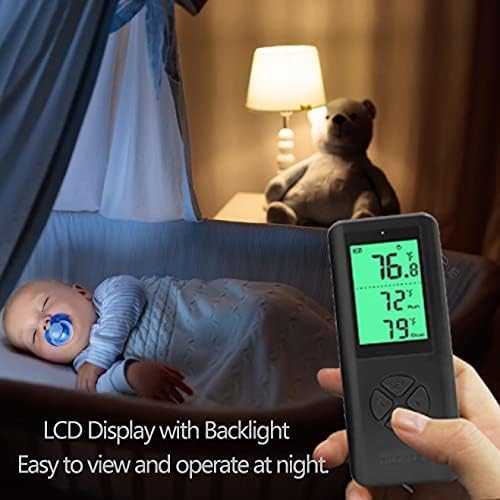
- شاشة LCD بإضاءة خلفية: Clear digital display for easy reading, even in low light.
2.3 Product Components Visual Guide


3. تعليمات الإعداد
3.1 تركيب بطارية جهاز التحكم عن بعد
- حدد مكان حجرة البطارية في الجزء الخلفي من جهاز التحكم عن بعد.
- افتح غطاء حجرة البطارية.
- قم بإدخال بطاريتين AAA، مع التأكد من القطبية الصحيحة (+/-).
- أغلق غطاء حجرة البطارية.
3.2 Connecting the Temperature Probe
- Identify the NTC temperature probe cable.
- Plug the probe's jack into the designated port on the side of the wireless thermostat receiver (plug-in outlet).
- Position the probe in the area where you wish to measure and control the temperature. Ensure it is not obstructed or directly exposed to heat/cold sources that do not represent the ambient temperature.
3.3 التشغيل الأولي والاقتران
- Plug the wireless thermostat receiver into a standard 3-prong grounded electrical outlet.
- The remote controller and receiver are designed to automatically pair upon initial power-up. The display on the remote should activate and show temperature readings.
- If the remote does not display readings or connect, ensure batteries are correctly installed and the receiver is powered. Refer to the Troubleshooting section if issues persist.
4. تعليمات التشغيل
4.1 Remote Controller Layout

The remote controller features a digital display and several buttons:
- زر SET: تُستخدم لإدخال الإعدادات وتأكيدها.
- أزرار لأعلى (▲) / لأسفل (▼): Used to adjust temperature values and navigate menu options.
- زر M (الوضع): Used to switch between heating and cooling modes, and other functions.
4.2 Setting Temperature and Mode
- حدد الوضع: اضغط على M button to toggle between Heating (indicated by a flame icon or similar) and Cooling (indicated by a snowflake icon or similar) modes.
- Enter Setting: اضغط على تعيين button once. The target temperature display will begin to flash.
- ضبط درجة الحرارة: استخدم أعلى (▲) و لأسفل (▼) buttons to set your desired target temperature.
- تأكيد الإعداد: اضغط على تعيين button again to confirm and save the target temperature. The display will stop flashing.
- The thermostat will now automatically turn on or off the connected device to maintain the set temperature.
4.3 وحدات درجة حرارة التبديل (درجة مئوية/فهرنهايت)
للتبديل بين درجة مئوية (℃) وفهرنهايت (℉):
- With the remote display active, press and hold the M button for approximately 3 seconds. The temperature unit on the display will change.
- Release the button once the desired unit is shown.
4.4 أجهزة إنذار درجات الحرارة المرتفعة/المنخفضة
The WTC200 features adjustable high and low-temperature alarms. When the ambient temperature exceeds the high alarm setting or falls below the low alarm setting, the remote controller will emit an audible alert.
- اضغط على تعيين button twice to enter the alarm setting mode.
- استخدم أعلى (▲) و لأسفل (▼) buttons to adjust the high-temperature alarm threshold.
- يضعط تعيين again to switch to the low-temperature alarm threshold.
- استخدم أعلى (▲) و لأسفل (▼) buttons to adjust the low-temperature alarm threshold.
- يضعط تعيين a third time to save and exit the alarm settings.
4.5 Manual ON/OFF on the Outlet
The plug-in outlet receiver has a manual power button. Press this button to manually turn the connected device ON or OFF, overriding the thermostat's automatic control. The remote will reflect the current status.
5. الصيانة
5.1 التنظيف
- تأكد من فصل الجهاز عن الكهرباء قبل التنظيف.
- Wipe the surfaces of the remote controller and plug-in outlet with a soft, dry cloth.
- لا تستخدم المنظفات الكاشطة أو المذيبات أو تغمر الجهاز في الماء.
5.2 استبدال البطارية
When the battery indicator on the remote controller's display shows low power, replace the AAA batteries as described in Section 3.1. Prompt battery replacement ensures continuous and reliable operation.
6. استكشاف الأخطاء وإصلاحها
| مشكلة | السبب المحتمل | حل |
|---|---|---|
| Remote display is blank or unresponsive. | بطاريات منخفضة أو ميتة؛ تركيب البطارية بشكل غير صحيح. | استبدل بطاريات AAA مع التأكد من القطبية الصحيحة. |
| Thermostat not controlling connected device. | Device not plugged into the outlet; outlet not receiving power; incorrect mode (heating/cooling); temperature settings outside range. | Ensure device is securely plugged into the thermostat outlet. Verify the thermostat outlet is plugged into a live wall socket. Check if the correct mode (heating/cooling) is selected. Adjust target temperature settings. |
| قراءات درجة الحرارة غير دقيقة. | Temperature probe is disconnected or improperly placed; probe is damaged. | Ensure the temperature probe is securely connected to the outlet. Reposition the probe away from direct heat/cold sources or drafts. If damage is suspected, contact support. |
| Remote and outlet not communicating. | خارج النطاق؛ تداخل؛ مشكلة في الاقتران. | Move the remote closer to the outlet. Ensure no large metal objects or strong electronic devices are between them. Re-power both units to attempt re-pairing. |
| يصدر صوت التنبيه بشكل غير متوقع. | Ambient temperature has reached a set high or low alarm threshold. | Check the current temperature and your alarm settings. Adjust alarm thresholds if necessary (refer to Section 4.4). |
7. المواصفات
| ميزة | التفاصيل |
|---|---|
| ماركة | SENSTREE |
| رقم الموديل | مركز التجارة العالمي 200 |
| نوع وحدة التحكم | بعيد |
| نوع التحكم في درجة الحرارة | اوتوماتيكي |
| تكنولوجيا الاتصال | RF (تردد الراديو) |
| مصدر الطاقة | كهربائي |
| المجلدtage | 1.5 Volts (Remote), 100-240 Volts (Outlet) |
| الحد الأقصى للحمل | 14A, 1500W (at 110V), 3000W (at 220V) |
| نوع العرض | شاشة LCD رقمية بإضاءة خلفية |
| طريقة التحكم | التحكم بالأزرار، جهاز التحكم عن بعد |
| مسبار درجة الحرارة | 2m/6ft NTC probe |
| البطاريات (عن بعد) | مطلوب بطاريتين AAA |
| وزن العنصر | 8.4 أونصات |
| أبعاد الحزمة | 4.8 × 4.17 × 2.32 بوصة |
8. الضمان والدعم
8.1 ضمان المنتج
The SENSTREE WTC200 Wireless Thermostat Plug-in Temperature Controller Outlet comes with a ضمان لمدة سنة واحدة يسري هذا الضمان من تاريخ الشراء. ويغطي عيوب المواد والتصنيع في ظل الاستخدام العادي. ولا يغطي الأضرار الناجمة عن سوء الاستخدام أو الحوادث أو التعديل غير المصرح به أو التركيب غير الصحيح.
8.2 دعم العملاء
For technical assistance, troubleshooting, or warranty claims, please contact SENSTREE customer support. Refer to the product packaging or the official SENSTREE webالموقع للحصول على أحدث معلومات الاتصال.