
1. انتهى المنتجview
The Lexmark MX611DHE is a monochrome laser multifunction device designed for office environments, offering comprehensive capabilities including printing, copying, scanning, and faxing. This robust unit is engineered for high-volume output and efficient document handling.
- متعددة الوظائف: Integrates print, copy, fax, and scan functions into a single device.
- أداء عالي السرعة: Capable of printing and copying at speeds up to 50 pages per minute (ppm).
- الطباعة على الوجهين: Supports automatic two-sided printing to conserve paper.
- سعة الإدخال: Features a standard input capacity of 650 sheets, expandable for larger tasks.
- الاتصال: Equipped with USB and Ethernet interfaces for versatile network integration.
- تحكم بديهي: Features a touchscreen display for easy navigation and operation.
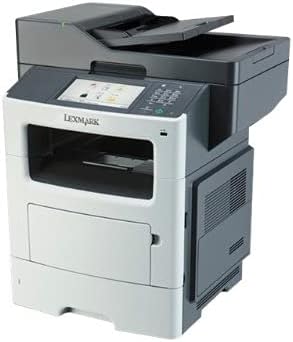
الشكل 1: الجبهة view of the Lexmark MX611DHE multifunction printer, showcasing its compact design and front-facing paper tray.
2. دليل الإعداد
Follow these steps to set up your Lexmark MX611DHE printer for initial use.
- فك التعبئة: أخرج الطابعة من عبوتها بحرص. أزل جميع الأشرطة الواقية ومواد التغليف من داخل الجهاز وخارجه.
- الموقع: Place the printer on a stable, level surface with adequate ventilation. Ensure there is enough space around the printer for proper operation and maintenance.
- توصيل الطاقة: Connect the power cord to the printer's power input and then to a grounded electrical outlet. Do not connect to a surge protector or extension cord initially.
- تحميل الورق: Open the paper tray and load the appropriate paper size (up to 8.5 x 14 inches). Adjust the paper guides to fit the paper stack snugly.
- اتصال الشبكة/USB:
- For Network (Ethernet): قم بتوصيل كابل Ethernet من منفذ Ethernet الخاص بالطابعة بجهاز التوجيه أو المحول الشبكي لديك.
- لليو إس بي: قم بتوصيل كابل USB من منفذ USB الخاص بالطابعة بالكمبيوتر.
- التشغيل الأولي: Press the power button to turn on the printer. Follow the on-screen prompts on the touchscreen display to select language, region, and perform initial setup configurations.
- تثبيت برنامج التشغيل: قم بتثبيت برامج تشغيل الطابعة اللازمة على جهاز الكمبيوتر الخاص بك. يمكنك عادةً العثور على برامج التشغيل على موقع دعم Lexmark. website or on an included installation CD (if applicable).
3. تعليمات التشغيل
This section provides basic instructions for using the Lexmark MX611DHE's primary functions.
3.1. الطباعة
- تأكد من تشغيل الطابعة وتوصيلها بالكمبيوتر أو الشبكة.
- افتح المستند الذي ترغب في طباعته على جهاز الكمبيوتر الخاص بك.
- يختار File > طباعة (أو الأمر المكافئ في تطبيقك).
- Choose "Lexmark MX611DHE" from the list of available printers.
- Adjust print settings such as number of copies, paper size, and duplex options as needed.
- انقر مطبعة.
3.2. النسخ
- ضع المستند بحيث يكون وجهه لأسفل على زجاج الماسح الضوئي أو بحيث يكون وجهه لأعلى في وحدة التغذية التلقائية للمستندات (ADF).
- على شاشة اللمس الخاصة بالطابعة، حدد ينسخ وظيفة.
- Adjust settings such as number of copies, lightness/darkness, and paper size.
- اضغط على يبدأ زر لبدء النسخ.
3.3. المسح

Figure 2: The Lexmark MX611DHE with its scanner lid open, revealing the flatbed scanner glass and the automatic document feeder mechanism.
- ضع المستند على زجاج الماسح الضوئي أو داخل وحدة التغذية التلقائية للمستندات.
- على شاشة اللمس الخاصة بالطابعة، حدد مسح ضوئي وظيفة.
- Choose your desired scan destination (e.g., Scan to Computer, Scan to Email, Scan to Network Folder).
- قم بضبط إعدادات المسح الضوئي مثل الدقة ووضع الألوان و file شكل.
- اضغط على يبدأ اضغط على الزر لبدء عملية المسح.
3.4. إرسال الفاكس
- تأكد من توصيل الطابعة بخط الهاتف.
- ضع المستند على زجاج الماسح الضوئي أو داخل وحدة التغذية التلقائية للمستندات.
- على شاشة اللمس الخاصة بالطابعة، حدد فاكس وظيفة.
- Enter the recipient's fax number using the keypad on the control panel.
- اضبط أي إعدادات ضرورية للفاكس.
- اضغط على يبدأ زر لإرسال الفاكس.
4. الصيانة
Regular maintenance ensures optimal performance and extends the lifespan of your Lexmark MX611DHE.
- تنظيف الجزء الخارجي: استخدمي قطعة قماش ناعمةamp, lint-free cloth to wipe the exterior surfaces of the printer. Avoid abrasive cleaners.
- تنظيف زجاج الماسح الضوئي: For clear scans, regularly clean the scanner glass with a soft, lint-free cloth and a mild glass cleaner.
- استبدال خرطوشة الحبر: When the toner low message appears, order a new Lexmark toner cartridge. Follow the instructions provided with the new cartridge for proper installation.
- تنظيف مسار الورق: If paper jams become frequent, consult the printer's internal guides or the Lexmark support website for instructions on cleaning the paper path rollers.
5. استكشاف الأخطاء وإصلاحها
This section addresses common issues you might encounter with your Lexmark MX611DHE.
| مشكلة | السبب المحتمل | حل |
|---|---|---|
| الطابعة لا تستجيب | تم فصل كابل الطاقة، مشكلة في الشبكة، مشكلة في برنامج التشغيل. | Check power connections. Verify network cable or USB connection. Reinstall printer drivers. |
| انحشار الورق | Incorrectly loaded paper, foreign object in paper path. | Open access covers and carefully remove jammed paper. Ensure paper is loaded correctly. |
| جودة طباعة رديئة | Low toner, dirty print head/rollers, incorrect print settings. | Replace toner cartridge. Clean internal components as per maintenance guide. Adjust print quality settings in driver. |
| الماسح لا يعمل | Scanner glass dirty, software issue, connectivity problem. | Clean scanner glass. Restart computer and printer. Check USB/network connection. |
6. المواصفات
Detailed technical specifications for the Lexmark MX611DHE.
| ميزة | التفاصيل |
|---|---|
| ماركة | ليكسمارك |
| اسم الموديل | MX611DHE |
| نوع العرض | LCD (Touchscreen) |
| تكنولوجيا الطباعة | ليزر (أحادي اللون) |
| أقصى سرعة للطباعة (أحادية اللون) | 50 جزء في المليون |
| أقصى سرعة للنسخ (أبيض وأسود) | 50 جزء في المليون |
| دقة | 1200 × 1200 نقطة في البوصة |
| سعة تخزين الذاكرة | 1024 ميجا بايت |
| دعم حجم الورقة | Up to 8.5 x 14 Inches |
| واجهة الأجهزة | USB ، إيثرنت |
| أبعاد المنتج | 22.6 × 23.5 × 26.5 بوصة |
| لون | أبيض رمادي |
| رمز المنتج الموحد | 656942073611 |
7. الضمان والدعم
Your Lexmark MX611DHE (Renewed) product is covered by a limited warranty and support resources.
- ضمان: يأتي هذا المنتج مع ضمان محدود لمدة 90 يومًا. Please refer to your purchase documentation for specific terms and conditions of the Amazon Renewed Guarantee.
- الدعم الفني: For technical assistance, driver downloads, or further troubleshooting, please visit the official Lexmark support webالموقع أو الاتصال بخدمة العملاء الخاصة بهم.
- الموارد المتاحة على الإنترنت: Additional user guides, FAQs, and firmware updates may be available on the Lexmark support portal.