
مقدمة
This manual provides comprehensive instructions for the setup, operation, and maintenance of your VSVABEFV USB 3.0 Hard Drive Docking Station. This versatile device is designed to provide easy access to 2.5-inch and 3.5-inch SATA HDDs/SSDs, offering high-speed data transfer, a multi-card reader, and a convenient one-key backup function. Please read this manual thoroughly before use to ensure proper functionality and to maximize the lifespan of your device.

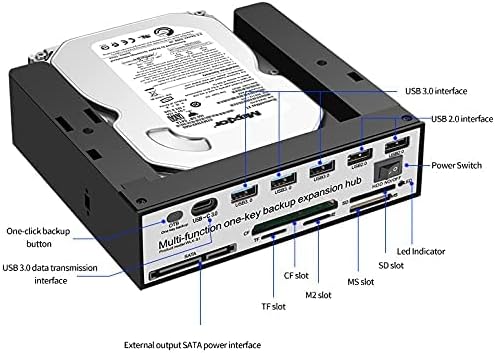
The VSVABEFV USB 3.0 Hard Drive Docking Station with a 3.5-inch HDD inserted, highlighting its multi-functionality.
محتويات الحزمة
تأكد من وجود جميع العناصر في العبوة:
- VSVABEFV USB 3.0 Hard Drive Docking Station (Model: WLX-S1)
- كابل بيانات أوسب شنومكس
- محول الطاقة
- دليل التعليمات
مميزات المنتج
- Multifunctional Hard Disk Docking Station: Supports all 2.5-inch / 3.5-inch SATA/SSD hard disks with capacities up to 10TB.
- Upgraded Chip: Features a high-performance main control HUB chip for data transfer speeds up to 6 Gbps, ensuring faster and more stable operation.
- All-in-one Card Reader: Supports SD/CF/MS/XD/TF/M2 series memory cards, with a maximum capacity of 120GB.
- One-key Backup Function: Simple button operation for easy file copying from your computer to the hard disk.
- التوافق الواسع: Compatible with Windows 98/Me/2000/XP/Vista/7/8/10, Mac OS 9.X/10.X, Linux, and later versions. Backward compatible with USB 2.0/1.1 connections.

انتهىview of the docking station's multi-functional capabilities.
يثبت
- توصيل الطاقة: Plug the provided power adapter into the DC 12V port on the back of the docking station and then into a power outlet.
- الاتصال بجهاز الكمبيوتر: Connect one end of the USB 3.0 data cable to the USB 3.0 port on the docking station and the other end to an available USB 3.0 port on your computer.
- أدخل القرص الصلب: Gently insert your 2.5-inch or 3.5-inch SATA HDD/SSD into the top slot of the docking station. The tool-free design allows for easy insertion and removal. Ensure the SATA connectors align properly.
- تشغيل الطاقة: Flip the power switch on the docking station to the 'ON' position. The device should be recognized by your computer automatically.

Proper insertion of a 3.5-inch hard drive into the docking station.
تعليمات التشغيل
نقل البيانات
Once the hard drive is inserted and the docking station is powered on and connected to your computer, the drive should appear as an external storage device. You can then drag and drop files to and from the drive, or use it for backups and other storage needs. The USB 3.0 interface ensures fast data transfer speeds.
One-Key Backup (OTB) Function
The docking station features a dedicated One-Key Backup button for quick data replication. To utilize this feature, you typically need to install specific software provided by the manufacturer. Refer to the manufacturer's website for the appropriate OTB software for your operating system. Once installed, configure the software to define your backup source and destination, then press the OTB button on the docking station to initiate the backup process.

Visual representation of the One-Key Backup function.
Using the Multi-Card Reader
The front panel of the docking station includes multiple card slots for various memory card formats (SD/CF/MS/XD/TF/M2). Simply insert your memory card into the corresponding slot. The card will appear as a removable drive on your computer, allowing you to access and transfer files.
HDD Independent Switch Control
The docking station is equipped with an independent power switch for the HDD. This allows you to power down the hard drive when not in use, contributing to energy saving and prolonging the drive's lifespan, without needing to disconnect the entire docking station from your computer.

The independent HDD power switch for convenient control.
التوافق
The docking station is compatible with a wide range of operating systems and hardware:
- أنظمة التشغيل: Windows 98/Me/2000/XP/Vista/7/8/10, Mac OS 9.X/10.X, Linux, and later versions.
- واجهة القرص الصلب: SATA I/II/III for 2.5-inch and 3.5-inch HDDs/SSDs.
- واجهة USB: USB 3.0 (backward compatible with USB 2.0/1.1).
- Card Reader Support: SD/CF/MS/XD/TF/M2 series memory cards.

The docking station supports multiple operating systems.
صيانة
لضمان الأداء الأمثل وطول عمر محطة الإرساء الخاصة بك:
- حافظ على نظافة جهازك وخلوه من الغبار. استخدم قطعة قماش ناعمة وجافة للتنظيف.
- تجنب تعريض الجهاز لدرجات حرارة شديدة أو رطوبة أو أشعة الشمس المباشرة.
- لا تسقط الجهاز أو تعرضه لصدمات قوية.
- Always safely eject hard drives from your operating system before physically removing them from the docking station.
استكشاف الأخطاء وإصلاحها
- لم يتم التعرف على محرك الأقراص: Ensure the power adapter is securely connected and the docking station is powered on. Verify the USB cable is properly connected to both the docking station and your computer. Try a different USB port on your computer. For new drives, you may need to initialize and format them through Disk Management (Windows) or Disk Utility (Mac).
- سرعات نقل البيانات البطيئة: Ensure you are connected to a USB 3.0 port on your computer. Older USB 2.0/1.1 ports will result in slower speeds. The speed also depends on the hard drive's performance.
- One-Key Backup Not Working: Confirm that the OTB software is correctly installed and configured on your computer. Ensure the hard drive is properly inserted and recognized.
- Intermittent Drive Connection: Check all cable connections. Ensure the hard drive is fully seated in the SATA port.
تحديد
| ميزة | التفاصيل |
|---|---|
| ماركة | VSVABEFV |
| نموذج | WLX-S1 |
| أنواع محركات الأقراص المتوافقة | محركات أقراص صلبة/محركات أقراص صلبة من نوع SATA مقاس 2.5 بوصة / 3.5 بوصة |
| أقصى سعة للمحرك | 10 تيرابايت |
| واجهة الأجهزة | USB 3.0 (متوافق مع الإصدارات السابقة USB 2.0/1.1) |
| معدل نقل البيانات | حتى 6 جيجابت في الثانية (USB 3.0) |
| دعم قارئ البطاقات | SD/CF/MS/XD/TF/M2 series (Max 120GB) |
| نظام التشغيل المتوافق | ويندوز، ماك أو إس، لينكس |
| أبعاد العنصر (LxWxH) | 6.61 × 6.14 × 1.81 بوصة |
| وزن العنصر | 11.8 أونصة (335 جرامًا) |
| لون | أسود |
Dimensions of the docking station.
فيديو المنتج الرسمي
This video demonstrates the features and functionality of a FIDECO USB 3.0 to SATA Hard Drive Docking Station, including speed tests for HDD and SSD.
الضمان والدعم
For warranty information, technical support, or any inquiries regarding your VSVABEFV USB 3.0 Hard Drive Docking Station, please refer to the product packaging or contact VSVABEFV customer service directly. Contact details can typically be found on the manufacturer's official webالموقع أو من خلال منصة الشراء الخاصة بك.