
1. المقدمة
This manual provides comprehensive instructions for the installation, programming, and operation of the Finder 12.A4.8.230.0010 NFC Weekly Time Clock. This electronic astronomical time switch features a weekly program, an analog output, and can be programmed via a joystick or an NFC-enabled smartphone using the Finder Toolbox app.
2. معلومات السلامة
يرجى قراءة تعليمات السلامة هذه بعناية قبل التركيب والتشغيل. قد يؤدي عدم اتباع هذه التعليمات إلى حدوث صدمة كهربائية أو حريق أو تلف للجهاز.
- يجب أن يتم إجراء التثبيت بواسطة كهربائي مؤهل وفقًا للوائح الأسلاك المحلية.
- تأكد من فصل مصدر الطاقة قبل أي أعمال تركيب أو صيانة.
- لا تعرض الجهاز للرطوبة أو درجات الحرارة العالية أو البيئات المسببة للتآكل.
- الجهاز مصمم للاستخدام الداخلي فقط.
3. انتهى المنتجview
The Finder 12.A4.8.230.0010 is an electronic time switch designed for DIN rail mounting. It offers precise time control with a weekly program and astronomical function.

الشكل 1: الجبهة view of the Finder 12.A4.8.230.0010 Time Clock, showing the LCD display, joystick, and NFC symbol.
المميزات الرئيسية:
- Weekly program for flexible scheduling.
- 1 analog output: 0-10 V or PWM.
- 1 changeover contact for 16 A / 250 V AC (AC1).
- العرض المجلدtage: 110-230 V AC/DC.
- LCD display for clear information.
- Programming via joystick or NFC-enabled smartphone with Finder Toolbox app (Android and iOS).
- Astronomical time control: automatic switching at sunrise and sunset based on postcode or coordinates.
- Adjustable time offset for sunrise/sunset.
4. الإعداد والتثبيت
This device is designed for DIN rail mounting. Follow these steps for proper installation:
- انقطاع التيار الكهربائي: تأكد من فصل مصدر الطاقة الرئيسي لمنطقة التثبيت بشكل كامل قبل المتابعة.
- التركيب: Mount the time switch securely onto a standard DIN rail.
- التوصيلات الكهربائية: Connect the power supply (110-230 V AC/DC) to terminals A1 and A2. Connect the load to the changeover contact terminals (NO, NC, COM) and the analog output (W, O, Y) as required. Refer to the wiring diagram below.
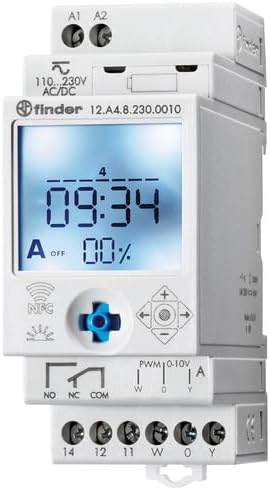
الشكل 2: مفصل view of the wiring terminals for power input (A1, A2), relay output (NO, NC, COM), and analog output (W, O, Y).
ملحوظة: The device features safe separation between the power supply and contacts.
5. تعليمات التشغيل
5.1 التشغيل الأولي
Once wired, restore power. The LCD display will illuminate. You may need to set the current date and time if it's the first use or after a prolonged power outage.
5.2 Programming via Joystick
The integrated joystick allows for direct programming on the device:
- ملاحة: Use the joystick to move through menu options (up, down, left, right).
- الاختيار/التأكيد: Press the joystick inwards to select an option or confirm a setting.
- Follow the on-screen prompts to set the current time, date, weekly program, and astronomical functions.
5.3 Programming via NFC (Finder Toolbox App)
For maximum flexibility, program the time switch using an NFC-enabled smartphone and the Finder Toolbox app:
- تحميل التطبيق: Download the "Finder Toolbox" app from the Google Play Store (Android) or Apple App Store (iOS).
- Create/Load Program: Open the app and create a new program or load an existing one. The app allows for detailed configuration of weekly schedules, astronomical settings, and special functions.
- نقل البيانات: To transfer the program, hold your smartphone close to the NFC symbol on the time switch. The app will guide you through the data transfer process.
- Read Program: You can also read an existing program from the time switch to your smartphone for editing or backup.
5.4 Astronomical Time Control
The device can automatically switch based on sunrise and sunset times:
- إعداد الموقع: Set your location by entering a postcode or geographical coordinates in the programming menu (via joystick or app).
- الإزاحة: You can set a selectable time offset for both sunrise and sunset times to adjust switching points.
- Astro ON/OFF: Configure specific ON/OFF times during the astronomical ON period if needed.
6. الصيانة
The Finder 12.A4.8.230.0010 is designed for maintenance-free operation. However, periodic checks are recommended:
- تنظيف: نظّف الجهاز بقطعة قماش جافة وناعمة. لا تستخدم منظفات أو مذيبات كاشطة.
- الاتصالات: Periodically check terminal connections to ensure they are secure.
- تحديثات البرامج الثابتة: Check the Finder website or app for any available firmware updates for improved functionality or bug fixes.
7. استكشاف الأخطاء وإصلاحها
| مشكلة | السبب المحتمل | حل |
|---|---|---|
| الجهاز لا يعمل. | لا يوجد مصدر للطاقة أو أسلاك غير صحيحة. | Check power connections (A1, A2) and ensure power is supplied. Verify wiring against the diagram. |
| البرنامج لا يعمل. | Incorrect program settings or manual override active. | Review program settings via joystick or app. Check for any active manual override functions. Ensure current date/time is correct. |
| NFC transfer fails. | Smartphone not NFC-enabled, app not open, or poor contact. | Ensure your smartphone has NFC enabled. Open the Finder Toolbox app. Hold the phone directly over the NFC symbol on the device. |
| Astronomical function inaccurate. | Incorrect location (postcode/coordinates) or time zone setting. | Verify the entered postcode or coordinates. Check the time zone setting. |
If the problem persists, please contact Finder technical support.
8. المواصفات الفنية
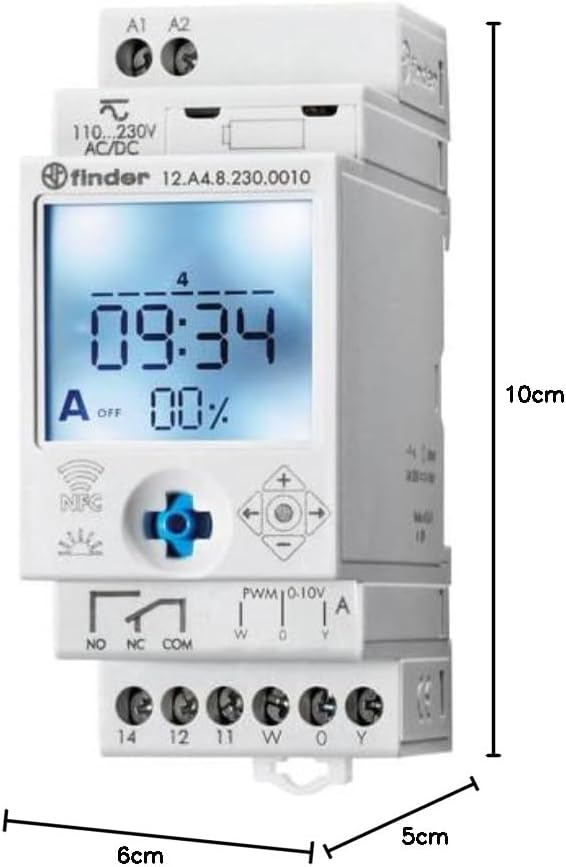
Figure 3: Dimensions of the Finder 12.A4.8.230.0010 Time Clock, showing approximate measurements of 10cm height, 6cm width, and 5cm depth.
| ميزة | التفاصيل |
|---|---|
| ماركة | الباحث |
| رقم الموديل | 12.أ4.8.230.0010 |
| الأبعاد (الارتفاع × العرض × العمق) | 10 × 6 × 5 سم |
| وزن | 70 جرام |
| حجم العرضtage | 110-230 فولت تيار متردد/مستمر |
| جهة اتصال الإخراج | 1 changeover contact, 16 A / 250 V AC (AC1) |
| المخرج التناظري | 0-10 V or PWM |
| مواد الاتصال | أكسيد الكبريت الفضي |
| الأعلى. تدفق الحالية | 120 أ لمدة 5 مللي ثانية |
| Min. Switching Time | 1 دقيقة |
| Max. Switching Power (230 V AC1) | 4000 فولت أمبير |
| مدخلات واجهة الإنسان | Buttons (Joystick) |
| البطاريات المطلوبة | لا |
| متوافق مع | Power supplies/ballasts with 0-10 V or PWM inputs, or Slave dimmers Type 15.11 |
9. الضمان والدعم
للحصول على معلومات الضمان والدعم الفني، يرجى الرجوع إلى موقع Finder الرسمي. webالموقع أو تواصل مع موزعك المحلي. احتفظ بإيصال الشراء كإثبات للشراء.
الشركة المصنعة: الباحث
Product on Amazon.es since: 24 مايو 2021