
مقدمة
Thank you for choosing the PILOT 720p Vehicle Dash Cam. This manual provides detailed instructions for the proper installation, operation, and maintenance of your new dash camera. Please read this manual thoroughly before use to ensure optimal performance and longevity of the device.
This dash cam is designed to record video footage while driving, offering features such as 720p HD resolution, a wide viewing angle, motion detection, and loop recording. It comes with an 8GB Micro SD card and a universal window mount for convenient setup.
محتويات الحزمة
يرجى التأكد من أن جميع العناصر المدرجة أدناه متضمنة في الحزمة الخاصة بك:
- وحدة كاميرا لوحة القيادة
- بطاقة Micro SD بسعة 8 جيجابايت
- جبل شفط جبل
- شاحن سيارة USB
- USB Charger and Sync Cable
- دليل المستخدم (هذا المستند)
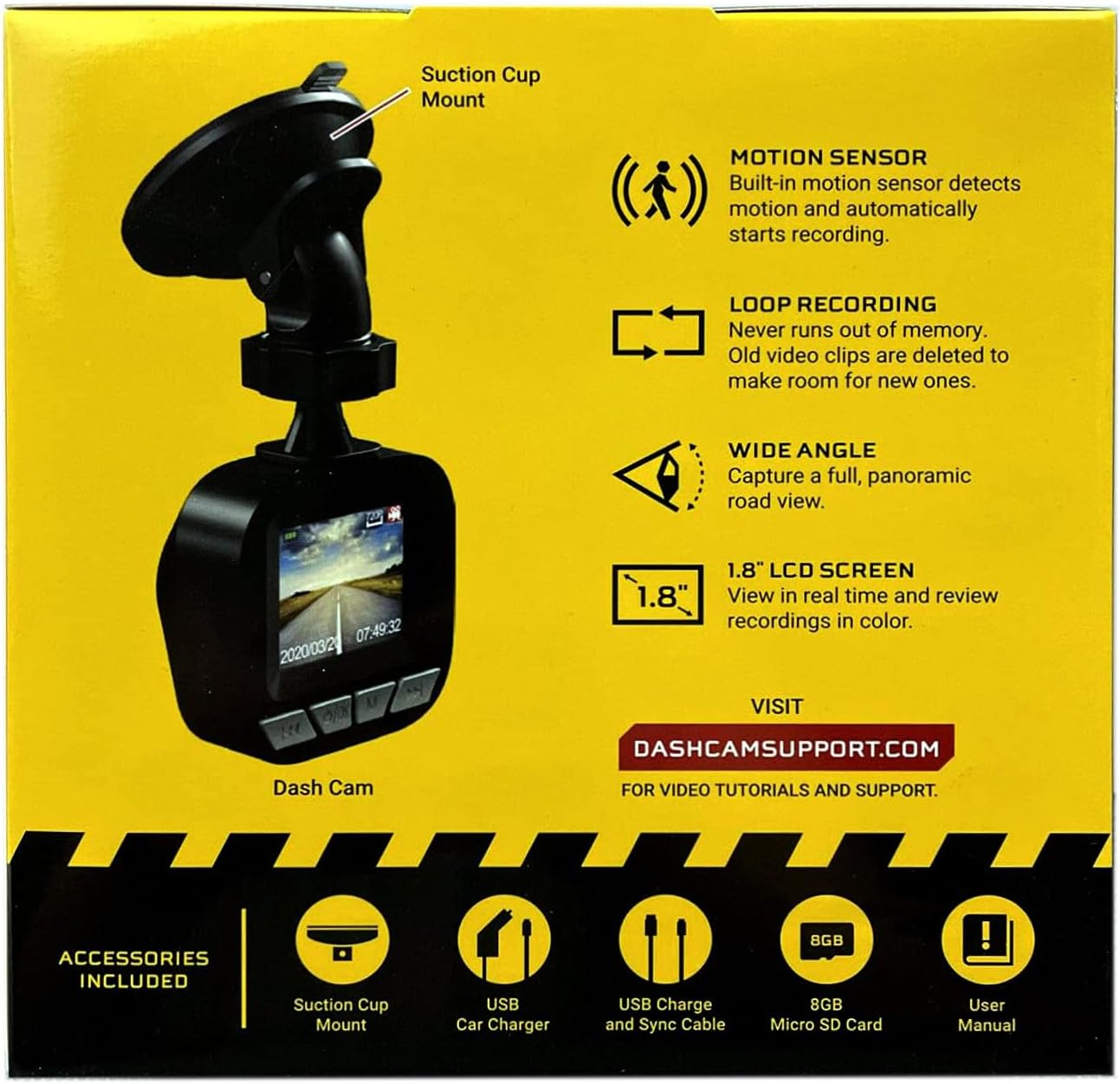
Image: The dash cam unit, suction cup mount, USB car charger, USB charge and sync cable, 8GB Micro SD card, and user manual are shown, along with a summary of key features like motion sensor, loop recording, wide angle, and 1.8" LCD screen.
مميزات المنتج
- دقة: تسجيل فيديو بدقة 720p HD.
- حجم الشاشة: 1.8-inch LCD display for real-time viewالتسجيل والتشغيل.
- Viewزاوية جي: Wide-angle lens to capture a broad road view.
- مستشعر الحركة: Built-in sensor detects motion and automatically initiates recording.
- التسجيل المتكرر: Automatically overwrites older video clips when the memory card is full, ensuring continuous recording.
- ميكروفون: مدمج لتسجيل الصوت.
- تخزين: يدعم بطاقات الذاكرة الصغيرة (Micro SD) بسعة تصل إلى 32 جيجابايت (بطاقة سعة 8 جيجابايت مرفقة).
- قوة: Built-in rechargeable Lithium-ion battery and USB 2.0 port for charging.
دليل الإعداد
1. إدخال بطاقة Micro SD
Locate the Micro SD card slot on the side or bottom of the dash cam. Gently insert the included 8GB Micro SD card into the slot until it clicks into place. Ensure the card is inserted correctly to avoid damage. The dash cam supports cards up to 32GB.
2. تركيب كاميرا لوحة القيادة
- Clean the desired area on your vehicle's windshield where you intend to mount the dash cam. Ensure the surface is dry and free of dust.
- قم بتثبيت قاعدة التثبيت المزودة بكوب شفط على وحدة كاميرا لوحة القيادة.
- Press the suction cup firmly against the windshield and flip the lever to secure it in place.
- اضبط زاوية كاميرا لوحة القيادة لضمان وضوح الصورة view of the road ahead, avoiding any obstructions.

الصورة: لقطة مقربة view of the front of the PILOT dash cam, showing the camera lens and the "PILOT" brand logo. This illustrates the main unit for mounting.
3. توصيل الطاقة
Connect the USB car charger to your vehicle's 12V power outlet (cigarette lighter socket). Then, connect the USB charger and sync cable from the car charger to the USB port on the dash cam. The dash cam will typically power on automatically when the vehicle starts and power is supplied.
تعليمات التشغيل
تشغيل/إيقاف الطاقة
- تلقائي: The dash cam will power on and begin recording automatically when connected to a power source and the vehicle ignition is turned on. It will power off automatically when the vehicle is turned off and power is disconnected.
- دليل: To manually power on or off, press and hold the power button (usually located on the side or bottom of the unit) for a few seconds.
وسائط التسجيل
- تسجيل حلقة مستمرة: The dash cam records video in continuous loops (e.g., 1, 3, or 5-minute segments). When the Micro SD card is full, the oldest unlocked files will be overwritten by new recordings. This ensures you always have the most recent footage.
- تسجيل كشف الحركة: When enabled in the settings, the dash cam will automatically start recording if it detects motion in front of the camera while the vehicle is parked and the dash cam is powered on. This feature is useful for monitoring your vehicle when stationary.
Viewجي التسجيلات
The 1.8-inch LCD screen allows you to view يعيش فوtagه وإعادةview recorded videos directly on the device. Use the navigation buttons (typically labeled 'Menu', 'Up', 'Down', 'OK') to browse through the menu options and playback recorded files. Refer to the on-screen interface for specific navigation prompts.
التاريخ والوقتamp
Ensure the date and time are set correctly in the dash cam's settings menu. This is crucial for accurate record-keeping of video footage.
صيانة
- تنظيف العدسة: Regularly clean the camera lens with a soft, lint-free cloth to ensure clear video quality. Avoid abrasive materials or harsh chemicals.
- إدارة بطاقة SD: It is recommended to format the Micro SD card periodically (e.g., once a month) within the dash cam's settings menu. This helps maintain card performance and prevents data corruption. Back up any important footagقبل التنسيق.
- العناية بالبطارية: The built-in Lithium-ion battery is primarily for emergency recording and saving settings. For continuous operation, keep the dash cam connected to the vehicle's power supply. Avoid exposing the device to extreme temperatures for extended periods.
- تحديثات البرامج الثابتة: Check the manufacturer's support webموقع (DASHCAMSUPPORT.COM) periodically for any available firmware updates to improve performance and add new features.
استكشاف الأخطاء وإصلاحها
| مشكلة | الحل المحتمل |
|---|---|
| كاميرا لوحة القيادة لا تعمل. |
|
| Dash cam turns off frequently during driving. |
|
| فيديو فوtagهو غير واضح أو ضبابي. |
|
| Dash cam is not recording. |
|
تحديد
| ميزة | التفاصيل |
|---|---|
| دقة | 720 بكسل عالية الدقة |
| حجم الشاشة | 1.8 بوصة |
| Viewزاوية جي | Wide Angle (135 Degrees Field Of View) |
| مستشعر الحركة | مدمج |
| التسجيل المتكرر | مدمج |
| ميكروفون | مدمج |
| منفذ يو اس بي | يو اس بي 2.0 |
| بطارية | بطارية ليثيوم أيون مدمجة قابلة لإعادة الشحن |
| دعم بطاقة الذاكرة | Micro SD up to 32GB (8GB included) |
| وزن العنصر | 8 أونصات |
| تكنولوجيا الاتصال | USB |
| نوع التركيب | جبل النافذة |
يدعم
For additional assistance, video tutorials, or further support, please visit the official support webموقع:
Please have your product model information ready when contacting support.