
1. المقدمة
Thank you for choosing the PROXTEND X502 Full HD Webcam. This manual provides detailed instructions to help you set up, operate, and maintain your webcam for optimal performance. The X502 is designed to deliver clear 1080p video at 30 frames per second, featuring an omni-directional microphone and automatic low light correction for various lighting conditions.
2. محتويات العبوة
يرجى التأكد من وجود جميع العناصر في الحزمة الخاصة بك:
- كاميرا PROXTEND X502 بدقة Full HD Webcam (PX-CAM007)
- Integrated Universal Mounting Clip
- دليل المستخدم (هذا المستند)
3. الإعداد
Follow these steps to set up your PROXTEND X502 Webكام:
- تركيب Webكام:
ال webcam features an integrated universal mounting clip. You can place the webcam on top of your computer monitor, laptop screen, or a flat surface. Adjust the clip to securely hold the webcam in position. The webcam also supports mini tripod mounting (tripod not included).
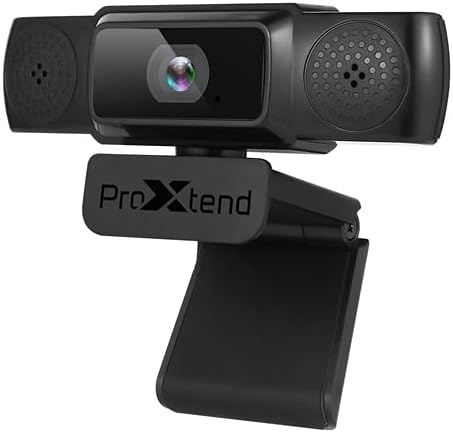
Image: The PROXTEND X502 Full HD Webcam shown with its universal mounting clip, suitable for monitors or flat surfaces.
- الاتصال بالكمبيوتر الخاص بك:
قم بتوصيل كابل USB من webقم بتوصيل الكاميرا بمنفذ USB متاح في جهاز الكمبيوتر الخاص بك. webcam is plug-and-play, meaning your operating system should automatically detect and install the necessary drivers. No additional software installation is typically required.
- Driver Installation Verification:
After connecting, allow a few moments for your computer to recognize the device. You can verify successful installation in your operating system's Device Manager (Windows) or System Information (macOS) under 'Cameras' or 'Imaging Devices'.
4. تعليمات التشغيل
بمجرد webcam is set up, you can begin using it with various applications:
- اختيار Webكام:
Open your preferred video conferencing, streaming, or recording application (e.g., Zoom, Microsoft Teams, Skype, OBS Studio). Navigate to the application's video and audio settings. Select "PROXTEND X502" as your camera and microphone input device.

الصورة: الجبهة view of the PROXTEND X502 Full HD Webcam, highlighting the lens and integrated microphones.
- جودة الفيديو:
ال webcam automatically adjusts for optimal image quality, including auto-focus and auto low light correction. Ensure adequate lighting for the best video performance. The 1920x1080p resolution at 30fps provides clear and smooth video.
- جودة الصوت:
The integrated omni-directional microphone captures sound from all directions. Position yourself appropriately to ensure your voice is clearly picked up. Most applications allow you to adjust microphone input levels in their audio settings.
5. المميزات
Key features of the PROXTEND X502 Full HD Webcam include:
- مستشعر صور CMOS مقاس 1 / 2.7 بوصة
- 2 ميجا بكسل
- Resolution: 1920x1080 at 30 frames per second
- ميكروفون متعدد الاتجاهات
- مشبك تثبيت عالمي
- Mini Tripod Support
- التصحيح التلقائي للضوء المنخفض
6. المواصفات
Detailed technical specifications for the PROXTEND X502 Full HD Webكام:

Image: A visual representation of the PROXTEND X502 Full HD Webcam's key features and technical specifications.
| ميزة | مواصفة |
|---|---|
| مستشعر الصورة | 1/2.7" CMOS Image Sensor |
| ميغا بكسل | 2 ميجا بكسل |
| اقصي دقة | 1920×1080 |
| دقة الفيديو | 1920×1080 |
| ماكس FPS | 30 إطارًا في الثانية |
| تنسيق فك تشفير الفيديو | H.264 / MJPG |
| وضع التعرض | آلي |
| توازن اللون الأبيض | آلي |
| يكسب | آلي |
| تعويض الإضاءة المنخفضة | آلي |
| Viewزاوية جي | 77° |
| المسافة البؤرية | 10 سم إلى ما لا نهاية |
| نوع التركيز | آلي |
| ميكروفون | متعددة الاتجاهات |
| صوت Sampمعدل لينغ | 1 قناة 16 بت 16 كيلو 32 كيلو 44.1 كيلو 48 كيلو |
| تنسيق الصوت | PCM ، متوافق مع UAC 1.0 |
| الواجهة | يو اس بي 2.0 |
| طول الكابل | 1.5 متر |
| نظام التشغيل المتوافق | Windows XP, Windows 7 (32bit/64bit), Windows 8, Windows 10, Android V5.0 or higher OS, MAC OS 10.6 or higher |
| أبعاد المنتج | 12.7 × 7.62 × 5.08 سم |
| وزن المنتج | 453.59 جرام |
7. استكشاف الأخطاء وإصلاحها
If you encounter issues with your PROXTEND X502 Webجرب الحلول التالية يا كام:
- لا يوجد صورة/فيديو:
- تأكد من توصيل كابل USB بإحكام بكل من webالكاميرا وجهاز الكمبيوتر الخاص بك.
- جرب منفذ USB مختلفًا على جهاز الكمبيوتر الخاص بك.
- أعد تشغيل الكمبيوتر الخاص بك.
- Check your application's settings to ensure the PROXTEND X502 is selected as the video input.
- Verify that no other application is currently using the webكام.
- لا يوجد صوت/الميكروفون لا يعمل:
- Ensure the PROXTEND X502 is selected as the microphone input in your application's audio settings.
- Check your computer's sound settings to ensure the microphone is enabled and not muted.
- Adjust the microphone input level in your system or application settings.
- جودة الفيديو رديئة:
- Ensure sufficient lighting in your environment.
- تنظيف webcam lens gently with a soft, lint-free cloth.
- Check your internet connection speed if streaming, as bandwidth can affect video quality.
8. الصيانة
لضمان طول العمر والأداء الأمثل لجهازك webكام:
- تنظيف: امسح برفق webcam lens with a soft, dry, lint-free cloth. Avoid using harsh chemicals or abrasive materials.
- تخزين: عندما لا تكون قيد الاستخدام ، قم بتخزين ملف webضع الكاميرا في مكان نظيف وجاف بعيدًا عن درجات الحرارة القصوى وأشعة الشمس المباشرة.
- التعامل: تجنب إسقاط webالكاميرا أو تعريضها لصدمات قوية.
9. الضمان والدعم
The PROXTEND X502 Full HD Webتأتي الكاميرا مع ضمان لمدة 7 سنوات, ensuring peace of mind regarding your purchase. For warranty claims, technical support, or any inquiries not covered in this manual, please refer to the contact information provided with your product packaging or visit the official PROXTEND webموقع.
10. معلومات الامتثال
This device complies with relevant regulatory standards for electronic equipment. For detailed compliance information, please refer to the product packaging or the official PROXTEND webموقع.