
Saooer BLUE 20A
Saooer 20A Solar Charge Controller User Manual
Model: BLUE 20A
مقدمة
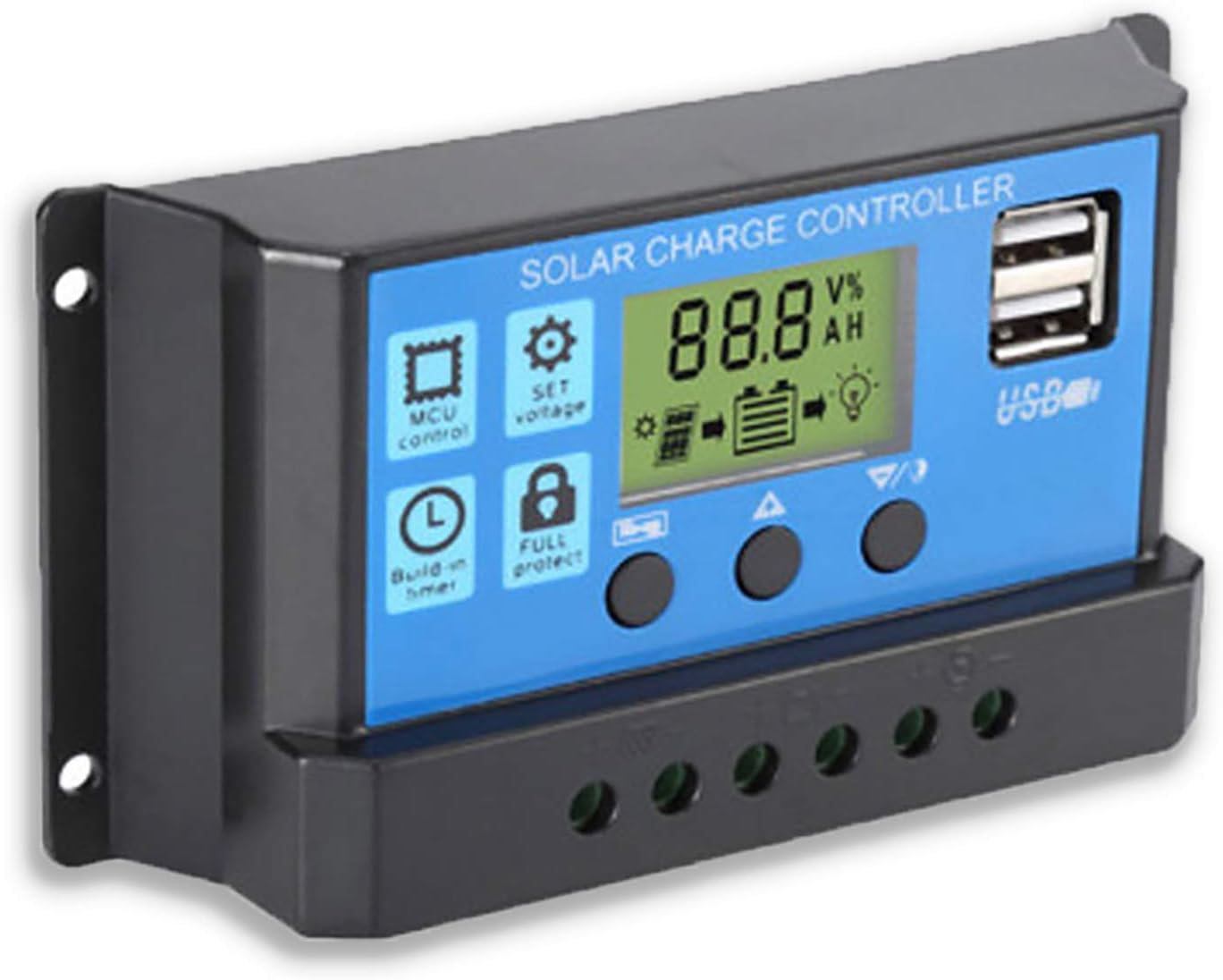
This manual provides essential information for the safe and efficient operation of your Saooer 20A Solar Charge Controller. This intelligent regulator is designed to manage the working of solar panels and batteries in a solar system, featuring dual USB ports for mobile device charging. It is compatible with 12V and 24V systems and includes multiple protection functions to ensure system efficiency and prolong battery lifespan.

الشكل 1: الجبهة view of the Saooer 20A Solar Charge Controller.
تعليمات السلامة
- Ensure all connections are correct before powering on the controller. Incorrect wiring can damage the device or connected components.
- The controller is designed for indoor use or in a protected environment. Avoid exposure to direct sunlight, high temperatures, or moisture.
- لا تحاول تفكيك أو إصلاح وحدة التحكم بنفسك. استعن بفنيين مؤهلين للصيانة.
- يحفظ بعيدًا عن متناول الأطفال.
- This controller is only suitable for lead-acid batteries: OPEN, AGM, GEL. Do not use with other battery types like Lithium-ion or LiFePO4, as this may cause damage or safety hazards.
- Always connect the battery first, then the solar panel, and finally the load. When disconnecting, reverse the order: disconnect the load, then the solar panel, and finally the battery.
مميزات المنتج
- نظام التشغيل الآليtagتحديد الهوية: Automatically detects 12V/24V system voltage.
- الشحن بتقنية PWM: Efficient Pulse Width Modulation charging mode.
- منافذ USB المزدوجة: Provides 5V/2A output for charging mobile devices.
- شاشة LCD: Clear display of status and data, allowing for convenient mode switching and parameter configuration.
- وظائف حماية متعددة: Includes short-circuit protection, open-circuit protection, reverse protection, and over-load protection.
- المعلمات القابلة للتعديل: User-adjustable charge and discharge parameters.
- تعويض درجة الحرارة: تعويض تلقائي لدرجة الحرارة من أجل شحن مثالي.
الإعداد والتثبيت
Follow these steps carefully to install your solar charge controller. Incorrect installation can lead to damage or malfunction.
- تحضير الأسلاك: Ensure all wires are properly stripped and have appropriate connectors if necessary. Use wires of sufficient gauge for your system's current.
- قم بتوصيل البطارية: Connect the battery to the charge regulator first. Observe correct polarity (+ to + and - to -). The controller will automatically recognize the battery voltagهـ (12 فولت أو 24 فولت).
الشكل 2: الجانب view showing the connection terminals for battery, solar panel, and load.
- ربط اللوحة الشمسية: Connect the solar panel to the solar charge controller. Ensure correct polarity.
- توصيل الحمل: Connect the consumer or load to the charge controller regulator. Ensure correct polarity.
ملاحظة هامة: Always connect the battery first, then the solar panel, and finally the load. When disconnecting the controller, please remove the solar panel, then the load, and finally the battery. This sequence helps the controller recognize the battery voltage correctly and prevents damage.
تعليمات التشغيل
شاشة LCD وأزرار

الشكل 3: بزاوية view showing the LCD display and control buttons.
The controller features an LCD display and three buttons for operation:
- زر القائمة: Used to cycle through display modes and enter parameter setting mode.
- زر لأعلى: Used to increase values or navigate upwards in menus.
- زر لأسفل: Used to decrease values or navigate downwards in menus.
أوضاع العرض
Press the Menu button to cycle through the following display modes:
- حجم البطاريةtagه (الخامس)
- حجم لوحة الطاقة الشمسيةtagه (الخامس)
- تيار الحمل (أمبير)
- Battery Temperature (°C)
- تيار الشحن (أمبير)
- تيار التفريغ (A)
- Load Working Mode (24H, 0-23H, 0H)
إعدادات المعلمة
To enter parameter setting mode, press and hold the Menu button for 5 seconds. Use the Up and Down buttons to adjust values, and the Menu button to confirm and move to the next parameter. Press and hold Menu again to exit setting mode.
| المعلمة | وصف | Default (12V) | Range (12V) |
|---|---|---|---|
| ب01/ب02/ب03 | Battery Type Selection (B01=Lead-acid, B02=Lithium Ion, B03=LiFePO4) | ب01 | غير متاح |
| Charge Off Voltage | المجلدtage at which charging stops | 14.4 فولت | 13.0 فولت - 15.0 فولت |
| حجم إعادة توصيل التفريغtage | المجلدtage at which load reconnects after low voltagقطع البريد | 12.6 فولت | 11.0 فولت - 13.5 فولت |
| حجم إيقاف التفريغtage | المجلدtage at which load disconnects to protect battery | 10.7 فولت | 9.0 فولت - 11.5 فولت |
| Load Working Time | Timer for load output (24H, 0-23H, 0H) | 24 ساعة | غير متاح |
Note: For 24V systems, multiply the 12V values by two.
صيانة
- التفتيش الدوري: قم بإجراء فحص دوري لجميع توصيلات الأسلاك للتأكد من إحكامها والتآكل.
- نظافة: حافظ على وحدة التحكم نظيفة وخالية من الغبار. استخدم قطعة قماش جافة للتنظيف.
- تهوية: تأكد من وجود تهوية كافية حول وحدة التحكم لمنع ارتفاع درجة الحرارة.
- صحة البطارية: مراقبة حجم البطاريةtage and health regularly. Replace batteries as needed.
استكشاف الأخطاء وإصلاحها
| مشكلة | السبب المحتمل | حل |
|---|---|---|
| وحدة التحكم لا تعمل / شاشة LCD فارغة | البطارية غير موصولة أو قطبيتها معكوسة؛ حجم البطاريةtagهـ منخفضة جدًا. | Check battery connections and polarity. Ensure battery has sufficient charge. |
| لوحة الطاقة الشمسية لا تشحن البطارية | Solar panel not connected or reverse polarity; Insufficient sunlight; Damaged solar panel. | Check solar panel connections and polarity. Ensure panel is in direct sunlight. Test solar panel output. |
| التحميل لا يعمل | الحمل غير موصول أو قطبيته معكوسة؛ جهد البطاريةtage too low (low voltage disconnect); Overload protection activated. | Check load connections and polarity. Charge battery. Reduce load or check for short circuit. |
| منافذ USB لا تشحن | حجم البطاريةtage too low; Device not compatible; Faulty USB cable. | Ensure battery is charged. Try a different device or cable. |
| Controller gets hot | Overload; Poor ventilation. | Reduce load. Ensure controller has adequate airflow and is not in an enclosed space. |
تحديد
| ميزة | التفاصيل |
|---|---|
| نموذج | أزرق 20أ |
| حجم النظامtage | 12V / 24V تلقائي |
| ماكس المسؤول / التفريغ الحالي | 20 أمبير |
| مخرج يو اس بي | Dual USB, 5V/2A (Max) |
| توافق نوع البطارية | Lead-acid (OPEN, AGM, GEL) |
| أبعاد المنتج | 5.12 × 2.76 × 1.5 بوصة (133 مم × 70 مم × 38 مم تقريبًا) |
| وزن العنصر | 5 أونصات |
| عرض | شاشة الكريستال السائل |
| درجة حرارة التشغيل | من -35 درجة مئوية إلى +60 درجة مئوية |

Figure 4: Product dimensions of the solar charge controller.
الضمان والدعم
For warranty information or technical support, please contact the manufacturer, Saooer, through their official channels. Refer to your purchase documentation for specific warranty terms and contact details.
الشركة المصنعة: Saooer
ASIN: B095764VB7
رمز المنتج العالمي: 605832982977
يمكنك زيارة Saooer Store on Amazon لمزيد من المعلومات أو للاتصال بالدعم.
Ask a question about this manual
Ask about setup, troubleshooting, compatibility, parts, safety, or missing instructions. Manuals+ will review the question and use this page’s manual context to help answer it.