
1. المقدمة
The ICOM IC-M94DE is a state-of-the-art floating VHF marine transceiver, designed for reliable communication and enhanced safety at sea. It is the world's first handheld VHF radio to integrate Digital Selective Calling (DSC), Automatic Identification System (AIS) receiver, and Global Navigation Satellite System (GNSS) capabilities. This lightweight yet highly durable device offers versatile, innovative, and high-performance features essential for any marine environment.
المميزات الرئيسية:
- Integrated AIS Receiver and DSC Functionality for enhanced safety.
- 6W RF Output Power providing extended communication range.
- 10 Hours Operating Time with the supplied BP-306 Li-Ion battery.
- 1500 mW Audio Output for clear sound in noisy marine environments.
- Navigation Function guiding you to specified waypoints.
- Float'n Flash and MOB Auto Set functions for easy recovery and emergency signaling if dropped in water.
- Integrated GPS Receiver for accurate positioning.
- Active Noise Cancellation Technology for improved audio clarity.
- IPX7 Waterproof Rating (1 meter depth for 30 minutes).
- Dualwatch and Tri-watch Functions for monitoring multiple channels.
- AquaQuake Draining Function to clear water from the speaker.
2. محتويات العبوة
Please ensure all the following items are included in your product package:
- BP-306 Li-Ion Battery (7.2V/2400 mAh)
- BC-251 Rapid Desktop Charger
- BC-242 AC Adapter
- FA-SC59V Antenna
- مشبك حزام MB-133
- حزام المعصم
- دليل المستخدم
3. انتهى المنتجview
The ICOM IC-M94DE is designed for ease of use and durability in marine conditions. Familiarize yourself with the radio's physical components and controls.

الشكل 3.1: الجبهة view of the IC-M94DE radio, highlighting its compact design, clear LCD screen, and intuitive button layout. The antenna is visible at the top.

الشكل 3.2: الجزء الخلفي view of the IC-M94DE, featuring the prominent red DISTRESS button, crucial for emergency situations. This button is protected to prevent accidental activation.

الشكل 3.3: تفصيلي view of the radio's display, showing channel 16, which is the international distress, safety, and calling frequency.
4. الإعداد
4.1 تركيب البطارية
- تأكد من إيقاف تشغيل الراديو.
- حدد مكان غطاء حجرة البطارية على الجزء الخلفي من الراديو.
- Unlatch or unscrew the cover as indicated by the markings.
- Insert the BP-306 Li-Ion battery, ensuring the contacts align correctly.
- Securely close the battery compartment cover, ensuring it is watertight.
4.2 شحن البطارية
- Connect the BC-242 AC adapter to a power outlet.
- Plug the AC adapter into the BC-251 rapid desktop charger.
- Place the IC-M94DE radio into the BC-251 charger cradle. Ensure the charging contacts on the radio align with those in the cradle.
- The charging indicator on the charger will illuminate, typically red during charging and green when fully charged.
- تستغرق عملية الشحن الكامل عادةً عدة ساعات. تجنب شحن البطارية لفترة أطول من اللازم.
4.3 ملحق الهوائي
- Carefully screw the FA-SC59V antenna onto the antenna connector at the top of the radio.
- Tighten it securely by hand, but do not overtighten.
4.4 التشغيل المبدئي
- اضغط مع الاستمرار على زر الطاقة (عادةً ما يكون مميزًا برمز الطاقة) حتى تضيء الشاشة.
- The radio will perform a self-test and display the current channel.
- اضبط مقبض الصوت على مستوى استماع مريح.
5. تعليمات التشغيل
5.1 التشغيل الأساسي
- تشغيل/إيقاف التشغيل: اضغط مع الاستمرار على زر الطاقة.
- ضبط مستوى الصوت: أدر مقبض الصوت باتجاه عقارب الساعة لزيادة الصوت، وعكس اتجاه عقارب الساعة لخفضه.
- ضبط الإسكات: Use the dedicated squelch button or menu option to adjust the receiver sensitivity and eliminate background noise.
- اختيار القناة: Use the UP/DOWN arrow buttons to change channels. Press the '16' button for instant access to Channel 16 (distress and calling).
- الإرسال (PTT): اضغط مع الاستمرار على زر التحدث (PTT) الموجود على جانب جهاز الراديو للإرسال. حرر الزر للاستقبال.
5.2 الاتصال الانتقائي الرقمي (DSC)
The IC-M94DE features integrated DSC for automated distress and safety calls.
- Distress Call: In an emergency, lift the protective cover on the back of the radio and press the red ضائقة button for several seconds. This will transmit a distress alert with your vessel's position.
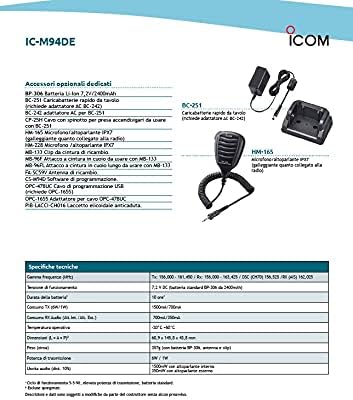
Figure 5.1: This screen indicates an active distress call, showing the radio is waiting for acknowledgment and the time until the next retransmission. It also provides options to cancel, resend, or pause the distress signal.
- Individual/Group Calls: Use the menu to initiate individual or group DSC calls to other vessels with known MMSI numbers.
- Receiving DSC Calls: The radio will alert you to incoming DSC calls. Follow the on-screen prompts to respond.
5.3 Automatic Identification System (AIS)
The integrated AIS receiver displays real-time vessel traffic information on the screen.
- Viewing AIS Targets: Access the AIS display mode through the menu. The screen will show nearby vessels as icons, along with their range and bearing.

Figure 5.2: The radio's display showing nearby AIS targets, represented by triangles, relative to the user's vessel (center). The range is set to 1.5 nautical miles, with options to adjust range (RNG) and target (TGT) views.

الشكل 5.3: آخر view of the AIS display, this time with a 3 nautical mile range, illustrating how the radio visualizes surrounding vessel traffic for enhanced situational awareness.
- AIS Target Call: Select an AIS target on the display to initiate a direct DSC individual call to that vessel.
5.4 GNSS (GPS Receiver)
The integrated GNSS receiver provides accurate position information and navigation capabilities.
- وظيفة التنقل: Use the navigation menu to set a waypoint and receive guidance to that location.
- Waypoint Storage: The radio allows you to store up to 50 favorite points or fishing destinations as waypoints.
5.5 Float'n Flash and MOB Auto Set
If the IC-M94DE is accidentally dropped into water, it will float, and its LCD screen, keys, and the distress button on the rear panel will flash, making it easier to locate and retrieve. If the distress button is pressed while the Float'n Flash function is active, it will automatically transmit a Man Overboard (MOB) distress signal.
5.6 AquaQuake Draining Function
This function helps to clear water from the speaker grille, preventing audio degradation after the radio has been exposed to water. Activate it via the menu or a dedicated button if available.
5.7 إلغاء الضوضاء النشط
The built-in active noise cancellation technology reduces background noise in both transmit and receive audio, ensuring clearer communication even in loud marine environments.
6. الصيانة
- تنظيف: امسح الراديو بقطعة ناعمة ، دamp cloth. Do not use abrasive cleaners or solvents. For saltwater exposure, rinse thoroughly with fresh water and dry completely.
- العناية بالبطارية: To maximize battery life, avoid fully discharging the battery frequently. Store the battery in a cool, dry place when not in use for extended periods.
- تخزين: Store the radio in a dry, temperate environment away from direct sunlight and extreme temperatures. Ensure the battery is partially charged (around 50%) for long-term storage.
7. استكشاف الأخطاء وإصلاحها
If you encounter issues with your IC-M94DE, refer to the following common problems and solutions:
| مشكلة | السبب المحتمل | حل |
|---|---|---|
| الراديو لا يعمل | بطارية منخفضة أو ميتة؛ بطارية مثبتة بشكل غير صحيح. | قم بشحن البطارية، وتأكد من تركيب البطارية بشكل صحيح. |
| No audio or weak audio | Volume too low; squelch set too high; water in speaker. | Increase volume; adjust squelch; use AquaQuake function. |
| لا يمكن الإرسال أو الاستقبال | Incorrect channel; antenna not attached; out of range. | Verify channel; attach antenna securely; move closer to other stations. |
| GPS/AIS not working | Poor satellite signal; unit indoors or obstructed view. | انتقل إلى منطقة مفتوحة ذات سماء صافية view. |
If the problem persists after trying these solutions, please contact ICOM customer support.
8. المواصفات
| ماركة | ICOM |
| رقم الموديل | IC-M94DE |
| لون | أسود |
| عدد القنوات | 121 |
| المميزات الخاصة | DSC and AIS Integration, Float'n Flash, MOB Auto Set, GPS Receiver, Active Noise Cancellation, AquaQuake, IPX7 Waterproof |
| طيف التردد | 156-174 ميجا هرتز |
| مستوى مقاومة الماء | IPX7 (مقاوم للماء) |
| عمر البطارية | 10 Hours (typical) |
| بروتوكول الاتصال | تردد عالي جدا |
| الشركة المصنعة | ايكوم |
9. معلومات الضمان
This ICOM product is covered by a standard manufacturer's warranty. Please refer to the warranty card included in your package or visit the official ICOM website for detailed terms and conditions regarding coverage, duration, and service procedures. Keep your proof of purchase for warranty claims.
10. معلومات الدعم
For technical assistance, product inquiries, or service, please contact ICOM customer support. Contact details can typically be found on the official ICOM webموقع (www.icomjapan.com) or in the documentation provided with your product. Ensure you have your model number (IC-M94DE) and serial number ready when contacting support.
ملاحظة حول مقاطع الفيديو: No relevant official product videos from the seller were available for the ICOM IC-M94DE model in the provided data. Therefore, no videos have been embedded in this manual.