
1. المقدمة
شكرا لك على الشراءasing the QFX PBX-8080 Portable Bluetooth Speaker. This manual provides important information regarding the setup, operation, and maintenance of your device. Please read it thoroughly before use and retain it for future reference.
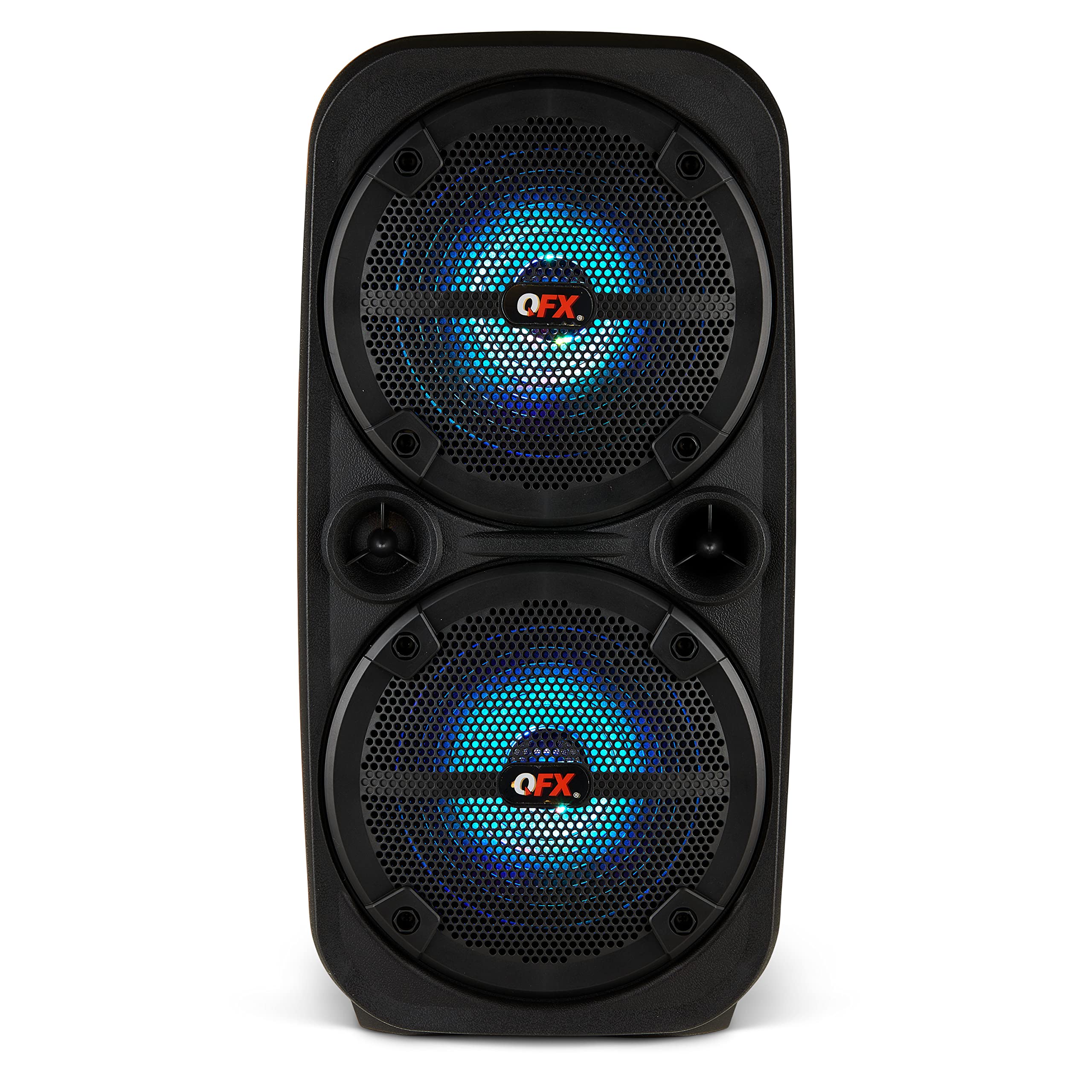
الصورة 1.1: الجبهة view of the QFX PBX-8080 Portable Bluetooth Speaker. This image displays the speaker's robust design, featuring two 8-inch woofers, a central control panel, and illuminated LED party lights, indicating its readiness for use.
2. تعليمات السلامة
- اقرأ التعليمات: اقرأ جميع تعليمات السلامة والتشغيل قبل استخدام المنتج.
- الاحتفاظ بالتعليمات: احتفظ بإرشادات السلامة والتشغيل للرجوع إليها في المستقبل.
- إنتبه للتحذيرات: التزم بجميع التحذيرات الموجودة على المنتج وفي تعليمات التشغيل.
- اتبع التعليمات: اتبع جميع تعليمات التشغيل والاستخدام.
- الماء والرطوبة: لا تستخدم هذا الجهاز بالقرب من الماء.
- تنظيف: نظف فقط بقطعة قماش جافة.
- تهوية: لا تسد أي فتحات تهوية. ثبّت المنتج وفقًا لتعليمات الشركة المصنعة.
- حرارة: لا تقم بالتثبيت بالقرب من أي مصادر للحرارة مثل المشعات أو فتحات التدفئة أو المواقد أو أي أجهزة أخرى (بما في ذلك ampالمُضخِّمات) التي تنتج الحرارة.
- حماية سلك الطاقة: احمِ سلك الطاقة من أن يدوس عليه أحد أو يضغط عليه، وخاصةً عند المقابس ومنافذ التوصيل الكهربائية ونقطة خروجها من الجهاز.
- المرفقات: استخدم فقط المرفقات/الملحقات المحددة من قبل الشركة المصنعة.
- البرق: افصل هذا الجهاز أثناء العواصف الرعدية أو عند عدم استخدامه لفترات طويلة من الزمن.
- الخدمة: أحل جميع أعمال الصيانة إلى موظفي الصيانة المؤهلين. يلزم إجراء الصيانة عند تعرض الجهاز للتلف بأي شكل من الأشكال، مثل تلف سلك مصدر الطاقة أو القابس، أو انسكاب السوائل أو سقوط الأشياء داخل الجهاز، أو تعرض الجهاز للمطر أو الرطوبة، أو عدم تشغيله بشكل طبيعي، أو سقوطه.
3. محتويات العبوة
يرجى تحديد المربع للعناصر التالية:
- QFX PBX-8080 Portable Bluetooth Speaker
- كابل شحن USB
- دليل التعليمات (هذا المستند)
4. انتهى المنتجview
The QFX PBX-8080 is a versatile portable speaker designed for powerful audio output and various connectivity options. It features dual 8-inch woofers, LED party lights, and multiple input methods.
المكونات الرئيسية:
- مكبرات صوت مزدوجة مقاس 8 بوصة: For powerful bass and clear audio.
- لوحة التحكم: Located on the top or front, featuring buttons for power, mode selection, volume, playback control, and LED light control.
- أضواء الحزب LED: Integrated lights that synchronize with music or can be set to various patterns.
- منافذ الإدخال: USB, Aux-in (3.5mm), Microphone input.
- منفذ الشحن: لتوصيل كابل الشحن USB.
- المقابض: لسهولة الحمل.
5. الإعداد
5.1 شحن السماعة
- حدد موقع منفذ الشحن على مكبر الصوت.
- قم بتوصيل كابل الشحن USB المرفق بمنفذ الشحن الخاص بالسماعة.
- قم بتوصيل الطرف الآخر من كابل USB بمحول طاقة USB متوافق (غير مرفق) أو بمنفذ USB مزود بالطاقة.
- The charging indicator light (if present) will illuminate, typically red, during charging.
- Once fully charged, the indicator light may change color (e.g., turn off or turn green). A full charge typically takes several hours.
- The speaker supports "Charge & Play," allowing you to use it while it is charging.
5.2 تشغيل/إيقاف التشغيل
- To power on the speaker, press and hold the Power button (usually marked with ⏻ or "POWER") for a few seconds until you hear an audible prompt or see the display/LEDs light up.
- لإيقاف التشغيل، اضغط مع الاستمرار على زر الطاقة مرة أخرى حتى يتم إيقاف تشغيل مكبر الصوت.
6. تعليمات التشغيل
6.1 اقتران بلوتوث
- Ensure the speaker is powered on and in Bluetooth mode. If not, press the "MODE" button until "Bluetooth" or "BT" is displayed/announced. The Bluetooth indicator will typically flash, indicating it's in pairing mode.
- على جهازك المحمول (الهاتف الذكي، الجهاز اللوحي، وما إلى ذلك)، قم بتمكين البلوتوث وابحث عن الأجهزة المتاحة.
- Select "QFX PBX-8080" from the list of found devices.
- Once paired, the speaker will emit an audible confirmation, and the Bluetooth indicator light will stop flashing and remain solid.
- يمكنك الآن تشغيل الصوت من جهازك عبر مكبر الصوت.
6.2 وظيفة الاستريو اللاسلكي الحقيقي (TWS)
The TWS function allows you to connect two PBX-8080 speakers wirelessly for a stereo sound experience.
- Ensure both PBX-8080 speakers are powered on and in Bluetooth mode, but لا متصل بأي جهاز.
- On one of the speakers, press and hold the "TWS" button (or a similar button, refer to speaker markings) for a few seconds.
- ستحاول السماعات الاتصال ببعضها البعض. بمجرد الاتصال، ستسمع نغمة تأكيد.
- Now, connect your mobile device to one of the paired PBX-8080 speakers via Bluetooth (as described in section 6.1). Both speakers will play audio in stereo.
6.3 مصابيح حفلات LED
The PBX-8080 features dynamic LED party lights. Use the "LIGHT" button (or similar) on the control panel to cycle through different light modes or to turn the lights off.
6.4 إدخال الميكروفون
- Connect a wired microphone (not included) to the "MIC IN" jack on the speaker.
- Adjust the microphone volume using the dedicated "MIC VOL" knob or buttons on the control panel.
- You can use the microphone while playing music from other sources.
6.5 مدخل ايه يو اكس
- Connect an external audio device (e.g., MP3 player, laptop) to the "AUX IN" jack using a 3.5mm audio cable (not included).
- Press the "MODE" button on the speaker until "AUX" mode is selected.
- Control playback and volume from your connected device or the speaker's main volume control.
6.6 مدخل USB
- Insert a USB flash drive (containing MP3 audio files) into the "USB" port.
- The speaker will automatically switch to USB mode and begin playing music from the drive. If not, press the "MODE" button to select "USB" mode.
- Use the playback controls (Play/Pause, Next/Previous Track) on the speaker to manage your music.
6.7 راديو FM
- Press the "MODE" button until "FM" radio mode is selected.
- Press the "PLAY/PAUSE" button (or a dedicated scan button) to automatically scan and save available FM radio stations.
- Use the "NEXT/PREVIOUS" buttons to navigate between saved stations.
- للحصول على استقبال أفضل، تأكد من أن مكبر الصوت موجود في منطقة مفتوحة.
7. الصيانة
- تنظيف: استخدم قطعة قماش ناعمة وجافة لتنظيف الجزء الخارجي من السماعة. لا تستخدم المنظفات الكاشطة أو الشمع أو المذيبات.
- تخزين: عند عدم الاستخدام لفترات طويلة، قم بتخزين السماعة في مكان بارد وجاف، بعيدًا عن أشعة الشمس المباشرة ودرجات الحرارة القصوى.
- العناية بالبطارية: لإطالة عمر البطارية، تجنب تفريغها بالكامل بشكل متكرر. اشحن السماعة بانتظام، حتى في حالة عدم استخدامها، للحفاظ على سلامتها.
- تجنب الماء: This speaker is not waterproof. Keep it away from water and moisture to prevent damage.
8. استكشاف الأخطاء وإصلاحها
| مشكلة | الحل المحتمل |
|---|---|
| لا يتم تشغيل مكبر الصوت. |
|
| لا يوجد صوت من السماعة. |
|
| فشل اقتران البلوتوث. |
|
| استقبال الراديو FM ضعيف. |
|
9. المواصفات
| ميزة | التفاصيل |
|---|---|
| اسم الموديل | مقسم-8080 |
| ماركة | كيو اف اكس |
| نوع السماعة | Woofer (2 x 8-inch) |
| تكنولوجيا الاتصال | بلوتوث |
| المميزات الخاصة | Bluetooth, True Wireless Stereo (TWS), LED Party Lights, Microphone Input, Aux Input, USB Input, FM Radio, Rechargeable, Handles |
| وضع إخراج الصوت | ستيريو |
| مصدر الطاقة | Corded Electric (for charging), Rechargeable Battery |
| وزن العنصر | 5.73 رطل (2.6 كجم) |
| أبعاد الوحدة (WxDxH) | 9.65 × 7.36 × 19.69 بوصة (تقريبًا) |
| رمز المنتج الموحد | 606540039670 |
10. الضمان والدعم
QFX products are designed and manufactured to the highest quality standards. For specific warranty information, please refer to the warranty card included with your purchase or visit the official QFX website. If you encounter any issues or require technical assistance, please contact QFX customer support.
QFX Customer Support:
- للحصول على أحدث معلومات الدعم، يرجى زيارة الموقع الإلكتروني التالي: متجر QFX على أمازون or the official QFX webموقع.