
مقدمة
This instruction manual provides comprehensive guidance for the SOAR NFL True Wireless Earbuds V.4. These earbuds feature Bluetooth 5.0 technology, a built-in microphone, and touch controls, offering 3-4 hours of playtime per charge. The included charging case ensures portability and extended use. Please read this manual thoroughly before using your earbuds to ensure proper operation and longevity.
ماذا يوجد في الصندوق
Upon opening your SOAR NFL True Wireless Earbuds V.4 package, you should find the following items:
- One (1) Pair of True Wireless Earbuds
- علبة شحن واحدة (1)
- كابل شحن Micro-USB واحد (1)

The image above displays the SOAR NFL True Wireless Earbuds V.4 in their retail packaging. The package includes the earbuds, the charging case, and a micro-USB charging cable.
المنتج انتهىview
The SOAR NFL True Wireless Earbuds V.4 consist of two individual earbuds and a portable charging case. Each earbud features a touch-sensitive area for controls and an LED indicator. The charging case has a lid, charging ports for the earbuds, and LED indicators to show its battery status.

This image shows the earbuds outside their charging case, which is open and connected to a charging cable. The charging case has designated slots for each earbud (Left and Right) and LED indicators for charging status.
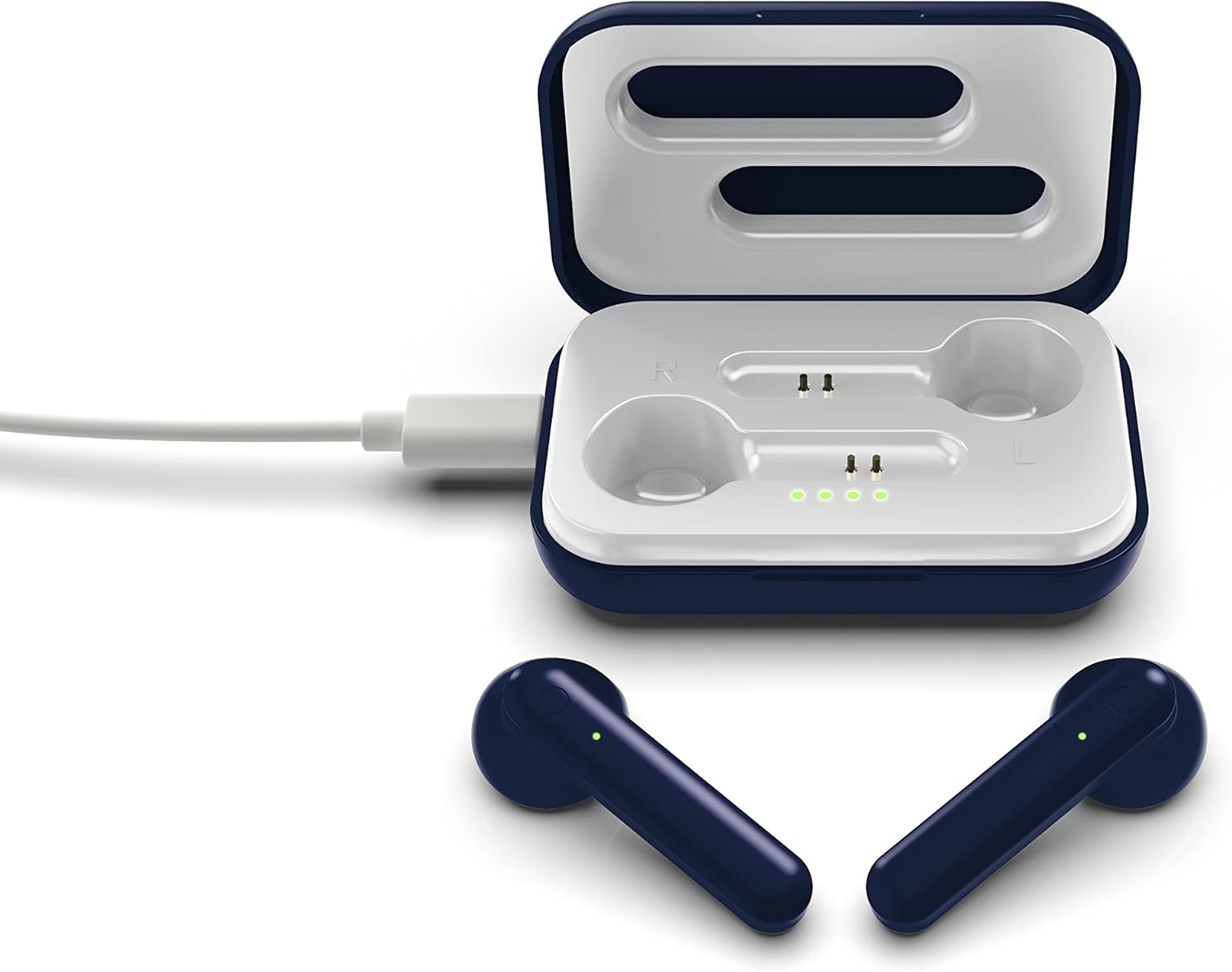
The image above illustrates the earbuds securely placed within their charging case. The illuminated LED lights on the case indicate the charging status of both the case and the earbuds.
يثبت
1. شحن سماعات الأذن والعلبة
قبل الاستخدام الأول، قم بشحن سماعات الأذن وعلبة الشحن بالكامل.
- شحن العلبة: Connect the provided Micro-USB cable to the charging port on the case and the other end to a USB power source (e.g., computer, wall adapter). The LED indicators on the case will illuminate to show charging progress.
- شحن سماعات الأذن: Place the earbuds into their respective slots in the charging case. Ensure they are correctly seated. The earbuds will begin charging automatically from the case's internal battery. The LED indicators on the earbuds will show their charging status.
- توفر عملية الشحن الكاملة ما يقارب 3-4 ساعات من وقت اللعب.
2. اقتران بلوتوث
لتوصيل سماعات الأذن بجهاز:
- تأكد من شحن وسادات الأذن.
- Open the charging case. The earbuds will automatically power on and enter pairing mode. The LED indicator on one earbud will flash, indicating it is ready to pair.
- على جهازك (الهاتف الذكي، الجهاز اللوحي، وما إلى ذلك)، قم بتمكين البلوتوث.
- بحث عن available Bluetooth devices and select "SOAR TWS4" from the list.
- Once connected, the earbud LED indicator will stop flashing. You will hear an audible confirmation.
- سيتم إعادة توصيل سماعات الأذن تلقائيًا بالجهاز المقترن الأخير عند إزالتها من العلبة، إذا تم تمكين البلوتوث على الجهاز.
تعليمات التشغيل
The SOAR NFL True Wireless Earbuds V.4 feature touch controls for easy management of audio and calls.
تشغيل/إيقاف الطاقة
- تشغيل الطاقة: افتح علبة الشحن، أو اضغط مطولاً على منطقة اللمس في كلتا السماعتين لمدة 3 ثوانٍ.
- إيقاف التشغيل: أعد وضع سماعات الأذن في علبة الشحن وأغلق الغطاء، أو اضغط مطولاً على منطقة اللمس في كلتا سماعتي الأذن لمدة 5 ثوانٍ.
تشغيل الموسيقى
- تشغيل/إيقاف مؤقت: ضغطة واحدة على أي سماعة أذن.
- المسار التالي: اضغط مرتين على سماعة الأذن اليمنى.
- المسار السابق: اضغط مرتين على سماعة الأذن اليسرى.
استدعاء إدارة
- الرد/إنهاء المكالمة: اضغط مرة واحدة على سماعة الأذن أثناء مكالمة واردة أو مكالمة نشطة.
- رفض المكالمة: اضغط مطولاً على أي من سماعتي الأذن لمدة ثانيتين أثناء المكالمة الواردة.
مساعد صوتي
- تنشيط مساعد الصوت: اضغط ثلاث مرات على أي سماعة أذن.
صيانة
العناية المناسبة ستطيل عمر سماعات الأذن الخاصة بك.
- تنظيف: استخدم قطعة قماش ناعمة وجافة لتنظيف سماعات الأذن وعلبة الشحن. لا تستخدم مواد كيميائية قاسية أو مواد كاشطة.
- تخزين: عندما لا تكون قيد الاستخدام، قم بتخزين سماعات الأذن في علبة الشحن الخاصة بها لحمايتها والحفاظ عليها مشحونة.
- مقاومة الماء: هذه السماعات غير مقاوم للماء. Avoid exposure to liquids, moisture, and extreme temperatures.
- الشحن: Use only the provided Micro-USB cable or a certified equivalent for charging.
استكشاف الأخطاء وإصلاحها
إذا واجهت مشكلات مع سماعات الأذن الخاصة بك، فراجع الحلول الشائعة التالية:
| مشكلة | حل |
|---|---|
| One earbud is not connecting or producing sound. |
|
| Earbuds are not pairing with my device. |
|
| سماعات الأذن لا تشحن. |
|
تحديد
| ميزة | التفاصيل |
|---|---|
| اسم الموديل | سماعات أذن لاسلكية حقيقية V.4 |
| رقم موديل العنصر | NFL-TWS4-SHKS |
| تكنولوجيا الاتصال | بلوتوث، لاسلكي |
| تكنولوجيا الاتصالات اللاسلكية | بلوتوث 5.0 |
| مدى البلوتوث | حتى 30 قدم (9.14 أمتار) |
| عمر البطارية (وقت التشغيل) | 3-4 ساعات لكل تهمة |
| نوع التحكم | اللمس، التحكم في الوسائط |
| ميزة خاصة | يتضمن ميكروفون |
| وضع الأذن | في الأذن |
| مستوى مقاومة الماء | غير مقاوم للماء |
| مادة | بلاستيك |
| أبعاد المنتج | 1.25 × 4.5 × 6.5 بوصة |
| وزن العنصر | 3.52 أونصات |
| الشركة المصنعة | Prime Brands Group, Inc. |
| رمز المنتج الموحد | 192129070757 |
فيديو المنتج الرسمي
يوفر هذا الفيديو عرضًا مرئيًاview of the SOAR TWS4 True Wireless Earbuds V.4, highlighting key features such as the wireless charging case, touch controls, and Bluetooth 5.0 technology. It demonstrates the product's design and functionality.
الضمان والدعم
Your SOAR NFL True Wireless Earbuds V.4 are covered by a ضمان محدود لمدة عامين. This warranty covers manufacturing defects and issues arising from normal use. It does not cover damage caused by misuse, accidents, unauthorized modifications, or exposure to liquids.
For warranty claims, technical support, or further assistance, please contact the manufacturer, Prime Brands Group, Inc., or visit their official webالموقع. احتفظ بإثبات الشراء للتحقق من الضمان.