
1. المقدمة
Thank you for choosing the LEADZM TMW003 TV Wall Mount. This manual provides essential instructions for the safe and correct installation, operation, and maintenance of your wall mount. Please read this manual thoroughly before installation and retain it for future reference.
This wall mount is designed to securely hold televisions ranging from 32 to 70 inches, supporting a maximum weight of 110 lbs (50 kg). It features a tilt adjustment for optimal viewing angles and is constructed from durable cold-rolled steel.
2. معلومات السلامة
WARNING: Failure to read and follow all instructions may result in personal injury, property damage, or voiding of warranty. If you have any questions, please contact customer service.
- قدرة الوزن: Do not exceed the maximum load capacity of 110 lbs (50 kg). This mount is intended for use only with the maximum weights indicated. Use with products heavier than the maximum weights indicated may result in instability causing possible injury.
- حجم الشاشة: This mount is designed for TVs between 32 and 70 inches. While some larger TVs may fit, ensure they do not exceed the weight limit and VESA compatibility.
- هيكل الجدار: The wall mount must be securely fastened to a solid wall structure (wood studs, concrete, or brick). Do NOT mount on drywall alone. Ensure the wall can support the combined weight of the mount and the TV.
- التثبيت الاحترافي: إذا كنت غير متأكد من عملية التركيب أو مدى ملاءمة الجدار الخاص بك، فاستشر متخصصًا مؤهلًا.
- أطفال: أبعد الأطفال عن منطقة التركيب. قد تشكل الأجزاء الصغيرة خطر الاختناق.
- أدوات: Use appropriate tools for installation. Wear safety glasses and other protective gear as needed.
3. محتويات العبوة
Please verify that all components are present and undamaged before beginning installation. Refer to the image below for a visual representation of the included hardware.

Image: Accessory Information Form and Hardware Kit. This image displays a table listing various screws, anchors, washers, and a spirit level, along with a photograph of these components.
تتضمن الحزمة:
- 1x TV Wall Mount (Main wall plate and TV brackets)
- 1x Standard Hardware Kit (Includes various screws, anchors, washers, and a spirit level. Note: Additional screws may be required for specific TV models. Please verify compatibility before installation.)
4. المواصفات
| ميزة | مواصفة |
|---|---|
| ماركة | ليدزم |
| نموذج | TMW003 |
| نوع التركيب | حامل الحائط |
| Supported Display Size | 32 - 70 بوصة |
| مدى الإمالة | 0 - 15 درجة |
| Max VESA Mounting Pattern | 600 × 400 ملم |
| Distance Between TV and Wall | 70 ملم |
| سعة التحميل | 110 رطل (50 كجم) |
| مادة | Cold Rolled Plate (Alloy Steel) |
| لون | أسود |
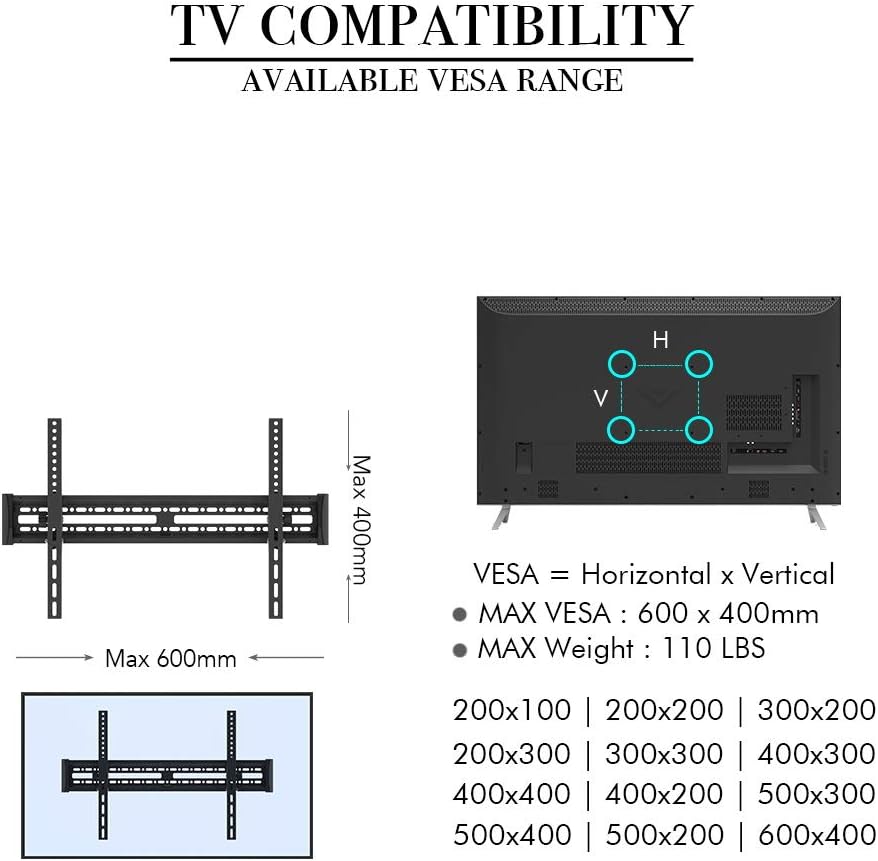
Image: TV Compatibility and VESA Range. This diagram shows the VESA mounting holes on the back of a TV and lists compatible VESA patterns such as 200x100, 200x200, 300x200, 300x300, 400x200, 400x300, 400x400, 500x200, 500x300, and 600x400 mm.
5. الإعداد والتثبيت
5.1 قبل أن تبدأ
- تحقق من نمط VESA الخاص بالتلفزيون: Measure the horizontal and vertical distance between the mounting holes on the back of your TV. Ensure it falls within the 600x400mm maximum VESA pattern.
- تحقق من وزن التلفزيون: Confirm your TV's weight does not exceed 110 lbs (50 kg).
- تحديد نوع الجدار: Determine if your wall is wood stud, concrete, or brick. This will dictate the appropriate mounting hardware and procedure.
5.2 الأدوات المطلوبة (غير متضمنة)
- قلم رصاص
- شريط قياس
- جهاز كشف العوارض الخشبية (للجدران الخشبية)
- Drill with appropriate drill bits (e.g., 10mm for concrete/brick, 5mm for wood studs)
- فيليبس رئيس مفك
- مفتاح ربط (لبراغي التثبيت)
- نظارات السلامة
5.3 Wall Type Compatibility

Image: Compatible Wall Types. This image shows successful mounting on wood studs and brick/concrete walls (requiring anchors), with a clear warning against mounting on drywall alone.
- جدران خشبية ذات دعامات: Locate the center of the wood studs using a stud finder. Ensure the mounting holes align with the center of the studs.
- Concrete/Brick Walls: Use the provided concrete anchors. Drill pilot holes into the solid concrete or brick.
- DO NOT mount on drywall alone. Drywall cannot support the weight of the TV and mount.
5.4 تركيب لوحة الحائط
- Determine the desired height for your TV. Hold the wall plate against the wall and use the included spirit level to ensure it is perfectly horizontal.
- Mark the drilling locations through the holes on the wall plate with a pencil.
- للأعمدة الخشبية: Drill pilot holes (approx. 5mm diameter) into the center of the marked stud locations. Secure the wall plate using the lag bolts (A1) and washers (F1/F2).
- للجدران الخرسانية/الطوبية: Drill pilot holes (approx. 10mm diameter) into the marked locations. Insert the concrete anchors (A2) flush with the wall surface. Secure the wall plate using the lag bolts (A1) and washers (F1/F2).
- تأكد من تثبيت لوحة الحائط بإحكام وأمان على الحائط.
5.5 Attaching Brackets to TV
- ضع جهاز التلفزيون الخاص بك بعناية ووجهه لأسفل على سطح ناعم ونظيف لمنع الخدوش.
- Attach the two vertical TV brackets to the back of your TV, aligning them with the VESA mounting holes.
- Select the appropriate screws (B, C, D, E) and washers (F1, F2, F3) from the hardware kit that fit your TV's mounting holes. Ensure the screws are long enough to securely fasten the brackets but not so long that they damage internal components.
- أحكم ربط المسامير بإحكام ، لكن لا تفرط في إحكام ربطها.
5.6 تركيب التلفزيون على لوحة الحائط
- بمساعدة، ارفع التلفاز بعناية باستخدام الأقواس المرفقة.
- قم بربط حاملات التلفزيون بالحافة العلوية للوحة الحائط.
- Gently lower the TV until the brackets engage with the wall plate.
- Locate the security screws or locking mechanisms on the bottom of the TV brackets. Tighten these screws to secure the TV to the wall plate and prevent accidental dislodging.
- Double-check that the TV is securely mounted and level.
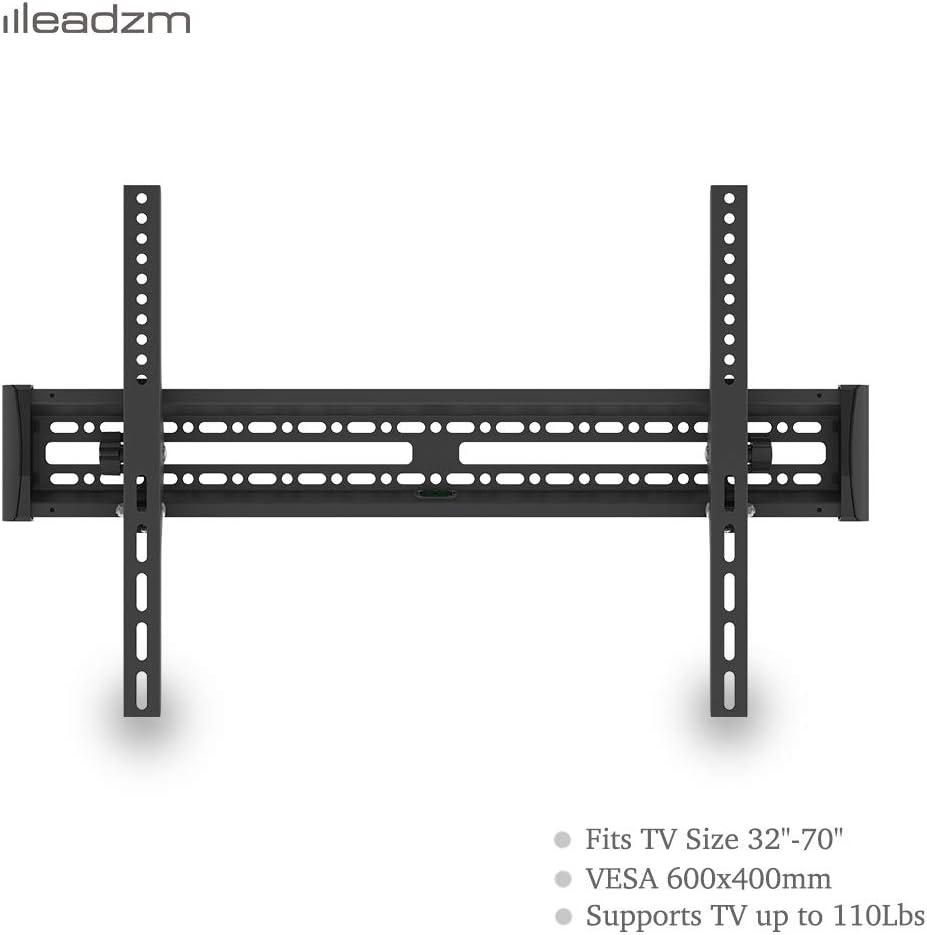
Image: LEADZM TMW003 TV Wall Mount. This image shows the assembled wall mount, consisting of a horizontal wall plate and two vertical brackets that attach to the TV.
6. Operating the Mount (Tilt Adjustment)
The LEADZM TMW003 TV Wall Mount allows for a tilt adjustment of 0 to 15 degrees to achieve your preferred viewزاوية جي.

Image: Tilt Angle Adjustment. This image highlights the tool-free knob used to adjust the TV's vertical tilt up to 15 degrees, also showing the slim design of the mount.
- To adjust the tilt, locate the tool-free knobs on the side of the TV brackets.
- Loosen the knobs slightly.
- Gently tilt the TV to the desired angle (up to 15 degrees downwards).
- Once the desired angle is achieved, tighten the knobs firmly to secure the TV in place.
7. الصيانة
- تنظيف: امسح الحامل بقطعة قماش ناعمة وجافة. تجنب استخدام المنظفات الكاشطة أو المذيبات.
- الفحوصات الدورية: افحص جميع البراغي والصواميل دوريًا للتأكد من إحكامها وثباتها. مع مرور الوقت، قد تؤدي الاهتزازات أو الحركة إلى ارتخاء المثبتات.
- ضرر: If any part of the mount appears damaged or worn, discontinue use and contact customer support for assistance.
8. استكشاف الأخطاء وإصلاحها
- التلفزيون ليس مستويا: Ensure the wall plate was installed perfectly level. If not, you may need to adjust the wall plate's position. Small adjustments can sometimes be made by slightly loosening and re-tightening the TV brackets.
- يبدو التلفزيون غير مستقر: Double-check that all wall plate bolts and TV bracket screws are securely tightened. Ensure the security screws on the TV brackets are engaged. Verify that the wall type is appropriate and the anchors (if used) are properly installed.
- Cannot tilt the TV: Ensure the tilt adjustment knobs are sufficiently loosened before attempting to adjust the angle.
- اجزاء مفقودة: Refer to the 'Package Contents' section. If parts are genuinely missing, contact LEADZM customer support.
9. الضمان والدعم
LEADZM is committed to providing high-quality products. For warranty information or technical support, please contact LEADZM customer service through the retailer where you purchased the product or visit the official LEADZM website. Please have your model number (TMW003) and purchase details ready when contacting support.