
1. المقدمة
شكرا لك على الشراءasing the Trevi CMP 588 DAB Portable Stereo System. This manual provides essential information for the safe and correct operation of your device. Please read it thoroughly before use and retain it for future reference.
The Trevi CMP 588 DAB is a versatile portable stereo system featuring DAB/DAB+ and FM radio with RDS, a CD/MP3 player, USB input, AUX-in, Bluetooth connectivity, and a headphone jack, all designed for an enhanced audio experience.
2. معلومات السلامة
- مصدر الطاقة: استخدم فقط محول الطاقة أو البطاريات المحددة. تأكد من أن مستوى الصوتtage matches the requirements of the unit.
- الماء والرطوبة: لا تعرض الجهاز للمطر أو الرطوبة، ولا تغمره في الماء. تجنب وضع أشياء مملوءة بالسوائل، مثل المزهريات، على الجهاز.
- تهوية: تأكد من التهوية الكافية. لا تسد فتحات التهوية.
- حرارة: احتفظ بالوحدة بعيدًا عن مصادر الحرارة مثل المشعات أو فتحات التدفئة أو المواقد أو الأجهزة الأخرى (بما في ذلك ampالمُضخِّمات) التي تنتج الحرارة.
- تنظيف: افصل الجهاز عن مقبس الكهرباء قبل التنظيف. استخدم قطعة قماش ناعمة وجافة. لا تستخدم المنظفات السائلة أو البخاخات.
- الخدمة: لا تحاول خدمة هذا المنتج بنفسك. قم بإحالة جميع أعمال الصيانة إلى أفراد الخدمة المؤهلين.
- مشغل أقراص ليزرية: لا تنظر مباشرة إلى شعاع الليزر.
3. محتويات العبوة
تأكد من أن جميع العناصر موجودة وفي حالة جيدة:
- Trevi CMP 588 DAB Portable Stereo System
- التيار المتردد كابل
- جهاز التحكم عن بعد
- دليل المستخدم (هذا المستند)
4. مواصفات المنتج
- DAB/DAB+ and FM Radio with RDS
- High Readability Dot Matrix Display
- CD Player (supports CD-DA, MP3)
- USB Input for MP3 Playback
- AUX-in for external audio devices
- اتصال البلوتوث
- مقبس سماعة الرأس
- تصميم محمول مع مقبض حمل
- جهاز التحكم عن بعد متضمن
5. الضوابط والتوصيلات

الشكل 1: الجبهة view of the Trevi CMP 588 DAB, showing speakers, display, and main controls.
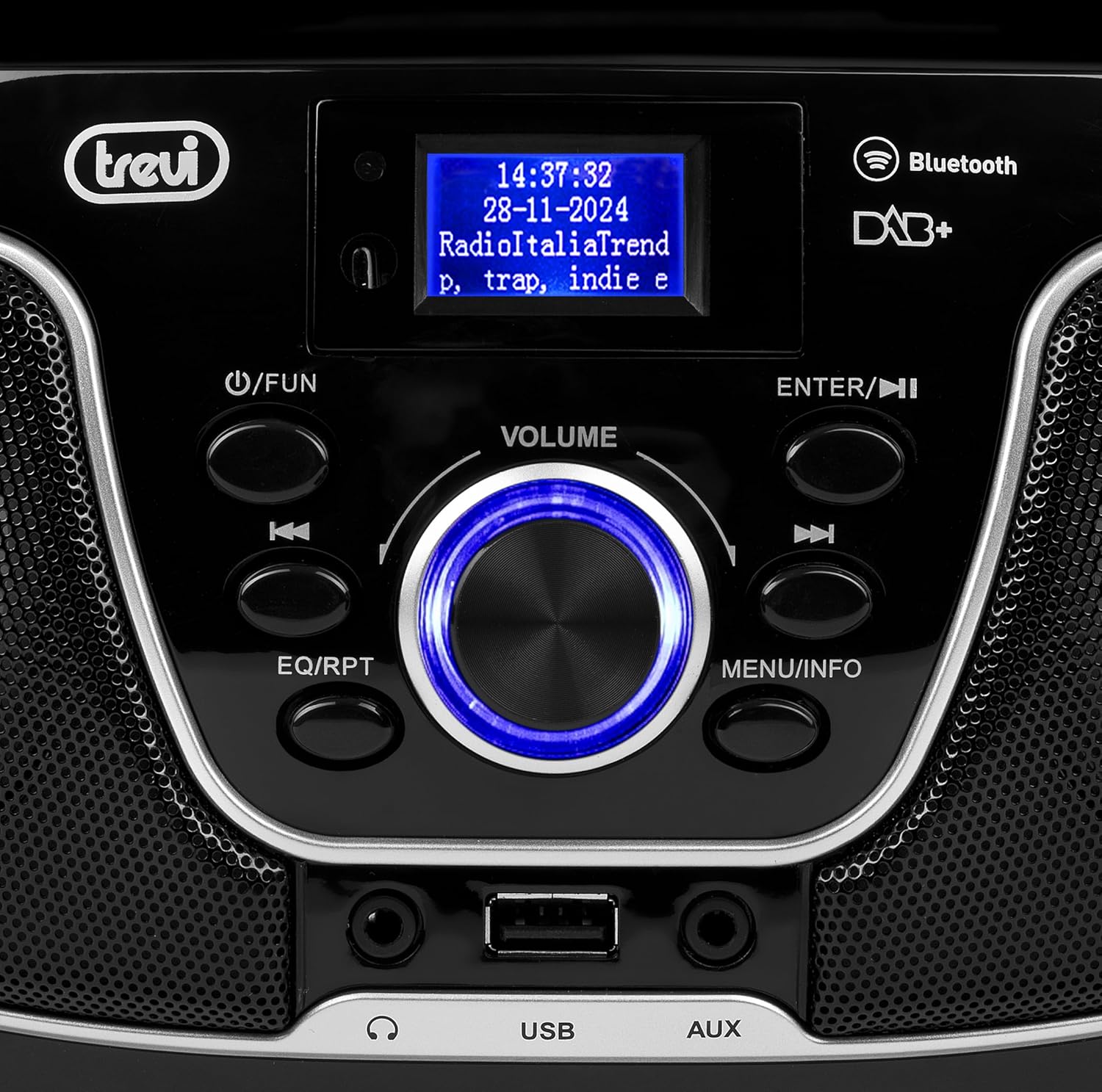
الشكل 2: مفصل view of the control panel, including power, function, volume knob, and navigation buttons.
ضوابط اللوحة الأمامية:
- POWER / FUN button: Press to turn on/off, press to switch functions (CD/USB/DAB/FM/Bluetooth/AUX).
- مقبض الصوت: Rotate to adjust volume. Press to confirm selections.
- ENTER / ►►I button: Confirm selection / Skip to next track/station.
- I▼▼ / EQ/RPT button: Skip to previous track/station / Equalizer settings / Repeat mode.
- MENU / INFO button: Access menu / Display information.
- منفذ USB: Connect USB storage devices for MP3 playback.
- مقبس إدخال الصوت الإضافي (AUX-in Jack): قم بتوصيل أجهزة الصوت الخارجية.
- مقبس سماعة الرأس: قم بتوصيل سماعات الرأس للاستماع الخاص.

الشكل 3: خلفي view of the Trevi CMP 588 DAB, showing the power input and telescopic antenna.
وصلات اللوحة الخلفية:
- مدخلات الطاقة AC: قم بتوصيل كابل طاقة التيار المتردد المرفق.
- هوائي تلسكوبي: قم بتمديده للحصول على أفضل استقبال للراديو.

Figure 4: Remote control for the Trevi CMP 588 DAB, showing various function buttons.
وظائف التحكم عن بعد:
- تعليق: السلطة / قبالة.
- وظيفة: Switch between modes (CD, USB, DAB, FM, Bluetooth, AUX).
- كتم الصوت: كتم الصوت/إلغاء كتم الصوت.
- RPT: كرر وضع التشغيل.
- مسح: Auto scan for radio stations.
- F+/CH+, F-/CH-: Navigate folders/channels.
- EQ: إعدادات المعادل.
- PLAY/PAUSE (►II): تشغيل / إيقاف التشغيل مؤقتًا.
- PREV/TUN- (▼▼): Previous track/tune down.
- NEXT/TUN+ (►►): Next track/tune up.
- توقف (■): أوقف التشغيل.
- MENU: قائمة الوصول.
- معلومات: عرض المعلومات.
- البرنامج: Program tracks/stations.
- حجم+/حجم-: ضبط مستوى الصوت.
6. الإعداد
6.1 توصيل الطاقة
- طاقة التيار المتردد: Connect the supplied AC power cable to the AC power input on the rear of the unit, then plug the other end into a wall outlet.
- تشغيل البطارية (اختياري): For portable use, insert 6 x C-size batteries (not included) into the battery compartment on the bottom of the unit. Ensure correct polarity.
6.2 التشغيل المبدئي
اضغط على POWER / FUN زر على الوحدة أو تعليق button on the remote control to turn on the system. The display will light up.
6.3 Setting Up the Antenna
For optimal radio reception, fully extend the telescopic antenna located at the rear of the unit. Adjust its position for the best signal.
7. تعليمات التشغيل
7.1 تشغيل راديو DAB/DAB+
- اضغط على POWER / FUN button repeatedly until "DAB" mode is selected.
- The unit will automatically scan for available DAB/DAB+ stations on first use. To perform a manual scan, press the قائمة طعام button, navigate to "Full Scan" and press يدخل.
- بمجرد اكتمال المسح، استخدم ▼▼ or ►► buttons to browse through the available stations. Press يدخل لتحديد محطة.
- اضغط على معلومات زر للتنقل بين شاشات عرض المعلومات المختلفة (مثل نوع البرنامج، وقوة الإشارة، والوقت).
تشغيل راديو 7.2 FM
- اضغط على POWER / FUN button repeatedly until "FM" mode is selected.
- To auto-scan and store stations, press the مسح ضوئي button on the remote. The unit will scan and save strong signals.
- لضبط الضبط يدويًا، اضغط مع الاستمرار على ▼▼ or ►► buttons to search for the next available station. Press briefly to fine-tune the frequency.
- The RDS function will display station information (if available).
7.3 تشغيل الأقراص المدمجة/ملفات MP3

الشكل 5: الجزء العلوي view of the Trevi CMP 588 DAB with the CD compartment open, ready for disc insertion.
- افتح غطاء حجرة القرص المضغوط.
- Place a CD (CD-DA or MP3 CD) onto the spindle with the label side facing up.
- أغلق غطاء حجرة القرص المضغوط.
- اضغط على POWER / FUN button repeatedly until "CD" mode is selected.
- The unit will read the disc. Press PLAY/PAUSE (►II) لبدء التشغيل.
- يستخدم ▼▼ or ►► to skip tracks. Press and hold to fast forward/rewind.
- يضعط قف (■) لإيقاف التشغيل.
7.4 تشغيل USB
- أدخل محرك أقراص فلاش USB يحتوي على MP3 files في منفذ USB.
- اضغط على POWER / FUN button repeatedly until "USB" mode is selected.
- ستقوم الوحدة تلقائيًا باكتشاف ملفات MP3 وبدء تشغيلها files.
- يستخدم ▼▼ or ►► لتخطي المسارات.
7.5 الاقتران عبر البلوتوث والتشغيل
- اضغط على POWER / FUN button repeatedly until "Bluetooth" mode is selected. The display will show "BT" or "PAIRING".
- قم بتمكين البلوتوث على جهازك المحمول (الهاتف الذكي، والكمبيوتر اللوحي، وما إلى ذلك).
- بحث عن available devices and select "TREVI CMP 588 DAB" from the list.
- Once paired, you can play audio from your device through the stereo system.
- Use the controls on your mobile device or the stereo system to manage playback.
7.6 تشغيل مدخل AUX
- Connect an external audio device (e.g., MP3 player, smartphone) to the AUX-in jack using a 3.5mm audio cable (not included).
- اضغط على POWER / FUN button repeatedly until "AUX" mode is selected.
- Play audio from your connected device. The volume can be controlled via both the stereo system and the external device.
8. الصيانة
8.1 تنظيف الوحدة
امسح الجزء الخارجي من الجهاز بقطعة قماش ناعمة وجافة. تجنب استخدام المنظفات الكاشطة أو الشمع أو المذيبات لأنها قد تُتلف الطلاء. تأكد من فصل الجهاز عن الكهرباء قبل التنظيف.
8.2 العناية بعدسات الأقراص المدمجة
If the CD player experiences reading errors, the lens may be dirty. Use a commercially available CD lens cleaner to clean the lens. Do not touch the lens with your fingers.
8.3 التخزين
If the unit will not be used for an extended period, remove the batteries (if applicable) and unplug the power cable. Store the unit in a cool, dry place away from direct sunlight and extreme temperatures.
9. استكشاف الأخطاء وإصلاحها
| مشكلة | السبب المحتمل | حل |
|---|---|---|
| لا يوجد طاقة | كابل الطاقة غير موصول؛ البطاريات فارغة أو تم إدخالها بشكل غير صحيح. | Check power cable connection; Replace batteries or ensure correct polarity. |
| لا يوجد صوت | مستوى الصوت منخفض جدًا؛ وظيفة كتم الصوت مُفعّلة؛ تم اختيار مصدر غير صحيح. | Increase volume; Deactivate mute; Select correct function (CD, USB, DAB, FM, BT, AUX). |
| استقبال الراديو ضعيف | الهوائي غير ممتد أو موضوع بشكل غير صحيح؛ منطقة إشارة ضعيفة. | قم بتمديد الهوائي التلسكوبي وضبطه بالكامل؛ وحاول نقل الوحدة إلى مكان مختلف. |
| لا يعمل القرص المضغوط/ذاكرة USB | القرص متسخ/مخدوش؛ غير صحيح file format on USB; USB drive not properly inserted. | Clean or replace disc; Ensure MP3 format for USB; Reinsert USB drive. |
| فشل اقتران البلوتوث | Device too far; Bluetooth not enabled on source device; Unit not in pairing mode. | Move devices closer; Enable Bluetooth on source device; Ensure unit is in Bluetooth mode and searching. |
10. المواصفات
- نموذج: CM 588 DAB
- مصدر الطاقة: AC 230V ~ 50Hz or 6 x C-size batteries (not included)
- استهلاك الطاقة: 15 واط
- نوع السماعة: Stereo (2 speakers)
- الاتصال: Bluetooth, USB, AUX-in
- تنسيقات الصوت المدعومة: CD audio (CD-DA), MP3
- الترددات اللاسلكية: DAB/DAB+, FM with RDS
- الأبعاد (الطول × العرض × الارتفاع): 50 × 50 × 28 سم (تقريبًا)
- وزن: 1.5 كيلوغرام (تقريبي)
- لون: أسود
11. الضمان والدعم
This product is covered by a standard manufacturer's warranty. Please refer to the warranty card included in your package for specific terms and conditions, including the warranty period and coverage details.
For technical support, service, or warranty claims, please contact your retailer or the official Trevi customer service. Contact information can typically be found on the Trevi webالموقع أو في عبوة المنتج.
Please retain your proof of purchase (receipt) for any warranty-related inquiries.