
1. معلومات هامة حول السلامة
Please read this entire manual before assembling or operating the ONETWOFIT Indoor Cycling Bike. Keep this manual for future reference. Failure to follow these instructions may result in injury or damage to the product.
- استشر الطبيب قبل البدء بأي برنامج رياضي.
- تأكد من تشديد جميع الأجزاء بشكل آمن قبل كل استخدام.
- أبقِ الأطفال والحيوانات الأليفة بعيدًا عن الجهاز أثناء التشغيل.
- ضع الدراجة على سطح مستوٍ ومستقر.
- ارتدي ملابس وأحذية رياضية مناسبة.
- The maximum user weight capacity is 300 pounds (136 kg).
- توقف عن ممارسة التمارين الرياضية فورًا إذا شعرت بالإغماء أو الدوار أو الألم.
2. انتهى المنتجview
The ONETWOFIT Indoor Cycling Bike OT319 is designed for home cardio training. It features a robust construction and adjustable components to suit various users.
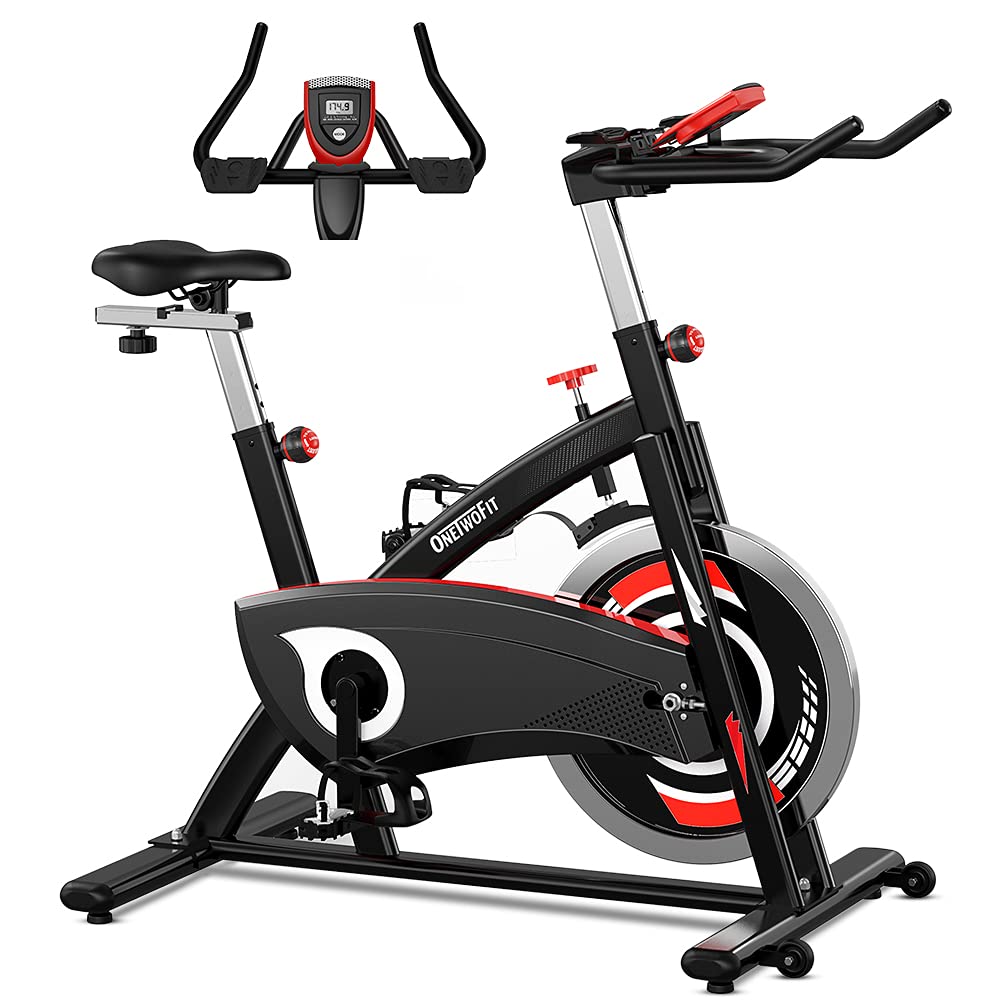
الشكل 2.1: انتهىview of the ONETWOFIT Indoor Cycling Bike OT319.
المميزات الرئيسية:
- Heavy Flywheel: Equipped with a 44-pound (20 kg) chromed flywheel for a stable and consistent cycling experience.
- Silent Belt Drive: يضمن التشغيل السلس والهادئ.
- المكونات القابلة للتعديل: Seat and handlebars offer multiple vertical adjustment levels for personalized fit.
- شاشات الكريستال السائل: Tracks essential workout data including time, speed, distance, calories, and odometer.
- مقاومة قابلة للتعديل: A friction resistance system allows for varied intensity levels.
- Safety Pedals: Cage pedals prevent feet from slipping during exercise.
- عجلات النقل: Integrated wheels for easy relocation of the bike.

Figure 2.2: Detail of the 44-pound chromed flywheel.

Figure 2.3: Illustration of the silent belt drive system and wool brake pads.
3. تعليمات التجميع
The ONETWOFIT Indoor Cycling Bike is designed for straightforward assembly. It is recommended to have assistance due to the weight of some components, particularly the flywheel.
خطوات الجمعية العامة:
- فك مكونات الحزمة: Carefully remove all parts from the packaging and lay them out. Verify all components are present against the parts list (refer to included manual for detailed list).
- تثبيت المثبتات: قم بتأمين قضبان التثبيت الأمامية والخلفية بالإطار الرئيسي باستخدام البراغي والأدوات المتوفرة.
- تثبيت الدواسات: Attach the left and right pedals to their respective crank arms. Note that pedals are typically marked 'L' for left and 'R' for right. Ensure they are tightened securely to prevent wobbling during use.
- تركيب عمود المقعد والمقعد: Insert the seat post into the frame and secure it at the desired height. Attach the seat to the seat post.
- تركيب عمود المقود والمقود: أدخل عمود المقود في الإطار وثبته. ثبّت المقود عليه.
- توصيل الشاشة: Connect the sensor wires from the main frame to the LCD monitor and mount the monitor onto the handlebar assembly.
- التحقق النهائي: Before first use, inspect all bolts and connections to ensure they are tight and secure.

Figure 3.1: Illustrates the adjustable components and overall dimensions for assembly planning.
4. تعليمات التشغيل
4.1 ضبط المقعد والمقود
يُعد ضبط المقعد والمقود بشكل صحيح أمرًا بالغ الأهمية لتحقيق الراحة وممارسة التمارين الرياضية بفعالية.
- تعديل المقعد: Loosen the adjustment knob below the seat post. Raise or lower the seat to a height where your leg has a slight bend at the knee when the pedal is at its lowest point. Tighten the knob securely. The seat also offers horizontal adjustment.
- تعديل المقود: Loosen the adjustment knob on the handlebar post. Adjust the handlebars to a comfortable height that allows for a slight bend in your elbows and a relaxed upper body posture. Tighten the knob securely.

الشكل 4.1: آلية ضبط المقعد.
الشكل 4.2: آلية ضبط المقود.
4.2 استخدام شاشة LCD
The integrated LCD monitor displays your workout data. Insert batteries (not included) into the monitor before first use.
- زر الوضع: Press to cycle through display functions: SCAN, TIME, SPEED, DISTANCE, CALORIES, ODOMETER.
- مسح: يقوم تلقائيًا بالتنقل بين جميع الوظائف كل بضع ثوانٍ.
- وقت: يعرض مدة التمرين الحالي الخاص بك.
- سرعة: يظهر لك سرعة دراجتك الحالية.
- مسافه: بعد: يعرض المسافة المقطوعة خلال التمرين الحالي.
- سعرات حراريه: يقوم بتقدير السعرات الحرارية المحروقة أثناء التمرين.
- عداد المسافات: يعرض إجمالي المسافة المتراكمة.
- إعادة: Press and hold the MODE button for a few seconds to reset all values (except Odometer).

Figure 4.3: LCD monitor interface and anti-friction hand pads.
4.3 ضبط المقاومة
The resistance knob controls the intensity of your workout.
- زيادة المقاومة: Turn the knob clockwise to increase the resistance, making pedaling more challenging.
- تقليل المقاومة: Turn the knob counter-clockwise to decrease the resistance, making pedaling easier.
- التوقف في حالات الطوارئ: Press down firmly on the resistance knob to engage the emergency brake and quickly stop the flywheel.

Figure 4.4: Resistance adjustment knob and emergency stop function.

Figure 4.5: Illustrates proper riding posture and muscle engagement during exercise.
5. الصيانة
Regular maintenance ensures the longevity and safe operation of your indoor cycling bike.
- تنظيف: امسح الدراجة بالإعلانamp امسح بقطعة قماش بعد كل استخدام لإزالة العرق والغبار. تجنب المنظفات الكاشطة.
- التحقق من الاتصالات: افحص جميع البراغي والصواميل والبراغي دوريًا للتأكد من إحكام ربطها. شد أي مثبتات مفكوكة.
- تشحيم: Apply a small amount of silicone-based lubricant to moving parts, such as the seat post and handlebar post, if they become difficult to adjust. Do not lubricate the belt drive or flywheel brake pad.
- تخزين: Store the bike in a dry, cool place away from direct sunlight and moisture.
6. استكشاف الأخطاء وإصلاحها
This section addresses common issues you might encounter with your cycling bike.
| مشكلة | السبب المحتمل | حل |
|---|---|---|
| Wobbly Handlebars/Seat | Loose adjustment knobs or bolts. | Ensure all adjustment knobs and mounting bolts for the handlebars and seat are fully tightened. |
| Pedals Detaching/Loose | Pedals not tightened correctly during assembly; stripped crank arm thread. | Re-tighten pedals firmly. Ensure left pedal is threaded counter-clockwise and right pedal clockwise. If the crank arm thread is stripped, contact customer support for replacement parts. |
| شاشة LCD لا تعرض البيانات | بطاريات فارغة، اتصال فضفاض. | Replace batteries in the monitor. Check that the sensor wires are securely connected to the monitor. |
| ضجيج غير عادي أثناء التشغيل | Loose components; friction from moving parts. | Check all bolts and nuts for tightness. Ensure the bike is on a level surface. If noise persists, contact customer support. |
7. المواصفات
Detailed technical specifications for the ONETWOFIT Indoor Cycling Bike OT319.
| ميزة | التفاصيل |
|---|---|
| رقم الموديل | OT319 |
| ماركة | أونيتوفيت |
| لون | أسود |
| مادة | Alloy Steel, Aluminium |
| مادة الإطار | فُولاَذ |
| نظام القيادة | حزام |
| آلية المقاومة | احتكاك |
| وزن الحذافة | 44 رطل (حوالي 20 كجم) |
| وزن العنصر | 98 رطل (حوالي 44.45 كجم) |
| الحد الأقصى لوزن السعة | 300 رطل (حوالي 136 كجم) |
| أبعاد المنتج (الطول × العرض × الارتفاع) | 107.95 x 53.09 x 111.51 cm (42.5 x 20.9 x 43.9 inches) |
| نوع العرض | قاد |
| وظائف المراقبة | Distance, Speed, Time, Calories, Odometer |
| مصدر الطاقة | Pedal-powered (non-electric for bike operation) |
| المميزات الخاصة | Adjustable Seat, Adjustable Handlebar, Anti-friction Hand Pads, Cage Pedals, Transport Wheels |

Figure 7.1: Illustration of the double triangle frame design for stability.
8. الضمان والدعم
For warranty information, technical support, or to order replacement parts, please contact ONETWOFIT customer service. Refer to your purchase documentation for specific warranty terms and contact details.
الشركة المصنعة: أونيتوفيت
ASIN: B08YJFFB76