
Bytech BY-AU-BS-152-BK
Bytech True Wireless Bluetooth Boost Link True Speaker User Manual
Model: BY-AU-BS-152-BK
مقدمة
شكرا لك على الشراءasing the Bytech True Wireless Bluetooth Boost Link True Speaker. This manual provides essential information for setting up, operating, and maintaining your new speakers. Please read this manual thoroughly before use to ensure proper operation and to maximize your listening experience. These speakers feature True Wireless Stereo (TWS) functionality, Bluetooth connectivity, FM Radio, and Bass Boost for rich audio.
معلومات السلامة
- لا تعرض مكبرات الصوت لدرجات حرارة شديدة أو رطوبة عالية أو لأشعة الشمس المباشرة.
- تجنب إسقاط السماعات أو تعريضها لصدمات قوية.
- Do not disassemble, repair, or modify the speakers yourself. Refer all servicing to qualified personnel.
- أبقِ مكبرات الصوت بعيدة عن الماء والسوائل الأخرى.
- استخدم فقط كابل الشحن ومحول الطاقة المحددين.
- نظّف السماعات بقطعة قماش ناعمة وجافة. لا تستخدم المنظفات الكاشطة أو المذيبات.
- Listen at moderate volume levels to avoid hearing damage.
محتويات الحزمة

Image: The Bytech Boost Link True Wireless Speakers shown in their retail packaging, highlighting the two speakers and the Bluetooth connectivity feature.
يرجى التأكد من أن جميع العناصر موجودة وفي حالة جيدة:
- 2 x Bytech Boost Link True Wireless Speakers
- كابل شحن واحد (USB)
- 1 × دليل المستخدم (هذه الوثيقة)
المنتج انتهىview

الصورة: لقطة مقربة للواجهة الأمامية view of the two Bytech Boost Link True Wireless Speakers, showing the speaker grilles and control buttons at the bottom.
تعرّف على مكونات السماعة وأدوات التحكم بها:
- شبكة مكبر الصوت: Protects the speaker driver.
- أزرار التحكم:
- زر الطاقة: Power On/Off, Play/Pause.
- زر الوضع: Switch between Bluetooth, FM Radio, etc.
- المسار السابق/زر خفض الصوت: ضغطة قصيرة للانتقال إلى المقطع السابق، وضغطة طويلة لخفض مستوى الصوت.
- المسار التالي/زر رفع الصوت: ضغطة قصيرة للانتقال إلى المقطع التالي، وضغطة طويلة لرفع مستوى الصوت.
- منفذ الشحن: لتوصيل كابل الشحن USB.
- مؤشر LED: Shows power status, charging status, and pairing status.
يثبت
شحن مكبرات الصوت
Before first use, fully charge both speakers. Connect the supplied USB charging cable to the charging port on each speaker and plug the other end into a USB power adapter (not included) or a computer's USB port. The LED indicator will show charging status and turn off or change color when fully charged.
تشغيل/إيقاف التشغيل
- لتشغيل: Press and hold the Power button on each speaker until the LED indicator lights up and you hear a power-on prompt.
- لإيقاف التشغيل: Press and hold the Power button on each speaker until the LED indicator turns off and you hear a power-off prompt.
تعليمات التشغيل
Bluetooth Pairing (Single Speaker Mode)
- تأكد من تشغيل السماعة وأنها في وضع الاقتران عبر البلوتوث (سيومض مؤشر LED).
- على جهازك (الهاتف الذكي، الجهاز اللوحي، الكمبيوتر المحمول)، قم بتمكين البلوتوث وابحث عن الأجهزة المتاحة.
- Select "BYTECH BOOST LINK" (or similar name) from the list.
- بمجرد الاقتران، سيتوقف مؤشر LED عن الوميض وسيظل ثابتًا، وستسمع صوت تأكيد.
اقتران سماعات ستيريو لاسلكية حقيقية (TWS) (سماعتان)
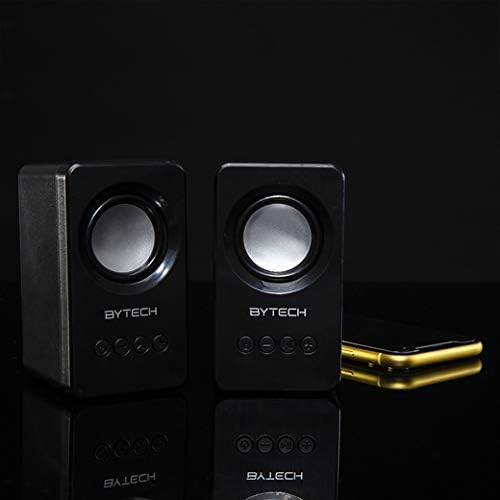
Image: The two Bytech Boost Link True Wireless Speakers positioned next to a smartphone, symbolizing their ability to connect wirelessly to each other and a device for stereo sound.
For a true stereo sound experience, you can pair both speakers together:
- Power on both Bytech Boost Link speakers. Do not connect them to your Bluetooth device yet.
- The speakers will automatically attempt to pair with each other. You will hear a confirmation sound when they are successfully linked for TWS. One speaker will become the master (left channel) and the other the slave (right channel).
- Once TWS paired, the master speaker will enter Bluetooth pairing mode (LED flashing).
- On your device, enable Bluetooth and search for "BYTECH BOOST LINK". Connect to this single entry.
- سيتم الآن تشغيل الصوت في وضع الاستريو بواسطة كلا السماعتين.
- ملحوظة: If the speakers do not automatically pair, try double-pressing the Mode button on one of the speakers to initiate TWS pairing.
تشغيل راديو FM
- Power on the speaker(s).
- اضغط على وضع اضغط على الزر بشكل متكرر حتى تسمع إشارة راديو FM.
- لإجراء المسح التلقائي وحفظ المحطات، اضغط مع الاستمرار على تشغيل/إيقاف مؤقت button. The speaker will scan and store available FM stations.
- استخدم المسار السابق و المسار التالي أزرار للتنقل بين المحطات المحفوظة.
Audio Playback and Volume Control
- تشغيل/إيقاف مؤقت: اضغط لفترة قصيرة على زر الطاقة.
- المسار التالي: اضغط ضغطة قصيرة على زر المسار التالي/رفع مستوى الصوت.
- المسار السابق: اضغط ضغطة قصيرة على زر المسار السابق/خفض مستوى الصوت.
- رفع الصوت: اضغط مطولاً على زر المسار التالي/رفع مستوى الصوت.
- اخفض الصوت: اضغط مطولاً على زر المسار السابق/خفض مستوى الصوت.
صيانة
- تنظيف: Use a soft, dry, lint-free cloth to clean the surface of the speakers. Do not use liquid cleaners, aerosols, or solvents.
- تخزين: عند عدم الاستخدام لفترات طويلة، قم بتخزين مكبرات الصوت في مكان بارد وجاف بعيدًا عن أشعة الشمس المباشرة ودرجات الحرارة القصوى.
- العناية بالبطارية: To prolong battery life, avoid fully discharging the battery frequently. Charge the speakers regularly, even if not in use.
استكشاف الأخطاء وإصلاحها
| مشكلة | السبب المحتمل | حل |
|---|---|---|
| لا يتم تشغيل مكبر الصوت. | بطارية منخفضة. | اشحن السماعة بالكامل. |
| لا يمكن الاقتران عبر البلوتوث. | السماعة ليست في وضع الاقتران؛ البلوتوث في الجهاز معطل؛ المسافة بين السماعة والجهاز بعيدة جدًا. | Ensure speaker LED is flashing; Turn on Bluetooth on your device; Move speaker closer to device (within 10 meters). |
| لا يوجد صوت. | Volume too low; Speaker not connected; Incorrect mode. | Increase volume on speaker and device; Re-pair Bluetooth; Ensure correct mode (Bluetooth/FM). |
| فشل اقتران TWS. | السماعات متصلة بالفعل بجهاز؛ السماعات متباعدة جداً. | Disconnect speakers from any device; Power off and on both speakers, then try TWS pairing again; Ensure speakers are close to each other. |
| استقبال راديو FM ضعيف. | إشارة ضعيفة؛ تداخل. | Relocate the speaker to an area with better reception; Extend the charging cable (can act as an antenna). |
تحديد
- نموذج: BY-AU-BS-152-BK
- ماركة: بايتك
- تقنية الاتصال: لاسلكي (بلوتوث)
- وضع إخراج الصوت: محيط
- نوع السماعة: الصوت المحيطي
- المميزات الخاصة: Wireless Bluetooth, Bass Boost, FM Radio, True Wireless Stereo (TWS)
- الاستخدامات الموصى بها: لمشغلات الموسيقى
- الأجهزة المتوافقة: كمبيوتر محمول ، جهاز لوحي ، هاتف ذكي
- نوع تحكم: أزرار الجهاز
- أبعاد الحزمة: 20.7 × 16 × 9 سم
- وزن: 560 جرام
الضمان والدعم
Bytech products are designed and manufactured to the highest quality standards. For information regarding warranty coverage, technical support, or service inquiries, please refer to the warranty card included with your purchase or visit the official Bytech webيرجى الاحتفاظ بإثبات الشراء الخاص بك للمطالبة بالضمان.
For further assistance, please contact Bytech customer support.
Ask a question about this manual
Ask about setup, troubleshooting, compatibility, parts, safety, or missing instructions. Manuals+ will review the question and use this page’s manual context to help answer it.