
1. المقدمة
شكرا لك على الشراءasing the QFX E-B3 Bluetooth Professional High-Power Speaker. This manual provides essential information for the safe and efficient operation of your speaker. Please read it thoroughly before use and retain it for future reference.
The QFX E-B3 is designed to deliver powerful audio with features including Bluetooth connectivity, FM radio, USB/SD card playback, LED party lights, and a 250W power amplifier. It also supports True Wireless System (TWS) for stereo pairing with another compatible speaker.
2. معلومات السلامة
- مصدر الطاقة: Connect the speaker only to the specified power supply as indicated on the unit.
- تهوية: تأكد من وجود تهوية كافية حول السماعة. لا تسد أي فتحات تهوية.
- الماء والرطوبة: This speaker is not waterproof. Do not expose it to rain, moisture, or any liquids to prevent electric shock or fire.
- حرارة: أبقِ السماعة بعيدة عن مصادر الحرارة مثل المشعات، أو أجهزة التدفئة، أو المواقد، أو أي أجهزة أخرى تنتج الحرارة.
- تنظيف: افصل السماعة عن مأخذ الطاقة قبل التنظيف. استخدم قطعة قماش جافة للتنظيف. لا تستخدم المنظفات السائلة أو المنظفات البخاخة.
- الخدمة: لا تحاول خدمة هذا المنتج بنفسك. قم بإحالة جميع أعمال الصيانة إلى أفراد الخدمة المؤهلين.
- الموقع: ضع السماعة على سطح مستوٍ وثابت لمنعها من السقوط.
3. محتويات العبوة
تأكد من وجود جميع العناصر في العبوة:
- QFX E-B3 High-Power Speaker
- ميكروفون
- جهاز التحكم عن بعد
- التيار المتردد كابل
- دليل المستخدم (هذا المستند)
4. انتهى المنتجview
The QFX E-B3 speaker features dual 15-inch woofers and a 1-inch tweeter, protected by a metal grill. It includes integrated handles and wheels for portability.

الشكل 4.1: الجبهة view of the QFX E-B3 Speaker.
Rear Panel Controls and Ports
The rear panel houses all input/output connections and control knobs.
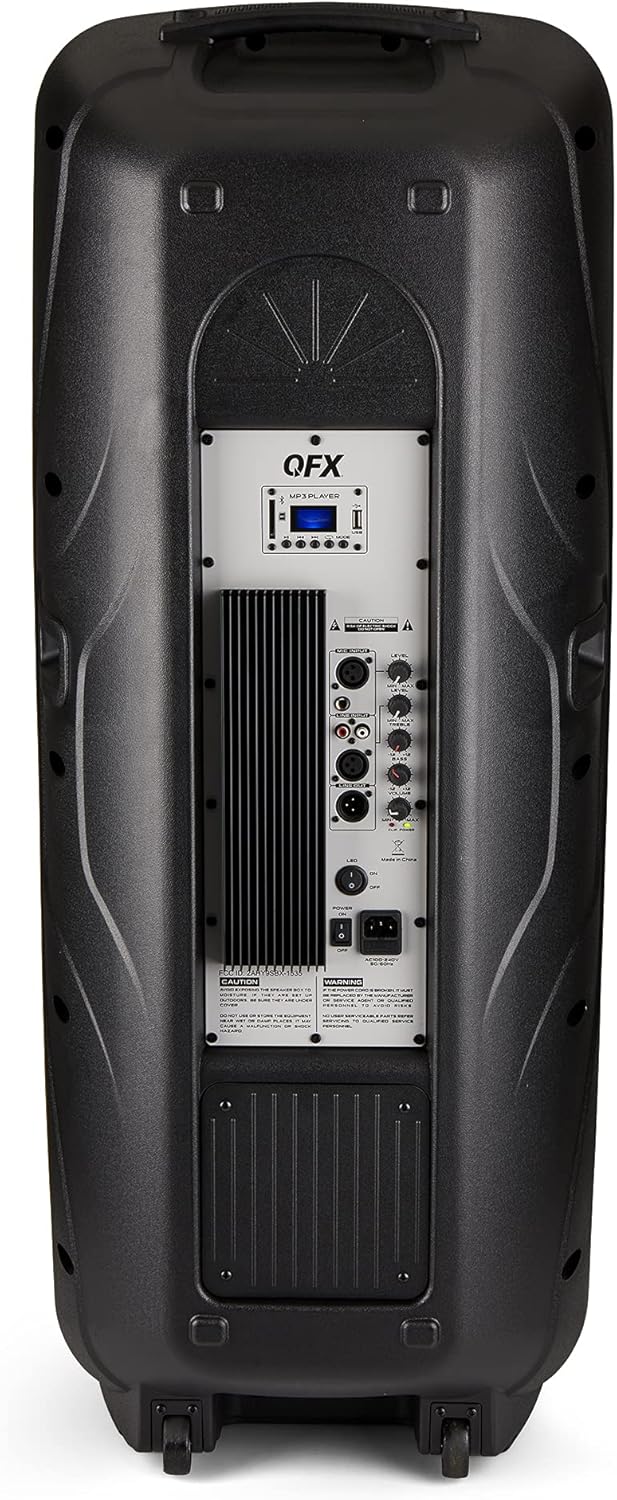
Figure 4.2: Rear panel with controls and ports.
- مفتاح التشغيل: يقوم بتشغيل/إيقاف مكبر الصوت.
- مدخل التيار المتردد: Connects the AC power cable.
- USB/SD Card Ports: لتشغيل الصوت fileمن محركات أقراص USB أو بطاقات SD.
- شاشة العرض: يعرض الوضع الحالي ومعلومات المسار.
- زر الوضع: Switches between input modes (Bluetooth, FM, USB, SD, RCA).
- زر التشغيل/الإيقاف المؤقت: Controls playback for USB/SD/Bluetooth.
- أزرار المسار السابق/التالي: Navigates tracks or FM stations.
- مقبض الصوت الرئيسي: ضبط مستوى الصوت الإجمالي.
- Bass/Treble Control Knobs: Adjusts low and high frequencies.
- مدخل ميكروفون XLR: Connects a wired microphone.
- مقابض مستوى صوت الميكروفون/الصدى: Adjusts microphone volume and echo effect.
- مدخل RCA (يسار/يمين): Connects external audio devices via RCA cables.
- XLR Line Input/Output: For connecting to other audio equipment.
5. الإعداد
التوظيف الأولي
Place the speaker on a stable, flat surface. For optimal sound, position it in a central location within the listening area. The integrated wheels and handle allow for easy transport.

Figure 5.1: Speaker being moved with handle and wheels.
توصيل الطاقة
- تأكد من أن مفتاح الطاقة الخاص بالسماعة في وضع الإيقاف.
- Connect the AC power cable to the AC input on the rear panel of the speaker.
- قم بتوصيل الطرف الآخر من كابل الطاقة المتردد بمقبس حائط قياسي.
- Flip the power switch to the ON position. The display screen will illuminate.
6. تعليمات التشغيل
بلوتوث الاقتران
- Turn on the QFX E-B3 speaker.
- اضغط على وضع button on the speaker or remote control until "BLUE" appears on the display screen, indicating Bluetooth mode.
- قم بتمكين البلوتوث على جهازك المحمول (الهاتف الذكي، والكمبيوتر اللوحي، وما إلى ذلك).
- بحث عن available Bluetooth devices and select "QFX E-B3" from the list.
- بمجرد الاقتران، سيصدر مكبر الصوت صوت تأكيد. يمكنك الآن تشغيل الصوت من جهازك عبر مكبر الصوت.
اقتران نظام لاسلكي حقيقي (TWS)
TWS allows two QFX E-B3 speakers to connect wirelessly for a stereo sound experience. This feature works only in Bluetooth mode.
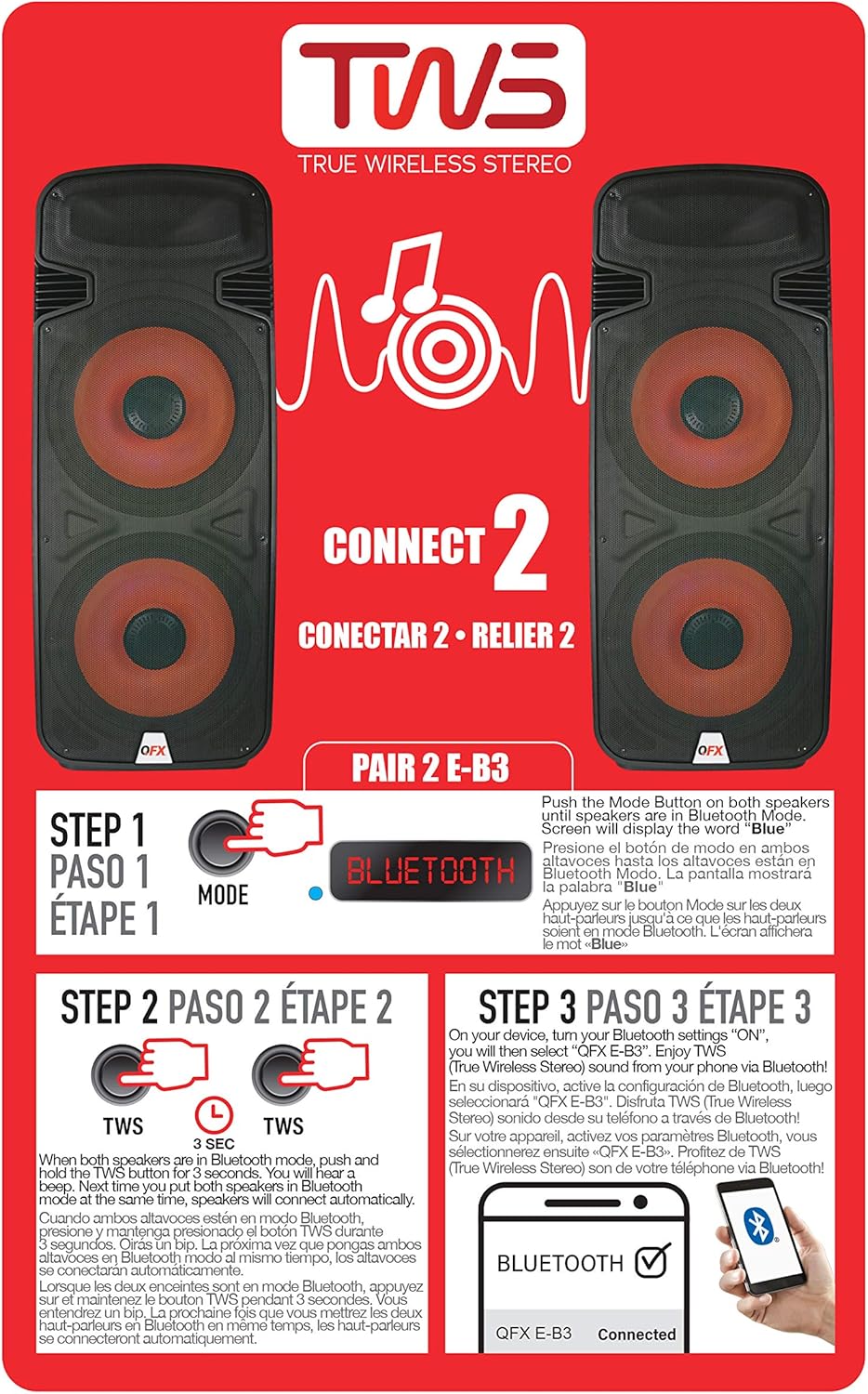
Figure 6.1: TWS Pairing Instructions.
- Ensure both QFX E-B3 speakers are powered on and in Bluetooth mode. The display on both speakers should show "BLUE".
- على أحد مكبرات الصوت (ستكون هذه هي مكبر الصوت الأساسي لديك)، اضغط مع الاستمرار على تي دبليو اس button for approximately 3 seconds. The speakers will attempt to connect to each other.
- Once successfully paired, you will hear a confirmation sound, and the display on the primary speaker will show "BLUE" while the secondary speaker will show "BLUE" as well.
- On your Bluetooth-enabled device, search for and select "QFX E-B3". The two speakers will now play audio in stereo.
تشغيل راديو FM
- اضغط على وضع button to switch to FM radio mode. The display will show the FM frequency.
- اضغط مع الاستمرار على تشغيل/إيقاف مؤقت اضغط على الزر لبدء المسح التلقائي لمحطات FM. سيقوم مكبر الصوت بحفظ جميع المحطات التي تم العثور عليها.
- استخدم المسار السابق / التالي أزرار للتنقل بين محطات الراديو المحفوظة.
تشغيل بطاقة USB / SD
- أدخل ذاكرة فلاش USB أو بطاقة SD (مع صوت متوافق) files) في المنفذ المخصص على اللوحة الخلفية.
- سيتحول مكبر الصوت تلقائيًا إلى وضع USB/SD وسيبدأ تشغيل الصوت fileإذا لم ينجح ذلك، فاضغط على وضع button to select USB or SD mode.
- استخدم تشغيل/إيقاف مؤقت و المسار السابق / التالي أزرار للتحكم في التشغيل.
مدخل الميكروفون
- Connect a microphone to the XLR Microphone Input on the rear panel.
- Adjust the Microphone Volume and Echo knobs to achieve the desired sound.
إدخال RCA
- Connect an external audio source (e.g., CD player, mixer) to the RCA Input (L/R) ports using appropriate RCA cables.
- اضغط على وضع button to select RCA input mode.
- Adjust the master volume on the speaker and the volume on your external audio source.
أضواء الحفلات LED
The speaker features integrated LED party lights that activate automatically when the speaker is powered on. There are no specific controls for the LED lights mentioned; they are designed to enhance the audio experience.
7. الصيانة
تنظيف
- Always unplug the speaker before cleaning.
- استخدم قطعة قماش ناعمة وجافة لمسح الأسطح الخارجية للسماعة.
- لا تستخدم المنظفات الكاشطة أو الشمع أو المذيبات لأنها قد تؤدي إلى إتلاف الطبقة النهائية.
- احرص على إبقاء فتحات التهوية خالية من الغبار والحطام.
تخزين
When not in use for extended periods, store the speaker in a cool, dry place, away from direct sunlight and extreme temperatures. Cover the speaker to protect it from dust.
8. استكشاف الأخطاء وإصلاحها
If you encounter issues with your QFX E-B3 speaker, refer to the following common problems and solutions:
| مشكلة | السبب المحتمل | حل |
|---|---|---|
| لا يوجد طاقة | Power cable not connected; Power outlet not active; Speaker power switch off. | Ensure AC cable is securely connected to speaker and outlet. Check if outlet is working. Turn speaker power switch ON. |
| لا يوجد صوت | Volume too low; Incorrect input mode selected; Audio source not playing. | Increase master volume. Press MODE button to select correct input. Ensure audio source is playing and its volume is up. |
| البلوتوث غير متصل | Speaker not in Bluetooth mode; Device Bluetooth off; Speaker already paired to another device; Device too far. | Ensure speaker is in Bluetooth mode ("BLUE" on display). Turn on device Bluetooth. Disconnect from other devices. Move device closer to speaker (within 30 feet). |
| فشل الاقتران TWS | Speakers not in Bluetooth mode; TWS button not held long enough. | Ensure both speakers are in Bluetooth mode. Press and hold the TWS button on one speaker for 3 seconds. |
| لا يعمل تشغيل USB/SD | وضع غير صحيح؛ غير متوافق file format; Corrupted USB/SD card. | Press MODE to select USB/SD. Ensure audio files are in a compatible format (e.g., MP3). Try a different USB/SD card. |
9. المواصفات
| ميزة | مواصفة |
|---|---|
| ماركة | كيو اف اكس |
| رقم الموديل | ه-ب3 |
| الحد الأقصى لقوة خرج السماعة | 250 واط |
| تكنولوجيا الاتصال | يو اس بي، بلوتوث |
| وضع إخراج الصوت | ستيريو |
| نوع التركيب | Plug Mount, Wheel Mount |
| نوع السماعة | Woofer (Dual 15 Inches) |
| نوع وحدة التحكم | جهاز التحكم عن بعد |
| لون | Party LED |
| مقاوم للماء | خطأ شنيع |
| طريقة التحكم | بعيد |
| قطر مكبر الصوت | 15 بوصة |
| عدد قنوات الصوت | 2.0 |
| التكنولوجيا اللاسلكية | بلوتوث |
| بروتوكول الاتصال | بلوتوث |
| مصدر الطاقة | كهرباء سلكية |
| نوع برنامج تشغيل الصوت | سائق ديناميكي |
| حجم برنامج تشغيل الصوت | 15 بوصة |
| أبعاد المنتج (العمق × العرض × الارتفاع) | 16.77 بوصة عمق × 13.98 بوصة عرض × 23.74 بوصة ارتفاع |
| وزن العنصر | 13.2 رطل |
| الأجهزة المتوافقة | كمبيوتر محمول، مشغل MP3، هاتف ذكي، جهاز لوحي، تلفزيون |
| رمز المنتج الموحد | 606540039618 |
10. معلومات الضمان
This product is covered by a limited warranty. For specific details regarding warranty coverage and terms, please refer to the warranty information provided at the point of purchase or contact QFX customer support directly. The warranty is typically per contract with the retailer.
11. الدعم
For technical assistance, troubleshooting beyond this manual, or inquiries about your QFX E-B3 speaker, please contact QFX customer support or your retailer. Contact information can usually be found on the manufacturer's webالموقع أو على إيصال الشراء الخاص بك.