
مقدمة
The Sharkoon Skiller SGK30 is a mechanical gaming keyboard designed for performance and durability. It features customizable RGB lighting, N-Key rollover, and a 1000Hz polling rate for responsive gameplay and typing. This manual provides essential information for setting up, operating, and maintaining your keyboard.

Image: Sharkoon Skiller SGK30 Mechanical Gaming Keyboard banner displaying the product name and type.
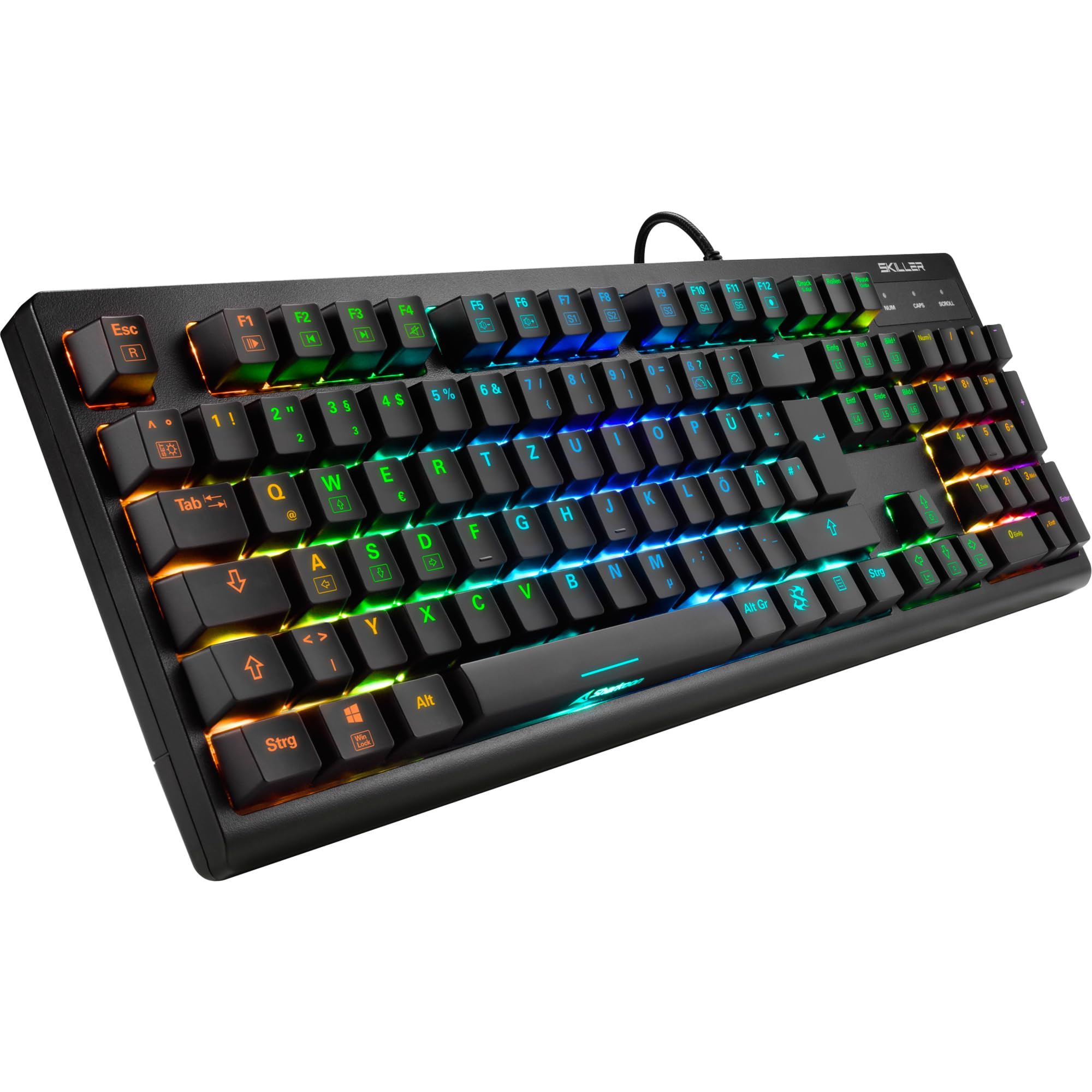
الصورة: من أعلى إلى أسفل view of the Sharkoon Skiller SGK30 mechanical gaming keyboard, showcasinيتميز بتصميمه الكامل وإضاءة خلفية RGB نابضة بالحياة.
المنتج انتهىview فيديو
فيديو: منتج رسميview of the Sharkoon Skiller SGK30 Mechanical Gaming Keyboard, demonstrating its features, RGB lighting effects, and mechanical switches.
يثبت
Follow these steps to set up your Sharkoon Skiller SGK30 keyboard:
- فك لوحة المفاتيح: قم بإزالة لوحة المفاتيح وكابل USB المرفق من عبوتهما بعناية.
- الاتصال بجهاز الكمبيوتر: Plug the Micro USB end of the cable into the keyboard's port and the standard USB-A end into an available USB port on your computer.
- تثبيت برنامج التشغيل: The keyboard is plug-and-play. Your operating system (Windows 10 or later recommended) should automatically detect and install the necessary drivers.
- تثبيت البرنامج (اختياري): For advanced customization of RGB lighting and key assignments, download the official Sharkoon software from the manufacturer's webموقع.

Image: The Sharkoon Skiller SGK30 keyboard positioned on a desk, ready for connection.
تعليمات التشغيل
وظائف المفاتيح الأساسية
The Sharkoon Skiller SGK30 features a standard layout with additional function keys accessible via the FN مفتاح.
- FN + F1-F12: Access multimedia controls (e.g., play/pause, volume up/down, mute).
- الجبهة الوطنية + مفتاح ويندوز: Lock/unlock the Windows key to prevent accidental presses during gaming.
- N- مفتاح التمديد: All keys are registered simultaneously, ensuring every keystroke is detected, even during rapid input.
رغب التحكم في الإضاءة
The keyboard offers extensive RGB lighting customization. Use the following combinations to adjust lighting effects:
- FN + Insert/Home/Page Up/Delete/End/Page Down: Cycle through various pre-programmed lighting effects.
- FN + Arrow Keys (Up/Down): Adjust brightness levels of the lighting.
- FN + Arrow Keys (Left/Right): اضبط سرعة تأثيرات الإضاءة الديناميكية.
- Custom Illumination: Use the dedicated software for advanced per-key lighting customization.

الصورة: لقطة مقربة view of the keyboard keys highlighting the adjustable RGB illumination capabilities.
تخصيص البرمجيات
For advanced settings, macro programming, and detailed RGB customization, download and install the Sharkoon Skiller SGK30 software from the official Sharkoon webالموقع. يسمح لك البرنامج بما يلي:
- Create and save custom lighting profiles.
- Program macros for specific keys.
- أعد تعيين وظائف المفاتيح.

Image: A screenshot showing the graphical user interface of the Sharkoon Skiller SGK30 customization software, illustrating various options for lighting and key remapping.
صيانة
تضمن الصيانة المناسبة طول عمر لوحة المفاتيح وأدائها الأمثل:
- تنظيف: استخدم قطعة قماش ناعمة وجافة لمسح سطح لوحة المفاتيح. وللتنظيف العميق، استخدم الهواء المضغوط لإزالة الغبار والأوساخ من بين أغطية المفاتيح.
- إزالة غطاء المفتاح: If necessary, keycaps can be carefully removed using a keycap puller (not included) for thorough cleaning of the switches. Reinstall keycaps by pressing them firmly onto the switch stems.
- تجنب السوائل: لا تعرض لوحة المفاتيح للسوائل. في حالة انسكاب السوائل، افصل لوحة المفاتيح فوراً واتركها تجف تماماً قبل إعادة توصيلها.
- تخزين: قم بتخزين لوحة المفاتيح في مكان بارد وجاف بعيدًا عن أشعة الشمس المباشرة ودرجات الحرارة القصوى.

الصورة: لقطة مقربة view of the mechanical switches on the Sharkoon Skiller SGK30 keyboard, illustrating their design for durability and ease of maintenance. Note: This model is available with Red switches, while the image shows Blue switches.
استكشاف الأخطاء وإصلاحها
If you encounter issues with your Sharkoon Skiller SGK30 keyboard, refer to the following common solutions:
| مشكلة | السبب المحتمل | حل |
|---|---|---|
| لوحة المفاتيح لا تستجيب | اتصال USB فضفاض، منفذ USB معيب، مشكلة في برنامج التشغيل. |
|
| إضاءة RGB لا تعمل أو غير صحيحة | Lighting settings incorrect, software conflict. |
|
| المفاتيح غير مسجلة | الغبار/الحطام تحت غطاء المفتاح، مفتاح معيب. |
|
تحديد
| ميزة | التفاصيل |
|---|---|
| ماركة | شاركون |
| رقم الموديل | 4044951030026 |
| نوع لوحة المفاتيح | لوحة مفاتيح الألعاب الميكانيكية |
| نوع المفتاح | Red Switch (Blue switches are also available for this model series) |
| الاتصال | ميكرو يو اس بي |
| معدل التصويت | 1000 هرتز |
| انقلاب المفتاح N | مدعوم |
| إضاءة RGB | إضاءة RGB قابلة للتخصيص |
| نظام التشغيل | ويندوز 10 (ومتوافق مع إصدارات ويندوز الأخرى) |
| الأبعاد (الطول × العرض × الارتفاع) | 44 × 14.4 × 3.5 سم |
| وزن | 867 جرام |
ماذا يوجد في الصندوق
The Sharkoon Skiller SGK30 package includes:
- Sharkoon Skiller SGK30 Mechanical Gaming Keyboard
- كابل يو اس بي
الضمان والدعم
للحصول على معلومات الضمان والدعم الفني، يرجى الرجوع إلى موقع Sharkoon الرسمي. webالموقع أو تواصل مع التاجر المحلي. احتفظ بإيصال الشراء للمطالبة بالضمان.
ملاحظة: تخضع مواصفات المنتج وميزاته للتغيير دون إشعار مسبق.