
FREETOO Portable Digital Hanging Scale
FREETOO Portable Digital Hanging Luggage Scale User Manual
Model: Portable Digital Hanging Scale
1. المقدمة
Thank you for choosing the FREETOO Portable Digital Hanging Luggage Scale. This manual provides essential information for the safe and effective use of your new scale. Please read it thoroughly before operation and retain it for future reference.

Image 1: The FREETOO Portable Digital Hanging Luggage Scale, black in color, featuring a digital display and a strap for weighing.
2. معلومات السلامة
- Do not overload the scale beyond its maximum capacity of 110 lb (50 kg).
- احتفظ بالميزان بعيدًا عن الماء ودرجات الحرارة العالية.
- تجنب إسقاط الميزان أو تعريضه لصدمات قوية.
- This device is for weighing luggage and similar items; do not use it for weighing people or animals.
- احتفظ بالبطاريات بعيدًا عن متناول الأطفال.
3. انتهى المنتجview
The FREETOO Portable Digital Hanging Luggage Scale is designed for convenience and accuracy. Key features include:
- دقة عالية: Measures up to 110 lb (50 kg) with a deviation of no more than 0.1 lb.
- شاشة سهلة القراءة: Backlit LCD for clear visibility in various lighting conditions.
- وحدات متعددة: Switch between pounds (lb), kilograms (kg), grams (g), and ounces (oz).
- وظائف ذكية: Tare function, weight lock, auto-off, low battery indicator, and overload indicator.
- تصميم محمول: مدمجة وخفيفة الوزن لسهولة النقل.

Image 2: The FREETOO scale displaying a weight of 8.50 lb, highlighting its maximum capacity of 110 lb and accuracy of 0.1 lb.
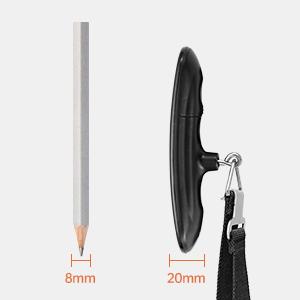
Image 3: A size comparison of the FREETOO scale next to a pencil, illustrating its compact and portable design.
4. الإعداد
4.1 تركيب البطارية
- حدد موقع حجرة البطارية في الجزء الخلفي من المقياس.
- افتح غطاء البطارية.
- Insert one CR2032 lithium button cell battery, ensuring the positive (+) side faces upwards. If there is a plastic insulator tab, remove it before inserting the battery.
- أغلق غطاء البطارية بشكل محكم.

Image 4: A hand inserting a CR2032 battery into the FREETOO scale's battery compartment.
5. تعليمات التشغيل
5.1 تشغيل/إيقاف التشغيل
- لتشغيل الجهاز: اضغط على زر الطاقة (U) once. The display will show '8888' and then '0.00' or '0.0' with the current unit.
- To turn off: Press and hold the power button for 3 seconds. The scale will also automatically turn off after 60 seconds of inactivity to conserve battery.
5.2 Changing Weight Units
- With the scale powered on and displaying '0.00', press the power button (U) repeatedly to cycle through the available units: lb (pounds), kg (kilograms), g (grams), and oz (ounces).
- اختر الوحدة التي تريدها قبل الوزن.

Image 5: The FREETOO scale's HD LCD display showing the four selectable weight units: grams (g), ounces (oz), kilograms (kg), and pounds (lb).
5.3 Weighing Luggage
- Ensure the scale is powered on and displaying '0.00' in your preferred unit.
- Attach the strap to the handle of your luggage.
- Lift the scale by its handle, holding it steady and horizontally.
- Wait for the weight reading to stabilize. The display will flash three times and then show 'HOLD' to indicate the weight has been locked.
- Lower the luggage to read the final weight. The weight will remain displayed for a few seconds before resetting or turning off automatically.

Image 6: A FREETOO scale being used to weigh a blue suitcase, demonstrating the secure hook and strap mechanism.

Image 7: A close-up of the FREETOO scale's display, showing the 'HOLD' indicator after a stable weight reading has been captured.
5.4 الوظيفة الفارغة
- The tare function allows you to subtract the weight of a container or attachment.
- قم بربط الحاوية الفارغة أو الملحق بالميزان.
- اضغط على زر الطاقة (U) once while the empty item is hanging. The display will reset to '0.00'.
- Now, add the items you wish to weigh to the container. The display will show only the net weight of the added items.

Image 8: An illustration of the FREETOO scale's key functions, including Tare, Weight Hold, Auto On/Off, Low Battery Indicator, and Overload Indicator.
6. الصيانة
- تنظيف الميزان مع لينة ، دamp لا تستخدم المنظفات الكاشطة أو تغمر الميزان في الماء.
- قم بتخزين الميزان في مكان بارد وجاف عند عدم استخدامه.
- Remove the battery if the scale will not be used for an extended period to prevent leakage.
7. استكشاف الأخطاء وإصلاحها
| مشكلة | السبب المحتمل | حل |
|---|---|---|
| المقياس لا يعمل | Low or dead battery; battery incorrectly installed; plastic insulator tab not removed. | Replace battery; ensure correct polarity; remove plastic tab. |
| قراءات غير دقيقة | Scale not held steady; item touching other surfaces; scale overloaded. | Hold scale steady and horizontally; ensure item hangs freely; do not exceed 110 lb (50 kg). |
| تظهر الشاشة "Lo" | بطارية منخفضة. | استبدل بطارية CR2032. |
| تظهر الشاشة "O-Ld" | التحميل الزائد. | Remove some weight from the item. Do not exceed 110 lb (50 kg). |
8. المواصفات
- ماركة: فريتو
- نموذج: Portable Digital Hanging Scale
- سعة: 110 رطل / 50 كجم
- دقة: 0.1 lb / 50 g
- الوحدات: lb, kg, g, oz
- عرض: شاشة LCD ذات إضاءة خلفية
- مصدر الطاقة: 1 × CR2032 بطارية (مضمنة)
- أبعاد المنتج: حوالي 5 × 2 × 1.5 بوصة
9. الضمان والدعم
FREETOO provides the following services for this product:
- ضمان: 30 Days Replacement
- خدمة: خدمة مدى الحياة
- دعم العملاء: 24-Hour Support
For any inquiries or assistance, please contact FREETOO customer support through the retailer's platform or the official FREETOO webموقع.
Ask a question about this manual
Ask about setup, troubleshooting, compatibility, parts, safety, or missing instructions. Manuals+ will review the question and use this page’s manual context to help answer it.