
1. المقدمة
This manual provides instructions for the safe and effective use of your Powerextra CP-W126 AC Power Supply Adapter Kit. This kit is designed to provide continuous power to compatible Fujifilm cameras, replacing the NP-W126 and NP-W126S batteries for extended shooting sessions.
2. معلومات السلامة
- Ensure the power adapter is connected to a power outlet with the correct voltagهـ (تيار متردد 100-240 فولت).
- Do not expose the adapter or dummy battery to water or excessive moisture.
- تجنب إسقاط المكونات أو تعريضها لصدمات قوية.
- لا تحاول فك أو تعديل المنتج.
- يحفظ بعيدًا عن متناول الأطفال.
- افصل محول الطاقة عن مأخذ التيار الكهربائي عند عدم استخدامه لفترات طويلة.
3. محتويات العبوة
تأكد من وجود جميع العناصر في الحزمة الخاصة بك:
- شنومكس أس محول الطاقة
- 1x CP-W126 DC Coupler (Dummy Battery)
- 1x US Plug AC Cord
- 1 × قطعة قماش تنظيف من الألياف الدقيقة
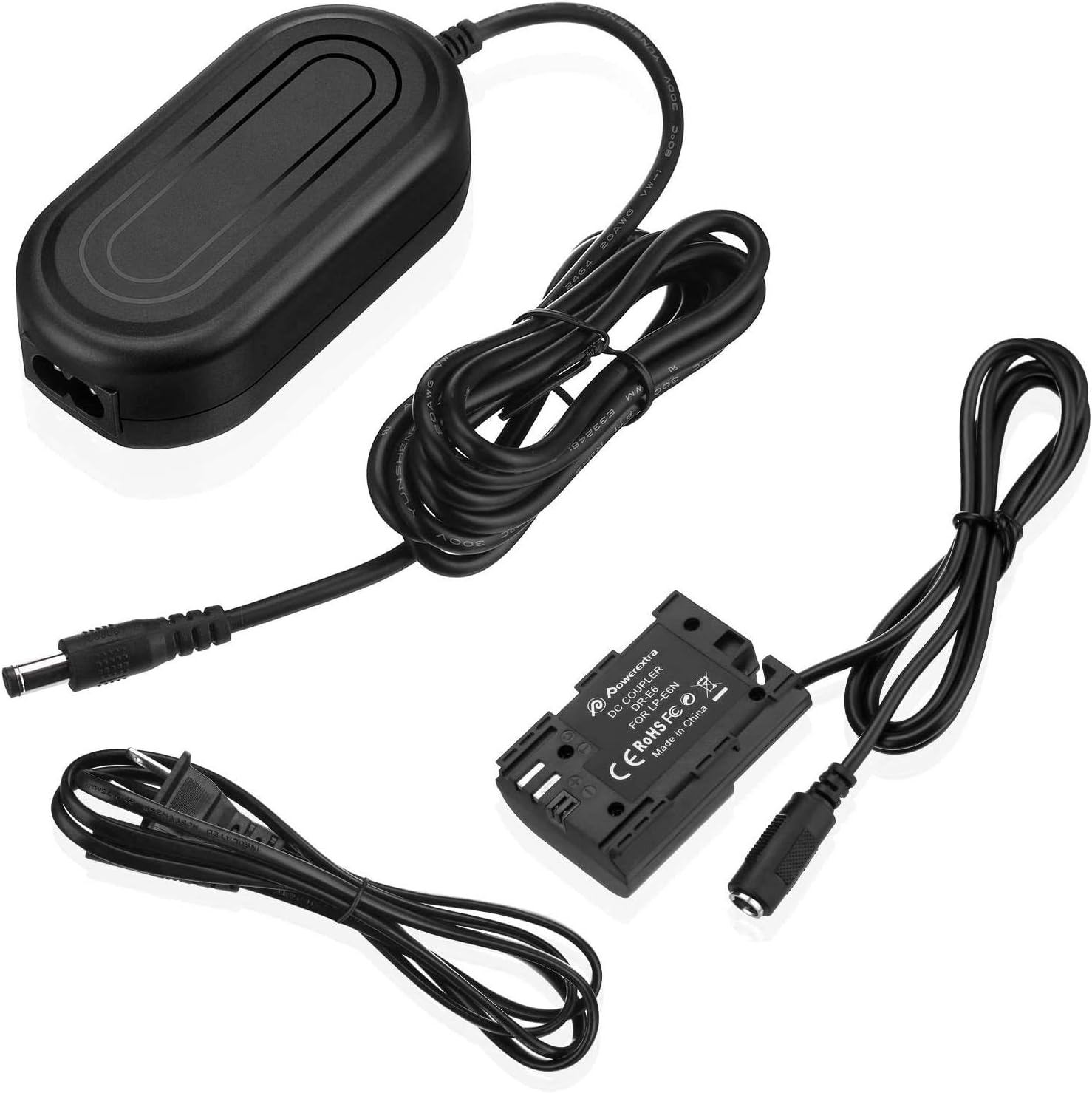
The kit includes the AC power adapter, the DC coupler (dummy battery), and the AC power cord. A microfiber cleaning cloth is also provided.
4. الإعداد والتثبيت
Follow these steps to set up and install the AC power supply adapter kit:
- قم بتوصيل سلك طاقة التيار المتردد: Insert the AC power cord into the AC power adapter.
- Connect the DC Coupler: Plug the DC port of the CP-W126 DC Coupler (dummy battery) into the DC port on the AC power adapter.
- Open Camera Battery Compartment: Open the battery compartment door on your compatible Fujifilm camera.
- Insert Dummy Battery: Carefully insert the CP-W126 DC Coupler into the camera's battery compartment, ensuring it is oriented correctly.
- توجيه الكابل: Locate the small rubber flap or opening on your camera's battery compartment door. Route the DC coupler cable through this opening. This allows the battery door to close properly while the cable exits the camera.
- Close Battery Compartment Door: Close the camera's battery compartment door securely. The door must be fully closed for the camera to power on.
- الاتصال بمنفذ الطاقة: Plug the AC power cord into a wall power outlet.
- تشغيل الكاميرا: Turn on your camera. It should now receive continuous power from the adapter.

دليل التثبيت بالفيديو
5. تعليمات التشغيل
Once installed, the Powerextra CP-W126 AC Power Supply Adapter Kit provides continuous power to your camera, eliminating the need for frequent battery changes. This is ideal for:
- Long studio shooting sessions
- التصوير الفوتوغرافي الفاصل الزمني
- Live streaming or video conferencing
- Extended video recording
موديلات الكاميرا المتوافقة
This AC adapter kit is compatible with Fujifilm cameras that use NP-W126 or NP-W126S batteries, including but not limited to:
- Fujifilm X100F, X-A1, X-A2, X-A3, X-A5, X-A7, X-A10, X-A20
- Fujifilm X-E1, X-E2, X-E2S, X-E3
- Fujifilm X-Pro1, X-Pro2, X-Pro3
- Fujifilm X-T1, X-T2, X-T10, X-T20, X-T30, X-T100, X-T200, X-H1, X-M1
- Fujifilm FinePix HS30EXR, HS33EXR, HS35EXR, HS50EXR

6. الصيانة
To ensure the longevity and optimal performance of your Powerextra AC Power Supply Adapter Kit:
- تنظيف: Use the provided microfiber cleaning cloth to gently wipe the adapter and cables. Avoid using harsh chemicals or abrasive materials.
- تخزين: Store the kit in a cool, dry place away from direct sunlight and extreme temperatures when not in use.
- العناية بالكابلات: Do not bend or crimp the cables excessively. Avoid placing heavy objects on the cables.
7. استكشاف الأخطاء وإصلاحها
If you encounter issues with your AC power supply adapter kit, consider the following:
- الكاميرا لا تعمل:
- Ensure all connections are secure between the AC cord, power adapter, and DC coupler.
- Verify that the battery compartment door on your camera is fully closed. The camera will not power on if the door is open.
- تحقق من عمل مقبس الحائط بشكل صحيح عن طريق توصيل جهاز آخر.
- الطاقة المتقطعة:
- افحص الكابلات بحثًا عن أي ضرر أو تآكل مرئي.
- Ensure the cable from the dummy battery is properly routed through the camera's cable exit port and not pinched.
- ارتفاع درجة الحرارة:
- While the adapter has built-in protection, ensure adequate ventilation around the power adapter during prolonged use.
- If the adapter feels excessively hot, disconnect it and allow it to cool down before resuming use.
8. المواصفات
| ميزة | مواصفة |
|---|---|
| حجم الإدخالtage | تيار متردد 100-240 فولت، 50/60 هرتز |
| حجم الإخراجtage | DC 8.4V / 3A |
| واتtage | 6 واط |
| ميزات الحماية | Over-Heated, Over-Current, Over-Voltage, Short-Circuit Protection |
| مادة | ABS + PC retardant materials |
| وزن العنصر | 7.4 أونصات |
| أبعاد الحزمة | 6.1 × 5.35 × 1.69 بوصة |
9. الضمان والدعم
Powerextra products are designed for reliability and performance. For any questions, technical support, or warranty claims, please refer to the following:
- ضمان: This product typically comes with a 12-month hassle-free warranty. Please retain your proof of purchase.
- دعم العملاء: Powerextra offers 12-hour response and 7*24 hour stand-by support, along with lifetime support for its products.
- اتصال: For further assistance, please visit the official Powerextra store or contact their customer service directly.
