
Yinleader 3000W12V
Yinleader 3000W 12V to 230V Pure Sine Wave Power Inverter User Manual
الموديل: 3000 واط 12 فولت
1. المقدمة
This manual provides essential information for the safe and efficient operation of your Yinleader 3000W 12V to 230V Pure Sine Wave Power Inverter. This device converts 12V DC battery power into 230V AC household power, allowing you to operate various electrical appliances from your vehicle, boat, or off-grid setup. Please read this manual thoroughly before installation and use.
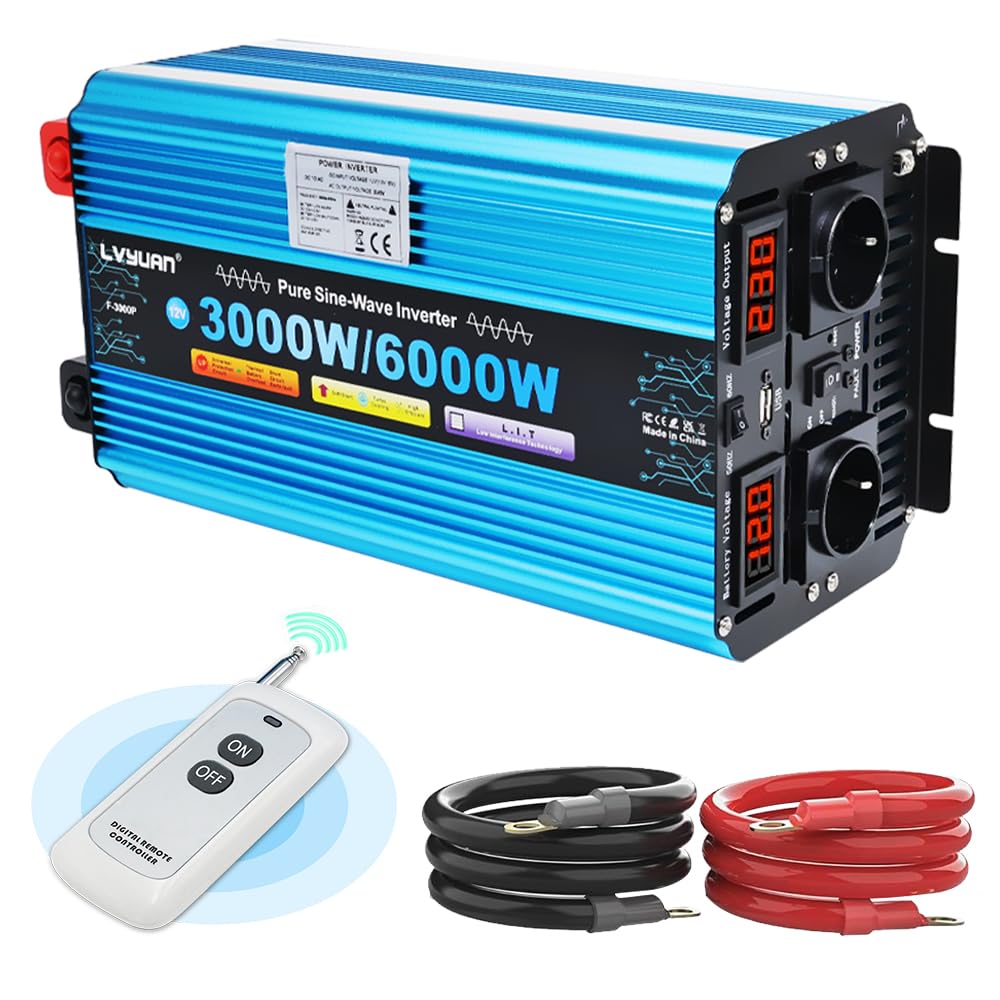
Image 1.1: Yinleader 3000W Pure Sine Wave Power Inverter, showcasing its design and power rating.
2. تعليمات السلامة
Failure to follow these safety instructions can result in serious injury or damage to the inverter and connected devices. Always exercise caution when working with electricity.
- تهوية: Ensure the inverter is installed in a well-ventilated area. Do not block the ventilation openings.
- رُطُوبَة: لا تعرض العاكس للماء أو المطر أو الثلج أو الرذاذ.
- حرارة: Avoid placing the inverter near heat sources or in direct sunlight.
- المواد القابلة للاشتعال: لا تقم بتشغيل العاكس بالقرب من المواد القابلة للاشتعال أو الغازات أو الأبخرة.
- توصيل البطارية: Connect the inverter only to a 12V DC battery. Ensure correct polarity (+ to + and - to -). Incorrect connection will damage the inverter.
- قدرة التحميل: Do not exceed the inverter's rated power output (3000W continuous, 6000W peak). Overloading can cause damage and fire hazards.
- التأريض: تأكد من أن العاكس مؤرض بشكل صحيح وفقًا للرموز الكهربائية المحلية.
- صيانة: لا تحاول فتح جهاز العاكس أو صيانته بنفسك. قم بإحالة جميع أعمال الصيانة إلى فنيين مؤهلين.
- أطفال: احتفظ بالعاكس بعيدًا عن متناول الأطفال.
3. محتويات العبوة
تأكد من وجود جميع العناصر في الحزمة الخاصة بك:
- 1 x Yinleader 3000W 12V to 230V Pure Sine Wave Power Inverter
- 2 x Battery Connection Cables (Red for Positive, Black for Negative)
- 6 × صمامات احتياطية
- 1 × جهاز تحكم عن بعد لاسلكي
- 1 × دليل المستخدم

Image 3.1: The inverter shown with its included battery connection cables and wireless remote control.
4. الإعداد والتثبيت
اتبع هذه الخطوات لإعداد محول الطاقة الخاص بك بشكل صحيح:
- اختر الموقع: Select a dry, cool, and well-ventilated area for the inverter. Ensure it is away from direct sunlight, heat, and moisture.
- تحضير البطارية: Ensure your 12V DC battery is fully charged and in good condition.
- توصيل الكابلات:
- قم بتوصيل أحمر positive (+) cable to the positive (+) terminal of the inverter.
- قم بتوصيل الطرف الآخر من أحمر cable to the positive (+) terminal of the 12V battery.
- قم بتوصيل أسود negative (-) cable to the negative (-) terminal of the inverter.
- قم بتوصيل الطرف الآخر من أسود cable to the negative (-) terminal of the 12V battery.
مهم: Ensure all connections are tight and secure to prevent loose connections, which can cause overheating and damage.
- التأريض: قم بتوصيل طرف التأريض الخاص بالعكس بأرضية مناسبة.
- الفحص الأولي: Before connecting any appliances, ensure the inverter's power switch is in the "OFF" position.

Image 4.1: Diagram illustrating the connection of the inverter to a 12V battery and subsequent connection of 230V appliances via Euro-plugs.
5. تعليمات التشغيل
5.1. Front and Rear Panel Overview

الصورة 5.1: تفصيلية view of the inverter's front and rear panels, highlighting the positive/negative ports, dual cooling fans, battery voltagعرض ه ، المجلدtage output display, USB port, On/Off switch, AC sockets, and LED indicators.
- منفذ إيجابي: Red terminal for positive battery connection.
- المنفذ السلبي: Black terminal for negative battery connection.
- مراوح التبريد المزدوجة: Automatically activate based on temperature and load.
- حجم البطاريةtagالعرض الإلكتروني: يعرض حجم دخل التيار المستمر الحاليtagه من البطارية.
- المجلدtagعرض المخرجات الإلكترونية: يعرض مستوى صوت خرج التيار المترددtage.
- منفذ USB: لشحن الأجهزة التي تعمل بمنفذ USB.
- مفتاح التشغيل/الإيقاف: مفتاح الطاقة الرئيسي للعاكس.
- مقابس التيار المتردد: Two 230V AC outlets for connecting appliances.
- مؤشر LED: Indicates power status and fault conditions.
5.2. Powering On and Connecting Appliances
- Ensure all battery connections are secure.
- Flip the On/Off switch on the inverter to the "ON" position. The LED indicator should light up, and the voltage displays will show readings.
- Plug your 230V AC appliances into the inverter's AC sockets.
- For USB charging, connect your device to the USB port.
- To power off, first turn off all connected appliances, then flip the inverter's On/Off switch to the "OFF" position.
5.3. استخدام جهاز التحكم عن بعد اللاسلكي
The wireless remote control allows you to turn the inverter on and off from a distance.
- Press button 'A' to turn the inverter ON.
- Press button 'B' to turn the inverter OFF.
- The remote control only functions when the inverter's main switch is in the 'OFF' position.
6. الميزات الرئيسية
- إخراج موجة جيبية نقية: This inverter produces a pure sine wave output, which is identical to the AC power supplied by utility companies. This makes it suitable for sensitive electronics, motors, and inductive loads that may not operate correctly or efficiently with modified sine wave inverters.
- مكونات عالية الجودة: Equipped with high-quality MOSFET/IGBT transistors and active cooling control, ensuring stable performance and low heat generation.
- نظام تبريد ذكي: Features dual cooling fans that operate based on temperature and load, reducing noise and ensuring efficient heat dissipation.

Image 6.1: Close-up of the inverter's silent cooling fans, designed for noise reduction and steady heat dissipation.
6.1. التطبيقات
The Yinleader Pure Sine Wave Inverter is ideal for powering a wide range of devices in various settings:
- Office Communications: Computers, printers, monitors, fax machines, scanners.
- الالكترونيات الاستهلاكية: TVs, DVD players, game consoles, Hi-Fi systems, musical instruments, satellite receivers.
- الأجهزة المنزلية: Vacuum cleaners, air conditioners, fans, shavers.
- أجهزة المطبخ: Toasters, ovens, kettles, microwaves.
- الاستخدام الخارجي: Camping, RVs, picnics, outdoor work.

الصورة 6.2: مثالamples of the inverter's use in various scenarios such as camping, RV travel, picnics, and outdoor work.

Image 6.3: Visual representation of various devices that can be powered by the inverter, including printers, drills, phones, tablets, portable fridges, computers, and fans.
7. وظائف الحماية
The inverter is equipped with multiple modern safety features to protect itself and your connected devices:
- حجم منخفضtagهـ- الحماية: Automatically shuts down if the input DC voltagينخفض مستوى الشحن (e) بشكل كبير، مما يمنع تفريغ البطارية بشكل مفرط.
- حماية درجة الحرارة العالية: Activates if the internal temperature exceeds safe limits (e.g., 75°C), preventing overheating.
- ارتفاع حجمtagهـ- الحماية: Protects against excessive input DC voltage.
- حماية من الدوائر القصيرة: Safeguards against short circuits in the output.
- Reverse-Connection Protection: Protects against incorrect battery polarity connection (typically via a blown fuse).
- حماية من التحميل الزائد: يتم إيقاف التشغيل إذا تجاوز الحمل المتصل قدرة العاكس.
- البداية الناعمة: Ensures a gradual power-up to protect sensitive equipment.
- حجم تلقائيtagاللائحة (AVR): يحافظ على حجم إخراج مستقرtage.
- Intelligent Power Management (IPM): Optimizes power delivery.

الصورة 7.1: انتهىview of the six primary protection features: low voltage, high temperature, high voltage, short circuit, reverse-connection, and overload protection.
8. الصيانة
لضمان طول عمر جهاز العاكس الخاص بك وأدائه الأمثل، اتبع إرشادات الصيانة التالية:
- تنظيف: حافظ على نظافة العاكس وخلوه من الغبار والأوساخ. استخدم قطعة قماش جافة وناعمة للتنظيف. لا تستخدم المنظفات السائلة.
- تهوية: Regularly check that the cooling vents are not obstructed.
- الاتصالات: Periodically inspect battery and appliance connections to ensure they remain tight and free from corrosion.
- تخزين: في حالة تخزين العاكس لفترة طويلة، افصله عن البطارية وخزنه في مكان بارد وجاف.
- صحة البطارية: Ensure your 12V battery is well-maintained and charged to prolong its life and the inverter's efficiency.
9. استكشاف الأخطاء وإصلاحها
إذا واجهت مشكلات مع العاكس الخاص بك، راجع المشكلات والحلول الشائعة التالية:
| مشكلة | السبب المحتمل | حل |
|---|---|---|
| العاكس لا يعمل. | توصيل البطارية غير محكم، انخفاض مستوى شحن البطاريةtage، انصهر الفيوز، تم إيقاف تشغيل مفتاح العاكس. | Check battery cables for secure connection. Charge battery. Replace fuses (refer to spare fuses provided). Ensure inverter switch is ON. |
| لا يوجد مخرج التيار المتردد. | Overload, high temperature, low battery voltage, fault condition. | Reduce connected load. Allow inverter to cool down. Charge battery. Check LED indicators for fault codes. |
| توقف العاكس عن العمل بشكل غير متوقع. | Overload, high temperature, low battery voltage. | This is a protection feature. Reduce load, ensure proper ventilation, or charge battery. |
| جهاز التحكم عن بعد لا يعمل. | Inverter's main switch is ON, remote battery dead. | Ensure the inverter's main switch is in the 'OFF' position for remote operation. Replace remote battery if necessary. |
إذا استمرت المشكلة بعد اتباع هذه الخطوات، فيرجى الاتصال بدعم العملاء.
10. المواصفات
| ميزة | مواصفة |
|---|---|
| رقم الموديل | 3000 وات 12 فولت |
| القدرة المقدرة | 3000 واط |
| Peak Power (Short-term) | 6000 واط |
| حجم الإدخال DCtage | 12 فولت تيار مستمر |
| حجم إخراج التيار المترددtage | 190-240 V AC (for 220V/230V/240V) |
| تكرار | 50 هرتز |
| كفاءة | 90% |
| التيار بدون حمل | ≤ 1 أمبير |
| شكل الموجة الناتجة | موجة جيبية نقية |
| حماية درجة الحرارة | 75 درجة مئوية |
| الوزن الصافي | 5.5 كجم |
| الأبعاد (الطول × العرض × الارتفاع) | 400 × 180 × 140 مم (تقريبًا) |
| إجمالي منافذ الطاقة | 2 |

Image 10.1: Diagram showing the approximate dimensions of the inverter: 360mm length, 180mm width, and 140mm height.
11. الضمان والدعم
Yinleader offers a 12-month warranty for this product. For warranty claims, technical support, or any questions not covered in this manual, please contact the seller or Yinleader customer service directly.
For more information about Yinleader products and services, you may visit their official channels or contact them through the platform where you purchased the product.
Ask a question about this manual
Ask about setup, troubleshooting, compatibility, parts, safety, or missing instructions. Manuals+ will review the question and use this page’s manual context to help answer it.