
ZEITHALTER SNC3002
دليل مستخدم ساعة المنبه الرقمية من زيثالتر
Model: SNC3002 | Brand: ZEITHALTER
1. المقدمة
Thank you for choosing the ZEITHALTER Digital Alarm Clock. This clock features a large, easy-to-read LED display, a convenient swivel base, adjustable alarm sound levels, and customizable display brightness. Designed for ease of use, it is ideal for bedrooms, living rooms, and offices. This manual provides detailed instructions to help you set up and operate your new alarm clock.

Figure 1: ZEITHALTER Digital Alarm Clock
2. محتويات العبوة
- ZEITHALTER Digital Alarm Clock (Model SNC3002)
- AC Power Adapter (integrated cord)
- دليل المستخدم
3. معلومات هامة حول السلامة
- لا تعرض الوحدة لدرجات حرارة شديدة أو أشعة الشمس المباشرة أو الغبار أو الرطوبة.
- Ensure the power cord is securely plugged into a standard US 120V outlet. Do not use with 240V.
- احتفظ بالجهاز بعيدًا عن الماء أو السوائل الأخرى.
- Do not attempt to disassemble or modify the clock. Refer all servicing to qualified personnel.
- Use only the specified AAA batteries for backup. Do not mix old and new batteries or different types of batteries.
4. الإعداد
4.1 توصيل الطاقة
The ZEITHALTER Digital Alarm Clock is primarily powered by AC electricity. Plug the integrated power cord into a standard 120V AC wall outlet. The display will illuminate, and the clock will be ready for initial setup.
4.2 تركيب بطارية احتياطية
من أجل السلطة outage protection, install two (2) AAA batteries (not included) into the battery compartment located on the bottom of the clock. The battery backup retains time and alarm settings during a power interruption and allows the alarm to sound. The display will not be illuminated during battery backup mode.

Figure 2: Battery backup ensures settings are retained during power outagإِسْ
5. تعليمات التشغيل
The clock features clearly labeled buttons on the back for easy operation. Refer to Figure 3 for button identification.
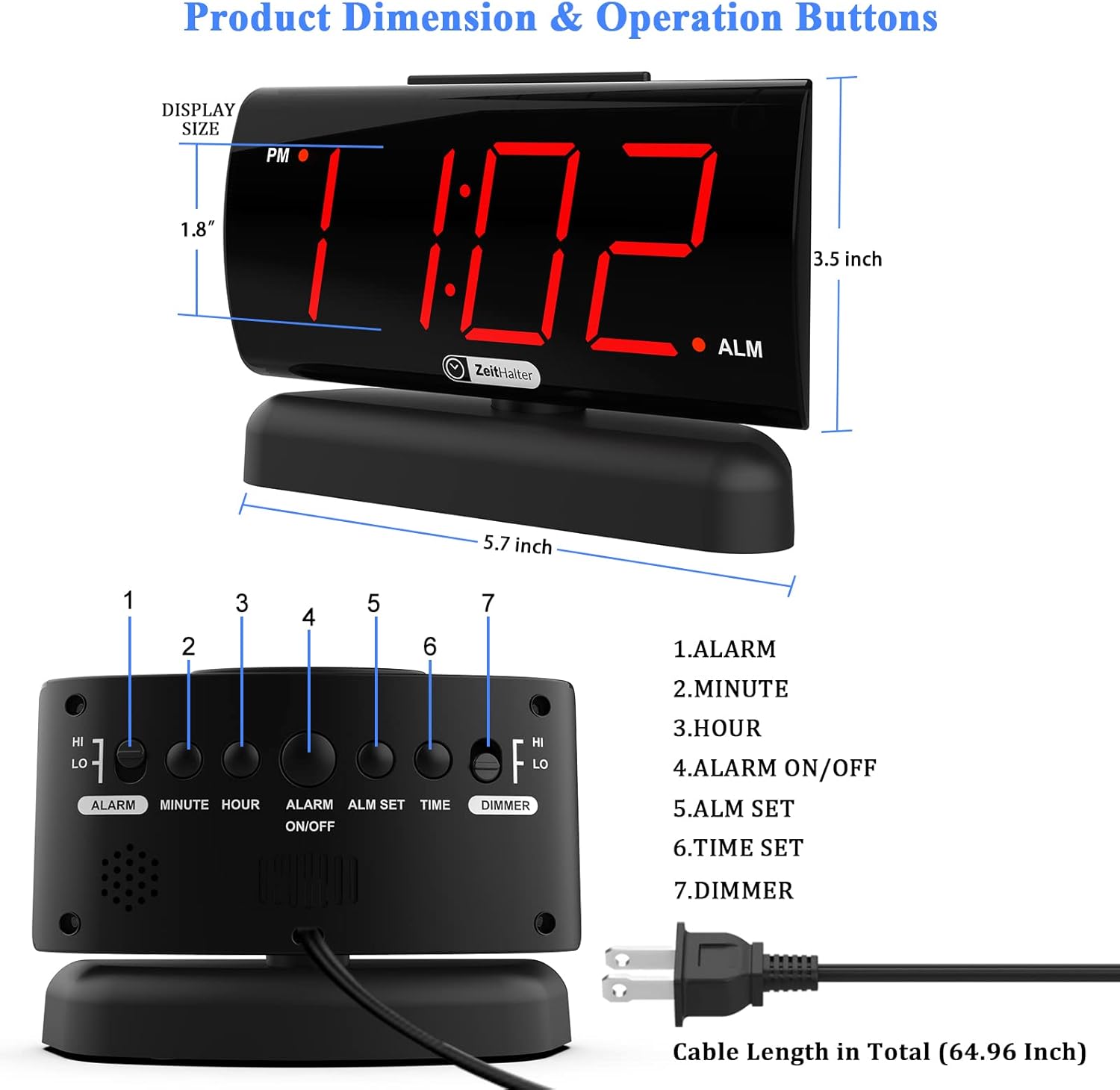
Figure 3: Product Dimensions & Operation Buttons
5.1 ضبط الوقت
- اضغط مع الاستمرار على الوقت المحدد اضغط على الزر حتى تبدأ أرقام الساعة في الوميض.
- اضغط على ساعة button to adjust the hour. Pay attention to the PM indicator.
- اضغط على دقيقة زر لضبط الدقيقة.
- يضعط الوقت المحدد مرة أخرى للتأكيد والخروج من وضع ضبط الوقت.
5.2 ضبط المنبه
- اضغط مع الاستمرار على ALM SET اضغط على الزر حتى تبدأ أرقام ساعة التنبيه في الوميض.
- اضغط على ساعة زر لضبط ساعة المنبه.
- اضغط على دقيقة زر لضبط دقيقة التنبيه.
- يضعط ALM SET مرة أخرى للتأكيد والخروج من وضع ضبط المنبه.
- لتنشيط أو إلغاء تنشيط التنبيه، اضغط على تشغيل / إيقاف الإنذار button. An alarm indicator (usually a small dot or icon) will appear on the display when the alarm is active.
5.3 وظيفة الغفوة
عندما يصدر صوت التنبيه، اضغط على الزر الكبير غفوة button located on the top of the clock. This will temporarily silence the alarm for 9 minutes. The alarm will sound again after the snooze period. To turn off the alarm completely, press the تشغيل / إيقاف الإنذار زر في الخلف.

Figure 4: Large Snooze Button for easy access.
5.4 ضبط سطوع الشاشة
The clock offers two levels of display brightness (High and Low). To adjust, slide the ديمر switch on the back of the clock to your preferred setting. The low setting is ideal for nighttime use to avoid disturbing sleep.

Figure 5: Two Display Brightness Levels.
5.5 ضبط مستوى صوت المنبه
The alarm sound has two volume levels: High and Low. To adjust, slide the ALARM HI/LO switch on the back of the clock to your desired volume. This allows for a comfortable wake-up experience, whether you are a light or heavy sleeper.

Figure 6: Adjustable Alarm Volume.
5.6 قاعدة دوارة 90 درجة
The clock is equipped with a 90° swivel base, allowing you to easily adjust the viewing angle for optimal readability from various positions in your room. Simply rotate the clock on its base to achieve the desired angle.

Figure 7: 90° Swivel Base for easy viewعمل.
5.7 Features in Action (Video)
Video 1: This video demonstrates various features of the ZEITHALTER Digital Alarm Clock, including AC power supply, setting the time, snooze mode, 2-level brightness dimmer, 90° swivel base, and battery installation. It provides a visual guide to the clock's functionality.
6. الصيانة
- تنظيف: To clean the clock, wipe the surface with a soft, dry cloth. Do not use abrasive cleaners or solvents, as they may damage the finish.
- استبدال البطارية: Replace the AAA backup batteries annually or if you notice settings are not retained during power outagإِسْ
- تخزين: في حال تخزين الساعة لفترة طويلة، قم بإزالة البطاريات الاحتياطية لمنع التسرب.
7. استكشاف الأخطاء وإصلاحها
| مشكلة | السبب المحتمل | حل |
|---|---|---|
| العرض فارغ. | No AC power; Dimmer set to 0% light. | Ensure the power cord is securely plugged in. Check the dimmer switch on the back and set it to HI or LO. |
| لا يصدر صوت الإنذار. | Alarm is not activated; Alarm time is incorrect; Volume is too low. | اضغط على تشغيل / إيقاف الإنذار button to activate the alarm (check for indicator). Verify the alarm time is set correctly. Adjust the ALARM HI/LO يُحوّل. |
| الوقت/الإعدادات المفقودة بعد انقطاع الطاقةtage. | البطاريات الاحتياطية ميتة أو غير مثبتة. | Install two new AAA batteries in the battery compartment. |
| Clock display is too dim/bright. | Dimmer setting is not preferred. | ضبط ديمر switch on the back of the clock. |
8. المواصفات
| ميزة | التفاصيل |
|---|---|
| رقم الموديل | SNC3002 |
| نوع العرض | 1.8'' Large Red LED Digital Display |
| مصدر الطاقة | AC 120V Corded Electric |
| النسخ الاحتياطي للبطارية | 2 بطاريات AAA (غير مدرجة) |
| مدة الغفوة | 9 دقائق |
| مستويات السطوع | 2 (مرتفع، منخفض) |
| مستويات صوت الإنذار | 2 (مرتفع، منخفض) |
| الأبعاد (العرض × الارتفاع) | 6.14 بوصة × 4.09 بوصة (156 مم × 104 مم) |
| وزن | 10.7 أونصات |
| مادة | بلاستيك ، أكريلونيتريل بوتادين ستايرين |
| المميزات الخاصة | 90° Swivel Base, Easy-to-Use Buttons |
9. الضمان والدعم
ZEITHALTER provides a ضمان لمدة 24 شهرًا for this product from the date of purchase, covering manufacturing defects. We also offer دعم مدى الحياة لضمان رضاكم.
للحصول على المساعدة التقنية، أو استكشاف الأخطاء وإصلاحها، أو تقديم مطالبات الضمان، يرجى الاتصال بفريق دعم العملاء لدينا:
- بريد إلكتروني: support@zeithalter.com
- Webموقع: www.zeithalter.com
Please have your model number (SNC3002) and purchase information ready when contacting support.
لا توجد مستندات ذات صلة
Ask a question about this manual
Ask about setup, troubleshooting, compatibility, parts, safety, or missing instructions. Manuals+ will review the question and use this page’s manual context to help answer it.