
FLOMASTA TD230W
FLOMASTA TD230W Programmable Digital Thermostat User Manual
الموديل: TD230W
1. المقدمة
Thank you for choosing the FLOMASTA TD230W Programmable Digital Thermostat. This modern, wall-mounted thermostat is designed to provide precise and efficient control over your HVAC system. Featuring a touch control interface, LCD display with backlight, and BACnet MS/TP connectivity, it offers advanced functionality for optimal climate management in your space.
This manual provides detailed instructions for installation, operation, and maintenance of your TD230W thermostat. Please read it thoroughly before beginning installation or operation to ensure safe and correct usage.
2. معلومات السلامة
تحذير: خطر حدوث صدمة كهربائية!
- Always disconnect power to the heating/cooling system at the main fuse or circuit breaker before installing or servicing the thermostat.
- يجب أن يتم التركيب فقط بواسطة كهربائي مؤهل أو فني تكييف وتبريد محترف.
- تأكد من أن جميع توصيلات الأسلاك آمنة وتتوافق مع القوانين الكهربائية المحلية.
- Do not operate the thermostat with wet hands or in damp شروط.
- This device operates on 230 Volts. Exercise extreme caution.
احتفظ بهذا الدليل للرجوع إليه في المستقبل.
3. مواصفات المنتج
- التحكم القابل للبرمجة: Allows for setting custom temperature schedules.
- واجهة التحكم باللمس: Intuitive and easy-to-use touch buttons.
- شاشة LCD بإضاءة خلفية: Clear temperature and setting visibility, even in low light.
- تصميم التركيب على الحائط: Sleek and modern aesthetic for seamless integration.
- اتصال BACnet MS/TP: For integration into building management systems.
- Electric Cable Power Source: Reliable wired power supply.
- المجلدtage: 230 فولت.
4. محتويات العبوة
يرجى تحديد المربع للعناصر التالية:
- FLOMASTA TD230W Digital Thermostat Unit
- مسامير التثبيت ومثبتات الحائط
- دليل المستخدم (هذا المستند)
5. الإعداد والتثبيت
The FLOMASTA TD230W thermostat is designed for wall mounting and requires a wired electrical connection. Professional installation is highly recommended to ensure proper functionality and safety.
5.1 اختيار الموقع
Select a location on an interior wall, approximately 1.5 meters (5 feet) above the floor. Avoid locations near heat sources (e.g., direct sunlight, lamps, fireplaces), drafts (e.g., windows, doors), or areas with poor air circulation.
5.2 تعليمات الأسلاك
Before proceeding, ensure power to the HVAC system is OFF at the circuit breaker.
- Carefully remove the front cover of the thermostat to expose the wiring terminals.
- Connect the electrical cables from your HVAC system to the corresponding terminals on the thermostat. Refer to the wiring diagram provided with your HVAC system or consult a professional for specific connections. The thermostat operates on 230V.
- تأكد من أن جميع التوصيلات محكمة وآمنة.
5.3 تركيب منظم الحرارة
- Once wired, secure the thermostat base to the wall using the provided mounting screws and wall anchors.
- Carefully reattach the front cover of the thermostat, ensuring it clicks securely into place.
- أعد التيار الكهربائي إلى نظام التكييف والتهوية عند قاطع الدائرة.

الشكل 1: الجبهة view of the FLOMASTA TD230W Thermostat. The display is dark, and two touch buttons are visible: one for day mode (sun icon) and one for night mode (crescent moon icon).
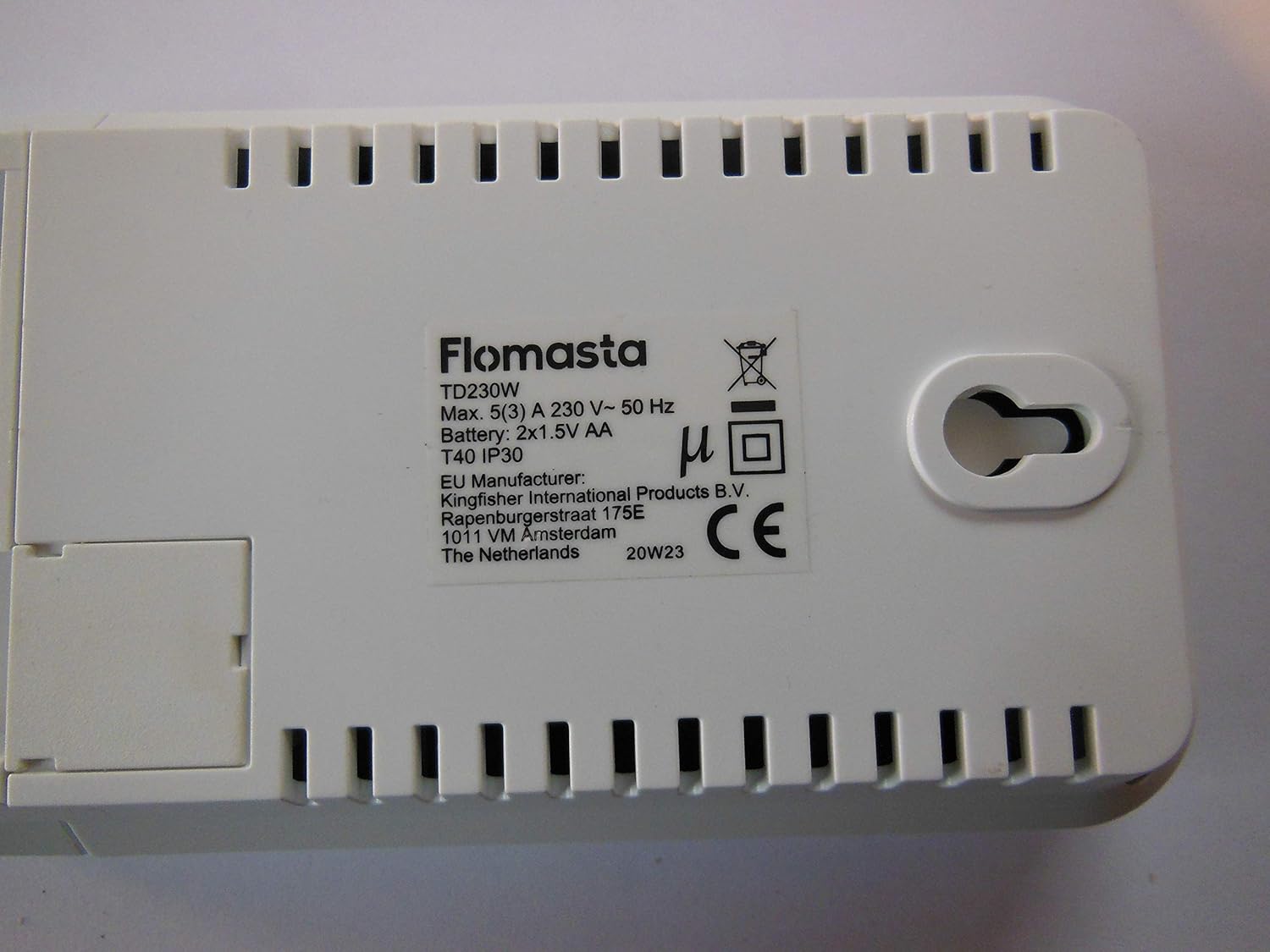
الشكل 2: العودة view of the FLOMASTA TD230W Thermostat. The label clearly shows the model TD230W, electrical ratings, and indicates a battery compartment for 2x1.5V AA batteries, which are likely for memory backup or low-power functions.
6. تعليمات التشغيل
The TD230W thermostat features a user-friendly touch control interface and an LCD display for easy operation.
6.1 التشغيل الأولي
Upon first power-on, the thermostat may prompt you to set the current time and day. Follow the on-screen instructions using the touch controls.
6.2 التحكم الأساسي في درجة الحرارة
- ضبط درجة الحرارة: استخدم + و - touch buttons (if present, or implied by "Touch Control") on the display to increase or decrease the desired temperature.
- اختيار الوضع: The thermostat typically supports heating, cooling, and auto modes. Use the mode button (if present) to cycle through these options.
- الإضاءة الخلفية: The LCD display features a backlight for improved visibility. It may activate automatically upon touch or have a dedicated button.
6.3 جداول البرمجة
The TD230W is a programmable thermostat, allowing you to set different temperatures for various times of the day and days of the week. Refer to the on-screen menu for detailed programming steps. Common programming options include:
- Weekday/Weekend Schedules: Set different programs for weekdays and weekends.
- Multiple Periods: Typically allows for 4-6 temperature periods per day (e.g., Wake, Leave, Return, Sleep).
- تجاوز مؤقت: Temporarily adjust the temperature without changing the programmed schedule.
- عقد دائم: Maintain a set temperature indefinitely until manually changed.
6.4 BACnet MS/TP Integration
For advanced users and building management systems, the TD230W supports BACnet MS/TP protocol. Consult your building management system administrator or a qualified technician for integration details and configuration. This feature allows for remote monitoring and control of the thermostat within a larger network.
7. الصيانة
تضمن الصيانة الدورية الأداء الأمثل وطول عمر منظم الحرارة الخاص بك.
- تنظيف: امسح الجزء الخارجي من منظم الحرارة برفق بقطعة قماش ناعمة.amp قطعة قماش. لا تستخدم المنظفات الكاشطة أو المذيبات أو بخاخات التنظيف مباشرة على الجهاز.
- استبدال البطارية: The back of the unit indicates it uses 2x1.5V AA batteries. These are likely for memory backup or to power the display during power outages. Replace batteries annually or when a low battery indicator appears on the display. To replace, carefully remove the thermostat from its wall mount (refer to installation steps in reverse), access the battery compartment on the back, replace the batteries, and re-mount.
- فتحات التهوية: Ensure that any small vents on the thermostat casing are free from dust and debris to allow for accurate temperature sensing.
8. استكشاف الأخطاء وإصلاحها
If you experience issues with your FLOMASTA TD230W thermostat, try the following solutions:
| مشكلة | السبب المحتمل | حل |
|---|---|---|
| العرض فارغ أو خافت. | No power, loose wiring, dead batteries (if applicable for display). | Check circuit breaker. Ensure wiring is secure. Replace AA batteries if present. |
| Thermostat not controlling HVAC. | Incorrect wiring, HVAC system off, thermostat in wrong mode. | Verify wiring connections. Check HVAC system power. Ensure thermostat is in heating/cooling mode. |
| يبدو أن قراءة درجة الحرارة غير دقيقة. | Thermostat location, blocked air vents. | Ensure thermostat is not near heat sources or drafts. Clean any dust from vents. |
| Cannot program schedule. | Incorrect settings, user error. | Review "Operating Instructions" section on programming. Reset thermostat to factory defaults if necessary (consult manufacturer for procedure). |
If the problem persists after attempting these solutions, please contact a qualified HVAC technician or the manufacturer's support.
9. المواصفات
| ميزة | مواصفة |
|---|---|
| نموذج | TD230W |
| الشركة المصنعة | FLOMASTA TD230W |
| أسلوب | حديث |
| مصدر الطاقة | الكابلات الكهربائية |
| المجلدtage | 230 فولت |
| نوع العرض | شاشة LCD مع إضاءة خلفية |
| نوع التركيب | حامل الحائط |
| المميزات الخاصة | قابلة للبرمجة |
| طريقة التحكم | التحكم باللمس |
| بروتوكول الاتصال | BACnet MS / TP |
| Battery (for backup) | 2x 1.5V AA (as per product image label) |
| الحد الأقصى الحالي | 5(3) A (as per product image label) |
| تصنيف IP | IP30 (as per product image label) |
10. الضمان والدعم
Warranty information for the FLOMASTA TD230W thermostat is typically provided at the point of purchase or included with the product packaging. Please retain your proof of purchase for warranty claims.
For technical support, troubleshooting assistance beyond this manual, or inquiries regarding spare parts, please contact the manufacturer or your retailer. Information regarding spare parts availability is currently unavailable.
You may find further information on the manufacturer's official webموقع: www.flomasta.com (ملاحظة: هذا هو عنصر نائب URL. Please refer to your product packaging for the correct manufacturer webموقع.)
Ask a question about this manual
Ask about setup, troubleshooting, compatibility, parts, safety, or missing instructions. Manuals+ will review the question and use this page’s manual context to help answer it.