
1. انتهى المنتجview
The KAIDI KD-763 is a wired gaming headset designed for use with the PlayStation 4 (PS4) console and other compatible devices with a 3.5mm audio jack. It features over-ear cups for immersive sound, a rotary microphone for clear communication, and an inline volume control for convenient audio adjustments. The headset also includes an LED lighting effect, typically powered via a USB connection.
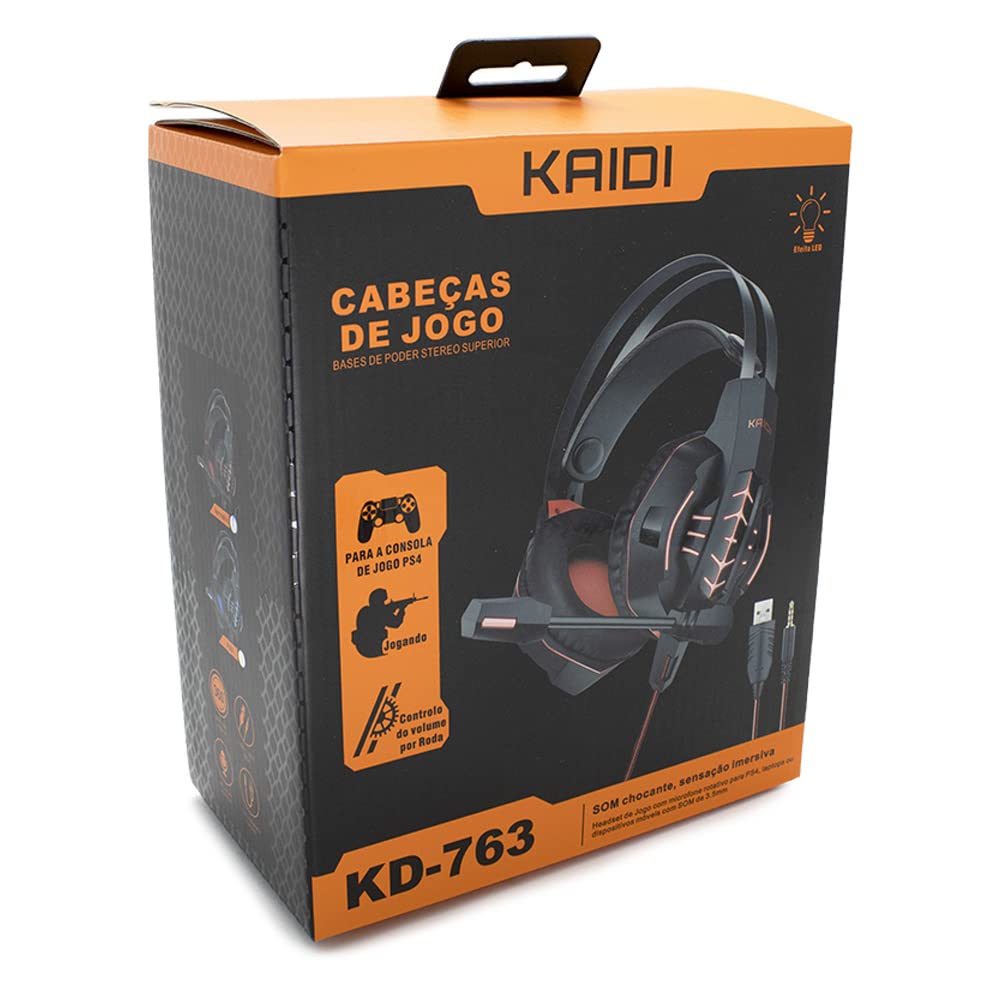
الشكل 1.1: The KAIDI KD-763 PS4 Gaming Headset packaging, showing the headset, its features, and compatibility with PS4.
2. معلومات السلامة
- تجنب الاستماع لفترات طويلة بمستويات صوت عالية لمنع تلف السمع.
- لا تعرض سماعة الرأس لدرجات حرارة شديدة أو رطوبة عالية أو لأشعة الشمس المباشرة.
- احتفظ بسماعة الرأس بعيدًا عن الماء والسوائل الأخرى.
- لا تحاول تفكيك سماعة الرأس أو تعديلها. قد يؤدي ذلك إلى إلغاء الضمان والتسبب في تلفها.
- نظف سماعة الرأس بقطعة قماش ناعمة وجافة فقط.
- يحفظ بعيدًا عن متناول الأطفال.
3. محتويات العبوة
يرجى التحقق من محتويات العبوة عند فتحها. في حال وجود أي نقص أو تلف في المنتجات، يرجى الاتصال بالبائع.
- KAIDI KD-763 Gaming Headset
- دليل المستخدم (هذا المستند)
4. دليل الإعداد
- Connect to PS4 Controller: Locate the 3.5mm audio jack on your PS4 controller. Insert the 3.5mm connector from the KD-763 headset firmly into this port.
- Powering LED Lights (Optional): If your headset features LED lighting, connect the USB connector from the headset to an available USB port on your PS4 console or a compatible USB power adapter. The LED lights will illuminate once connected.
- اضبط مقاس سماعة الرأس: Extend or retract the headband to ensure the earcups sit comfortably and securely over your ears. The over-ear design should fully enclose your ears for optimal sound isolation.
- موضع الميكروفون: Adjust the flexible rotary microphone boom to a position near your mouth for clear voice pickup. Ensure it is not obstructing your vision.
- Configure PS4 Audio Settings:
- اذهب الى إعدادات > الأجهزة > أجهزة الصوت on your PS4.
- تعيين جهاز الإدخال to "Headset (Controller)".
- تعيين جهاز الإخراج to "Headset (Controller)".
- تعيين الإخراج إلى سماعات الرأس to "All Audio" for full game and chat sound.
- يُعدِّل التحكم في مستوى الصوت (سماعات الرأس) إلى مستوى مريح.
5. تعليمات التشغيل
5.1. التحكم في مستوى الصوت
The KD-763 headset features an inline volume control wheel located on the cable. Rotate the wheel upwards to increase the volume and downwards to decrease it. Adjust to a comfortable listening level.
5.2. استخدام الميكروفون
The microphone is designed to capture your voice clearly. Ensure it is positioned correctly near your mouth. If your PS4 audio settings are configured correctly, your voice will be transmitted to other players in online games or chat parties.
To mute the microphone, check if there is a physical mute switch on the inline control. If not, you can mute the microphone through your PS4's quick menu (hold the PS button on your controller).
6. الصيانة
- تنظيف: Use a soft, dry, lint-free cloth to wipe the earcups and headband. Do not use liquid cleaners or abrasive materials.
- تخزين: عند عدم استخدام سماعة الرأس، احفظها في مكان نظيف وجاف، بعيدًا عن أشعة الشمس المباشرة ودرجات الحرارة القصوى. تجنب تشابك الكابل.
- العناية بالكابلات: Do not pull on the cable to disconnect the headset. Always grasp the plug. Avoid bending or twisting the cable excessively.
7. استكشاف الأخطاء وإصلاحها
- لا يوجد صوت أو مستوى الصوت منخفض:
- تأكد من إدخال مقبس 3.5 ملم بالكامل في وحدة تحكم PS4.
- Check the inline volume control wheel on the headset cable and turn it up.
- Verify PS4 audio settings (إعدادات > الأجهزة > أجهزة الصوت) are correctly configured for the headset.
- Test the headset with another device (e.g., smartphone) to rule out a headset issue.
- الميكروفون لا يعمل:
- تأكد من وضع ذراع الميكروفون بشكل صحيح.
- Check PS4 audio settings (إعدادات > الأجهزة > أجهزة الصوت) to ensure جهاز الإدخال is set to "Headset (Controller)".
- Confirm the microphone is not muted via an inline switch or the PS4 quick menu.
- اختبر الميكروفون باستخدام تطبيق أو جهاز آخر إن أمكن.
- أضواء LED لا تعمل:
- Ensure the USB connector is firmly plugged into a powered USB port.
- جرب منفذ USB مختلفًا.
8. المواصفات
| ماركة: | كايدي |
| نموذج: | كيه دي-763 |
| نوع السماعة: | Over-ear (Circumaurais) |
| مقاومة: | 32 أوم |
| حساسية: | 110 ديسيبل |
| الاتصال: | Wired (3.5mm audio jack + USB for LED) |
| الأجهزة المتوافقة: | Gaming Consoles (e.g., PS4), devices with 3.5mm audio jack |
| الاستخدام المحدد: | الألعاب |
| نوع التحكم: | Inline Volume Control Wheel |
| ميكروفون: | Rotary/Swivel |
| تأثير الصمام: | Yes (USB powered) |
9. الضمان والدعم
KAIDI products are designed and manufactured to the highest quality standards. For information regarding warranty coverage, terms, and conditions, please refer to the warranty card included with your purchase or visit the official KAIDI webموقع.
For technical support, troubleshooting assistance, or to inquire about replacement parts, please contact KAIDI customer service through their official channels. Contact information can typically be found on the product packaging or the official KAIDI webموقع.