
VPFET 52-542
VPFET 4K60Hz HDMI Audio Extractor User Manual
نموذج: شنومكس-شنومكس
1. المقدمة
The VPFET 4K60Hz HDMI Audio Extractor is designed to separate audio signals from an HDMI source and output them to an external sound system via optical SPDIF or 3.5mm audio interfaces. This device supports high-resolution video up to 4K at 60Hz, HDMI 2.0b, HDCP 2.2, and HDR10, making it suitable for various home entertainment and professional audio-video setups. It allows users to enjoy high-quality audio from HDMI sources on audio receivers, soundbars, or headphones that may not have HDMI input capabilities.
2. الميزات الرئيسية
- HDMI Audio Extraction: Extracts audio from an HDMI signal to optical SPDIF and 3.5mm stereo outputs.
- دعم عالي الدقة: Compatible with 4K@60Hz (YUV444), 1080P@144Hz, and 1080P@120Hz video resolutions.
- HDMI 2.0b Standard: Supports 18Gbps bandwidth, HDCP 2.2, and DVI compliance.
- دعم HDR10: Enhances visual quality with High Dynamic Range (HDR10). Use HDMI 2.0 certified cables for optimal HDR10 compatibility.
- صوت Sampمعدل لينغ: Supports audio sampling rates up to 192kHz.
- أوضاع صوتية متعددة: Features 2.0CH, 5.1CH, and TV audio modes for flexible output configuration.
- استهلاك منخفض للطاقة: Powered via a 5V USB port, requiring minimal power.
- التوافق الواسع: Suitable for various HDMI source devices such as Blu-ray/DVD players, gaming consoles (Xbox, PlayStation), PCs/laptops, and streaming devices.
- التوصيل والتشغيل: مصمم لسهولة التركيب والاستخدام الفوري.
3. محتويات العبوة
تأكد من وجود جميع العناصر في العبوة:
- 1x VPFET HDMI Audio Extractor
- 1 × كابل HDMI
- 1X كابل الطاقة USB
- 1x L/R RCA Audio Cable (3.5mm to RCA)
- 1 × دليل المستخدم

الشكل 1: محتويات العبوة وأبعاد الجهاز
This image displays the VPFET HDMI Audio Extractor unit along with all the cables and documentation included in the product package. It also shows the device's approximate dimensions: 2.3 inches (length) x 2.1 inches (width) x 0.9 inches (height).
4. انتهى المنتجview
The VPFET HDMI Audio Extractor features clearly labeled ports and controls for easy connection and operation.

Figure 2: Front Panel of the Audio Extractor
هذه الصورة توفر صورة واضحة view of the front panel of the VPFET HDMI Audio Extractor. Key components visible include the HDMI OUT port for video passthrough, a 'SIG' indicator light for signal status, an OPTICAL (SPDIF) port for digital audio output, and a 3.5mm AUX port for analog stereo audio output.

Figure 3: Rear Panel of the Audio Extractor
This image shows the rear panel of the VPFET HDMI Audio Extractor. It highlights the 'MODE' switch, which allows selection between 5.1CH, 2CH, and TV audio output modes. Also visible are the HDMI IN port for connecting the source device, a 'PW' indicator light for power status, and the USB 5V port for power input.
5. تعليمات الإعداد
Follow these steps to connect your VPFET HDMI Audio Extractor:
- قم بتوصيل مصدر HDMI: Use an HDMI cable to connect your source device (e.g., Blu-ray player, gaming console, PC) to the هدمي إن port on the audio extractor.
- توصيل الشاشة: Use another HDMI cable to connect your display device (e.g., TV, monitor, projector) to the مخرج HDMI port on the audio extractor.
- توصيل إخراج الصوت:
- For digital audio (5.1CH or 2.0CH PCM): Connect an optical cable from the بصري port on the extractor to your audio receiver or soundbar.
- For analog stereo audio (2.0CH PCM): Connect a 3.5mm audio cable from the 3.5 ملم AUX port on the extractor to your headphones or stereo speakers. The included L/R RCA cable can be used if your audio system requires RCA inputs.
- تشغيل الجهاز: Connect the provided USB power cable to the يو اس بي 5 فولت port on the extractor and plug the other end into a 5V USB power source (e.g., a USB port on your TV, a phone charger, or a dedicated 5V1A USB power adapter). The 'PW' indicator light will illuminate.
- حدد وضع الصوت: ضبط وضع switch on the extractor according to your audio output requirements (refer to Section 6: Operating Modes).

الشكل 4: مخطط التوصيل النموذجي
This diagram illustrates a common setup for the HDMI Audio Extractor. An input device (e.g., Blu-ray player) connects to the HDMI IN port. The HDMI OUT port connects to a TV for video. Audio is extracted via the Optical port to an amplifier or via the 3.5mm AUX port to headphones. A crucial note indicates that the device does not support ARC (Audio Return Channel) or eARC functionality.
Video 1: HDMI Audio Extractor Connection Diagram
This video demonstrates the step-by-step connection process for the VPFET HDMI Audio Extractor, showing how to connect source devices, displays, and audio output devices using HDMI, optical, and 3.5mm cables. It also illustrates the different audio output modes and their corresponding connections.
6. أوضاع التشغيل
The audio extractor features a MODE switch to select the desired audio output format:
- 5.1CH الوضع:
In this mode, the optical output will provide 5.1 channel audio. This mode is ideal if your sound equipment (e.g., AV receiver, soundbar) supports Dolby Digital or DTS formats. The 3.5mm output is not active in this mode.

Figure 5: 5.1CH Optical Audio Setup
This image illustrates the connection for 5.1CH optical audio. A laptop (source) is connected to the HDMI IN of the extractor. The HDMI OUT goes to a TV. The optical output from the extractor is connected to a 5.1 speaker system, providing surround sound.
- 2.0CH الوضع:
When 2.0CH mode is selected, both the 3.5mm stereo output and the optical output will provide 2-channel PCM stereo audio. For this mode, ensure your HDMI source device's audio output is set to PCM format. This mode is suitable for headphones or stereo speaker systems.
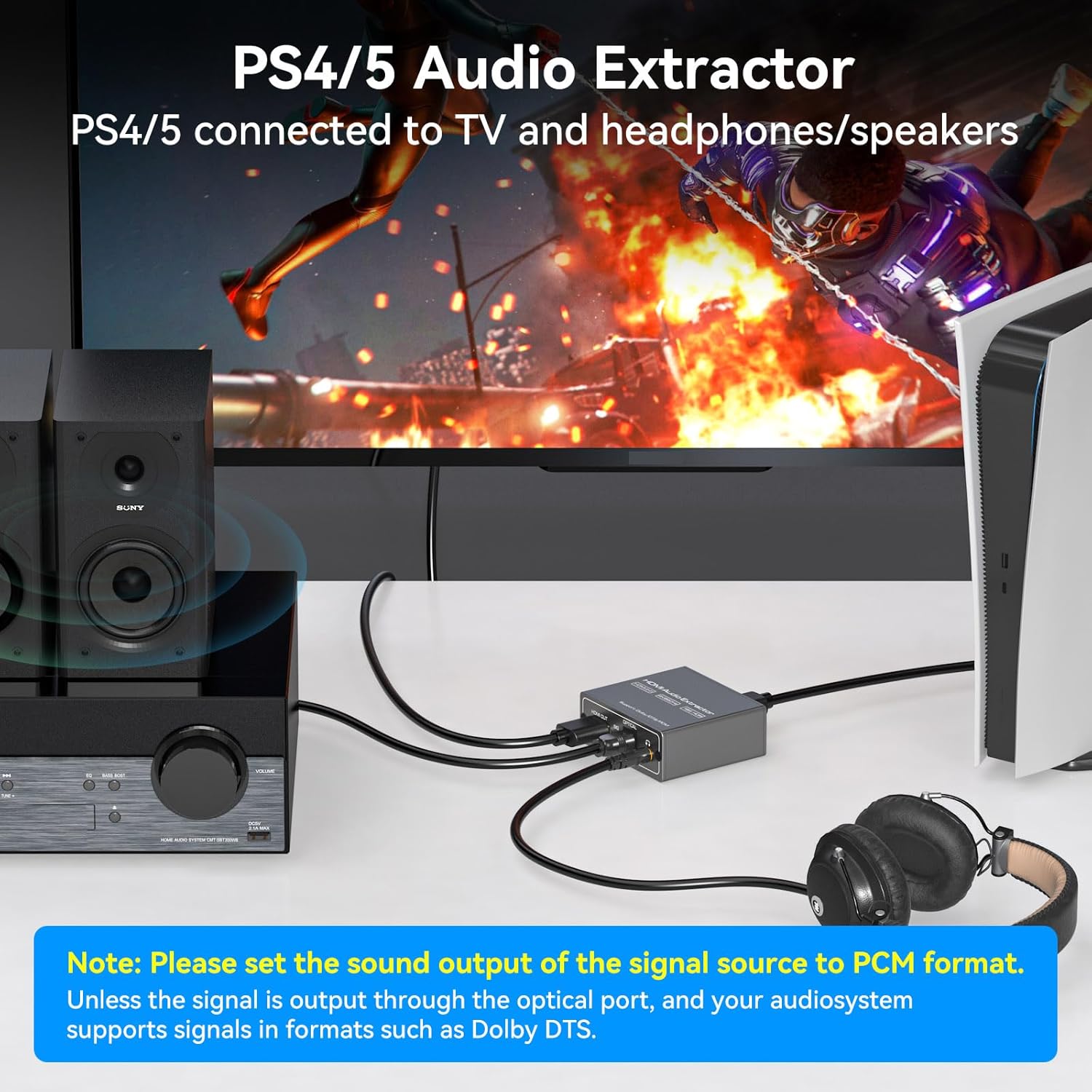
Figure 6: 2.0CH Headphone Audio Setup
This image demonstrates connecting a PlayStation 4 or 5 to the HDMI Audio Extractor. The video signal is passed through to a TV, while the 3.5mm audio output is connected to headphones, allowing for private listening during gaming.
- وضع التلفزيون:
In TV mode, the audio format output will follow the parameters supported by your connected TV. Use this mode if you encounter no audio signal when using 5.1CH or 2.0CH modes, especially if your display device uses a DVI interface or has specific audio handling requirements.
ملاحظة هامة: If no sound is obtained, please ensure the audio output setting on your signal source device (e.g., Blu-ray player, game console, PC) is configured to تنسيق PCM, especially when using 2.0CH mode for 3.5mm output.
7. استكشاف الأخطاء وإصلاحها
- لا يوجد مخرج صوتي:
- Ensure the audio extractor is properly powered via the USB 5V port and the 'PW' indicator light is on.
- Verify that all HDMI and audio cables are securely connected.
- التحقق من وضع switch setting on the extractor. If using 3.5mm output, select 2.0CH mode. If using optical output for surround sound, select 5.1CH mode.
- Confirm that your HDMI source device's audio output is set to تنسيق PCM, especially for 2.0CH output. For 5.1CH optical output, ensure your audio receiver supports Dolby Digital or DTS.
- Increase the volume on both your signal source and the connected audio receiver/speakers/headphones.
- No Video Output or Poor Video Quality:
- تأكد من توصيل جميع كابلات HDMI بشكل آمن.
- Use high-quality, HDMI 2.0 certified cables, especially for 4K@60Hz and HDR10 signals.
- Verify that your display device supports the resolution and refresh rate being output by your source.
- ARC/eARC Not Working:
هذا الجهاز يفعل لا support ARC (Audio Return Channel) or eARC functionality. Audio must be extracted from the HDMI source before it reaches the TV, or from the TV's dedicated audio output ports if available.
- Low Audio Volume:
If the audio output is too low, increase the volume on your signal source device and the connected audio output device (e.g., headphones, speakers, ampمكبر).
8. المواصفات
| ميزة | التفاصيل |
|---|---|
| أبعاد المنتج (الطول × العرض × الارتفاع) | 4.8 × 2.2 × 0.8 بوصة |
| وزن العنصر | 0.317 أونصات |
| رقم الموديل | 52-542 |
| نسخة HDMI | اتش دي ام اي 2.0 ب |
| إصدار HDCP | بروتوكول حماية المحتوى عالي الوضوح 2.2 |
| دعم أقصى دقة | 4K@60Hz (YUV444), 1080P@144Hz, 1080P@120Hz |
| النطاق الترددي | 18 جيجابت في الثانية |
| دعم HDR | النطاق الديناميكي العالي 10 |
| منافذ إخراج الصوت | Optical (SPDIF), 3.5mm AUX |
| مدخلات الطاقة | يو اس بي 5 فولت |
| لون | أسود |
| الأجهزة المتوافقة | PC, TV, Blu-ray/DVD players, gaming consoles, streaming devices |
9. الصيانة
To ensure the longevity and optimal performance of your VPFET HDMI Audio Extractor:
- احتفظ بالجهاز في مكان بارد وجاف، بعيداً عن أشعة الشمس المباشرة والحرارة الزائدة.
- تجنب تعريض الجهاز للرطوبة أو السوائل.
- نظّف الجزء الخارجي بقطعة قماش ناعمة وجافة. تجنّب استخدام مواد كيميائية قاسية أو منظفات كاشطة.
- تأكد من التهوية المناسبة حول الجهاز لمنع ارتفاع درجة الحرارة.
- تعامل مع الكابلات والموصلات بلطف لمنع تعرضها للتلف.
10. الضمان والدعم
VPFET is committed to providing quality products and customer satisfaction. This audio splitter comes with a user manual and necessary cables. If you encounter any problems with your device, including defective products or operational issues, please contact our professional technical support team immediately. We are dedicated to assisting you until your issue is resolved and offer replacement services for product problems.
For support, please refer to the contact information provided in your product packaging or visit the official VPFET webموقع.
المستندات ذات الصلة - 52-542
 |
VPFET HD811 HDMI Audio Extractor User Manual Comprehensive user manual for the VPFET HD811 HDMI Audio Extractor. This guide covers features, detailed specifications, panel layout, connection diagrams, step-by-step setup instructions, audio mode selection, FireTV settings, and troubleshooting tips for optimal audio extraction from HDMI sources. |
 |
دليل مستخدم مستخرج الصوت HDMI دليل المستخدم لمستخرج الصوت HDMI، يوضح بالتفصيل ميزاته ومواصفاته ووصف اللوحة وإعدادات EDID ومخطط الأسلاك واستكشاف الأخطاء وإصلاحها. |
 |
Goobay HDMI™ Audio Extractor 4K @ 30 Hz Bedienungsanleitung Die Bedienungsanleitung für den Goobay HDMI™ Audio Extractor 4K @ 30 Hz (Modell 58469). Erfahren Sie mehr über Einrichtung, Anschlüsse, Audioformate und Fehlerbehebung für diesen HDMI-zu-Analog-Audio-Konverter. |
 |
VPFET CV121AD Audio Converter User Manual User manual for the VPFET CV121AD Audio Converter, detailing features, specifications, connections, and troubleshooting for converting audio signals (Toslink, Coaxial, ARC) to various outputs (Toslink, Coaxial, Stereo R/L, 3.5mm). |
 |
توصيل ButtKicker بنظام بدون مخرج مضخم صوت دليل حول كيفية توصيل أنظمة ButtKicker اللمسية بمصادر الصوت التي تفتقر إلى مخرج مضخم صوت مخصص، مع تفصيل استخدام مستخلصات الصوت HDMI ومحولات البصري إلى التناظري. |
 |
SEADA SD-HHA HDMI to HDMI + Audio Converter User Manual Detailed user manual for the SEADA SD-HHA HDMI to HDMI + Audio Converter, covering features, specifications, connection diagrams, and safety instructions. Supports 4K@60Hz, HDR, ARC, and multiple audio outputs. |
Ask a question about this manual
Ask about setup, troubleshooting, compatibility, parts, safety, or missing instructions. Manuals+ will review the question and use this page’s manual context to help answer it.