
Naztech 15350
Naztech Xpods PRO True Wireless Noise Cancelling Earbuds
الموديل: 15350
Brand: Naztech
مقدمة
The Naztech Xpods PRO are advanced true wireless noise-cancelling earbuds designed for an immersive audio experience and clear communication. Featuring HD sound, touch controls, and IPX4 water resistance, these earbuds are suitable for various activities, including sports and daily use. They come with a wireless charging case for extended playtime and convenient recharging.

Image: Naztech Xpods PRO earbuds, charging case, and product packaging, highlighting key features like 25 hours play time and touch controls.
يثبت
ماذا يوجد في الصندوق
- حافظة الشحن اللاسلكي
- كابل شحن USB-C
- 6 Sets of Silicone Ear Tips (3 sizes, 2 colors)
شحن سماعات الأذن والعلبة
Before first use, fully charge the Xpods PRO and their charging case. The case can be charged via the included USB-C cable or a Qi-compatible wireless charging pad.
- شحن USB-C: قم بتوصيل كابل USB-C بمنفذ الشحن الموجود على العلبة وبمصدر الطاقة.
- الشحن اللاسلكي: ضع علبة الشحن على قاعدة شحن لاسلكية متوافقة مع تقنية Qi. تأكد من محاذاة العلبة بشكل صحيح للشحن.
A 10-minute quick charge provides approximately 1 hour of playback. A full charge offers up to 5 hours of playtime for the earbuds, with the charging case providing an additional 20 hours, totaling 25 hours of playtime.
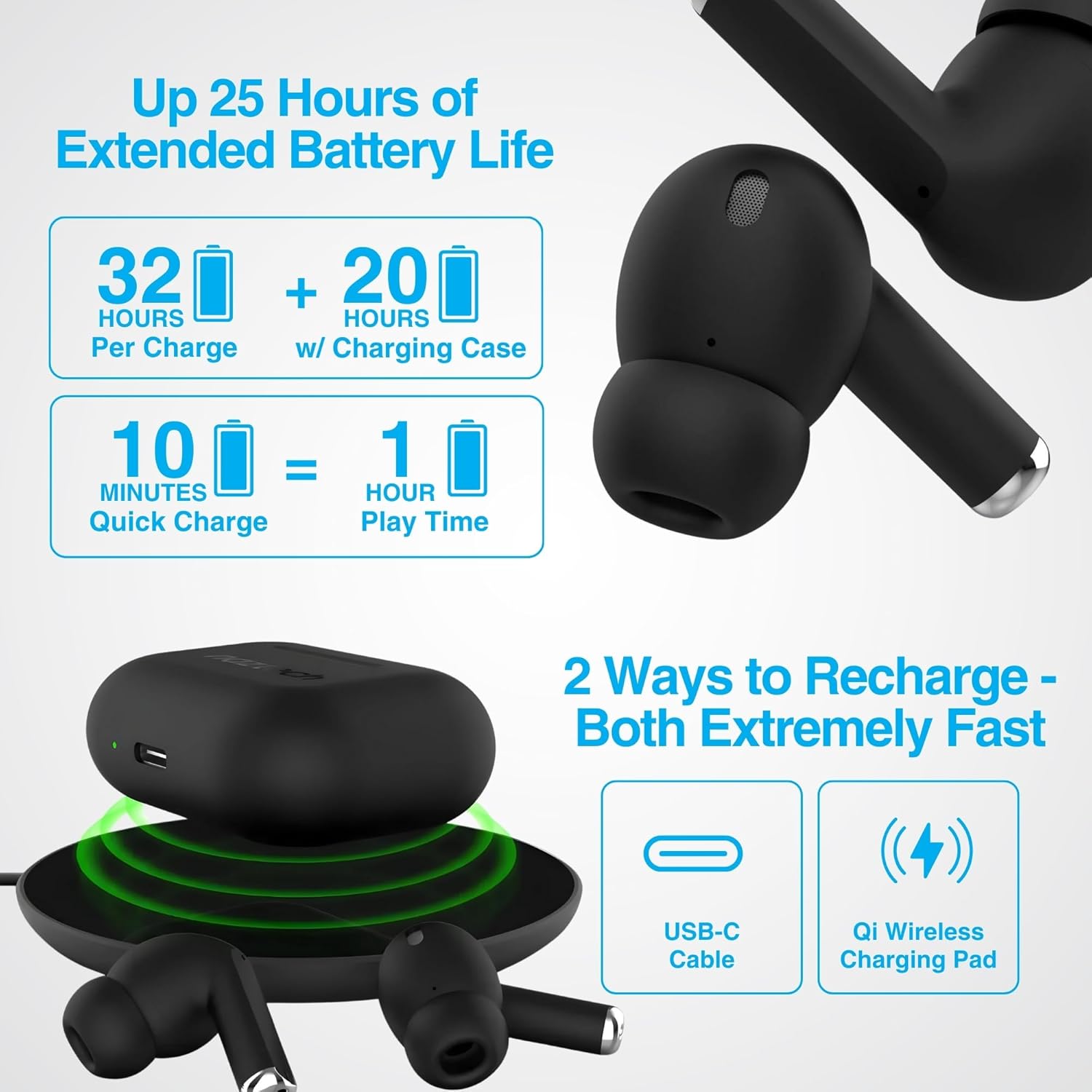
Image: Illustration showing USB-C and Qi wireless charging options for the Naztech Xpods PRO case, along with battery life indicators.
الاقتران بجهازك
- تأكد من شحن وسادات الأذن.
- افتح علبة الشحن. ستدخل سماعات الأذن تلقائيًا في وضع الاقتران.
- على جهازك (الهاتف الذكي، الجهاز اللوحي، وما إلى ذلك)، انتقل إلى إعدادات البلوتوث وقم بتمكين البلوتوث.
- Select "NAZTECH Xpods PRO" from the list of available devices.
- بمجرد الاتصال، ستسمع تأكيدًا صوتيًا، وستكون سماعات الأذن جاهزة للاستخدام.
The Xpods PRO feature Bluetooth 5.0 for stable connectivity up to 33 feet (10 meters) and auto-pair technology for seamless re-connection with previously paired devices.

Image: A smartphone screen showing the "NAZTECH Xpods PRO" listed in Bluetooth settings, demonstrating universal compatibility with various devices.
تعليمات التشغيل
عناصر التحكم باللمس
The Xpods PRO feature intuitive touch sensor controls on each earbud for easy management of audio playback and calls.
| فعل | يتحكم |
|---|---|
| تشغيل/إيقاف الموسيقى مؤقتًا | نقرة واحدة على أي من سماعات الأذن |
| المسار التالي | انقر مرتين على سماعة الأذن اليمنى |
| المسار السابق | انقر مرتين على سماعة الأذن اليسرى |
| الرد على المكالمة/إنهائها | نقرة واحدة على أي من سماعات الأذن |
| رفض المكالمة | اضغط مع الاستمرار على إحدى سماعات الأذن لمدة ثانيتين |
| تفعيل المساعد الصوتي | اضغط ثلاث مرات على أي سماعة أذن |

Image: Diagram illustrating the touch control functions on the Naztech Xpods PRO earbuds.
ارتداء سماعات الأذن
For optimal sound quality and a secure fit, choose the silicone ear tips that best suit your ear canal. The Xpods PRO come with 6 sets of silicone ear tips in 3 sizes and 2 colors to ensure a comfortable and noise-isolating fit.

Image: Naztech Xpods PRO earbuds shown with various silicone ear tip sizes, emphasizing customizable fit.
إلغاء الضوضاء
The Xpods PRO feature Passive Noise Cancellation through their closed-system design, which helps to immerse you in music by preserving low-frequency bass richness and reducing ambient noise. Dual microphones with advanced voice capture technology filter out wind and background noise for clear conversations.

Image: A person using Naztech Xpods PRO, illustrating the clear call quality and passive noise cancellation features.
صيانة
تنظيف
To maintain optimal performance and hygiene, regularly clean your Xpods PRO earbuds and charging case. Use a soft, dry, lint-free cloth to wipe down the surfaces. For ear tips, you may gently wipe them with a slightly damp قم بتثبيت القماش واتركه يجف تماماً قبل إعادة تثبيته.
تجنب استخدام المواد الكاشطة أو المذيبات أو المواد الكيميائية القاسية، لأنها قد تتلف المنتج.
مقاومة الماء (IPX4)
The Naztech Xpods PRO are rated IPX4 water-resistant, meaning they are protected against splashing water from any direction. This makes them suitable for workouts and light rain. However, they are not designed for submersion in water or exposure to pressurized water jets. Do not use them while swimming or showering.

Image: A person wiping sweat from their face, indicating the IPX4 water-resistant rating of the Naztech Xpods PRO for active use.
تخزين
When not in use, store your Xpods PRO in their charging case to protect them from dust, dirt, and physical damage. Store the case and earbuds in a cool, dry place away from extreme temperatures and direct sunlight.
استكشاف الأخطاء وإصلاحها
If you encounter issues with your Naztech Xpods PRO, refer to the following common solutions:
سماعات الأذن غير مقترنة أو غير متصلة
- التحقق من البطارية: تأكد من أن سماعات الأذن وعلبة الشحن مشحونة بشكل كافٍ.
- بصلح: Turn off Bluetooth on your device, place earbuds back in the case, close and reopen the case. Then, re-enable Bluetooth on your device and try pairing again.
- نسيت الجهاز: On your device's Bluetooth settings, "forget" or "unpair" the "NAZTECH Xpods PRO" and then attempt to pair from scratch.
- مسافة: Ensure your device is within the 33ft (10m) Bluetooth range.
- تدخل: ابتعد عن الأجهزة اللاسلكية الأخرى التي قد تسبب تداخلاً.
Sound Quality Issues (e.g., Static, Low Volume)
- سماعات أذن نظيفة: Ensure the mesh filters and ear tips are clean and free of debris.
- ملاءمة طرف الأذن: Experiment with different sized silicone ear tips to ensure a proper seal in your ear canal, which significantly impacts sound quality and bass response.
- جودة المصدر: Ensure the audio source (music file(خدمة البث) ذات جودة عالية.
- حجم الجهاز: تحقق من مستويات الصوت على كل من جهازك المتصل وسماعات الأذن.
مشاكل الشحن
- فحص الكابل: Ensure the USB-C cable is securely connected to both the case and the power source. Try a different USB-C cable and power adapter if available.
- لوحة لاسلكية: If using wireless charging, ensure the case is correctly positioned on the charging pad and the pad is powered on.
- وضع سماعات الأذن: Ensure the earbuds are correctly seated in the charging case, making proper contact with the charging pins.
تحديد
| ميزة | التفاصيل |
|---|---|
| اسم الموديل | NAZTECH Xpods PRO |
| رقم موديل العنصر | 15350 |
| تكنولوجيا الاتصال | لاسلكي (بلوتوث 5.0) |
| لاسلكي المدى | حتى 33 قدم / 10 متر |
| نوع التحكم | اللمس (التحكم بالوسائط) |
| التحكم في الضوضاء | إلغاء الضجيج السلبي |
| تصنيف مقاومة الماء | IPX4 |
| إجمالي وقت اللعب | ما يصل إلى 25 ساعة (مع علبة الشحن) |
| Earbud Playtime (per charge) | تصل إلى 5 ساعة |
| شحن سريع | شحن لمدة 10 دقائق لتشغيل لمدة ساعة واحدة |
| واجهة الشحن | USB-C، شحن لاسلكي Qi |
| المكونات المضمنة | USB-C Charging Cable, 6 Sets of Silicone Ear Tips, Wireless Charging Case |
| مادة | بلاستيك |
| أبعاد المنتج | 2.39 × 1.81 × 0.91 بوصة |
| وزن العنصر | 4.4 أونصات |
الضمان والدعم
Naztech products are designed for quality and performance. While specific warranty details are not provided in this manual, Naztech generally backs its products with warranties. For detailed warranty information, product support, or technical assistance, please visit the official Naztech webالموقع أو اتصل بخدمة العملاء الخاصة بهم مباشرة.
يمكنك العثور على مزيد من المعلومات وموارد الدعم من خلال زيارة Naztech Store on Amazon أو الرسمية الخاصة بهم webموقع.
Ask a question about this manual
Ask about setup, troubleshooting, compatibility, parts, safety, or missing instructions. Manuals+ will review the question and use this page’s manual context to help answer it.