
1. المقدمة
Welcome to your Apple iPhone 12 Pro Max. This manual provides essential information for setting up, operating, maintaining, and troubleshooting your device. The iPhone 12 Pro Max is a powerful smartphone featuring a 6.7-inch Super Retina XDR OLED display, A14 Bionic chip, and an advanced triple-camera system. This particular device is a renewed unit, thoroughly inspected to ensure full functionality and a minimum battery capacity of 80%.
2. انتهى المنتجview
Familiarize yourself with the physical components and controls of your iPhone 12 Pro Max.
2.1 الجبهة View

الصورة: الجبهة view of the iPhone 12 Pro Max, highlighting the Super Retina XDR display and the TrueDepth camera system within the notch.
2.2 خلفي View

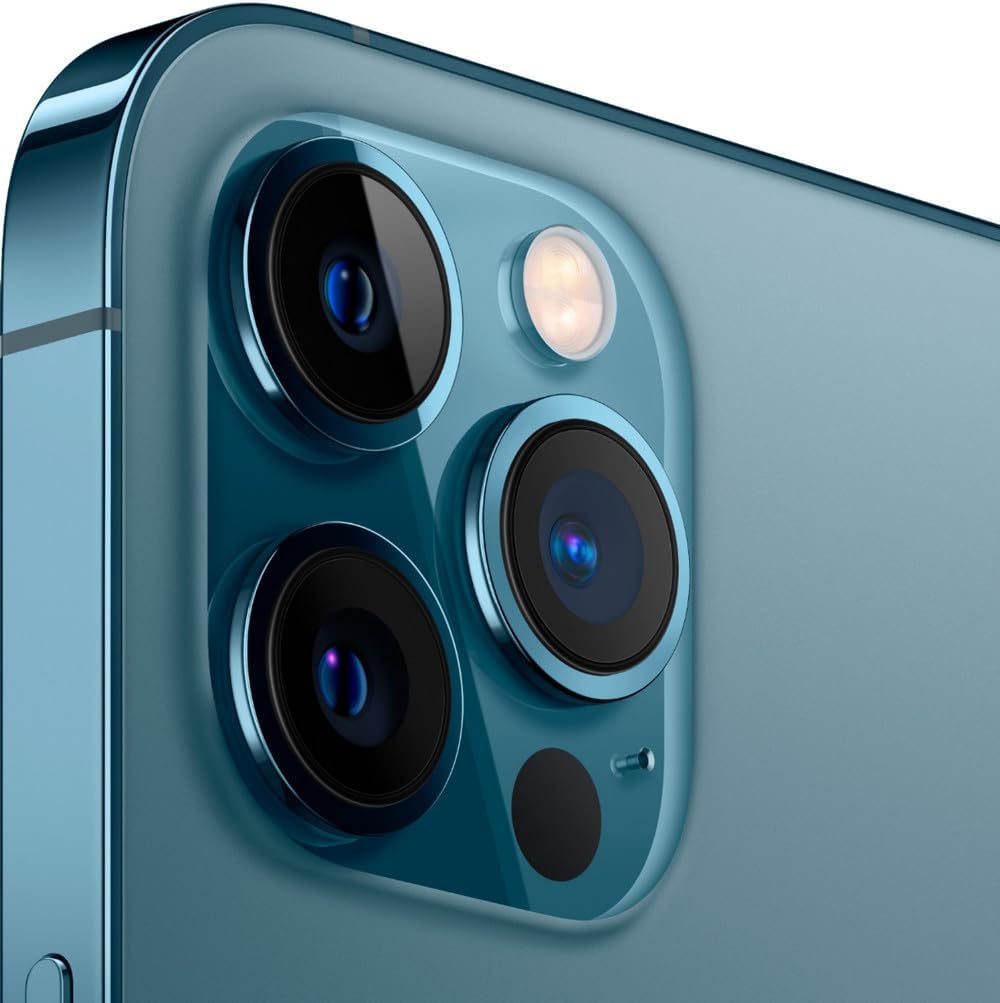
الصورة: الخلفية view of the iPhone 12 Pro Max in Pacific Blue, featuring the prominent triple-lens camera module and the iconic Apple logo.
2.3 الجانب Views والمنافذ

الصورة: الجانب المحترفfile of the iPhone 12 Pro Max, illustrating the placement of the volume up/down buttons, the Ring/Silent switch, and the Side button.

الصورة: مفصلة view of the top edge of the iPhone 12 Pro Max, showing the earpiece speaker and microphone.
الصورة: مفصلة view of the bottom edge of the iPhone 12 Pro Max, featuring the Lightning connector, microphone, and speaker grilles.
3. الإعداد
Follow these steps to set up your iPhone 12 Pro Max for the first time.
- تشغيل الطاقة: Press and hold the Side button on the right side of the device until the Apple logo appears.
- الترتيب الأولي: اتبع التعليمات التي تظهر على الشاشة لاختيار لغتك ومنطقتك والاتصال بشبكة Wi-Fi.
- نقل البيانات (اختياري): If you have an existing iPhone, you can transfer your data during setup using Quick Start or iCloud backup.
- Face ID & Passcode: Set up Face ID for secure unlocking and authentication, and create a strong passcode.
- معرف آبل: Sign in with your Apple ID or create a new one to access App Store, iCloud, and other Apple services.
- تحديثات البرامج: Ensure your device is running the latest iOS version for optimal performance and security. Navigate to الإعدادات > عام > تحديث البرنامج.
4. تعليمات التشغيل
This section covers basic operations and gestures for navigating your iPhone 12 Pro Max.
- الشاشة الرئيسية: اسحب لأعلى من الحافة السفلية للشاشة للانتقال إلى الشاشة الرئيسية.
- محوّل التطبيقات: اسحب لأعلى من الحافة السفلية وتوقف في منتصف الشاشة لـ view افتح التطبيقات.
- مركز التحكم: Swipe down from the top-right corner of the screen to access Control Center for quick settings.
- مركز إعلام: اسحب لأسفل من الزاوية العلوية اليسرى أو منتصف الشاشة لـ view إشعارات.
- سيري: Say "Hey Siri" or press and hold the Side button to activate Siri.
- التحكم في مستوى الصوت: استخدم زري رفع وخفض الصوت الموجودين على الجانب الأيسر من الجهاز.
- مفتاح الرنين/الصامت: Use the switch above the volume buttons to quickly toggle between Ring and Silent modes.
5. ميزات الكاميرا
The iPhone 12 Pro Max features an advanced triple-camera system for high-quality photography and videography.
- Triple 12MP Camera System: Includes a Wide (f/1.6), Ultra Wide (f/2.4), and Telephoto (f/2.2 with 2.5x optical zoom) lens.
- ماسح ضوئي بتقنية LiDAR: Enhances autofocus in low light and enables next-level AR experiences.
- الوضع الليلي: Automatically activates in low-light conditions for brighter, more detailed photos.
- الاندماج العميق: Improves detail and reduces noise in medium to low-light scenes.
- تقنية HDR الذكية 3: يوازن العناصر في اللقطة للحصول على صور ذات مظهر طبيعي أكثر.
- Dolby Vision HDR Video Recording: Capture cinematic-quality video at up to 4K at 60fps.
انتهت الكاميراview فيديو
فيديو: تقرير مفصلview of the Apple iPhone 12 Pro Max, including a comprehensive look at its camera capabilities and features.
6. البطارية والشحن
The iPhone 12 Pro Max is equipped with a 3687 mAh Lithium-Ion battery, offering up to 18 hours of average use. This renewed device is guaranteed to have a minimum battery capacity of 80%.
- الشحن: استخدم كابل USB المرفق ومحول طاقة متوافق لشحن جهازك.
- الشحن السريع: Supports fast charging, allowing you to reach up to 50% charge in approximately 30 minutes with a 20W or higher power adapter (sold separately).
- ماج سيف: Compatible with MagSafe wireless charging accessories for convenient and efficient charging.
- صحة البطارية: Monitor your battery's health and optimize its performance by going to Settings > Battery > Battery Health & Charging.
7. الصيانة
Proper maintenance ensures the longevity and optimal performance of your iPhone.
- تنظيف: استخدم قطعة قماش ناعمة وخالية من الوبر لتنظيف جهاز iPhone الخاص بك. تجنب استخدام المواد الكاشطة أو المواد الكيميائية القاسية.
- تحديثات البرامج: Regularly update iOS to the latest version to receive security patches and new features.
- ادارة التخزين: Periodically check and manage your device storage via الإعدادات > عام > مساحة تخزين iPhone لضمان التشغيل السلس.
- دعم: Regularly back up your iPhone data to iCloud or a computer to prevent data loss.
- تجنب درجات الحرارة القصوى: Do not expose your iPhone to extreme heat or cold, as this can affect battery life and performance.
8. استكشاف الأخطاء وإصلاحها
يتناول هذا القسم المشكلات الشائعة وحلولها.
- الجهاز لا يستجيب: If your iPhone is unresponsive, perform a force restart: Press and quickly release the Volume Up button, then press and quickly release the Volume Down button, then press and hold the Side button until the Apple logo appears.
- مشاكل الاتصال: For Wi-Fi or cellular problems, try toggling Airplane Mode on and off, or reset network settings (الإعدادات > عام > نقل أو إعادة ضبط الآيفون > إعادة الضبط > إعادة ضبط إعدادات الشبكة).
- تعطل التطبيق: أغلق التطبيق ثم أعد فتحه. إذا استمرت المشكلة، فاحذف التطبيق وأعد تثبيته.
- استنزاف البطارية: يفحص الإعدادات> البطارية to identify apps consuming the most power. Adjust settings or restrict background activity as needed.
- Screen Issues (Renewed Device): As a renewed device, minimal cosmetic damage not noticeable at arm's length is expected. If screen issues significantly impact functionality, refer to warranty information.
Renewed Condition Overview فيديو
فيديو: فتح علبة وإعادةview of a renewed Apple iPhone 12 Pro Max, detailing the condition of the device and included accessories.
9. المواصفات
| ماركة | تفاحة |
| اسم الموديل | آيفون 12 برو ماكس |
| نظام التشغيل | اي او اس 16 |
| نموذج وحدة المعالجة المركزية | شريحة A14 Bionic من شركة آبل |
| ذاكرة الوصول العشوائي (RAM) | 6 جيجا بايت |
| سعة تخزين الذاكرة | 256 جيجا بايت |
| حجم الشاشة | 6.7 بوصة |
| دقة | 2778 × 1284 بكسل |
| تكنولوجيا الخلوية | 5G |
| مزود خدمة الاتصالات اللاسلكية | مفتوح لجميع شركات النقل |
| سعة البطارية | 3687 مللي أمبير (نموذجي) |
| متوسط عمر البطارية | 18 ساعة |
| وزن العنصر | 0.41 رطل |
| لون | الأزرق الهادئ |
10. ماذا يوجد في الصندوق
Your Apple iPhone 12 Pro Max package includes:
- Apple iPhone 12 Pro Max (Renewed)
- USB Cable (compatible, may not be original Apple)
- أداة إخراج شريحة SIM (إن وجدت)
Note: Accessories may not be original Apple but are guaranteed to be compatible and fully functional. Product may come in a generic box.
11. الضمان والدعم
Your renewed Apple iPhone 12 Pro Max comes with a ضمان لمدة 90 يومًا. For any issues or support needs, please contact the seller or refer to the Amazon Renewed program details for assistance.
للحصول على دعم إضافي، قم بزيارة Official Apple iPhone Support Page.