
مقدمة
This manual provides comprehensive instructions for the Vivitar Podcast and Social Media Microphone MIC918. This high-quality condenser microphone is designed for clear audio capture for various applications, including podcasting, live streaming, gaming, voice-overs, and vocal recording. It features a simple plug-and-play USB connection, integrated volume control, and a stable tripod stand for optimal positioning.
معلومات السلامة
- لا تعرض الميكروفون للماء أو الرطوبة الزائدة.
- تجنب درجات الحرارة القصوى أو أشعة الشمس المباشرة.
- لا تحاول تفكيك الميكروفون أو تعديله. سيؤدي ذلك إلى إلغاء الضمان.
- أبقِ الميكروفون بعيدًا عن المجالات المغناطيسية القوية.
- استخدم فقط قطعة قماش ناعمة وجافة للتنظيف.
المنتج انتهىview
محتويات الحزمة
- Vivitar MIC918 Microphone Unit
- موقف ترايبود
- Integrated USB Connection Cable
مكونات الميكروفون
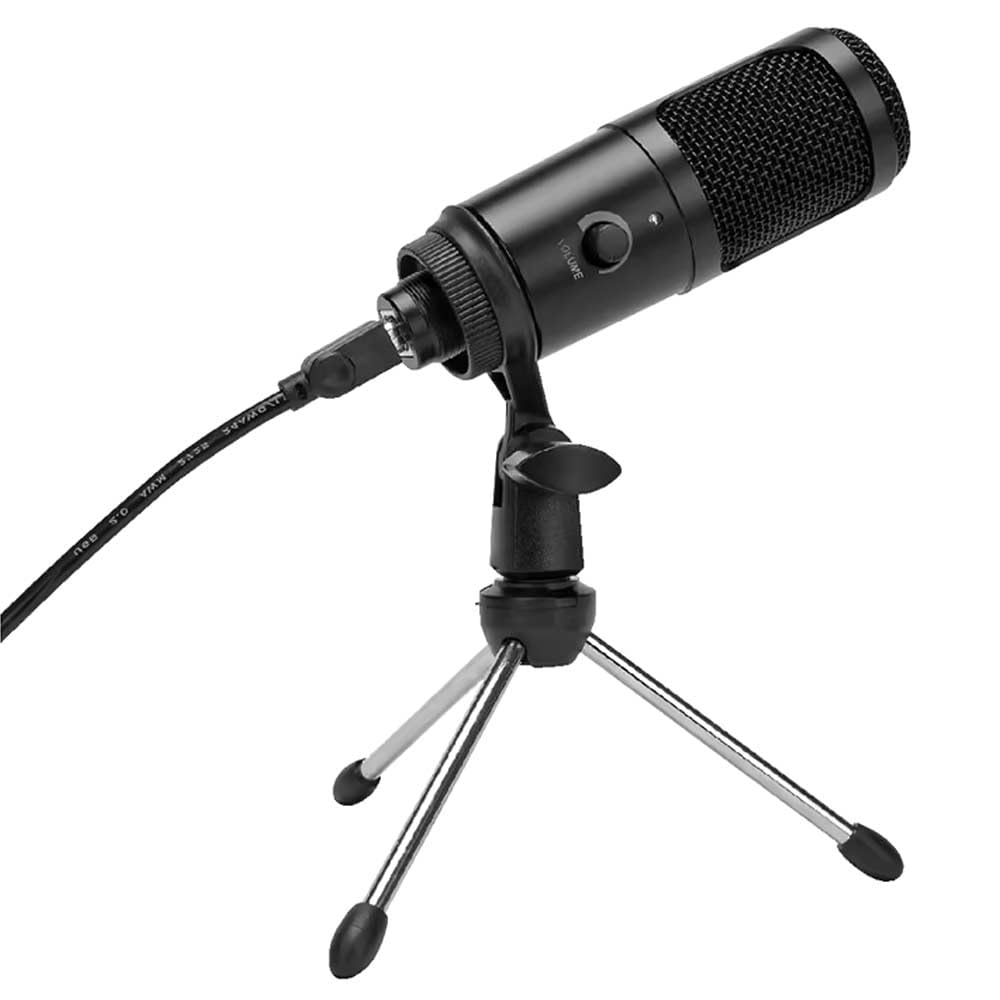
الشكل 1: Vivitar MIC918 Microphone unit attached to its tripod stand, showing the integrated USB cable.

الشكل 2: جانب view of the Vivitar MIC918 Microphone, highlighting the volume control knob and the Vivitar brand logo.
The microphone unit features a durable metal construction. The front side includes a volume control knob for easy audio level adjustments. The microphone is designed with a unidirectional polar pattern to focus on sound directly in front of it, reducing background noise.
يثبت
توصيل الميكروفون
- تجميع الحامل: If not already assembled, unfold the tripod stand and ensure it is stable on a flat surface. Securely attach the microphone unit to the stand's mounting point. The rotating shaft ring allows for angle adjustment.
- الاتصال بالجهاز: Plug the integrated USB cable from the microphone into an available USB port on your computer, laptop, or compatible gaming console.
- التوصيل والتشغيل: The Vivitar MIC918 is a plug-and-play device. Your operating system (Windows, macOS, etc.) should automatically detect and install the necessary drivers. No additional software installation is typically required.
- حدد كجهاز إدخال: After connecting, navigate to your device's sound settings or the audio settings within your recording/streaming software. Select the "Vivitar MIC918" or similar USB audio device as your primary input (microphone) device.
التشغيل
ضبط مستوى الصوت
The microphone features a built-in volume control knob located on its side (refer to Figure 2). Rotate this knob clockwise to increase the microphone's input sensitivity (volume) and counter-clockwise to decrease it. Adjust this to achieve the desired recording level without distortion.
وضع الميكروفون
For optimal audio capture, position the microphone directly in front of the sound source (e.g., your mouth for speaking or singing). The tilting tripod stand allows you to adjust the microphone's angle to best suit your needs. Due to its unidirectional polar pattern, the microphone is most sensitive to sounds coming from the front and less sensitive to sounds from the sides or rear, helping to minimize ambient noise.
صيانة
- تنظيف: Use a soft, dry, lint-free cloth to wipe the microphone's exterior. Do not use liquid cleaners, aerosols, or solvents.
- تخزين: When not in use, store the microphone in a clean, dry place, away from dust and extreme temperatures.
- التعامل: تعامل مع الميكروفون بحرص. تجنب إسقاطه أو تعريضه لصدمات قوية.
استكشاف الأخطاء وإصلاحها
| مشكلة | السبب المحتمل | حل |
|---|---|---|
| لا يصدر أي صوت من الميكروفون. | الميكروفون غير موصول بشكل صحيح. تم اختيار جهاز إدخال غير صحيح. مستوى صوت الميكروفون منخفض جداً. | Ensure USB cable is securely plugged into both the microphone and the device. Verify that "Vivitar MIC918" is selected as the input device in your system's sound settings or recording software. Increase the volume using the knob on the microphone and check system input levels. |
| Poor sound quality (e.g., muffled, too quiet, background noise). | Incorrect microphone positioning. High ambient noise. Input level too high or too low. | Position the microphone closer to the sound source and ensure it's facing directly towards it. سجل في بيئة أكثر هدوءًا. Adjust the microphone's volume knob and system input levels to an optimal range, avoiding clipping or being too faint. |
| لم يتعرف الكمبيوتر على الميكروفون. | منفذ أو كابل USB معيب. System driver issue. | حاول توصيل الميكروفون بمنفذ USB مختلف على جهاز الكمبيوتر الخاص بك. Restart your computer. If the issue persists, check your operating system's device manager for any driver conflicts or updates. |
تحديد
| ميزة | مواصفة |
|---|---|
| ماركة | VIVITAR |
| رقم الموديل | ميكروفون 918 |
| الاتصال | منفذ USB (التوصيل والتشغيل) |
| نوع الميكروفون | مكثف |
| النمط القطبي | أحادي الاتجاه |
| إشارة إلى نسبة الضوضاء | 78 ديسيبل |
| مواد التغليف | معدن |
| وزن العنصر | 0.95 رطل (حوالي 0.43 كجم) |
| أبعاد العنصر (الطول × العرض × الارتفاع) | 8.86 × 5.36 × 2.49 بوصة (حوالي 22.5 × 13.6 × 6.3 سم) |
| مصدر الطاقة | كهرباء سلكية (عبر USB) |
| الأجهزة المتوافقة | Computers, Laptops, Gaming Consoles |
معلومات الضمان
The Vivitar Podcast and Social Media Microphone MIC918 comes with a 3-Year USA Warranty. For specific terms, conditions, and to register your product, please refer to the official Vivitar webالموقع أو تواصل مع خدمة العملاء مباشرةً. احتفظ بإثبات الشراء لطلبات الضمان.
دعم العملاء
For further assistance, technical support, or inquiries regarding your Vivitar MIC918 microphone, please visit the official Vivitar website or contact their customer service department. Contact information can typically be found on the Vivitar webيمكنك الوصول إلى الموقع من خلال قسمي "الدعم" أو "اتصل بنا".
