
مقدمة
This manual provides essential instructions for the proper use and maintenance of your Vikefon Type C Charging and Data Cable. This 1-meter cable is designed for efficient charging and high-speed data transfer between your Type C enabled devices and compatible power sources or computers.

Image: The Vikefon Type C Charging and Data Cable, featuring a standard USB-A connector on one end and a reversible USB-C connector on the other.
مميزات المنتج
- USB Connector Quality: Ensures reliable charging and high-speed data transmission.
- انتاج الطاقة: Supports up to 5V, 3 Amp للشحن السريع.
- التوافق العالمي: Fully compatible with all Type C mobile devices for fast charging and syncing.
- Reversible USB Type-C Connector: Allows for quick and easy connections in any orientation.
- تصميم متين: Features intricate nylon braiding for enhanced durability and longevity, outlasting standard cables.
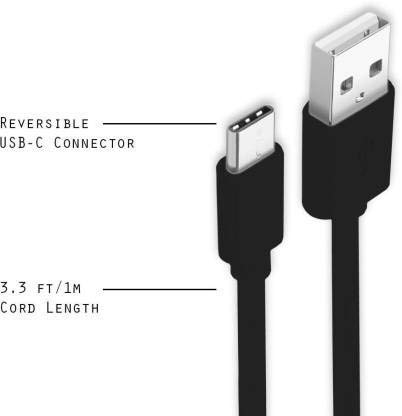
Image: A diagram illustrating the reversible nature of the USB-C connector and the cable's 1-meter (3.3 ft) cord length.
يثبت
- تحديد الموصلات: The cable has a standard USB-A connector on one end and a smaller, oval-shaped USB Type-C connector on the other.
- الاتصال بمصدر الطاقة/الكمبيوتر: Insert the USB-A end of the cable into a compatible USB port on a wall adapter, power bank, car charger, or computer.
- الاتصال بالجهاز: Insert the USB Type-C end into the charging/data port of your smartphone, tablet, or other Type C enabled device. The USB Type-C connector is reversible, so it can be inserted in either orientation.
- تحقق من الاتصال: Ensure both ends are securely connected. Your device should indicate that it is charging or connected for data transfer.
تعليمات التشغيل
شحن جهازك
- Connect the USB-A end of the cable to a compatible USB power adapter (e.g., wall charger, car charger, power bank).
- Connect the USB Type-C end to your device's charging port.
- Ensure the power adapter is plugged into a live power outlet. Your device should begin charging.
نقل البيانات
- Connect the USB-A end of the cable to a USB port on your computer.
- Connect the USB Type-C end to your device.
- On your device, you may receive a prompt asking to allow data access or to select a USB connection mode (e.g., "File Transfer," "MTP"). Select the appropriate option to enable data transfer.
- يجب أن يظهر جهازك كقرص قابل للإزالة أو جهاز وسائط على جهاز الكمبيوتر الخاص بك، مما يسمح لك بنقل الملفات files.
صيانة
- التعامل السليم: Always grasp the connector head when plugging or unplugging the cable. Avoid pulling directly on the cable itself to prevent damage to the internal wires.
- تجنب الانحناء: Do not excessively bend or crimp the cable, especially near the connectors, as this can cause internal wire breakage.
- تخزين: Store the cable in a clean, dry place away from extreme temperatures and direct sunlight. Avoid tangling the cable.
- تنظيف: If necessary, gently wipe the cable and connectors with a dry, soft cloth. Do not use liquids or abrasive cleaners.

الصورة: لقطة مقربة view highlighting the durable metal heads of the Vikefon Type C cable connectors, designed for anti-oxidation and corrosion resistance.
استكشاف الأخطاء وإصلاحها
- الجهاز لا يشحن:
- تأكد من توصيل كلا طرفي الكابل بشكل آمن.
- تأكد من أن محول الطاقة يعمل بشكل صحيح وموصول بمأخذ كهربائي يعمل.
- حاول استخدام محول طاقة مختلف أو منفذ USB.
- تحقق من منفذ شحن جهازك بحثًا عن أي شوائب أو تلف.
- الشحن البطيء:
- Ensure you are using a power adapter that supports fast charging (e.g., 3A output).
- أغلق أي تطبيقات تعمل في الخلفية غير ضرورية على جهازك.
- لا نقل البيانات:
- Confirm the cable is properly connected to both your device and computer.
- On your device, check the notification panel for USB options and select "File "نقل" أو "MTP".
- حاول الاتصال بمنفذ USB مختلف على جهاز الكمبيوتر الخاص بك.
- أعد تشغيل جهازك وجهاز الكمبيوتر.
تحديد
| ميزة | التفاصيل |
|---|---|
| ماركة | Vikefon |
| اسم الموديل | النوع ج |
| رقم الموديل | النوع C 0129 |
| نوع الموصل | منفذ USB من النوع C (ذكر إلى ذكر) |
| نوع الكابل | USB |
| الأجهزة المتوافقة | Laptop, PC, Smartphone (e.g., Xiaomi Redmi 8A, Poco M2, Poco M2 Pro, Samsung, Motorola, Lenovo, Lava, Sony, HTC, LG, Karbonn, Maxx) |
| المميزات الخاصة | Charging Wire, Durable, High Data Transfer Rate, High Quality, Long Length |
| معدل نقل البيانات | Up to 0.48 Gigabits Per Second (480 Mbps) |
| تكنولوجيا الاتصال | USB |
| التقى المواصفات | ايزو |
| لون | أسود |
| شكل العنصر | دائري |
| Outer Material Type | Rubber (with Nylon Braiding) |
| طول الكابل | 1 متر |
الضمان والدعم
Specific warranty details for the Vikefon Type C Charging and Data Cable are not provided in this manual. For information regarding warranty coverage, returns, or technical support, please refer to the product packaging or contact the manufacturer directly through their official channels.