
Weelko 2418ef53-2aca-4897-b2c8-1fbe68f4aaf3
Professional Pressotherapy System
دليل المستخدم
Model: 2418ef53-2aca-4897-b2c8-1fbe68f4aaf3 | Brand: Weelko
1. انتهى المنتجview
The Weelko Hightech Professional Pressotherapy system is a digital device designed for professional use, featuring a touch screen display and four distinct working programs. This system is equipped with a comprehensive suit including boots, leggings, an abdominal band, and armrests, along with a cable blanket for organized storage. It is engineered to enhance circulation and aid in fat removal through lymphatic drainage activation.

Image 1.1: The Weelko Hightech Pressotherapy main unit with its various attachments, including leg, arm, and abdominal cuffs.
2. المكونات المضمنة
The Weelko Hightech Pressotherapy system comes with the following components:
- الوحدة الرئيسية (1)
- Right Leg Cuff (1)
- Left Leg Cuff (1)
- Right Arm Cuff (1)
- Left Arm Cuff (1)
- Right Foot Cuff (1)
- Left Foot Cuff (1)
- Abdominal Cuff (1)
- Cable Blanket (1)
- Tubes (1 set)
- كابل الطاقة (1)
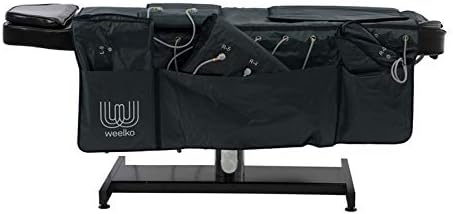
Image 2.1: The cable blanket provided for organizing and storing the system's tubes and cables.
3. تعليمات الإعداد
Follow these steps to set up your pressotherapy system:
- توصيل الطاقة: Connect the power cable to the designated port on the rear panel of the main unit.
- Connect Tubes: Correctly connect the air tubes to the corresponding ports on the rear panel. Refer to the numerical instructions next to each port to ensure proper connection.
- Prepare Blanket: Place the cable blanket on a flat surface where the patient can comfortably lie down.
- Ensure Hygiene: Cover the blanket with disposable paper or a hygienic sheet to maintain optimal sanitary conditions for each use.
- Apply Suit: Carefully wrap the pressotherapy suit (composed of the chosen cuffs) around the user's body. Always ensure the user wears a disposable garment underneath the suit for hygiene.

Image 3.1: A user lying on the blanket with the pressotherapy suit applied, demonstrating proper setup for a session.
4. تعليمات التشغيل
Once the system is set up, follow these steps to operate the device:
- تشغيل الطاقة: Activate the power button located on the front panel of the main unit.
- قائمة الوصول: Click on the Weelko logo displayed on the touch screen to access the main menu and select desired settings.
- Select Program (MODE): Navigate to the "MODE" menu. This allows you to choose from four available programs. It is recommended to begin with program 'C' and then select other programs based on the patient's specific needs.
- Adjust Intensity (LEVEL): Use the "LEVEL" menu to set the inflation intensity. There are 3 levels of intensity available. Adjust using the '+' and '-' buttons.
- Set Treatment Time (TIME): Use the "TIME" menu to adjust the duration of the treatment. The default treatment duration is 30 minutes.
- Start/Pause Treatment: Press the "PLAY / PAUSE" button to initiate or temporarily halt the pressotherapy treatment.
5. الصيانة
Proper maintenance ensures the longevity and optimal performance of your Weelko Pressotherapy system:
- تنظيف: After each use, wipe down the main unit and the exterior of the cuffs with a soft, damp cloth. Use a mild, non-abrasive disinfectant if necessary. Ensure all surfaces are dry before storage.
- Cuff Hygiene: Always use disposable liners or garments under the cuffs to maintain hygiene and prevent direct skin contact. Clean the interior of the cuffs periodically according to professional hygiene standards.
- تخزين: Store the main unit and all components in a clean, dry place, away from direct sunlight and extreme temperatures. Utilize the provided cable blanket to neatly store tubes and cuffs.
- فحص الأنابيب: Regularly inspect the air tubes for any kinks, cracks, or damage. Replace damaged tubes immediately to ensure proper air pressure and function.
- الخدمة المهنية: For any complex issues or routine professional checks, contact authorized Weelko service centers.
6. استكشاف الأخطاء وإصلاحها
If you encounter issues with your pressotherapy system, consider the following common solutions:
- لا يوجد طاقة:
- تأكد من توصيل كابل الطاقة بشكل آمن بكل من الوحدة ومأخذ الطاقة العامل.
- Check if the power switch on the unit is in the 'ON' position.
- تأكد من أن منفذ الطاقة يعمل عن طريق توصيل جهاز آخر.
- Cuffs Not Inflating/Deflating Properly:
- Check all air tube connections to the main unit and to the cuffs. Ensure they are securely attached and not kinked.
- Inspect the tubes and cuffs for any visible damage or leaks.
- Verify that the selected program and intensity settings are appropriate.
- شاشة اللمس لا تستجيب:
- Try restarting the unit by turning it off and then on again.
- تأكد من أن الشاشة نظيفة وخالية من الأوساخ أو الرطوبة.
- ضوضاء غير عادية:
- A slight humming sound during operation is normal. If you hear loud or unusual noises, turn off the unit immediately and contact customer support.
If the problem persists after attempting these solutions, please contact Weelko customer support for assistance.
7. المواصفات الفنية
| فئة | مواصفة |
|---|---|
| رقم الموديل | 2418ef53-2aca-4897-b2c8-1fbe68f4aaf3 |
| أبعاد التعبئة والتغليف | 66 × 45 × 40 سم |
| الوزن الإجمالي | 18.5 كجم |
| أبعاد المنتج | 34 × 38 × 15 سم |
| قوة العمل | 50 واط |
| ضغط الهواء | 0 - 0.4 كجم/سم² |
| تدفق الهواء | 0.40 لتر/دقيقة |
| Air Pressure Rhythm | 0 - 15 s |
| Air Channels | 10 (20 bags) |
| تصنيف المجلدtage | 220 فولت ~ 240 فولت |
| تكرار | شنومكسهز / شنومكسهز |
| القدرة المقدرة | 50 واط |
8. الضمان والدعم
For information regarding product warranty, returns, or technical support, please refer to the documentation provided with your purchase or contact Weelko customer service directly. Ensure you have your model number (2418ef53-2aca-4897-b2c8-1fbe68f4aaf3) and purchase details ready when contacting support.
For further assistance, please visit the official Weelko webالموقع أو اتصل بالموزع المحلي لديك.
Ask a question about this manual
Ask about setup, troubleshooting, compatibility, parts, safety, or missing instructions. Manuals+ will review the question and use this page’s manual context to help answer it.