
مقدمة
The Jamo C910 Subwoofer is designed to deliver powerful low-frequency performance, enhancing your audio experience for both music and movies. Featuring a 10-inch front-firing polyfiber woofer and a 300W Class D amplifier, this subwoofer combines robust acoustics with a modern design. This manual provides essential information for proper setup, operation, and care of your C910 Subwoofer.
الميزات الرئيسية
- Ampمكبر: 300 واط صنف د amplifier for dynamic sound.
- Wireless Ready: Compatible with the Klipsch WA-2 wireless kit for flexible placement.
- Front-Firing Port: Allows for versatile placement, including inside cabinets, without compromising bass performance.
- مكبر الصوت: 10-inch front-firing polyfiber woofer.
- المكونات المتضمنة: Powered Subwoofer, Grille, and power cord.
- مصدر الطاقة: Corded Electric.
يثبت
1. فك التعبئة والتركيب
Carefully remove the subwoofer from its packaging. The Jamo C910 features a front-firing port, which offers greater flexibility in placement compared to rear-ported designs. You can place it closer to a wall or even inside a cabinet without significantly affecting its performance. For optimal sound, experiment with different locations in your room.

الشكل 1: الجبهة view of the Jamo C910 Subwoofer with the grille removed, highlighting the 10-inch woofer and front-firing port.
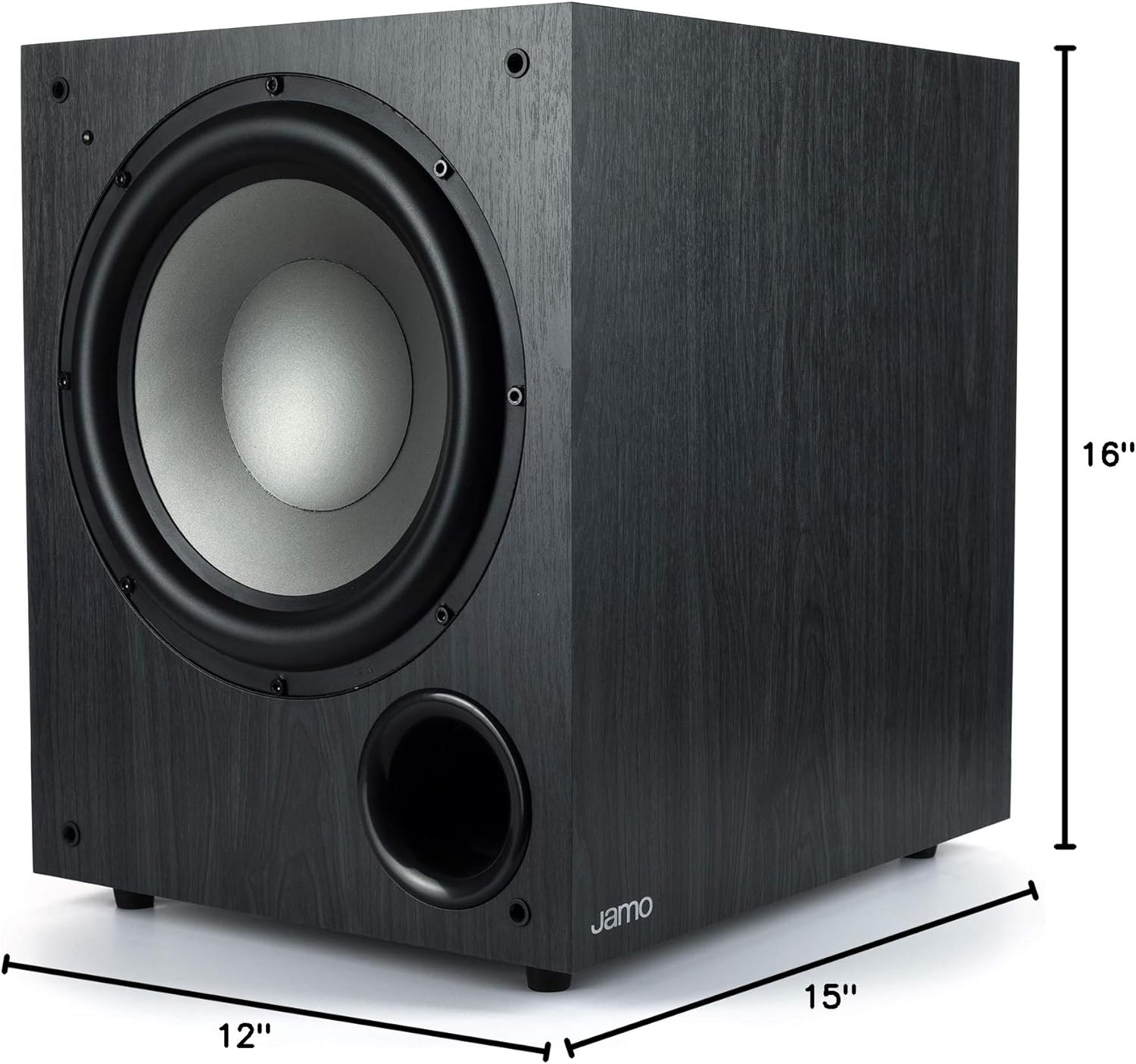
Figure 2: Product dimensions of the Jamo C910 Subwoofer, measuring 15"D x 12"W x 16"H.
2. الاتصالات
Locate the control panel on the rear of the subwoofer. It includes various inputs and controls for integration with your audio system.

Figure 3: Rear control panel of the Jamo C910 Subwoofer, detailing connection ports and adjustment knobs.
- Line In (L/LFE, R): Use an RCA cable to connect the LFE output from your AV receiver to the L/LFE input on the subwoofer. If your receiver has stereo RCA outputs for the subwoofer, use both L and R inputs.
- WA-2 Port: This port is for connecting an optional Klipsch WA-2 wireless subwoofer kit (sold separately). This allows for wireless signal transmission to the subwoofer, eliminating the need for a long RCA cable.
- مدخل التيار المتردد: Connect the provided power cord to this input and then to a wall outlet.
3. تشغيل/إيقاف التشغيل
The subwoofer features an automatic power on/off function. When the power switch on the rear panel is set to "ON", the subwoofer will automatically turn on when it detects an audio signal and enter standby mode when no signal is present for a period of time. You can also manually switch it "OFF" using the toggle switch.
ضوابط التشغيل
The rear panel provides several controls to fine-tune the subwoofer's performance:
- مقدار: يضبط مستوى الإخراج الإجمالي لمضخم الصوت الفرعي. ابدأ بإعداد منخفض وقم بزيادة المستوى تدريجياً حتى يمتزج صوت الجهير بسلاسة مع مكبرات الصوت الرئيسية.
- Frequency (Crossover): This knob sets the upper frequency limit for the subwoofer. Adjust it to match the low-frequency capabilities of your main speakers. A common starting point is around 80-100 Hz.
- الطور (0°/180°): This switch helps to ensure that the subwoofer's output is in phase with your main speakers. Experiment with both settings to find the one that produces the most impactful and coherent bass.
صيانة
To ensure the longevity and optimal performance of your Jamo C910 Subwoofer, follow these maintenance guidelines:
- تنظيف: Use a soft, dry cloth to wipe the cabinet. Avoid abrasive cleaners or solvents.
- الموقع: Keep the subwoofer away from direct sunlight, heat sources, and excessive moisture. Ensure adequate ventilation around the unit.
- مصبغة: The included grille can be attached to protect the woofer from dust and physical damage.
استكشاف الأخطاء وإصلاحها
If you encounter issues with your Jamo C910 Subwoofer, refer to the following common troubleshooting tips:
- لا يوجد صوت:
- Check if the subwoofer is powered on and the power cord is securely connected.
- Verify that the audio input cable (RCA) is correctly connected to both the subwoofer and your receiver.
- Ensure the volume knob on the subwoofer is not set to minimum.
- Confirm that your AV receiver's subwoofer output is enabled and the volume is adjusted appropriately.
- Distorted or Unclear Bass:
- Adjust the Volume and Frequency (Crossover) knobs on the subwoofer.
- Experiment with the Phase switch (0° or 180°) to find the setting that provides the most cohesive bass with your main speakers.
- تحقق من وجود أي اتصالات فضفاضة أو الكابلات التالفة.
- Ensure the subwoofer is not placed in a corner or too close to a wall, which can cause excessive booming.
- Subwoofer Not Turning On Automatically:
- Ensure the power switch on the rear panel is set to "ON".
- Increase the volume output for the subwoofer from your AV receiver to ensure a strong enough signal is sent to trigger the auto-on feature.
تحديد
| ماركة | جامو |
| اسم الموديل | سي910 |
| نوع السماعة | مضخم الصوت ، مكبر الصوت |
| ميزة خاصة | تعزيز الجهير |
| الاستخدامات الموصى بها | موسيقى وأفلام |
| الأجهزة المتوافقة | Smartphone, Tablet, Desktop, Television, Projector, Laptop |
| قطر الصبووفر | 10 بوصة |
| تكوين قناة الصوت المحيطي | 5.1 |
| لون | أسود |
| المكونات المضمنة | Powered Subwoofer, Grille and power cord |
| أبعاد المنتج | 15 بوصة عمق × 12 بوصة عرض × 16 بوصة ارتفاع |
| وزن العنصر | 30 رطل |
| مقاوم للماء | خطأ شنيع |
| الحد الأقصى للمدى | 10 Meters (Wireless, with optional kit) |
| طريقة التحكم | Remote (with optional wireless kit) |
| تكنولوجيا الاتصالات اللاسلكية | Wi-Fi (with optional wireless kit) |
| مصدر الطاقة | كهرباء سلكية |
| الحد الأقصى لقوة خرج السماعة | 300 واط |
| تكنولوجيا الاتصال | ار سي ايه |
| نوع التركيب | جبل منضدية |
الضمان والدعم
The Jamo C910 Subwoofer comes with a Limited Warranty. For detailed information regarding warranty coverage, terms, and conditions, please refer to the warranty card included with your product or visit the official Jamo website. For technical support or service inquiries, please contact Jamo customer service.