
1. المقدمة
This manual provides detailed instructions for the installation, operation, and maintenance of your Overmax Camspot 3.7 Full HD Wireless Indoor Camera. Please read this manual thoroughly before using the product to ensure proper function and safety. Keep this manual for future reference.
2. محتويات العبوة
تأكد من وجود جميع المكونات في العبوة:
- Overmax Camspot 3.7 Wireless Indoor Camera
- Power Cable with Adapter
- طقم التثبيت (مسامير، مثبتات جدارية، دعامة)
- دليل المستخدم (هذا المستند)
3. انتهى المنتجview
Familiarize yourself with the camera's components and interfaces.
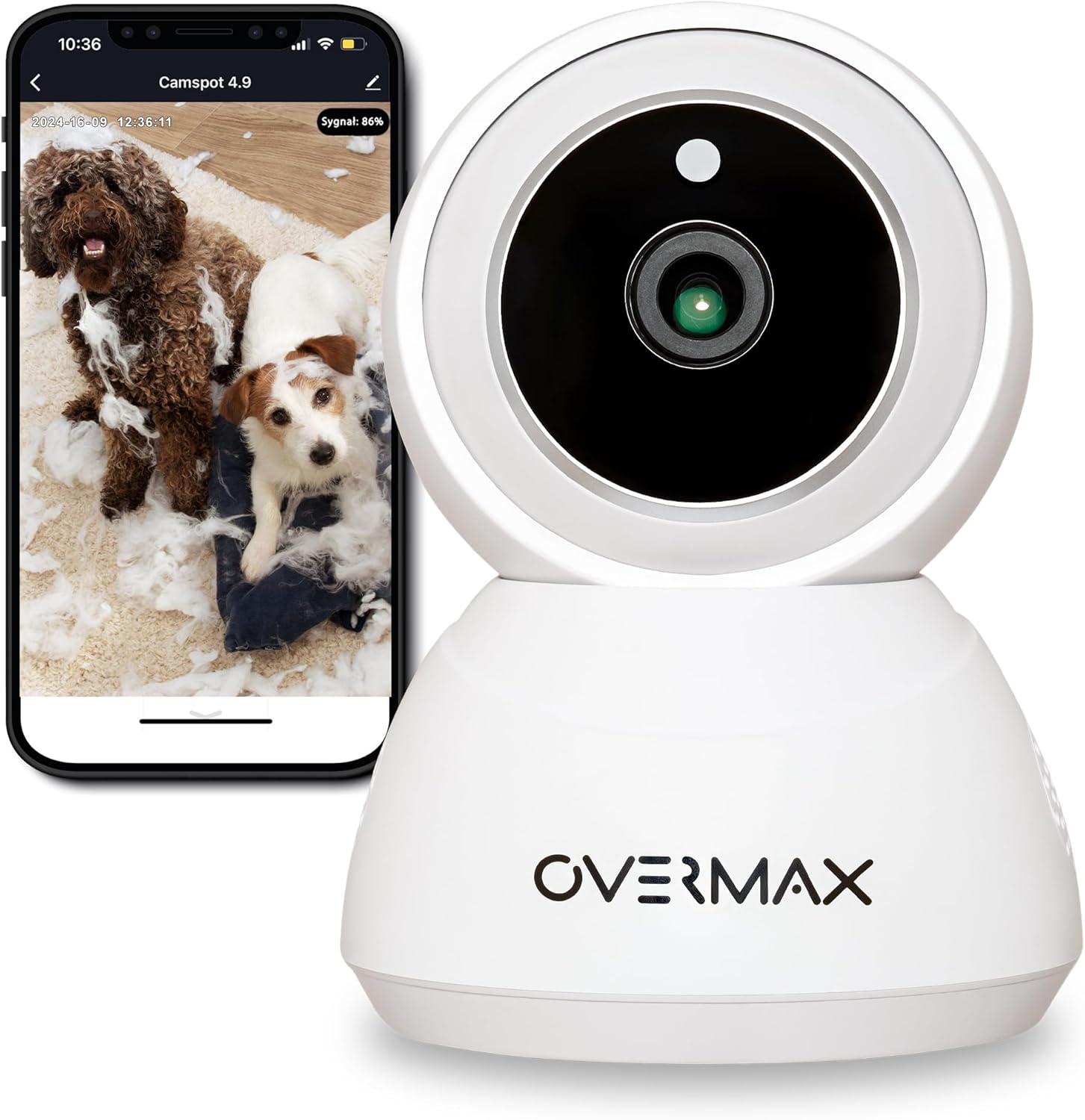
الشكل 3.1: الجبهة view of the Overmax Camspot 3.7 camera with a smartphone showing the live video feed.

الشكل 3.2: الجانب view of the Overmax Camspot 3.7 camera, showing its dome shape and speaker grille.

الشكل 3.3: خلفي view of the camera, highlighting the LAN port, Reset button, and DC 5V power input.

الشكل 3.4: View of the camera with the microSD card slot visible, located beneath the lens assembly.
4. الإعداد
4.1 التثبيت المادي
The Camspot 3.7 can be placed on a flat surface or mounted to a wall or ceiling.
- اختر الموقع: اختر موقعًا يوفر المطلوب viewing angle and is within range of your Wi-Fi network or an Ethernet connection.
- التركيب (اختياري):
- قم بتثبيت دعامة التثبيت على السطح المطلوب باستخدام البراغي والمثبتات الجدارية المرفقة.
- Secure the camera to the mounting bracket. Ensure it is firmly attached.

Figure 4.1: The Overmax Camspot 3.7 camera shown mounted on a wall bracket, illustrating a typical installation.
4.2 تثبيت التطبيق وإنشاء الحساب
The Overmax Control app is required to operate the camera.
- تنزيل التطبيق: بحث عن "Overmax Control" in your smartphone's app store (iOS or Android) and download it.
- إنشاء حساب: افتح التطبيق واتبع التعليمات التي تظهر على الشاشة لإنشاء حساب مستخدم جديد.

Figure 4.2: The Overmax Camspot 3.7 camera alongside a smartphone displaying the 'CONTROL' app logo, indicating the required application for setup and operation.
4.3 Power On and Network Connection
- تشغيل الطاقة: Connect the power cable to the camera's DC 5V port and plug the adapter into a power outlet. The camera will power on and initiate its startup sequence.
- إتصال شبكة:
- واي فاي: اتبع التعليمات الموجودة داخل التطبيق لتوصيل الكاميرا بشبكة Wi-Fi بتردد 2.4 جيجاهرتز.
- إيثرنت (اختياري): Connect an Ethernet cable from your router to the camera's LAN port for a wired connection.
4.4 إقران الكاميرا
Once the camera is powered on and the app is installed, proceed with pairing:
- إضافة جهاز: In the Overmax Control app, tap the "Add Device" or "+" icon.
- حدد نوع الكاميرا: Choose the appropriate camera model (Camspot 3.7).
- مسح رمز الاستجابة السريعة: The app will prompt you to scan a QR code. Position your smartphone's screen with the QR code approximately 15-20 cm in front of the camera lens. The camera will emit a sound upon successful scanning.
- الإعداد الكامل: Follow any remaining on-screen prompts in the app to finalize the pairing process.

Figure 4.3: The Overmax Camspot 3.7 camera positioned to scan a QR code displayed on a smartphone, a common method for device pairing.
5. تعليمات التشغيل
5.1 مباشر View
Access the live video feed from your camera through the Overmax Control app. This allows real-time monitoring of the camera's surroundings.
5.2 التحكم في الحركة الأفقية/الرأسية
The Camspot 3.7 features motorized pan and tilt capabilities.
- الدوران الأفقي: 355 درجة
- الدوران العمودي: 120 درجة
Use the directional controls within the Overmax Control app to adjust the camera's viewزاوية عن بعد.

Figure 5.1: Diagram illustrating the camera's extensive pan (355°) and tilt (120°) rotation range.
5.3 الصوت ثنائي الاتجاه
The camera is equipped with a microphone and speaker, enabling two-way communication. You can listen to the camera's environment and speak through the camera using the app.
5.4 كشف الحركة والتتبع التلقائي
The camera can detect moving objects and automatically track their movement within its field of view. Configure motion detection sensitivity and alerts in the app settings.
5.5 الرؤية الليلية
The Camspot 3.7 features infrared technology for clear viewing in low-light or complete darkness, with a night vision range of up to 10 meters. The camera automatically switches to night mode when ambient light is insufficient.
5.6 التسجيل والتخزين
The camera supports two primary storage methods for video recordings:
- بطاقة MicroSD: Insert a microSD card (up to 128GB, not included) into the designated slot for local storage. This allows for continuous recording for up to 3 weeks.
- التخزين السحابي: The camera supports real-time cloud storage for recordings. Refer to the app for subscription details and options.
5.7 تكامل المنزل الذكي
The Camspot 3.7 is compatible with Google Home and Amazon Alexa. Follow the instructions within the respective smart home apps to integrate your camera for voice control and automation.
5.8 Baby Monitor Function
Utilize the camera's features, including two-way audio and night vision, to monitor an infant. The app provides a comprehensive interface for this purpose.

Figure 5.2: The Overmax Camspot 3.7 camera shown with a smartphone displaying the app's control interface, including options for screenshot, speaking, recording, cloud storage, and direction control.
6. الصيانة
- تنظيف: استخدم قطعة قماش ناعمة وجافة لتنظيف عدسة الكاميرا وجسمها. لا تستخدم مواد كيميائية قاسية أو منظفات كاشطة.
- تحديثات البرامج الثابتة: Regularly check the Overmax Control app for available firmware updates to ensure optimal performance and security.
- ادارة التخزين: إعادة بشكل دوريview and manage recordings on your microSD card or cloud storage to free up space if needed.
7. استكشاف الأخطاء وإصلاحها
- الكاميرا غير متصلة بشبكة Wi-Fi:
- تأكد من أن شبكة الواي فاي لديك تعمل بتردد 2.4 جيجاهرتز. الكاميرا لا تدعم شبكات 5 جيجاهرتز.
- Check Wi-Fi password for correctness.
- قرّب الكاميرا من جهاز التوجيه (الراوتر).
- أعد تشغيل الكاميرا وجهاز التوجيه الخاص بك.
- لا يعيش View:
- Verify internet connection on your smartphone and the camera.
- تأكد من أن الكاميرا تعمل ومتصلة بالشبكة.
- أعد تشغيل التطبيق.
- كشف الحركة لا يعمل:
- تأكد من تفعيل خاصية كشف الحركة في إعدادات التطبيق.
- ضبط إعدادات الحساسية.
- تحقق من وجود عوائق في عدسة الكاميرا view.
- بطاقة MicroSD لا تسجل:
- تأكد من إدخال بطاقة microSD بشكل صحيح.
- Format the microSD card through the app.
- Check if the card is full or corrupted.
- الكاميرا لا تستجيب:
- Press and hold the Reset button (located at the back) for approximately 5-10 seconds to factory reset the camera. You will need to re-pair it after a reset.
8. المواصفات
| ميزة | مواصفة |
|---|---|
| اسم الموديل | Overmax Camspot 3.7 |
| دقة الفيديو | كامل الوضوح (1080 بكسل) |
| عدسة | 3.6 ملم |
| إطارات في الثانية (FPS) | 25-30 |
| ضغط الفيديو | ح.264 |
| الدوران الأفقي | 355° |
| الدوران العمودي | 120° |
| نطاق الرؤية الليلية | يصل مداه إلى 10 أمتار (الأشعة تحت الحمراء) |
| دعم بطاقة MicroSD | حتى 128 جيجابايت |
| الاتصال | واي فاي (2.4 جيجاهرتز)، إيثرنت |
| الأنظمة المدعومة | Windows XP/7/8/10, Android, iOS, Mac |
| صوت ثنائي الاتجاه | Yes (Microphone, 1W Speaker) |
| كشف الحركة | Yes (Automatic Detector) |
| مزود الطاقة | 12 Volts, 1 Watt |
| الأبعاد (الطول × العرض × الارتفاع) | 8.5 × 8.2 × 10.5 سم |
| وزن | 180 جرام |
| مادة | معدن |
| لون | أبيض |
9. الضمان والدعم
Overmax products are covered by a manufacturer's warranty. For specific warranty terms and conditions, please refer to the warranty card included in your package or visit the official Overmax webموقع.
For technical support, troubleshooting assistance, or any product-related inquiries, please contact Overmax customer service through the contact information provided on the official website or within the Overmax Control application.